Release 8.1.5
A67779-01
 Library |
 Product |
 Contents |
 Index |
| Oracle8i SQL Reference Release 8.1.5 A67779-01 |
|


filespec_datafiles & filespec_tempfiles::=

filespec_redo_log_file_groups::=

To specify a file as a datafile or tempfile
To specify a group of one or more files as a redo log file group.
A filespec can appear in the following statements: "CREATE DATABASE", "ALTER DATABASE", "CREATE TABLESPACE", and "ALTER TABLESPACE", "CREATE CONTROLFILE", "CREATE LIBRARY", and "CREATE TEMPORARY TABLESPACE".
You must have the privileges necessary to issue one of these statements.
The following statement creates a database named PAYABLE that has two redo log file groups, each with two members, and one datafile:
CREATE DATABASE payable
   LOGFILE GROUP 1 ('diska:log1.log', 'diskb:log1.log') SIZE 50K,
           GROUP 2 ('diska:log2.log', 'diskb:log2.log') SIZE 50K
   DATAFILE 'diskc:dbone.dat' SIZE 30M;
The first filespec in the LOGFILE clause specifies a redo log file group with the GROUP value 1. This group has members named 'DISKA:LOG1.LOG' and 'DISKB:LOG1.LOG', each 50 kilobytes in size.
The second filespec in the LOGFILE clause specifies a redo log file group with the GROUP value 2. This group has members named 'DISKA:LOG2.LOG' and 'DISKB:LOG2.LOG', also 50 kilobytes in size.
The filespec in the DATAFILE clause specifies a datafile named 'DISKC:DBONE.DAT', 30 megabytes in size.
All of these filespecs specify a value for the SIZE parameter and omit the REUSE clause, so none of these files can already exist. Oracle must create them.
The following statement adds another redo log file group with two members to the PAYABLE database:
ALTER DATABASE payable
   ADD LOGFILE GROUP 3 ('diska:log3.log', 'diskb:log3.log')
   SIZE 50K REUSE;
The filespec in the ADD LOGFILE clause specifies a new redo log file group with the GROUP value 3. This new group has members named 'DISKA:LOG3.LOG' and 'DISKB:LOG3.LOG', each 50 kilobytes in size. Because the filespec specifies the REUSE clause, each member can already exist. If a member exists, it must have a size of 50 kilobytes. If it does not exist, Oracle creates it with that size.
The following statement creates a tablespace named STOCKS that has three datafiles:
CREATE TABLESPACE stocks
   DATAFILE 'diskc:stock1.dat',
            'diskc:stock2.dat',
            'diskc:stock3.dat';
The filespecs for the datafiles specifies files named 'DISKC:STOCK1.DAT', 'DISKC:STOCK2.DAT', and 'DISKC:STOCK3.DAT'. Since each filespec omits the SIZE parameter, each file must already exist.
The following statement alters the STOCKS tablespace and adds a new datafile:
ALTER TABLESPACE stocks
   ADD DATAFILE 'diskc:stock4.dat' REUSE;
The filespec specifies a datafile named 'DISKC:STOCK4.DAT'. Since the filespec omits the SIZE parameter, the file must already exist and the REUSE clause is not significant.

To grant system privileges and roles to users and roles. Both privileges and roles are either local, global, or external (see "CREATE USER" and "CREATE ROLE" for definitions).
You can authorize database users to use roles through means other than the database and the GRANT statement. For example, some operating systems have facilities that grant operating system privileges to operating system users. You can use such facilities to grant roles to Oracle users with the initialization parameter OS_ROLES. If you choose to grant roles to users through operating system facilities, you cannot also grant roles to users with the GRANT statement, although you can use the GRANT statement to grant system privileges to users and system privileges and roles to other roles. For information about other authorization methods, see Oracle8i Administrator's Guide.
For information on granting object privileges, see "GRANT object_privileges".
To grant a system privilege, you must either have been granted the system privilege with the ADMIN OPTION or have been granted the GRANT ANY PRIVILEGE system privilege.
To grant a role, you must either have been granted the role with the ADMIN OPTION or have been granted the GRANT ANY ROLE system privilege, or you must have created the role.
|
system_priv |
is a system privilege to be granted. Table 7-5 lists the system privileges (organized by the database object operated upon). |
|
|
|
|
|
|
|
Restrictions:
|
|
|
role |
is a role to be granted. You can grant an Oracle predefined role or a user-defined role. Table 7-6 lists the predefined roles. For information on creating a user-defined role, see "CREATE ROLE". |
|
|
|
|
|
|
TO |
identifies users or roles to which system privileges and roles are granted. Restriction: A user, role, or PUBLIC cannot appear more than once in the TO clause. |
|
|
PUBLIC |
grants system privileges or roles to all users. |
|
|
WITH ADMIN OPTION |
enables the grantee to |
|
|
|
If you grant a system privilege or role to a user without specifying WITH ADMIN OPTION, and then subsequently grant the privilege or role to the user WITH ADMIN OPTION, the user has the ADMIN OPTION on the privilege or role. To revoke the admin option on a system privilege or role from a user, you must revoke the privilege or role from the user altogether and then grant the privilege or role to the user without the admin option. |
|
| Predefined Role | Purpose |
|---|---|
|
|
These roles are provided for compatibility with previous versions of Oracle. You should not rely on these roles, because they may not be created automatically by future versions of Oracle. Rather, Oracle recommends that you to design your own roles for database security. |
|
|
These roles are provided for accessing exported data dictionary views and packages. For more information on these roles, see Oracle8i Application Developer's Guide - Fundamentals. |
|
|
These roles are provided for convenience in using the Import and Export utilities. For more information on these roles, see Oracle8i Utilities. |
|
|
You need these roles to use Oracle's Advanced Queuing functionality. For more information on these roles, see Oracle8i Application Developer's Guide - Advanced Queuing. |
|
|
This role is used by Enterprise Manager/Intelligent Agent. For more information, see Oracle Enterprise Manager Administrator's Guide. |
|
|
You need this role to create a user who owns a recovery catalog. For more information on recovery catalogs, see Oracle8i Backup and Recovery Guide. |
|
|
A DBA using Oracle's heterogeneous services feature needs this role to access appropriate tables in the data dictionary and to manipulate them with the DBMS_HS package. For more information, refer to Oracle8i Distributed Database Systems and Oracle8i Supplied Packages Reference. |
|
Oracle also creates other roles that authorize you to administer the database. On many operating systems, these roles are called OSOPER and OSDBA. Their names may be different on your operating system. |
|
To grant the CREATE SESSION system privilege to RICHARD, allowing RICHARD to log on to Oracle, issue the following statement:
GRANT CREATE SESSIONTO richard;
To grant the CREATE TABLE system privilege to the role TRAVEL_AGENT, issue the following statement:
GRANT CREATE TABLETO travel_agent;
TRAVEL_AGENT's privilege domain now contains the CREATE TABLE system privilege.
The following statement grants the TRAVEL_AGENT role to the EXECUTIVE role:
GRANT travel_agentTO executive;
TRAVEL_AGENT is now granted to EXECUTIVE. EXECUTIVE's privilege domain contains the CREATE TABLE system privilege.
To grant the EXECUTIVE role with the ADMIN OPTION to THOMAS, issue the following statement:
GRANT executiveTO thomas WITH ADMIN OPTION;
THOMAS can now perform the following operations with the EXECUTIVE role:
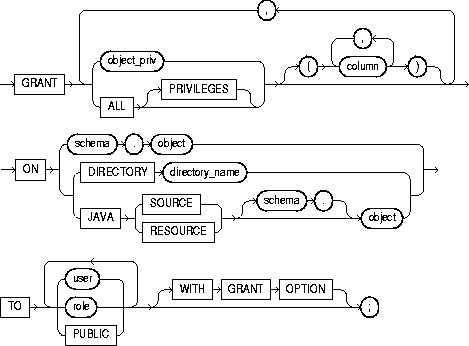
To grant privileges for a particular object to users, roles, and PUBLIC. To grant system privileges and roles, use the GRANT system_privileges_and_roles statement described in the previous section of this chapter. Table 7-7 summarizes the object privileges that you can grant on each type of object.
If you grant a privilege to a user, Oracle adds the privilege to the user's privilege domain. The user can immediately exercise the privilege.
If you grant a privilege to a role, Oracle adds the privilege to the role's privilege domain. Users who have been granted and have enabled the role can immediately exercise the privilege. Other users who have been granted the role can enable the role and exercise the privilege.
If you grant a privilege to PUBLIC, Oracle adds the privilege to the privilege domain of each user. All users can immediately exercise the privilege.
Table 7-8 lists object privileges and the operations that they authorize. You can grant any of these system privileges with the GRANT statement.
For information on granting system privileges and roles, see "GRANT system_privileges_and_roles". For information on revoking object grants, see "REVOKE schema_object_privileges".
You must own the object or the owner of the object must have granted you the object privileges with the GRANT OPTION. This rule applies to users with the DBA role.
|
object_priv |
is an object privilege to be granted. You can substitute any of the values shown in Table 7-7. See also Table 7-8. Restriction: A privilege cannot appear more than once in the list of privileges to be granted. |
|
|
ALL [PRIVILEGES] |
grants all the privileges for the object that you have been granted with the GRANT OPTION. The user who owns the schema containing an object automatically has all privileges on the object with the GRANT OPTION. (The keyword PRIVILEGES is optional.) |
|
|
column |
specifies a table or view column on which privileges are granted. You can specify columns only when granting the INSERT, REFERENCES, or UPDATE privilege. If you do not list columns, the grantee has the specified privilege on all columns in the table or view. |
|
|
ON |
identifies the object on which the privileges are granted. Directory schema objects and Java source and resource schema objects are identified separately because they reside in separate namespaces. |
|
|
|
object |
identifies the schema object on which the privileges are granted. If you do not qualify object with schema, Oracle assumes the object is in your own schema. The object can be one of the following types (see Table 7-7): |
|
|
|
Note: You cannot grant privileges directly to a single partition of a partitioned table. For information on how to grant privileges to a single partition indirectly, refer to Oracle8i Concepts. |
|
|
DIRECTORY |
identifies a directory schema object on which privileges are granted by the DBA. You cannot qualify directory_name with a schema name. See "CREATE DIRECTORY". |
|
|
JAVA SOURCE | RESOURCE |
identifies a Java source or resource schema object on which privileges are granted. See "CREATE JAVA". |
|
TO |
identifies users or roles to which the object privilege is granted. Restriction: A user or role cannot appear more than once in the TO clause. |
|
|
|
PUBLIC |
grants object privileges to all users. |
|
WITH GRANT OPTION |
allows the grantee to grant the object privileges to other users and roles. The grantee must be a user or PUBLIC, rather than a role. |
|
| Object Privilege | Allows Grantee to . . . |
|---|---|
|
The following table privileges authorize operations on a table. Any one of following object privileges allows the grantee to lock the table in any lock mode with the LOCK TABLE statement. |
|
|
ALTER |
Change the table definition with the ALTER TABLE statement. |
|
DELETE |
Remove rows from the table with the DELETE statement. Note: You must grant the SELECT privilege on the table along with the DELETE privilege. |
|
INDEX |
Create an index on the table with the CREATE INDEX statement. |
|
INSERT |
Add new rows to the table with the INSERT statement. |
|
REFERENCES |
Create a constraint that refers to the table. You cannot grant this privilege to a role. |
|
SELECT |
Query the table with the SELECT statement. |
|
UPDATE |
Change data in the table with the UPDATE statement. Note: You must grant the SELECT privilege on the table along with the UPDATE privilege. |
|
The following view privileges authorize operations on a view. Any one of the following object privileges allows the grantee to lock the view in any lock mode with the LOCK TABLE statement. To grant a privilege on a view, you must have that privilege with the GRANT OPTION on all of the view's base tables. |
|
|
DELETE |
Remove rows from the view with the DELETE statement. |
|
INSERT |
Add new rows to the view with the INSERT statement. |
|
SELECT |
Query the view with the SELECT statement. |
|
UPDATE |
Change data in the view with the UPDATE statement. |
|
The following sequence privileges authorize operations on a sequence. |
|
|
ALTER |
Change the sequence definition with the ALTER SEQUENCE statement. |
|
SELECT |
Examine and increment values of the sequence with the CURRVAL and NEXTVAL pseudocolumns. |
|
The following procedure, function, and package privilege authorizes operations on procedures, functions, or packages. This privilege also applies to Java sources, classes, and resources, which Oracle treats as though they were procedures for purposes of granting object privileges. |
|
|
EXECUTE |
Compile the procedure or function or execute it directly, or access any program object declared in the specification of a package. |
|
|
Note: Users do not need this privilege to execute a procedure, function, or package indirectly. For more information, refer to Oracle8i Concepts and Oracle8i Application Developer's Guide - Fundamentals. |
|
The following snapshot privilege authorizes operations on a snapshot. |
|
|
SELECT |
Query the snapshot with the SELECT statement. |
|
Synonym privileges are the same as the privileges for the base object. Granting a privilege on a synonym is equivalent to granting the privilege on the base object. Similarly, granting a privilege on a base object is equivalent to granting the privilege on all synonyms for the object. If you grant a user a privilege on a synonym, the user can use either the synonym name or the base object name in the SQL statement that exercises the privilege. |
|
|
The following directory privilege provides secured access to the files stored in the operating system directory to which the directory object serves as a pointer. The directory object contains the full pathname of the operating system directory where the files reside. Because the files are actually stored outside the database, Oracle server processes also need to have appropriate file permissions on the file system server. Granting object privileges on the directory database object to individual database users, rather than on the operating system, allows Oracle to enforce security during file operations. |
|
|
READ |
Read files in the directory. |
|
The following object type privilege authorizes operations on an object type |
|
|
EXECUTE |
Use and reference the specified object and to invoke its methods. |
|
The following indextype privilege authorizes operations on indextypes. |
|
|
EXECUTE |
Reference an indextype. |
|
The following operator privilege authorizes operations on user-defined operators. |
|
|
EXECUTE |
Reference an operator. |
To grant READ on directory BFILE_DIR1 to user SCOTT, with the GRANT OPTION, issue the following statement:
GRANT READ ON DIRECTORY bfile_dir1 TO scottWITH GRANT OPTION;
To grant all privileges on the table BONUS to the user JONES with the GRANT OPTION, issue the following statement:
GRANT ALL ON bonus TO jonesWITH GRANT OPTION;
JONES can subsequently perform the following operations:
To grant SELECT and UPDATE privileges on the view GOLF_HANDICAP to all users, issue the following statement:
GRANT SELECT, UPDATEON golf_handicap TO PUBLIC;
All users can subsequently query and update the view of golf handicaps.
To grant SELECT privilege on the ESEQ sequence in the schema ELLY to the user BLAKE, issue the following statement:
GRANT SELECTON elly.eseq TO blake;
BLAKE can subsequently generate the next value of the sequence with the following statement:
SELECT elly.eseq.NEXTVALFROM DUAL;
To grant BLAKE the REFERENCES privilege on the EMPNO column and the UPDATE privilege on the EMPNO, SAL, and COMM columns of the EMP table in the schema SCOTT, issue the following statement:
GRANT REFERENCES (empno), UPDATE (empno, sal, comm)ON scott.emp TO blake;
BLAKE can subsequently update values of the EMPNO, SAL, and COMM columns. BLAKE can also define referential integrity constraints that refer to the EMPNO column. However, because the GRANT statement lists only these columns, BLAKE cannot perform operations on any of the other columns of the EMP table.
For example, BLAKE can create a table with a constraint:
CREATE TABLE dependent(dependno NUMBER, dependname VARCHAR2(10), employee NUMBER CONSTRAINT in_emp REFERENCES scott.emp(empno) );
The constraint IN_EMP ensures that all dependents in the DEPENDENT table correspond to an employee in the EMP table in the schema SCOTT.

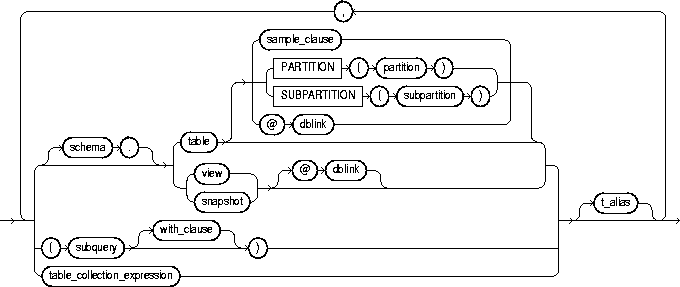
subquery: see "SELECT and Subqueries".

table_collection_expression::=



To add rows to a table, a view's base table, a partition of a partitioned table or a subpartition of a composite-partitioned table, or an object table or an object view's base table.
For you to insert rows into a table, the table must be in your own schema or you must have INSERT privilege on the table.
For you to insert rows into the base table of a view, the owner of the schema containing the view must have INSERT privilege on the base table. Also, if the view is in a schema other than your own, you must have INSERT privilege on the view.
If you have the INSERT ANY TABLE system privilege, you can also insert rows into any table or any view's base table.
|
hint |
is a comment that passes instructions to the optimizer on choosing an execution plan for the statement. For the syntax and description of hints, see "Hints" and Oracle8i Tuning. |
|
|
table_expression_clause |
||
|
schema |
is the schema containing the table or view. If you omit schema, Oracle assumes the table or view is in your own schema. |
|
|
table | view | subquery |
is the name of the table or object table, or view or object view, or the column or columns returned by a subquery, into which rows are to be inserted. If you specify a view or object view, Oracle inserts rows into the view's base table. If any value to be inserted is a REF to an object table, and if the object table has a primary key object identifier, then the column into which you insert the REF must be a REF column with a referential integrity or SCOPE constraint to the object table. |
|
|
|
If table (or the base table of view) contains one or more domain index columns, this statement executes the appropriate indextype insert routine. For more information on these routines, see Oracle8i Data Cartridge Developer's Guide. Issuing an INSERT statement against a table fires any INSERT triggers defined on the table. |
|
|
|
Restrictions:
|
|
|
|
|
|
|
PARTITION (partition_name) | SUBPARTITION (subpartition_name) |
specifies the name of the partition or subpartition within table (or the base table of view) targeted for inserts. If a row to be inserted does not map into a specified partition or subpartition, Oracle returns an error. Restriction: This clause is not valid for object tables or object views. |
|
|
dblink |
is a complete or partial name of a database link to a remote database where the table or view is located. For information on referring to database links, see "Referring to Schema Objects and Parts". You can insert rows into a remote table or view only if you are using Oracle's distributed functionality. |
|
|
|
If you omit dblink, Oracle assumes that the table or view is on the local database. |
|
|
with_clause |
restricts the subquery in one of the following ways: |
|
|
|
||
|
|
|
|
|
table_collection_expression |
informs Oracle that the collection value expression should be treated as a table. See "Table Collection Examples". |
|
|
|
collection_expression |
is a subquery that selects a nested table column from table or view. |
|
|
Note: In earlier releases of Oracle, table_collection_expression was expressed as "THE subquery". That usage is now deprecated. |
|
|
column |
is a column of the table or view. In the inserted row, each column in this list is assigned a value from the values_clause or the subquery. |
|
|
|
If you omit one of the table's columns from this list, the column's value for the inserted row is the column's default value as specified when the table was created. For more information on default column values, see "CREATE TABLE". If any of these columns has a NOT NULL constraint, then Oracle returns an error indicating that the constraint has been violated and rolls back the INSERT statement. If you omit the column list altogether, the values_clause or query must specify values for all columns in the table. |
|
|
values_clause |
specifies a row of values to be inserted into the table or view. See the syntax description in "Expressions" and "SELECT and Subqueries". You must specify a value in the values_clause for each column in the column list. If you omit the column list, then the values_clause must provide values for every column in the table. |
|
|
|
Restrictions:
|
|
|
|
Note: If you insert string literals into a RAW column, during subsequent queries, Oracle will perform a full table scan rather than using any index that might exist on the RAW column. |
|
|
subquery |
is a subquery that returns rows that are inserted into the table. If the subquery selects no rows, Oracle inserts no rows into the table.
The subquery can refer to any table, view, or snapshot, including the target table of the INSERT statement. The select list of this subquery must have the same number of columns as the column list of the INSERT statement. If you omit the column list, then the subquery must provide values for every column in the table. See "SELECT and Subqueries". |
|
|
|
You can use subquery in combination with the TO_LOB function to convert the values in a LONG column to LOB values in another column in the same or another table. For a discussion of why and when to copy LONGs to LOBs, see Oracle8i Migration. For a description of how to use the TO_LOB function, see "Conversion Functions". See also the TO_LOB Example. To migrate LONGs to LOBs in a view, you must perform the migration on the base table, and then add the LOB to the view. |
|
|
|
Note: If subquery returns (in part or totally) the equivalent of an existing materialized view, Oracle may use the materialized view (for query rewrite) in place of one or more tables specified in subquery. For more information on materialized views and query rewrite, see Oracle8i Tuning. |
|
|
|
||
|
t_alias |
provides a correlation name for the table, view, or subquery to be referenced elsewhere in the statement. |
|
|
returning_clause |
retrieves the rows affected by the INSERT. An INSERT statement with a returning_clause retrieves the rows inserted and stores them in PL/SQL variables or bind variables. Using a returning_clause in INSERT statements with a values_clause enables you to return column expressions, ROWIDs, and REFs and store them in output bind variables. You can also use INSERT with a returning_clause for views with single base tables. |
|
|
|
expr |
is some form of the syntax descriptions in "Expressions". You must specify a column expression in the returning_clause for each variable in the data_item_list. |
|
|
INTO |
indicates that the values of the changed rows are to be stored in the variable(s) specified in data_item_list. |
|
|
data_item |
is a PL/SQL variable or bind variable that stores a retrieved expr value. |
|
|
Restrictions: |
|
The following statement inserts a row into the DEPT table:
INSERT INTO dept
   VALUES (50, 'PRODUCTION', 'SAN FRANCISCO');
The following statement inserts a row with six columns into the EMP table. One of these columns is assigned NULL and another is assigned a number in scientific notation:
INSERT INTO emp (empno, ename, job, sal, comm, deptno)
   VALUES (7890, 'JINKS', 'CLERK', 1.2E3, NULL, 40);
The following statement has the same effect as the preceding example, but uses a subquery in the table_expression_clause:
INSERT INTO (SELECT empno, ename, job, sal, comm, deptno FROM emp)
   VALUES (7890, 'JINKS', 'CLERK', 1.2E3, NULL, 40);
The following statement copies managers and presidents or employees whose commission exceeds 25% of their salary into the BONUS table:
INSERT INTO bonus
   SELECT ename, job, sal, comm
   FROM emp
   WHERE comm > 0.25 * sal
   OR job IN ('PRESIDENT', 'MANAGER');
The following statement inserts a row into the ACCOUNTS table owned by the user SCOTT on the database accessible by the database link SALES:
INSERT INTO scott.accounts@sales (acc_no, acc_name)
   VALUES (5001, 'BOWER');
Assuming that the ACCOUNTS table has a BALANCE column, the newly inserted row is assigned the default value for this column (if one has been defined), because this INSERT statement does not specify a BALANCE value.
The following statement inserts a new row containing the next value of the employee sequence into the EMP table:
INSERT INTO emp
   VALUES  (empseq.nextval, 'LEWIS', 'CLERK',
            7902, SYSDATE, 1200, NULL, 20);
The following example adds rows from LATEST_DATA into partition OCT98 of the SALES table:
INSERT INTO sales PARTITION (oct98)
   SELECT * FROM latest_data;
The following example returns the values of the inserted rows into output bind variables :BND1 and :BND2:
INSERT INTO emp VALUES (empseq.nextval, 'LEWIS', 'CLARK',
                        7902, SYSDATE, 1200, NULL, 20)
   RETURNING sal*12, job INTO :bnd1, :bnd2;
The following example returns the reference value for the inserted row into bind array :1:
INSERT INTO employee
   VALUES ('Kitty Mine', 'Peaches Fuzz', 'Meena Katz')
   RETURNING REF(employee) INTO :1;
The following example copies LONG data to a LOB column in the following existing table:
CREATE TABLE long_tab (long_pics LONG RAW);
First you must create a table with a LOB.
CREATE TABLE lob_tab (lob_pics BLOB);
Next, use an INSERT ... SELECT statement to copy the data in all rows for the LONG column into the newly created LOB column:
INSERT INTO lob_tab (lob_pics)
   SELECT TO_LOB(long_pics) FROM long_tab;
Once you are confident that the migration has been successful, you can drop the LONG_PICS table. Alternatively, if the table contains other columns, you can simply drop the LONG column from the table as follows:
ALTER TABLE long_tab DROP COLUMN long_pics;
When you INSERT or UPDATE a BFILE, you must initialize it to null or to a directory alias and filename, as shown in the next example. Assume that the EMP table has a NUMBER column followed by a BFILE column:
INSERT INTO emp
   VALUES (1, BFILENAME ('a_dir_alias', 'a_filename'));
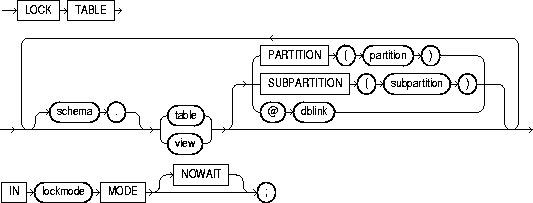
To lock one or more tables (or table partitions or subpartitions) in a specified mode. This lock manually overrides automatic locking and permits or denies access to a table or view by other users for the duration of your operation.
Some forms of locks can be placed on the same table at the same time. Other locks allow only one lock per table. For a complete description of the interaction of lock modes, see Oracle8i Concepts.
A locked table remains locked until you either commit your transaction or roll it back, either entirely or to a savepoint before you locked the table. For more information, see "COMMIT", "ROLLBACK", and "SAVEPOINT".
A lock never prevents other users from querying the table. A query never places a lock on a table. Readers never block writers and writers never block readers.
The table or view must be in your own schema or you must have the LOCK ANY TABLE system privilege, or you must have any object privilege on the table or view.
|
schema |
is the schema containing the table or view. If you omit schema, Oracle assumes the table or view is in your own schema. |
|
table / view |
is the name of the table to be locked. If you specify view, Oracle locks the view's base tables. If you specify PARTITION (partition) or SUBPARTITION (subpartition), Oracle first acquires an implicit lock on the table. The table lock is the same as the lock you specify for partition or subpartition, with two exceptions:
If you specify PARTITION and table is composite-partitioned, then Oracle acquires locks on all the subpartitions of partition. |
|
dblink |
is a database link to a remote Oracle database where the table or view is located. For information on specifying database links, see "Referring to Objects in Remote Databases". You can lock tables and views on a remote database only if you are using Oracle's distributed functionality. All tables locked by a LOCK TABLE statement must be on the same database. |
|
|
If you omit dblink, Oracle assumes the table or view is on the local database. |
|
lockmode |
ROW SHARE allows concurrent access to the locked table, but prohibits users from locking the entire table for exclusive access. ROW SHARE is synonymous with SHARE UPDATE, which is included for compatibility with earlier versions of Oracle. ROW EXCLUSIVE is the same as ROW SHARE, but also prohibits locking in SHARE mode. Row Exclusive locks are automatically obtained when updating, inserting, or deleting. SHARE allows concurrent queries but prohibits updates to the locked table. SHARE ROW EXCLUSIVE is used to look at a whole table and to allow others to look at rows in the table but to prohibit others from locking the table in SHARE mode or updating rows. EXCLUSIVE allows queries on the locked table but prohibits any other activity on it. |
|
NOWAIT |
specifies that Oracle returns control to you immediately if the specified table (or specified partition or subpartition) is already locked by another user. In this case, Oracle returns a message indicating that the table, partition, or subpartition is already locked by another user. |
|
|
If you omit this clause, Oracle waits until the table is available, locks it, and returns control to you. |
The following statement locks the EMP table in exclusive mode, but does not wait if another user already has locked the table:
LOCK TABLE empIN EXCLUSIVE MODE NOWAIT;
The following statement locks the remote ACCOUNTS table that is accessible through the database link BOSTON:
LOCK TABLE accounts@bostonIN SHARE MODE;
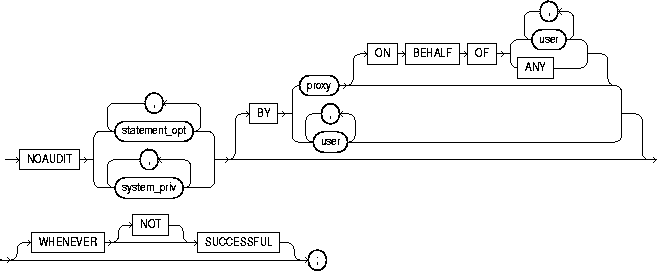
To stop auditing previously enabled by the AUDIT sql_statements statement. To stop auditing enabled by the AUDIT schema_objects statement, refer to "NOAUDIT schema_objects".
The NOAUDIT statement must have the same syntax as the previous AUDIT statement. Further, it reverses the effects only of that particular statement. Therefore, if one AUDIT statement (statement A) enables auditing for a specific user, and a second (statement B) enables auditing for all users, then a NOAUDIT statement to disable auditing for all users (statement C) reverses statement B, but leaves statement A in effect and continues to audit the user that statement A specified. For information on auditing specific SQL statements, see the "AUDIT sql_statements".
You must have the AUDIT SYSTEM system privilege.
|
statement_opt |
is a statement option for which auditing is stopped. For a list of the statement options and the SQL statements they audit, see Table 7-1 and Table 7-2. |
|
|
system_priv |
is a system privilege for which auditing is stopped. For a list of the system privileges and the statements they authorize, see Table 7-5. |
|
|
BY user |
stops auditing only for SQL statements issued by specified users in their subsequent sessions. If you omit this clause, Oracle stops auditing for all users' statements, except for the situation described for WHENEVER SUCCESSFUL. |
|
|
BY proxy |
stops auditing only for the SQL statements issued by the specified proxy, on behalf of a specific user or any user. |
|
|
WHENEVER SUCCESSFUL |
stops auditing only for SQL statements that complete successfully. NOT stops auditing only for statements that result in Oracle errors. |
|
|
|
If you omit the WHENEVER SUCCESSFUL clause entirely, Oracle stops auditing for all statements, regardless of success or failure. |
|
The following examples correspond to three examples listed in "AUDIT sql_statements".
If you have chosen auditing for every SQL statement that creates or drops a role, you can stop auditing of such statements by issuing the following statement:
NOAUDIT ROLE;
If you have chosen auditing for any statement that queries or updates any table issued by the users SCOTT and BLAKE, you can stop auditing for SCOTT's queries by issuing the following statement:
NOAUDIT SELECT TABLE
   BY scott;
The above statement stops auditing only SCOTT's queries, so Oracle continues to audit BLAKE's queries and updates as well as SCOTT's updates.
To stop auditing on all statements that are authorized by DELETE ANY TABLE system privilege, issue the following statement:
NOAUDIT DELETE ANY TABLE;
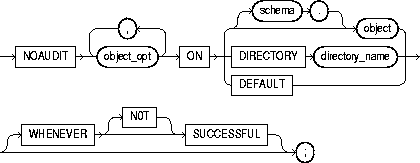
To stop auditing previously enabled by the AUDIT schema_objects statement. For more information on auditing, see "AUDIT schema_objects".
To stop auditing enabled by the AUDIT sql_statements statement, refer to "NOAUDIT sql_statements".
The object on which you stop auditing must be in your own schema or you must have the AUDIT ANY system privilege. In addition, if the object you chose for auditing is a directory, even if you created it, you must have the AUDIT ANY system privilege.
|
object_opt |
stops auditing for particular operations on the object. For a list of these options, see Table 7-3. |
|
|
ON |
identifies the object on which auditing is stopped. If you do not qualify object with schema, Oracle assumes the object is in your own schema. |
|
|
object |
must a table, view, sequence, stored procedure, function, or package, snapshot, or library. |
|
|
|
For information on auditing specific schema objects, refer to "AUDIT schema_objects". |
|
|
DIRECTORY directory_name |
identifies the name of the directory on which auditing is being stopped. |
|
|
DEFAULT |
removes the specified object options as default object options for subsequently created objects. |
|
|
WHENEVER SUCCESSFUL |
stops auditing only for SQL statements that complete successfully. NOT stops auditing only for statements that result in Oracle errors. |
|
|
|
If you omit the WHENEVER SUCCESSFUL clause entirely, Oracle stops auditing for all statements, regardless of success or failure. |
|
If you have chosen auditing for every SQL statement that queries the EMP table in the schema SCOTT, you can stop auditing for such queries by issuing the following statement:
NOAUDIT SELECT
   ON scott.emp;
You can stop auditing for queries that complete successfully by issuing the following statement:
NOAUDIT SELECT
   ON scott.emp
   WHENEVER SUCCESSFUL;
This statement stops auditing only for successful queries. Oracle continues to audit queries resulting in Oracle errors.
