Release 8.1.5
A67779-01
 Library |
 Product |
 Contents |
 Index |
| Oracle8i SQL Reference Release 8.1.5 A67779-01 |
|



To create a namespace for a context (a set of application-defined attributes that validates and secures an application) and to associate the namespace with the externally created package that sets the context. For a definition and discussion of contexts, refer to Oracle8i Concepts.
To create a context namespace, you must have CREATE ANY CONTEXT system privilege.
|
OR REPLACE |
redefines an existing context namespace using a different package. |
|
|
namespace |
is the name of the context namespace to create or modify. Context namespaces are always stored in the schema SYS. |
|
|
schema |
is the schema owning package. If you omit schema, Oracle uses the current schema. |
|
|
package |
is the PL/SQL package that sets or resets the context attributes under the namespace for a user session. For more information on setting the package, see Oracle8i Supplied Packages Reference. |
|
|
Note: To provide some design flexibility, Oracle does not verify the existence of the schema or the validity of the package at the time you create the context. |
||
Suppose you have a human resources application (HR) and a PL/SQL package (HR_SECURE_CONTEXT), which validates and secures the HR application. The following statement creates the context namespace HR_CONTEXT and associates it with the package HR_SECURE_CONTEXT:
CREATE CONTEXT hr_context USING hr_secure_context;
You can control data access based on this context using the SYS_CONTEXT function. For example, suppose your HR_SECURE_CONTEXT package has defined an attribute ORG_ID as a particular organization identifier. You can secure a base table HR_ORG_UNIT by creating a view that restricts access based on the value of ORG_ID, as follows:
CREATE VIEW hr_org_secure_view AS
     SELECT * FROM hr_org_unit
     WHERE organization_id = SYS_CONTEXT ('hr_context', 'org_id');
For more information on the SYS_CONTEXT function, see "SYS_CONTEXT".
|
WARNING: Oracle recommends that you perform a full backup of all files in the database before using this statement. For more information, see Oracle8i Backup and Recovery Guide. |
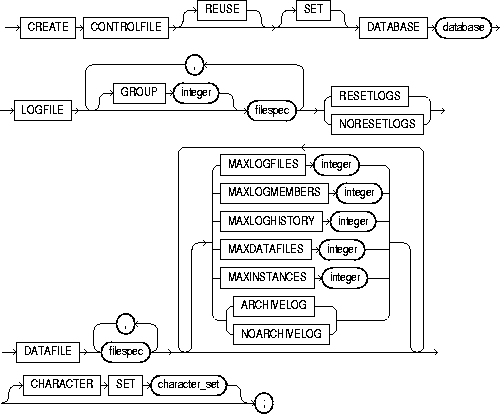
filespec: See "filespec".
To re-create a control file in one of the following cases:
When you issue a CREATE CONTROLFILE statement, Oracle creates a new control file based on the information you specify in the statement. If you omit any clauses, Oracle uses the default values rather than the values for the previous control file. After successfully creating the control file, Oracle mounts the database in the mode specified by the initialization parameter PARALLEL_SERVER. You then must perform media recovery before opening the database. It is recommended that you then shut down the instance and take a full backup of all files in the database.
For more information about using this statement, see Oracle8i Backup and Recovery Guide.
You must have the OSDBA role enabled. The database must not be mounted by any instance.
If the REMOTE_LOGIN_PASSWORDFILE initialization parameter is set to EXCLUSIVE, Oracle returns an error when you attempt to re-create the control file. To avoid this message, either set the parameter to SHARED, or re-create your password file before re-creating the control file. For more information about the REMOTE_LOGIN_PASSWORDFILE parameter, see Oracle8i Reference.
|
REUSE |
specifies that existing control files identified by the initialization parameter CONTROL_FILES can be reused, thus ignoring and overwriting any information they may currently contain. If you omit this clause and any of these control files already exists, Oracle returns an error. |
|
|
DATABASE database |
specifies the name of the database. The value of this parameter must be the existing database name established by the previous CREATE DATABASE statement or CREATE CONTROLFILE statement. |
|
|
SET DATABASE database |
changes the name of the database. The name of a database can be as long as eight bytes. |
|
|
LOGFILE |
specifies the redo log files for your database. You must list all members of all redo log file groups. See the syntax description of filespec in "filespec". |
|
|
|
GROUP integer |
specifies logfile group. If you specify GROUP values, Oracle verifies these values with the GROUP values when the database was last open. |
|
RESETLOGS |
ignores the contents of the files listed in the LOGFILE clause. These files do not have to exist. Each filespec in the LOGFILE clause must specify the SIZE parameter. Oracle assigns all online redo log file groups to thread 1 and enables this thread for public use by any instance. After using this clause, you must open the database using the RESETLOGS clause of the ALTER DATABASE statement. |
|
|
NORESETLOGS |
specifies that all files in the LOGFILE clause should be used as they were when the database was last open. These files must exist and must be the current online redo log files rather than restored backups. Oracle reassigns the redo log file groups to the threads to which they were previously assigned and reenables the threads as they were previously enabled. |
|
|
DATAFILE |
specifies the datafiles of the database. You must list all datafiles. These files must all exist, although they may be restored backups that require media recovery. See the syntax description of filespec in "filespec". |
|
|
MAXLOGFILES integer |
specifies the maximum number of online redo log file groups that can ever be created for the database. Oracle uses this value to determine how much space in the control file to allocate for the names of redo log files. The default and maximum values depend on your operating system. The value that you specify should not be less than the greatest GROUP value for any redo log file group. |
|
|
MAXLOGMEMBERS integer |
specifies the maximum number of members, or identical copies, for a redo log file group. Oracle uses this value to determine how much space in the control file to allocate for the names of redo log files. The minimum value is 1. The maximum and default values depend on your operating system. |
|
|
MAXLOGHISTORY integer |
specifies the maximum number of archived redo log file groups for automatic media recovery of the Oracle Parallel Server. Oracle uses this value to determine how much space in the control file to allocate for the names of archived redo log files. The minimum value is 0. The default value is a multiple of the MAXINSTANCES value and depends on your operating system. The maximum value is limited only by the maximum size of the control file. This parameter is useful only if you are using Oracle with the Parallel Server option in both parallel mode and archivelog mode. |
|
|
MAXDATAFILES integer |
specifies the initial sizing of the datafiles section of the control file at CREATE DATABASE or CREATE CONTROLFILE time. An attempt to add a file whose number is greater than MAXDATAFILES, but less than or equal to DB_FILES, causes the Oracle control file to expand automatically so that the datafiles section can accommodate more files. |
|
|
|
The number of datafiles accessible to your instance is also limited by the initialization parameter DB_FILES. |
|
|
MAXINSTANCES integer |
specifies the maximum number of instances that can simultaneously have the database mounted and open. This value takes precedence over the value of the initialization parameter INSTANCES. The minimum value is 1. The maximum and default values depend on your operating system. |
|
|
ARCHIVELOG |
establishes the mode of archiving the contents of redo log files before reusing them. This clause prepares for the possibility of media recovery as well as instance or crash recovery. |
|
|
NOARCHIVELOG |
If you omit both the ARCHIVELOG clause and NOARCHIVELOG clause, Oracle chooses NOARCHIVELOG mode by default. After creating the control file, you can change between ARCHIVELOG mode and NOARCHIVELOG mode with the ALTER DATABASE statement. |
|
|
CHARACTER SET character_set |
optionally reconstructs character set information in the control file. In case media recovery of the database is required, this information will be available before the database is open, so that tablespace names can be correctly interpreted during recovery. This clause is useful only if you are using a character set other than the default US7ASCII. If you are re-creating your control file and you are using Recovery Manager for tablespace recovery, and if you specify a different character set from the one stored in the data dictionary, then tablespace recovery will not succeed. (However, at database open, the control file character set will be updated with the correct character set from the data dictionary.) For more information on tablespace recovery, see Oracle8i Backup and Recovery Guide |
|
|
|
Note: You cannot modify the character set of the database with this clause. |
|
This statement re-creates a control file. In this statement, database ORDERS_2 was created with the F7DEC character set.
CREATE CONTROLFILE REUSE
   DATABASE orders_2
   LOGFILE GROUP 1 ('diskb:log1.log', 'diskc:log1.log') SIZE 50K,
           GROUP 2 ('diskb:log2.log', 'diskc:log2.log') SIZE 50K
   NORESETLOGS
   DATAFILE 'diska:dbone.dat' SIZE 2M
                              MAXLOGFILES 5
                              MAXLOGHISTORY 100
                              MAXDATAFILES 10
                              MAXINSTANCES 2
                              ARCHIVELOG
   CHARACTER SET F7DEC;
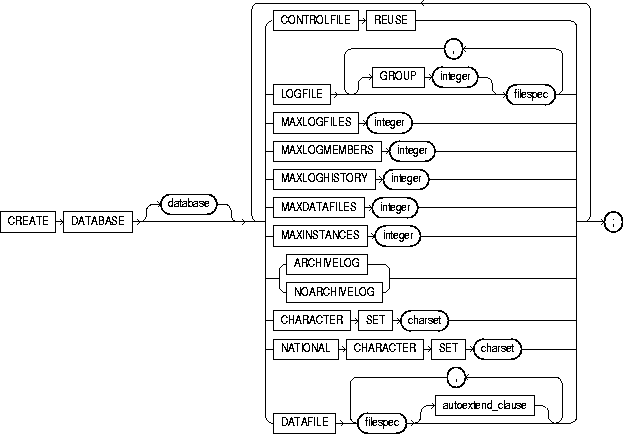
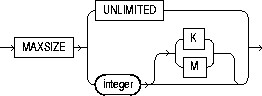
maxsize_clause::=
To create a database, making it available for general use.
This statement erases all data in any specified datafiles that already exist in order to prepare them for initial database use. If you use the statement on an existing database, all data in the datafiles is lost.
After creating the database, this statement mounts it in either exclusive or parallel mode (depending on the value of the PARALLEL_SERVER initialization parameter) and opens it, making it available for normal use. You can then create tablespaces and rollback segments for the database. For information on these tasks, see "CREATE ROLLBACK SEGMENT" and "CREATE TABLESPACE".
For more information on modifying a database, see "ALTER DATABASE".
You must have the OSDBA role enabled.
If the REMOTE_LOGIN_PASSWORDFILE initialization parameter is set to EXCLUSIVE, Oracle returns an error when you attempt to re-create the database. To avoid this message, either set the parameter to SHARED, or re-create your password file before re-creating the database. For more information about the REMOTE_LOGIN_PASSWORDFILE parameter, see Oracle8i Reference.
|
database |
is the name of the database to be created and can be up to 8 bytes long. The database name can contain only ASCII characters. Oracle writes this name into the control file. If you subsequently issue an ALTER DATABASE statement that explicitly specifies a database name, Oracle verifies that name with the name in the control file. Database names should also adhere to the rules described in "Schema Object Naming Rules". |
|
|
|
Note: You cannot use special characters from European or Asian character sets in a database name. For example, characters with umlauts are not allowed. |
|
|
|
If you omit the database name from a CREATE DATABASE statement, Oracle uses the name specified by the initialization parameter DB_NAME. If the DB_NAME initialization parameter has been set, and you specify a different name from the value of that parameter, Oracle returns an error. |
|
|
CONTROLFILE REUSE |
reuses existing control files identified by the initialization parameter CONTROL_FILES, thus ignoring and overwriting any information they currently contain. Normally you use this clause only when you are re-creating a database, rather than creating one for the first time. You cannot use this clause if you also specify a parameter value that requires that the control file be larger than the existing files. These parameters are MAXLOGFILES, MAXLOGMEMBERS, MAXLOGHISTORY, MAXDATAFILES, and MAXINSTANCES. |
|
|
|
If you omit this clause and any of the files specified by CONTROL_FILES already exist, Oracle returns an error. |
|
|
LOGFILE |
specifies one or more files to be used as redo log files. Each filespec specifies a redo log file group containing one or more redo log file members (copies). For the syntax of filespec, see "filespec". All redo log files specified in a CREATE DATABASE statement are added to redo log thread number 1. |
|
|
|
GROUP integer |
uniquely identifies a redo log file group and can range from 1 to the value of the MAXLOGFILES parameter. A database must have at least two redo log file groups. You cannot specify multiple redo log file groups having the same GROUP value. If you omit this parameter, Oracle generates its value automatically. You can examine the GROUP value for a redo log file group through the dynamic performance table V$LOG. |
|
|
If you omit the LOGFILE clause, Oracle creates two redo log file groups by default. The names and sizes of the default files depend on your operating system. |
|
|
MAXLOGFILES integer |
specifies the maximum number of redo log file groups that can ever be created for the database. Oracle uses this value to determine how much space in the control file to allocate for the names of redo log files. The default, minimum, and maximum values depend on your operating system. |
|
|
MAXLOGMEMBERS integer |
specifies the maximum number of members, or copies, for a redo log file group. Oracle uses this value to determine how much space in the control file to allocate for the names of redo log files. The minimum value is 1. The maximum and default values depend on your operating system. |
|
|
MAXLOGHISTORY integer |
specifies the maximum number of archived redo log files for automatic media recovery with Oracle Parallel Server. Oracle uses this value to determine how much space in the control file to allocate for the names of archived redo log files. The minimum value is 0. The default value is a multiple of the MAXINSTANCES value and depends on your operating system. The maximum value is limited only by the maximum size of the control file. |
|
|
|
Note: This parameter is useful only if you are using Oracle with the Parallel Server option in parallel mode, and archivelog mode enabled. |
|
|
MAXDATAFILES integer |
specifies the initial sizing of the datafiles section of the control file at CREATE DATABASE or CREATE CONTROLFILE time. An attempt to add a file whose number is greater than MAXDATAFILES, but less than or equal to DB_FILES, causes the Oracle control file to expand automatically so that the datafiles section can accommodate more files. |
|
|
|
The number of datafiles accessible to your instance is also limited by the initialization parameter DB_FILES. |
|
|
MAXINSTANCES integer |
specifies the maximum number of instances that can simultaneously have this database mounted and open. This value takes precedence over the value of initialization parameter INSTANCES. The minimum value is 1. The maximum and default values depend on your operating system. |
|
|
ARCHIVELOG |
specifies that the contents of a redo log file group must be archived before the group can be reused. This clause prepares for the possibility of media recovery. |
|
|
NOARCHIVELOG |
specifies that the contents of a redo log file group need not be archived before the group can be reused. This clause does not allow for the possibility of media recovery. |
|
|
|
The default is NOARCHIVELOG mode. After creating the database, you can change between ARCHIVELOG mode and NOARCHIVELOG mode with the ALTER DATABASE statement. |
|
|
CHARACTER SET |
specifies the character set the database uses to store data. You cannot change the database character set after creating the database. The supported character sets and default value of this parameter depend on your operating system. |
|
|
|
Restriction: You cannot specify any fixed-width multibyte character sets as the database character set. For more information about character sets, see Oracle8i National Language Support Guide. |
|
|
NATIONAL CHARACTER SET |
specifies the national character set used to store data in columns specifically defined as NCHAR, NCLOB, or NVARCHAR2. If not specified, the national character set defaults to the database character set. See Oracle8i National Language Support Guide for valid character set names. |
|
|
DATAFILE |
specifies one or more files to be used as datafiles. See the syntax description of filespec in "filespec". All these files become part of the SYSTEM tablespace. If you omit this clause, Oracle creates one datafile by default. The name and size of this default file depend on your operating system. |
|
|
|
Note: Oracle recommends that the total initial space allocated for the SYSTEM tablespace be a minimum of 5 megabytes. |
|
|
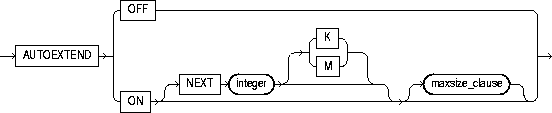
autoextend_clause |
enables or disables the automatic extension of a datafile. If you do not specify this clause, datafiles are not automatically extended. |
|
|
|
OFF |
disables autoextend if it is turned on. NEXT and MAXSIZE are set to zero. Values for NEXT and MAXSIZE must be respecified in ALTER DATABASE AUTOEXTEND or ALTER TABLESPACE AUTOEXTEND statements. |
|
|
ON |
enables autoextend. |
|
|
NEXT |
specifies the size in bytes of the next increment of disk space to be allocated to the datafile automatically when more extents are required. Use K or M to specify this size in kilobytes or megabytes. The default is the size of one data block. |
|
|
MAXSIZE |
specifies the maximum disk space allowed for automatic extension of the datafile. |
|
|
UNLIMITED |
sets no limit on the allocation of disk space to the datafile. |
The following statement creates a small database using defaults for all arguments:
CREATE DATABASE;
The following statement creates a database and fully specifies each argument:
CREATE DATABASE newtestCONTROLFILE REUSE LOGFILE GROUP 1 ('diskb:log1.log', 'diskc:log1.log') SIZE 50K, GROUP 2 ('diskb:log2.log', 'diskc:log2.log') SIZE 50K MAXLOGFILES 5 MAXLOGHISTORY 100 DATAFILE 'diska:dbone.dat' SIZE 2M MAXDATAFILES 10 MAXINSTANCES 2 ARCHIVELOG CHARACTER SET US7ASCII NATIONAL CHARACTER SET JA16SJISFIXED DATAFILE 'disk1:df1.dbf' AUTOEXTEND ON 'disk2:df2.dbf' AUTOEXTEND ON NEXT 10M MAXSIZE UNLIMITED;
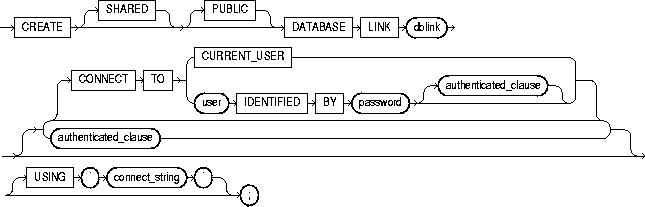

To create a database link. A database link is a schema object in the local database that allows you to access objects on a remote database. The remote database need not be an Oracle system.
Once you have created a database link, you can use it to refer to tables and views on the remote database. You can refer to a remote table or view in a SQL statement by appending @dblink to the table or view name. You can query a remote table or view with the SELECT statement. If you are using Oracle with the distributed option, you can also access remote tables and views using any of the following statements:
For information about accessing remote tables or views with PL/SQL functions, procedures, packages, and datatypes, see Oracle8i Application Developer's Guide - Fundamentals. For information on distributed database systems, see Oracle8i Distributed Database Systems.
To create a private database link, you must have CREATE DATABASE LINK system privilege. To create a public database link, you must have CREATE PUBLIC DATABASE LINK system privilege.
You must have CREATE SESSION privilege on the remote Oracle database.
Net8 must be installed on both the local and remote Oracle databases.
To access non-Oracle systems you must use the Oracle Heterogeneous Services.
|
SHARED |
uses a single network connection to create a public database link that can be shared between multiple users. This clause is available only with the multi-threaded server configuration. For more information about shared database links, see Oracle8i Distributed Database Systems. |
|
|
PUBLIC |
creates a public database link available to all users. If you omit this clause, the database link is private and is available only to you. |
|
|
dblink |
is the complete or partial name of the database link. For guidelines for naming database links, see "Referring to Objects in Remote Databases". |
|
|
|
Restrictions:
|
|
|
CONNECT TO |
enables a connection to the remote database. |
|
|
CURRENT_USER |
creates a current user database link. The current user must be a global user with a valid account on the remote database for the link to succeed. If the database link is used directly, that is, not from within a stored object, then the current user is the same as the connected user. |
|
|
|
When executing a stored object (such as a procedure, view, or trigger) that initiates a database link, CURRENT_USER is the username that owns the stored object, and not the username that called the object. For example, if the database link appears inside procedure SCOTT.P (created by SCOTT), and user JANE calls procedure SCOTT.P, the current user is SCOTT. |
|
|
|
However, if the stored object is an invoker-rights function, procedure, or package, the invoker's authorization ID is used to connect as a remote user. For example, if the privileged database link appears inside procedure SCOTT.P (an invoker-rights procedure created by SCOTT), and user JANE calls procedure SCOTT.P, then CURRENT_USER is JANE and the procedure executes with JANE's privileges. For more information on invoker-rights functions, see "CREATE FUNCTION". |
|
|
user IDENTIFIED BY password |
is the username and password used to connect to the remote database (fixed user database link). If you omit this clause, the database link uses the username and password of each user who is connected to the database (connected user database link). |
|
|
authenticated_clause |
specifies the username and password on the target instance. This clause authenticates the user to the remote server and is required for security. The specified username and password must be a valid username and password on the remote instance. The username and password are used only for authentication. No other operations are performed on behalf of this user. |
|
|
|
You must specify this clause when using the SHARED clause. |
|
|
USING 'connect string' |
specifies the service name of a remote database. For information on specifying remote databases, see Net8 Administrator's Guide. |
|
The following statement defines a current-user database link:
CREATE DATABASE LINK sales.hq.acme.com
   CONNECT TO CURRENT_USER
   USING 'sales';
The following statement defines a fixed-user database link named SALES.HQ.ACME.COM:
CREATE DATABASE LINK sales.hq.acme.com
   CONNECT TO scott IDENTIFIED BY tiger
   USING 'sales';
Once this database link is created, you can query tables in the schema SCOTT on the remote database in this manner:
SELECT *
   FROM emp@sales.hq.acme.com;
You can also use DML statements to modify data on the remote database:
INSERT INTO accounts@sales.hq.acme.com(acc_no, acc_name, balance)
   VALUES (5001, 'BOWER', 2000);

UPDATE accounts@sales.hq.acme.com
   SET balance = balance + 500;

DELETE FROM accounts@sales.hq.acme.com
   WHERE acc_name = 'BOWER';
You can also access tables owned by other users on the same database. This statement assumes SCOTT has access to ADAM's DEPT table:
SELECT *
   FROM adams.dept@sales.hq.acme.com;
The previous statement connects to the user SCOTT on the remote database and then queries ADAM's DEPT table.
A synonym may be created to hide the fact that SCOTT's EMP table is on a remote database. The following statement causes all future references to EMP to access a remote EMP table owned by SCOTT:
CREATE SYNONYM emp
   FOR scott.emp@sales.hq.acme.com;
The following statement defines a shared public fixed user database link named SALES.HQ.ACME.COM that refers to user SCOTT with password TIGER on the database specified by the string service name 'SALES':
CREATE SHARED PUBLIC DATABASE LINK sales.hq.acme.com
   CONNECT TO scott IDENTIFIED BY tiger
   AUTHENTICATED BY anupam IDENTIFIED BY bhide
   USING 'sales';
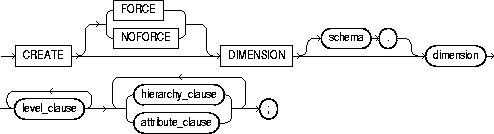




To create a dimension. A dimension defines a parent-child relationship between pairs of column sets, where all the columns of a column set must come from the same table. However, columns in one column set (or "level") can come from a different table than columns in another set. The optimizer uses these relationships with materialized views to perform query rewrite. The Summary Advisor uses these relationships to recommend creation of specific materialized views. For more information on materialized views, see "CREATE MATERIALIZED VIEW / SNAPSHOT". For more information on query rewrite, the optimizer and the Summary Advisor, see Oracle8i Tuning.
To create a dimension in your own schema, you must have the CREATE DIMENSION system privilege. To create a dimension in another user's schema, you must have the CREATE ANY DIMENSION system privilege. In either case, you must have the SELECT object privilege on any objects referenced in the dimension.
This statement creates a TIME dimension on table TIME_TAB, and creates a GEOG dimension on tables CITY, STATE, and COUNTRY.
CREATE DIMENSION time
   LEVEL curDate         IS time_tab.curDate
   LEVEL month           IS time_tab.month
   LEVEL qtr             IS time_tab.qtr
   LEVEL year            IS time_tab.year
   LEVEL fiscal_week     IS time_tab.fiscal_week
   LEVEL fiscal_qtr      IS time_tab.fiscal_qtr
   LEVEL fiscal_year     IS time_tab.fiscal_year
   HIERARCHY month_rollup (
      curDate            CHILD OF
      month              CHILD OF
      qtr                CHILD OF
      year)
   HIERARCHY fiscal_year_rollup (
      curDate            CHILD OF
      fiscal_week        CHILD OF
      fiscal_qtr         CHILD OF
      fiscal_year )
   ATTRIBUTE curDate     DETERMINES (holiday, dayOfWeek)
   ATTRIBUTE month       DETERMINES (yr_ago_month, qtr_ago_month)
   ATTRIBUTE fiscal_qtr  DETERMINES yr_ago_qtr
   ATTRIBUTE year        DETERMINES yr_ago ;

CREATE DIMENSION geog
   LEVEL cityID         IS (city.city, city.state)
   LEVEL stateID        IS state.state
   LEVEL countryID      IS country.country
   HIERARCHY political_rollup (
      cityID            CHILD OF
      stateID           CHILD OF
      countryID
         JOIN KEY city.state REFERENCES stateID
         JOIN KEY state.country REFERENCES countryID);

To create a directory object. A directory object specifies an alias for a directory on the server's file system where external binary file LOBs (BFILEs) are located. You can use directory names when referring to BFILEs in your PL/SQL code and OCI calls, rather than hard-coding the operating system pathname, thereby allowing greater file management flexibility. For more information on BFILE objects, see "Large Object (LOB) Datatypes".
All directories are created in a single namespace and are not owned by an individual's schema. You can secure access to the BFILEs stored within the directory structure by granting object privileges on the directories to specific users. for more information on granting object privileges, see "Large Object (LOB) Datatypes".
When you create a directory, you are automatically granted the READ object privilege and can grant READ privileges to other users and roles. The DBA can also grant this privilege to other users and roles.
You must have CREATE ANY DIRECTORY system privileges to create directories.
You must also create a corresponding operating system directory for file storage. Your system or database administrator must ensure that the operating system directory has the correct read permissions for Oracle processes.
Privileges granted for the directory are created independently of the permissions defined for the operating system directory. Therefore, the two may or may not correspond exactly. For example, an error occurs if user SCOTT is granted READ privilege on the directory schema object, but the corresponding operating system directory does not have READ permission defined for Oracle processes.
|
OR REPLACE |
re-creates the directory database object if it already exists. You can use this clause to change the definition of an existing directory without dropping, re-creating, and regranting database object privileges previously granted on the directory. Users who had previously been granted privileges on a redefined directory can still access the directory without being regranted the privileges For information on removing a directory from the database, see "DROP DIRECTORY". |
|
|
directory |
is the name of the directory object to be created. The maximum length of directory is 30 bytes. You cannot qualify a directory object with a schema name. |
|
|
|
Note: Oracle does not verify that the directory you specify actually exists. Therefore, take care that you specify a valid directory in your operating system. In addition, if your operating system uses case-sensitive pathnames, be sure you specify the directory in the correct format. (However, you need not include a trailing slash at the end of the pathname.) |
|
|
'path_name' |
is the full pathname of the operating system directory on the server where the files are located. The single quotes are required, with the result that the path name is case sensitive. |
|
The following statement redefines directory database object BFILE_DIR to enable access to BFILEs stored in the operating system directory /PRIVATE1/LOB/FILES:
CREATE OR REPLACE DIRECTORY bfile_dir AS '/private1/LOB/files';
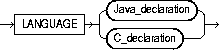
Java_declaration::=

C_declaration::=

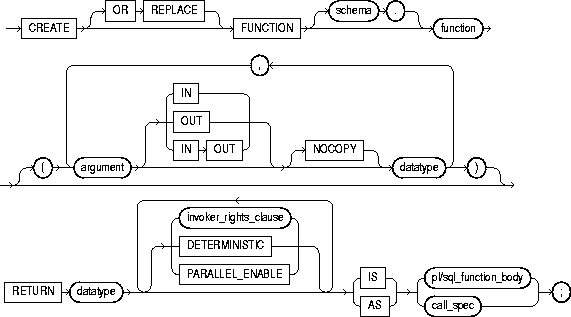
To create a stored function or a call specification.
A stored function (also called a user function) is a set of PL/SQL statements you can call by name. Stored functions are very similar to procedures, except that a function returns a value to the environment in which it is called. User functions can be used as part of a SQL expression. For a general discussion of procedures and functions, see "CREATE PROCEDURE". For examples of creating functions, see "Examples".
A call specification declares a Java method or a third-generation language (3GL) routine so that it can be called from SQL and PL/SQL. The call specification tells Oracle which Java method, or which named function in which shared library, to invoke when a call is made. It also tells Oracle what type conversions to make for the arguments and return value.
The CREATE FUNCTION statement creates a function as a standalone schema object. You can also create a function as part of a package. For information on creating packages, see "CREATE PACKAGE".
For information on modifying a function, see "ALTER FUNCTION". For information on shared libraries, see "CREATE LIBRARY". For information on dropping a standalone function, see "DROP FUNCTION". For more information about registering external functions, see Oracle8i Application Developer's Guide - Fundamentals.
Before a stored function can be created, the user SYS must run the SQL script DBMSSTDX.SQL. The exact name and location of this script depend on your operating system.
To create a function in your own schema, you must have the CREATE PROCEDURE system privilege. To create a function in another user's schema, you must have the CREATE ANY PROCEDURE system privilege. To replace a function in another user's schema, you must have the ALTER ANY PROCEDURE system privilege.
To invoke a call specification, you may need additional privileges (for example, EXECUTE privileges on C library for a C call specification). For more information on such prerequisites, refer to PL/SQL User's Guide and Reference or Oracle8i Java Stored Procedures Developer's Guide.
To embed a CREATE FUNCTION statement inside an Oracle precompiler program, you must terminate the statement with the keyword END-EXEC followed by the embedded SQL statement terminator for the specific language.
|
OR REPLACE |
re-creates the function if it already exists. Use this clause to change the definition of an existing function without dropping, re-creating, and regranting object privileges previously granted on the function. If you redefine a function, Oracle recompiles it. For information on recompiling functions, see "ALTER FUNCTION". |
|
|
|
Users who had previously been granted privileges on a redefined function can still access the function without being regranted the privileges. If any function-based indexes depend on the function, Oracle marks the indexes DISABLED. |
|
|
schema |
is the schema to contain the function. If you omit schema, Oracle creates the function in your current schema. |
|
|
function |
is the name of the function to be created. If creating the function results in compilation errors, Oracle returns an error. You can see the associated compiler error messages with the SHOW ERRORS command. |
|
|
|
Restrictions on User-Defined Functions User-defined functions cannot be used in situations that require an unchanging definition. Thus, you cannot use user-defined functions: |
|
|
|
In addition, when a function is called from within a query or DML statement, the function cannot:
|
|
|
|
Except for the restriction on OUT and IN OUT parameters, Oracle enforces these restrictions not only for the function called directly from the SQL statement, but also for any functions that function calls, and on any functions called from the SQL statements executed by that function or any function it calls. |
|
|
argument |
is the name of an argument to the function. If the function does not accept arguments, you can omit the parentheses following the function name. |
|
|
IN |
specifies that you must supply a value for the argument when calling the function. This is the default. |
|
|
OUT |
specifies the function will set the value of the argument. |
|
|
IN OUT |
specifies that a value for the argument can be supplied by you and may be set by the function. |
|
|
NOCOPY |
instructs Oracle to pass this argument as fast as possible. This clause can significantly enhance performance when passing a large value like a record, a PL/SQL table, or a varray to an OUT or IN OUT parameter. (IN parameter values are always passed NOCOPY.) |
|
|
|
|
|
|
|
These effects may or may not occur on any particular call. You should use NOCOPY only when these effects would not matter. |
|
|
datatype |
is the datatype of an argument. An argument can have any datatype supported by PL/SQL. |
|
|
|
The datatype cannot specify a length, precision, or scale. Oracle derives the length, precision, or scale of an argument from the environment from which the function is called. |
|
|
RETURN datatype |
specifies the datatype of the function's return value. Because every function must return a value, this clause is required. The return value can have any datatype supported by PL/SQL. |
|
|
|
The datatype cannot specify a length, precision, or scale. Oracle derives the length, precision, or scale of the return value from the environment from which the function is called. For information on PL/SQL datatypes, see PL/SQL User's Guide and Reference. |
|
|
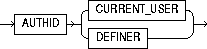
invoker_rights_clause |
lets you specify whether the function executes with the privileges and in the schema of the user who owns it or with the privileges and in the schema of CURRENT_USER. For information on how CURRENT_USER is determined, see Oracle8i Concepts and Oracle8i Application Developer's Guide - Fundamentals. This clause also determines how Oracle resolves external names in queries, DML operations, and dynamic SQL statements in the function. For more information refer to PL/SQL User's Guide and Reference. |
|
|
|
AUTHID CURRENT_USER |
specifies that the function executes with the privileges of CURRENT_USER. This clause creates an "invoker-rights function." This clause also specifies that external names in queries, DML operations, and dynamic SQL statements resolve in the schema of CURRENT_USER. External names in all other statements resolve in the schema in which the function resides. |
|
|
AUTHID DEFINER |
specifies that the function executes with the privileges of the owner of the schema in which the function resides, and that external names resolve in the schema where the function resides. This is the default. |
|
DETERMINISTIC |
is an optimization hint that allows the system to use a saved copy of the function's return result (if such a copy is available). The saved copy could come from a materialized view, a function-based index, or a redundant call to the same function in the same SQL statement. The query optimizer can choose whether to use the saved copy or re-call the function. |
|
|
|
The function should reliably return the same result value whenever it is called with the same values for its arguments. Therefore, do not define the function to use package variables or to access the database in any way that might affect the function's return result, because the results of doing so will not be captured if the system chooses not to call the function. |
|
|
|
A function must be declared DETERMINISTIC in order to be called in the expression of a function-based index, or from the query of a materialized view if that view is marked REFRESH FAST or ENABLE QUERY REWRITE. |
|
|
|
For information on materialized views, see Oracle8i Tuning. For information on function-based indexes, see "CREATE INDEX". |
|
|
PARALLEL_ENABLE |
is an optimization hint indicating that the function can be executed from a parallel execution server of a parallel query operation. The function should not use session state, such as package variables, as those variables may not be shared among the parallel execution servers. For more information on these concepts, see Oracle8i Application Developer's Guide - Fundamentals. |
|
|
pl/sql_subprogram_body |
declares the function in a PL/SQL subprogram body. For more information on PL/SQL subprograms, see Oracle8i Application Developer's Guide - Fundamentals. |
|
|
call_spec |
maps a Java or C method name, parameter types, and return type to their SQL counterparts.
|
|
|
|
AS EXTERNAL |
is an alternative way of declaring a C method. This clause has been deprecated and is supported for backward compatibility only. Oracle Corporation recommends that you use the AS LANGUAGE C syntax. |
The following statement creates the function GET_BAL.
CREATE FUNCTION get_bal(acc_no IN NUMBER)
   RETURN NUMBER
   IS acc_bal NUMBER(11,2);
   BEGIN
      SELECT balance
      INTO acc_bal
      FROM accounts
      WHERE account_id = acc_no;
      RETURN(acc_bal);
    END;
The GET_BAL function returns the balance of a specified account.
When you call the function, you must specify the argument ACC_NO, the number of the account whose balance is sought. The datatype of ACC_NO is NUMBER.
The function returns the account balance. The RETURN clause of the CREATE FUNCTION statement specifies the datatype of the return value to be NUMBER.
The function uses a SELECT statement to select the BALANCE column from the row identified by the argument ACC_NO in the ACCOUNTS table. The function uses a RETURN statement to return this value to the environment in which the function is called.
The function created above can be used in a SQL statement. For example:
SELECT get_bal(100) FROM DUAL;
The following statement creates PL/SQL standalone function GET_VAL that registers the C routine C_GET_VAL as an external function. (The parameters have been omitted from this example.)
CREATE FUNCTION get_val( x_val IN NUMBER, y_val IN NUMBER, image IN LONG RAW ) RETURN BINARY_INTEGER AS LANGUAGE C NAME "c_get_val" LIBRARY c_utils PARAMETERS (...);


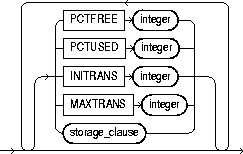


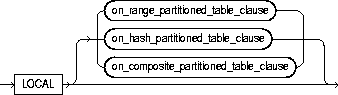
on_range_partitioned_table_clause::=

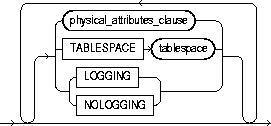
segment_attributes_clause::=
on_hash_partitioned_table_clause::=
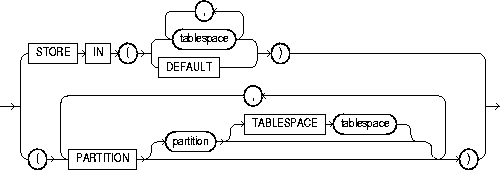
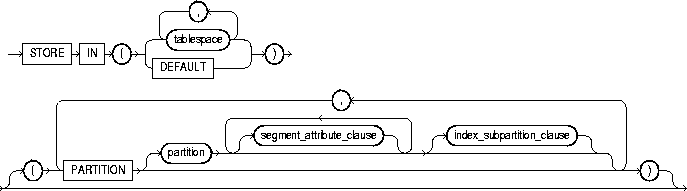
on_composite_partitioned_table_clause::=
global_partition_clause::=
storage_clause: See "storage_clause".
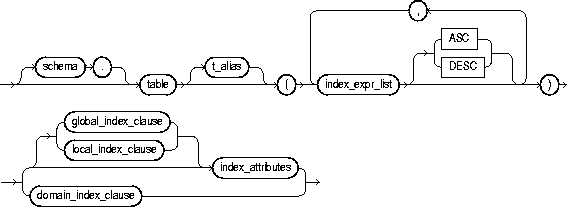
To create an index on
To create a domain index, which is an instance of an application-specific index of type indextype.
An index is a schema object that contains an entry for each value that appears in the indexed column(s) of the table or cluster and provides direct, fast access to rows. A partitioned index consists of partitions containing an entry for each value that appears in the indexed column(s) of the table. A function-based index is an index on expressions. It enables you to construct queries that evaluate the value returned by an expression, which in turn may include functions (built-in or user-defined).
For a discussion of indexes, see Oracle8i Concepts. For information on modifying an index, see "ALTER INDEX".
To create an index in your own schema, one of the following conditions must be true:
To create an index in another schema, you must have CREATE ANY INDEX system privilege. Also, the owner of the schema to contain the index must have either space quota on the tablespaces to contain the index or index partitions, or UNLIMITED TABLESPACE system privilege.
To create a domain index in your own schema, you must also have EXECUTE privilege on the indextype. If you are creating a domain index in another user's schema, the index owner also must have EXECUTE privilege on the indextype and its underlying implementation type. Before creating a domain index, you should first define the indextype. See "CREATE INDEXTYPE".
To create a function-based index in your own schema on your own table, you must have the QUERY REWRITE system privilege. To create the index in another schema or on another schema's table, you must have the GLOBAL QUERY REWRITE privilege. The table owner must also have the EXECUTE object privilege on the function(s) used in the function-based index.
|
UNIQUE |
specifies that the value of the column (or columns) upon which the index is based must be unique. If the index is local nonprefixed (see local_index_clause below), then the index key must contain the partitioning key. |
|
|
|
Oracle recommends that you do not explicitly define UNIQUE indexes on tables. Uniqueness is strictly a logical concept and should be associated with the definition of a table. Therefore, define UNIQUE integrity constraints on the desired columns. For more information on constraints, see "constraint_clause". |
|
|
|
Restrictions: |
|
|
BITMAP |
specifies that index is to be created as a bitmap, rather than as a B-tree. Bitmap indexes store the rowids associated with a key value as a bitmap. Each bit in the bitmap corresponds to a possible rowid, and if the bit is set, it means that the row with the corresponding rowid contains the key value. The internal representation of bitmaps is best suited for applications with low levels of concurrent transactions, such as data warehousing. See Oracle8i Concepts and Oracle8i Tuning for more information about using bitmap indexes. Restrictions: |
|
|
schema |
is the schema to contain the index. If you omit schema, Oracle creates the index in your own schema. |
|
|
index |
is the name of the index to be created. An index can contain several partitions. |
|
|
cluster_index_clause |
specifies the cluster for which a cluster index is to be created. If you do not qualify cluster with schema, Oracle assumes the cluster is in your current schema. You cannot create a cluster index for a hash cluster. For more information on clusters, see "CREATE CLUSTER". |
|
|
table_index_clause |
specifies table (and its attributes) on which you are defining the index. If you do not qualify table with schema, Oracle assumes the table is contained in your own schema. |
|
|
|
You create an index on a nested table column by creating the index on the nested table storage table. Include the NESTED_TABLE_ID pseudocolumn of the storage table to create a UNIQUE index, which effectively ensures that the rows of a nested table value are distinct. |
|
|
|
Restrictions: |
|
|
|
|
|
|
t_alias |
specifies a correlation name (alias) for the table upon which you are building the index. |
|
|
|
Note: This alias is required if the index_expression_list references any object type attributes or object type methods. See "Function-based Index on Type Method Example". |
|
|
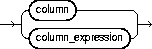
index_expr_list |
lets you specify the column or column expression upon which the index is based. |
|
|
column |
is the name of a column in the table. A bitmap index can have a maximum of 30 columns. Other indexes can have as many as 32 columns. Restriction: You cannot create an index on columns or attributes whose type is user-defined, LONG, LONG RAW, LOB, or REF, except that Oracle supports an index on REF type columns or attributes that have been defined with a SCOPE clause. |
|
|
|
You can create an index on a scalar object attribute column or on the system-defined NESTED_TABLE_ID column of the nested table storage table. If you specify an object attribute column, the column name must be qualified with the table name. If you specify a nested table column attribute, it must be qualified with the outermost table name, the containing column name, and all intermediate attribute names leading to the nested table column attribute. |
|
|
|
is an expression built from columns of table, constants, SQL functions, and user-defined functions. When you specify column_expression, you create a function-based index. Name resolution of the function is based on the schema of the index creator. User-defined functions used in column_expression are fully name resolved during the CREATE INDEX operation. |
|
|
|
After creating a function-based index, collect statistics on both the index and its base table using the ANALYZE statement (see "ANALYZE"). Oracle cannot use the function-based index until these statistics have been generated. |
|
|
|
When you subsequently query a table that uses a function-based index, you must ensure in the query that column_expression is not null. See the Function-Based Index Example. |
|
|
|
If the function on which the index is based becomes invalid or is dropped, Oracle marks the index DISABLED. Queries on a DISABLED index fail if the optimizer chooses to use the index. DML operations on a DISABLED index fail unless
|
|
|
|
Oracle's use of function-based indexes is also affected by the setting of the |
|
|
|
Restrictions on function-based indexes:
|
|
|
|
Note: If a public synonym for a function, package, or type is used in column_expression, and later an actual object with the same name is created in the table owner's schema, then Oracle will disable the function-based index. When you subsequently enable the function-based index using ALTER INDEX ... ENABLE or ALTER INDEX ... REBUILD, the function, package, or type used in the column_expression will continue to resolve to the function, package, or type to which the public synonym originally pointed. It will not resolve to the new function, package, or type. |
|
|
ASC | DESC |
specifies whether the index should be created in ascending or descending order. Indexes on character data are created in ascending or descending order of the character values in the database character set. Oracle treats descending indexes as if they were function-based indexes. You do not need the QUERY REWRITE or GLOBAL QUERY REWRITE privileges to create them, as you do with other function-based indexes. However, as with other function-based indexes, Oracle does not use descending indexes until you first analyze the index and the table on which the index is defined. See the column_expression clause of this statement. Restriction: You cannot specify either of these clauses for a domain index. You cannot specify DESC for a bitmapped index or a reverse index. |
|
|
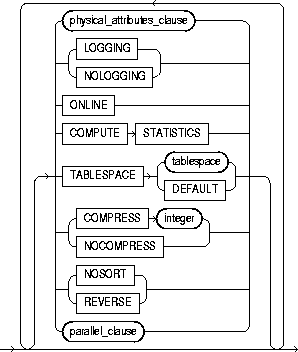
index_attributes |
||
|
physical_attributes_clause |
establishes values for physical and storage characteristics for the index. See "CREATE TABLE". Restriction: You cannot specify the PCTUSED parameter for an index. |
|
|
|
PCTFREE |
is the percentage of space to leave free for updates and insertions within each of the index's data blocks. |
|
|
storage_clause |
establishes the storage characteristics for the index. See the "storage_clause". |
|
TABLESPACE |
is the name of the tablespace to hold the index, index partition, or index subpartition. If you omit this clause, Oracle creates the index in the default tablespace of the owner of the schema containing the index. |
|
|
|
For a local index, you can specify the keyword DEFAULT in place of tablespace. New partitions or subpartitions added to the local index will be created in the same tablespace(s) as the corresponding partitions or subpartitions of the underlying table. |
|
|
|
enables key compression, which eliminates repeated occurrence of key column values and may substantially reduce storage. Use integer to specify the prefix length (number of prefix columns to compress).
|
|
|
|
Oracle compresses only nonpartitioned indexes that are nonunique or unique indexes of at least two columns. Restriction: You cannot specify COMPRESS for a bitmapped index. |
|
|
NOCOMPRESS |
disables key compression. This is the default. |
|
|
NOSORT |
indicates to Oracle that the rows are stored in the database in ascending order, so that Oracle does not have to sort the rows when creating the index. If the rows of the indexed column or columns are not stored in ascending order, Oracle returns an error. For greatest savings of sort time and space, use this clause immediately after the initial load of rows into a table. Restrictions: |
|
|
REVERSE |
stores the bytes of the index block in reverse order, excluding the rowid. You cannot specify NOSORT with this clause. |
|
|
|
You cannot reverse a bitmap index or an index-organized table. |
|
|
LOGGING | NOLOGGING |
specifies that the creation of the index will be logged (LOGGING) or not logged (NOLOGGING) in the redo log file. It also specifies that subsequent Direct Loader (SQL*Loader) and direct-load INSERT operations against the index are logged or not logged. LOGGING is the default. |
|
|
|
If index is nonpartitioned, this is the logging attribute of the index. |
|
|
|
If index is partitioned, the logging attribute specified is
|
|
|
|
In NOLOGGING mode, data is modified with minimal logging (to mark new extents INVALID and to record dictionary changes). When applied during media recovery, the extent invalidation records mark a range of blocks as logically corrupt, since the redo data is not logged. Thus if you cannot afford to lose this index, it is important to take a backup after the NOLOGGING operation. |
|
|
|
If the database is run in ARCHIVELOG mode, media recovery from a backup taken before the LOGGING operation will re-create the index. However, media recovery from a backup taken before the NOLOGGING operation will not re-create the index. |
|
|
|
The logging attribute of the index is independent of that of its base table. |
|
|
|
If you omit this clause, the logging attribute is that of the tablespace in which it resides. |
|
|
|
For more information about logging and parallel DML, see Oracle8i Concepts and Oracle8i Parallel Server Concepts and Administration. |
|
|
ONLINE |
specifies that DML operations on the table will be allowed during creation of the index. For a description of online index building and rebuilding, see Oracle8i Concepts. Restriction: Parallel DML is not supported during online index building. If you specify ONLINE and then issue parallel DML statements, Oracle returns an error. |
|
|
COMPUTE STATISTICS |
enables you to collect statistics at relatively little cost during the creation of an index. These statistics are stored in the data dictionary for ongoing use by the optimizer in choosing a plan of execution for SQL statements. The types of statistics collected depend on the type of index you are creating. |
|
|
|
Note: If you create an index using another index (instead of a table), the original index might not provide adequate statistical information. Therefore, Oracle generally uses the base table to compute the statistics, which will improve the statistics but may negatively affect performance. |
|
|
|
Additional methods of collecting statistics are available in PL/SQL packages and procedures. For more information, refer to Oracle8i Supplied Packages Reference. |
|
|
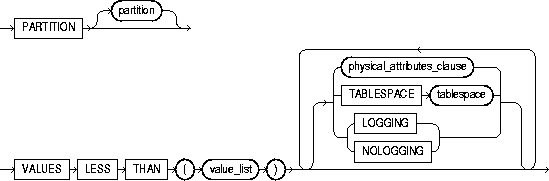
global_index_clause |
specifies that the partitioning of the index is user defined and is not equipartitioned with the underlying table. By default, nonpartitioned indexes are global indexes. |
|
|
|
PARTITION BY RANGE |
specifies that the global index is partitioned on the ranges of values from the columns specified in column_list. You cannot specify this clause for a local index. |
|
|
(column_list) |
is the name of the column(s) of a table on which the index is partitioned. The column_list must specify a left prefix of the index column list. |
|
|
|
You cannot specify more than 32 columns in column_list, and the columns cannot contain the ROWID pseudocolumn or a column of type ROWID. |
|
|
PARTITION partition |
describes the individual partitions. The number of clauses determines the number of partitions. If you omit partition, Oracle generates a name with the form SYS_Pn. |
|
|
VALUES LESS THAN (value_list) |
specifies the (noninclusive) upper bound for the current partition in a global index. The value_list is a comma-separated, ordered list of literal values corresponding to column_list in the partition_by_range_clause. Always specify MAXVALUE as the value_list of the last partition. |
|
|
|
Note: If index is partitioned on a DATE column, and if the NLS date format does not specify the century with the year, you must use the TO_DATE function with a 4-character format mask for the year. The NLS date format is determined implicitly by NLS_TERRITORY or explicitly by NLS_DATE_FORMAT. For more information on these initialization parameters, see Oracle8i National Language Support Guide. See also the "Partitioned Table Example". |
|
|
|
Restriction: You cannot specify this clause for a local index. |
|
local_index_clauses |
specify that the index is partitioned on the same columns, with the same number of partitions and the same partition bounds as table. Oracle automatically maintains LOCAL index partitioning as the underlying table is repartitioned. |
|
|
|
on_range_partitioned_table_clause |
describes an index on a range-partitioned table. |
|
|
PARTITION partition |
describes the individual partitions. The number of clauses determines the number of partitions. For a local index, the number of index partitions must be equal to the number of the table partitions, and in the same order. If you omit partition, Oracle generates a name that is consistent with the corresponding table partition. If the name conflicts with an existing index partition name, the form SYS_Pn is used. |
|
|
on_hash_partitioned_table_clause |
describes an index on a hash-partitioned table. If you do not specify partition, Oracle uses the name of the corresponding base table partition, unless it conflicts with an explicitly specified name of another index partition. In this case, Oracle generates a name of the form SYS_Pnnn. You can optionally specify TABLESPACE for all index partitions or for one or more individual partitions. If you do not specify TABLESPACE at the index or partition level, Oracle stores each index partition in the same tablespace as the corresponding table partition. |
|
|
on_composite_partitioned_table_clause |
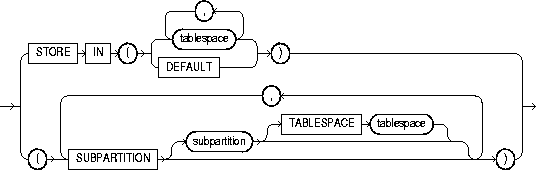
describes an index on a composite-partitioned table. The first STORE IN clause specifies the default tablespace for the index subpartitions. You can override this storage by specifying a different tablespace in the index_subpartitioning_clause. If you do not specify TABLESPACE for subpartitions either in this clause or in the index_subpartitioning_clause, Oracle uses the tablespace specified for index. If you also do not specify TABLESPACE for index, Oracle stores the subpartition in the same tablespace as the corresponding table subpartition. |
|
|
STORE IN |
lets you specify how index hash partitions (for a hash-partitioned index) or index subpartitions (for a composite-partitioned index) are to be distributed across various tablespaces. The number of tablespaces does not have to equal the number of index partitions. If the number of index partitions is greater than the number of tablespaces, Oracle cycles through the names of the tablespaces. |
|
|
DEFAULT |
is valid only for a local index on a hash or composite-partitioned table. This clause overrides any tablespace specified at the index level for a partition or subpartition, and stores the index partition or subpartition in the same partition as the corresponding table partition or subpartition. |
|
|
index_subpartition_clause |
specifies one or more tablespaces in which to store all subpartitions in partition or one or more individual subpartitions in partition. The subpartition inherits all other attributes from partition. Attributes not specified for partition are inherited from index. |
|
domain_index_clause |
specifies that index is a domain index. Restrictions:
|
|
|
|
column |
specifies the table columns or object attributes on which the index is defined. Each column can have only one domain index defined on it. Restrictions: |
|
|
indextype |
specifies the name of the indextype. This name should be a valid schema object that you have already defined. See "CREATE INDEXTYPE". |
|
|
PARAMETERS 'string' |
specifies the parameter string that is passed uninterrupted to the appropriate indextype routine. The maximum length of the parameter string is 1000 characters. Once the domain index is created, Oracle invokes this routine (see Oracle8i Data Cartridge Developer's Guide for information on these routines.) If the routine does not return successfully, the domain index is marked FAILED. The only operation supported on an failed domain index is DROP INDEX. |
|
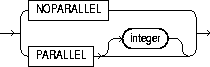
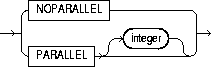
parallel_clause |
causes creation of the index to be parallelized. For additional information, see the Notes to the parallel_clause of "CREATE TABLE". |
|
|
|
NOPARALLEL |
specifies serial execution. This is the default. |
|
|
PARALLEL |
causes Oracle to select a degree of parallelism equal to the number of CPUs available on all participating instances times the value of the PARALLEL_THREADS_PER_CPU initialization parameter. |
|
|
PARALLEL integer |
specifies the degree of parallelism, which is the number of parallel threads used in the parallel operation. Each parallel thread may use one or two parallel execution servers. Normally Oracle calculates the optimum degree of parallelism, so it is not necessary for you to specify integer. |
The following statement creates an index using 10 parallel execution servers, 5 to scan SCOTT.EMP and another 5 to populate the EMP_IDX index:
CREATE INDEX emp_idx
   ON scott.emp (ename)
   PARALLEL 5;
To create an index with the COMPRESS clause, you might issue the following statement:
CREATE INDEX emp_idx2 ON emp(job, ename) COMPRESS 1;
The index will compress repeated occurrences of JOB column values.
To quickly create an index in parallel on a table that was created using a fast parallel load (so all rows are already sorted), you might issue the following statement. (Oracle will choose the appropriate degree of parallelism.)
CREATE INDEX i_loc
   ON big_table (akey)
   NOSORT
   NOLOGGING
   PARALLEL;
To create an index for the EMPLOYEE cluster, issue the following statement:
CREATE INDEX ic_emp ON CLUSTER employee;
No index columns are specified, because the index is automatically built on all the columns of the cluster key. For cluster indexes, all rows are indexed.
Consider the following statement:
SELECT ename FROM emp WHERE comm IS NULL;
The above query does not use an index created on the COMM column unless it is a bitmap index.
The following statements creates a function-based index on the EMP table based on an uppercase evaluation of the ENAME column:
CREATE INDEX emp_i ON emp (UPPER(ename));
To ensure that Oracle will use the index rather than performing a full table scan, be sure that the value of the function is not null in subsequent queries. For example, the statement
SELECT * FROM emp WHERE UPPER(ename) IS NOT NULL
   ORDER BY UPPER(ename);
is guaranteed to use the index, but without the where_clause Oracle may perform a full table scan.
This example entails an object type RECTANGLE containing two number attributes: length and width. The AREA() method computes the area of the rectangle.
CREATE TYPE rectangle AS OBJECT
( length NUMBER,
  width NUMBER,
  MEMBER FUNCTION area RETURN NUMBER DETERMINISTIC
);

CREATE OR REPLACE TYPE BODY rectangle AS
  MEMBER FUNCTION area RETURN NUMBER IS
  BEGIN
   RETURN (length*width);
  END;
END;
Now, if you create a table RECTAB of type RECTANGLE, you can create a function-based index on the AREA() method as follows:
CREATE TABLE recttab OF rectangle;
CREATE INDEX area_idx ON recttab x (x.area());
You can use this index efficiently to evaluate a query of the form:
SELECT * FROM recttab x WHERE x.area() > 100;
The following statement collects statistics on the nonpartitioned EMP_INDX index:
CREATE INDEX emp_indx ON emp(empno) COMPUTE STATISTICS;
The type of statistics collected depends on the type of index you are creating. For more information, refer to Oracle8i Concepts.
The following statement creates a global prefixed index STOCK_IX on table STOCK_XACTIONS with two partitions, one for each half of the alphabet. The index partition names are system generated:
CREATE INDEX stock_ix ON stock_xactions
  (stock_symbol, stock_series)
   GLOBAL PARTITION BY RANGE (stock_symbol)
     (PARTITION VALUES LESS THAN ('N') TABLESPACE ts3,
      PARTITION VALUES LESS THAN (MAXVALUE) TABLESPACE ts4);
This statement creates a local index on the ITEM column of the SALES table. The STORE IN clause immediately following LOCAL indicates that SALES is hash partitioned. Oracle will distribute the hash partitions between the TBS1 and TBS2 tablespaces:
CREATE INDEX sales_idx ON sales(item) LOCAL
   STORE IN (tbs1, tbs2);
This statement creates a local index on the SALES table, which is composite-partitioned. The STORAGE clause specifies default storage attributes for the index. The STORE IN clause specifies one or more default tablespaces for the index subpartitions. However, this default is overridden for the four subpartitions of partition Q3_1997, because separate TABLESPACE is specified.
CREATE INDEX sales_idx ON sales(sale_date, item)
   STORAGE (INITIAL 1M, MAXEXTENTS UNLIMITED)
   LOCAL
   STORE IN (tbs1, tbs2, tbs3, tbs4, tbs5)
   (PARTITION q1_1997, PARTITION q2_1997,
    PARTITION q3_1997
      (SUBPARTITION q3_1997_s1 TABLESPACE ts2,
       SUBPARTITION q3_1997_s2 TABLESPACE ts4,
       SUBPARTITION q3_1997_s3 TABLESPACE ts6,
       SUBPARTITION q3_1997_s4 TABLESPACE ts8),
    PARTITION q4_1997,
    PARTITION q1_1998);
To create a bitmap partitioned index on a table with four partitions, issue the following statement:
CREATE BITMAP INDEX partno_ixON lineitem(partno) TABLESPACE ts1 LOCAL (PARTITION quarter1 TABLESPACE ts2, PARTITION quarter2 STORAGE (INITIAL 10K NEXT 2K), PARTITION quarter3 TABLESPACE ts2, PARTITION quarter4);
In the following example, UNIQUE index UNIQ_PROJ_INDX is created on storage table NESTED_PROJECT_TABLE. Including pseudocolumn NESTED_TABLE_ID ensures distinct rows in nested table column PROJS_MANAGED:
CREATE TYPE proj_type AS OBJECT
   (proj_num NUMBER, proj_name VARCHAR2(20));
CREATE TYPE proj_table_type AS TABLE OF proj_type;
CREATE TABLE employee ( emp_num NUMBER, emp_name CHAR(31),
   projs_managed proj_table_type )
   NESTED TABLE projs_managed STORE AS nested_project_table;
CREATE UNIQUE INDEX uniq_proj_indx
   ON nested_project_table ( NESTED_TABLE_ID, proj_num);
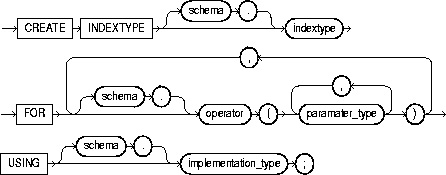
To create an indextype, which is an object that specifies the routines that manage a domain (application-specific) index. Indextypes reside in the same namespace as tables, views, and other schema objects. This statement binds the indextype name to an implementation type, which in turn specifies and refers to user-defined index functions and procedures that implement the indextype. For more information on implementing indextypes, see Oracle8i Data Cartridge Developer's Guide and Oracle8i Concepts.
To create an indextype in your own schema, you must have the CREATE INDEXTYPE system privilege. To create an indextype in another schema, you must have CREATE ANY INDEXTYPE system privilege. In either case, you must have the EXECUTE object privilege on the implementation type and the supported operators.
An indextype supports one or more operators, so before creating an indextype, you should first design the operator or operators to be supported and provide functional implementation for those operators. For more information on operators, see "CREATE OPERATOR".
|
schema |
is the name of the schema in which the indextype resides. If you omit schema, Oracle creates the indextype in your own schema. |
|
|
indextype |
is the name of the indextype to be created. |
|
|
FOR |
specifies the list of operators supported by the indextype. |
|
|
|
schema |
is the schema containing the operator. If you omit schema, Oracle assumes the operator is in your own schema. |
|
|
operator |
specifies the name of the operator supported by the indextype. |
|
|
parameter_type |
lists the types of parameters to the operator. |
|
|
All the operators listed in this clause should be valid operators. |
|
|
USING |
specifies the type that provides the implementation for the new indextype. |
|
|
|
implementation_type |
is the name of the type that implements the appropriate ODCI interface.
For additional information on this interface, see Oracle8i Data Cartridge Developer's Guide. |
The following statement creates an indextype named TextIndexType and specifies the CONTAINS operator that is supported by the indextype and the TextIndexMethods type that implements the index interface:
CREATE INDEXTYPE TextIndexType
   FOR contains (VARCHAR2, VARCHAR2)
   USING TextIndexMethods;
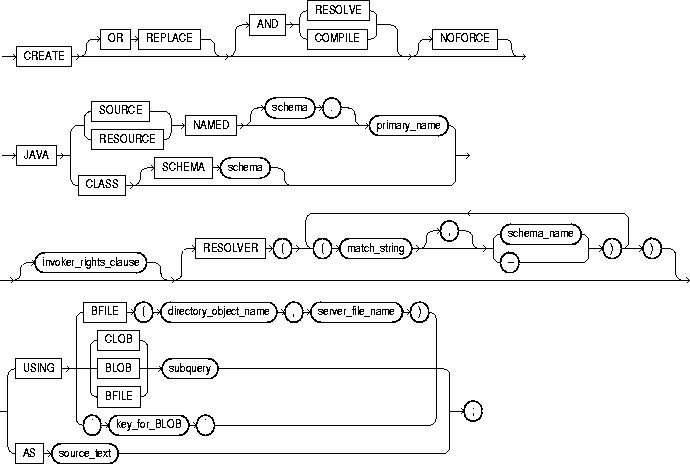
To create a schema object containing a Java source, class, or resource. For information on the following topics, see these books:
To create or replace a schema object containing a Java source, class, or resource in your own schema, you must have CREATE PROCEDURE system privilege. To create such a schema object in another user's schema, you must have CREATE ANY PROCEDURE system privilege. To replace such a schema object in another user's schema, you must also have ALTER ANY PROCEDURE system privilege.
|
OR REPLACE |
re-creates the schema object containing the Java class, source, or resource if it already exists. Use this clause to change the definition of an existing object without dropping, re-creating, and regranting object privileges previously granted. If you redefine a Java schema object and specify RESOLVE or COMPILE, Oracle recompiles or resolves the object. If the resolution or compilation is successful, Oracle does not invalidate classes that reference the Java schema object. For additional information, see "ALTER JAVA". |
|
|
|
Users who had previously been granted privileges on a redefined function can still access the function without being regranted the privileges. |
|
|
RESOLVE | COMPILE |
are synonymous keywords. They specify that Oracle should attempt to resolve the Java schema object that is created if this statement succeeds.
Restriction: You cannot specify this clause for a Java resource. |
|
|
NOFORCE |
rolls back the results of this CREATE command if you have specified either RESOLVE or COMPILE, and the resolution or compilation fails. If you do not specify this option, Oracle takes no action if the resolution or compilation fails (that is, the created schema object remains). |
|
|
JAVA SOURCE |
loads a Java source file. |
|
|
JAVA CLASS |
loads a Java class file. |
|
|
JAVA RESOURCE |
loads a Java resource file. |
|
|
NAMED |
is required for a Java source or resource.
If you do not specify schema, Oracle creates the object in your own schema. |
|
|
|
Restrictions: |
|
|
SCHEMA schema |
applies only to a Java class. This optional clause specifies the schema in which the object containing the Java file resides. If you do not specify SCHEMA and you do not specify NAMED (above), Oracle creates the object in your own schema. |
|
|
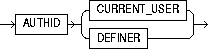
invoker_rights_clause |
specifies whether the methods of the class execute with the privileges and in the schema of the user who owns the class or with the privileges and in the schema of CURRENT_USER. For information on how CURRENT_USER is determined, see Oracle8i Concepts and Oracle8i Application Developer's Guide - Fundamentals. This clause also determines how Oracle resolves external names in queries, DML operations, and dynamic SQL statements in the member functions and procedures of the type. For more information refer to Oracle8i Java Stored Procedures Developer's Guide. |
|
|
|
AUTHID CURRENT_USER |
specifies that the methods of the class execute with the privileges of CURRENT_USER. This clause is the default and creates an "invoker-rights class." This clause also specifies that external names in queries, DML operations, and dynamic SQL statements resolve in the schema of CURRENT_USER. External names in all other statements resolve in the schema in which the methods reside. |
|
|
AUTHID DEFINER |
specifies that the methods of the class execute with the privileges of the owner of the schema in which the class resides, and that external names resolve in the schema where the class resides. |
|
RESOLVER |
specifies a mapping of the fully qualified Java name to a Java schema object, where
This mapping is stored with the definition of the schema objects created in this command for use in later resolutions (either implicit or in explicit ALTER ... RESOLVE statements). |
|
|
USING |
determines a sequence of character (CLOB or BFILE) or binary (BLOB or BFILE) data for the Java class or resource. Oracle uses the sequence of characters to define one file for a Java class or resource, or one source file and one or more derived classes for a Java source. |
|
|
|
BFILE |
identifies a previously created file on the operating system (directory_object_name) and server file (server_file_name) containing the sequence. BFILE is usually interpreted as a character sequence by CREATE JAVA SOURCE and as a binary sequence by CREATE JAVA CLASS or CREATE JAVA RESOURCE. |
|
|
CLOB/BLOB/ BFILE subquery |
supplies a query that selects a single row and column of the type specified (CLOB, BLOB, or BFILE). The value of the column makes up the sequence of characters. |
|
|
key_for_BLOB |
supplies the following implicit query: SELECT LOB FROM CREATE$JAVA$LOB$TABLE WHERE NAME = 'key_for_BLOB';
Restriction: To use this case, the table |
|
AS source_text |
determines a sequence of characters for a Java or SQLJ source. |
|
The following statement creates a schema object containing a Java class using the name found in a Java binary file:
CREATE JAVA CLASS USING BFILE (bfile_dir, 'Agent.class');
This example assumes the directory object bfile_dir, which points to the operating system directory containing the Java class Agent.class, already exists. In this example, the name of the class determines the name of the Java class schema object.
The following statement creates a Java source schema object:
CREATE JAVA SOURCE NAMED "Hello" AS
   public class Hello (
      public static String hello() (
         return "Hello World";   ) );
The following statement creates a Java resource schema object named APPTEXT from a BFILE:
CREATE JAVA RESOURCE NAMED "appText"
   USING BFILE (bfile_dir, 'textBundle.dat');

filespec: See "filespec".
To create a schema object associated with an operating-system shared library. The name of this schema object can then be used in the call_spec of CREATE FUNCTION or CREATE PROCEDURE statements, or when declaring a function or procedure in a package or type, so that SQL and PL/SQL can call to third-generation-language (3GL) functions and procedures. For more information on functions and procedures, see "CREATE FUNCTION", "CREATE PROCEDURE", and PL/SQL User's Guide and Reference.
To create a library in your own schema, you must have the CREATE LIBRARY system privilege. To create a library in another user's schema, you must have the CREATE ANY LIBRARY system privilege. To use the procedures and functions stored in the library, you must have EXECUTE object privileges on the library.
The CREATE LIBRARY statement is valid only on platforms that support shared libraries and dynamic linking.
The following statement creates library EXT_LIB:
CREATE LIBRARY ext_lib AS '/OR/lib/ext_lib.so';
The following statement re-creates library EXT_LIB:
CREATE OR REPLACE LIBRARY ext_lib IS '/OR/newlib/ext_lib.so';

physical_attributes_clause: See "CREATE TABLE".
subquery: See "SELECT and Subqueries".
LOB_storage_clause: See "CREATE TABLE".
partitioning_clauses: See "CREATE TABLE".
To create a materialized view or snapshot. The terms "snapshot" and "materialized view" are synonymous. Both refer to a table that contains the results of a query of one or more tables, each of which may be located on the same or on a remote database. The tables in the query are called master tables or detail tables. The databases containing the master tables are called the master databases.
For replication purposes, materialized views allow you to maintain copies of remote data on your local node. The copies are updatable with the Advanced Replication feature, read-only without this feature. You can select data from a materialized view as you would from a table or view. For more information on materialized views used to support replication, see Oracle8i Replication.
For data warehousing purposes, a materialized view definition can include an aggregation (SUM, COUNT(x), COUNT(*), COUNT(DISTINCT x), AVG, VARIANCE, STDDEV, MIN, and MAX) and any number of joins. Such materialized views can be used in query rewrite, an optimization technique that transforms a user request written in terms of master tables into a semantically equivalent request that includes one or more materialized view. In a data warehousing environment, all detail tables must be local.
Materialized views can take several forms. The various types of materialized views are discussed in Oracle8i Tuning.
To create a materialized view in your own schema, you must have the CREATE SNAPSHOT or CREATE MATERIALIZED VIEW, CREATE TABLE, CREATE INDEX, and CREATE VIEW system privileges.
To create a materialized view in another user's schema, you must have the CREATE ANY SNAPSHOT or CREATE ANY MATERIALIZED VIEW system privilege.
To enable a materialized view for query rewrite:
The schema that contains the materialized view must have sufficient quota in the target tablespace to store the materialized view's base table and index or have the UNLIMITED TABLESPACE system privilege.
To create and refresh a materialized view, both the creator and materialized view owner must be able to issue the defining query of the materialized view. This capability depends directly on the database link that the materialized view's defining query uses.
When you create a materialized view, Oracle creates one table, at least one index, and may create one view, all in the schema of the materialized view. Oracle uses these objects to maintain the materialized view's data. You must have the privileges necessary to create these objects. For information on these privileges, see "CREATE TABLE", "CREATE VIEW", and "CREATE INDEX".
For complete information about the prerequisites that apply to creating materialized views for replication, see Oracle8i Replication. For complete information about the prerequisites that apply to creating materialized views for data warehousing, see Oracle8i Tuning.
|
schema |
is the schema to contain the materialized view. If you omit schema, Oracle creates the materialized view in your schema. |
||
|
materialized_view / snapshot |
is the name of the materialized view to be created. Oracle generates names for the table and indexes used to maintain the materialized view by adding a prefix or suffix to the materialized view name. Oracle recommends that you limit your materialized view names to 19 bytes, so that the Oracle-generated names will be 30 bytes or less and will contain the entire materialized view name. |
||
|
physical_attributes_clause |
establishes values for the PCTFREE, PCTUSED, INITRANS, and MAXTRANS parameters (or, when used in the USING INDEX clause, for the INITRANS and MAXTRANS parameters only) and the storage parameters for the internal table Oracle uses to maintain the materialized view's data. For information on the PCTFREE, PCTUSED, INITRANS, and MAXTRANS parameters, see "CREATE TABLE". For information, about the storage_clause, see the "storage_clause". |
||
|
TABLESPACE |
specifies the tablespace in which the materialized view is to be created. If you omit this clause, Oracle creates the materialized view in the default tablespace of the owner of the materialized view's schema. |
||
|
LOB_storage_clause |
specifies the LOB storage characteristics. For detailed information about specifying the parameters of the LOB_storage_clause, see "CREATE TABLE". |
||
|
CLUSTER |
creates the materialized view as part of the specified cluster. Since a clustered materialized view uses the cluster's space allocation, do not use the physical_attributes_clause or the TABLESPACE clause with the CLUSTER clause. |
||
|
LOGGING | NOLOGGING |
establishes the logging characteristics for the materialized view. For a description of logging characteristics, see "CREATE TABLE". |
||
|
CACHE | NOCACHE |
determines where in the buffer cache Oracle stores blocks retrieved for the materialized view. For a description see "CREATE TABLE". |
||
|
partitioning_clauses |
specifies that the materialized view is partitioned on specified ranges of values or on a hash function. Partitioning of materialized views is the same as partitioning tables, as described in "CREATE TABLE". |
||
|
parallel_clause |
causes creation of the materialized view to be parallelized. For additional information, see the Notes to the parallel_clause of "CREATE TABLE". |
||
|
|
NOPARALLEL |
specifies serial execution. This is the default. |
|
|
|
PARALLEL |
causes Oracle to select a degree of parallelism equal to the number of CPUs available on all participating instances times the value of the PARALLEL_THREADS_PER_CPU initialization parameter. |
|
|
|
PARALLEL integer |
specifies the degree of parallelism, which is the number of parallel threads used in the parallel operation. Each parallel thread may use one or two parallel execution servers. Normally Oracle calculates the optimum degree of parallelism, so it is not necessary for you to specify integer. |
|
|
BUILD |
specifies when to populate the materialized view. |
||
|
|
IMMEDIATE |
specifies that the materialized view is populated immediately. This is the default. |
|
|
|
DEFERRED |
For replication purposes, this clause specifies that the materialized view will be populated at the next REFRESH operation. The first (deferred) refresh is always a complete refresh. Until then, the status of the materialized view is INVALID, so it cannot be used for query rewrite. |
|
|
|
|
|
For data warehousing purposes, this clause specifies that you will refresh the materialized view later manually using the DBMS_MVIEW.REFRESH procedure. |
|
ON PREBUILT TABLE |
lets you register an existing table to a preinitialized materialized view. The table must have the same name as the resulting materialized view. This is particularly useful for registering large materialized views in a data warehousing environment. The existing table object retains its identity as a table and is optionally maintained by the materialized view refresh mechanism to reflect changes made to the detail tables of subquery. |
||
|
|
Restriction:
|
||
|
|
WITH REDUCED PRECISION |
lets you authorize the loss of precision that will result if the precision of the table or materialized view columns do not exactly match the precision returned by subquery. |
|
|
|
WITHOUT REDUCED PRECISION |
requires that the precision of the table or materialized view columns match exactly the precision returned by subquery, or the create operation will fail. This is the default. |
|
|
USING INDEX |
specifies parameters for the indexes Oracle creates to maintain the materialized view. See physical_attributes_clause, above. Restriction: You cannot specify the PCTUSED or PCTFREE parameters in this clause. |
||
|
refresh_clause |
specifies how and when Oracle automatically refreshes the materialized view. When a materialized view's master tables are modified, the data in a materialized view must be updated to ensure that the materialized view accurately reflects the data currently in its master table(s). This clause lets you schedule the times and specify the mode for Oracle to refresh the materialized view automatically. |
||
|
|
Notes:
|
||
|
|
FAST |
specifies a fast (incremental) refresh mode, which uses only the updated data stored in the materialized view log associated with the master or detail table. The appropriate log must exist for the fast refresh to succeed unless you use direct-path load. |
|
|
|
|
Oracle can perform a fast refresh only if all of the following conditions are true:
|
|
|
|
|
Other restrictions may exist on the types of materialized views that you can fast refresh. For a complete explanation of when you can fast refresh a materialized view used for replication, see Oracle8i Replication. For a complete explanation of when you can fast refresh a materialized view used for data warehousing, see Oracle8i Tuning. |
|
|
|
|
If you specify FAST for a materialized view with insufficient information to be incrementally refreshed, Oracle raises an error. |
|
|
|
COMPLETE |
specifies a complete refresh mode, or a refresh that reexecutes the materialized view's query. If you specify a complete refresh, Oracle performs a complete refresh regardless of whether a fast refresh is possible. |
|
|
|
FORCE |
specifies a fast refresh if one is possible or complete refresh if a fast refresh is not possible. Oracle decides whether a fast refresh is possible at refresh time. |
|
|
|
If you omit FAST, COMPLETE, and FORCE, Oracle uses FORCE by default. |
||
|
|
ON COMMIT |
specifies that the refresh is to occur automatically when at the next COMMIT operation. Restriction: This clause is supported only for materialized join views and materialized aggregate views. For further information, see Oracle8i Replication and Oracle8i Tuning. |
|
|
|
ON DEMAND |
specifies that materialized views will be refreshed on demand by calling one of the three DBMS_MVIEW procedures. For information on these procedures, see Oracle8i Supplied Packages Reference. The types of materialized views you can create by specifying refresh on demand are described in Oracle8i Tuning. Alternatively, this clause specifies that a fast refresh will occur only if you add data using a direct-path method. |
|
|
|
START WITH |
specifies a date expression for the first automatic refresh time. |
|
|
|
NEXT |
specifies a date expression for calculating the interval between automatic refreshes. |
|
|
|
Both the START WITH and NEXT values must evaluate to a time in the future. If you omit the START WITH value, Oracle determines the first automatic refresh time by evaluating the NEXT expression when you create the materialized view. If you specify a START WITH value but omit the NEXT value, Oracle refreshes the materialized view only once. If you omit both the START WITH and NEXT values, or if you omit the refresh_clause entirely, Oracle does not automatically refresh the materialized view. |
||
|
|
WITH PRIMARY KEY |
specifies that a primary-key materialized view is to be created. This is the default, and should be used in all cases except those described for WITH ROWID. |
|
|
|
WITH ROWID |
specifies that a rowid materialized view is to be created. Rowid materialized views provide compatibility with master tables in releases of Oracle prior to 8.0. |
|
|
|
|
You can also use rowid materialized views to support selected materialized views that do not include all primary key columns. Rowid materialized views must be based on a single remote table and cannot contain any of the following: Rowid materialized views cannot be fast refreshed after a master table reorganization. |
|
|
|
USING ROLLBACK SEGMENT |
specifies the remote rollback segment to be used during materialized view refresh, where rollback_segment is the name of the rollback segment to be used. (To change the local materialized view rollback segment, use the DBMS_REFRESH package, described in Oracle8i Replication.) |
|
|
|
|
|
|
|
|
|
If you do not specify MASTER or LOCAL, Oracle uses LOCAL by default. If you do not specify rollback_segment, Oracle automatically chooses the rollback segment to be used. The master rollback segment is stored on a per-materialized-view basis and is validated during materialized view creation and refresh. If the materialized view is complex, the master rollback segment, if specified, is ignored. |
|
|
|
NEVER REFRESH |
suppresses refresh of the materialized view. If you issue a REFRESH statement on the materialized view, Oracle returns an error. |
|
|
FOR UPDATE |
allows a subquery, primary key, or rowid materialized view to be updated. When used in conjunction with Advanced Replication, these updates will be propagated to the master. For more information, see Oracle8i Replication. |
||
|
QUERY REWRITE |
specifies whether the materialized view is eligible to be used for query rewrite. |
||
|
|
ENABLE |
enables the materialized view for query rewrite. For more information on query rewrite, see Oracle8i Tuning. |
|
|
|
|
Note: Query rewrite is disabled by default, so you must specify this clause to make materialized views eligible for query rewrite. |
|
|
|
|
Restrictions:
|
|
|
|
DISABLE |
specifies that the materialized view is not eligible for use by query rewrite. However, a disabled materialized view can be refreshed. |
|
|
AS subquery |
specifies the materialized view query. When you create the materialized view, Oracle executes this query and places the results in the materialized view. This query is any valid SQL query. However, not all queries are fast refreshable, nor are all queries eligible for query rewrite. |
||
|
|
Notes:
|
||
|
|
Restrictions:
|
||
|
|
In addition, you should restrict the contents of subquery depending on what you hope to achieve with the materialized view, as follows: If you want the materialized view to be eligible for fast refresh using a materialized view log, some restrictions apply. For more information on restrictions relating to replication, see Oracle8i Replication. For more information on restrictions relating to data warehousing, see Oracle8i Tuning. |
||
|
|
If you are creating a materialized view enabled for query rewrite: |
||
|
|
If you want to optimize query rewrite, the following additional guidelines apply: |
||
|
|
|
||
The following statement creates and populates a materialized view and specifies refresh mode and time:
CREATE MATERIALIZED VIEW mv1 REFRESH FAST ON COMMIT
   AS SELECT t.month, p.prod_name, SUM(f.sales) AS sum_sales
      FROM time t, product p, fact f
      WHERE f.curDate = t.curDate AND f.item = p.item
      GROUP BY t.month, p.prod_name
   BUILD IMMEDIATE;
The following statement creates and populates a materialized view SALES_BY_MONTH_BY_STATE. The materialized view will be populated with data as soon as the statement executes successfully, and subsequent refreshes will be accomplished by reexecuting the materialized view's query:
CREATE MATERIALIZED VIEW sales_by_month_by_state
   TABLESPACE my_ts PARALLEL (10)
   ENABLE QUERY REWRITE
   BUILD IMMEDIATE
   REFRESH COMPLETE
   AS SELECT t.month, g.state, SUM(sales) AS sum_sales
      FROM fact f, time t, geog g
      WHERE f.cur_date = t.cur_date AND f.city_id = g.city_id
      GROUP BY month, state;
The following statement creates a materialized view for an existing summary table, SALES_SUM_TABLE:
CREATE MATERIALIZED VIEW sales_sum_table
   ON PREBUILT TABLE
   ENABLE QUERY REWRITE
   AS SELECT t.month, g.state, SUM(sales)
      FROM fact f, time g, geog g
      WHERE f.cur_date = t.cur_date AND f.city_id = g.city_id
      GROUP BY month, state;
The following statement creates a materialized join view MJV:
CREATE MATERIALIZED VIEW mjv
   REFRESH FAST
   START WITH 1-JUL-98
   NEXT SYSDATE +7 AS
      SELECT l.rowid as l_rid, l.pk, l.ofk, l.c1, l.c2,
         o.rowid as o_rid, o.pk, o.cfk, o.c1, o.c2,
         c.rowid as c_rid, c.pd, c.c1, c.c2
      FROM l, o, c
      WHERE l.ofk = o.pk(+) AND o.ofk = c.pk(+);
The following statement creates a subquery materialized view based on the ORDERS table in the SALES schema at a remote database:
CREATE MATERIALIZED VIEW sales.orders FOR UPDATE
   AS SELECT * FROM sales.orders@dbs1.acme.com
   WHERE status = 'SHIPPABLE';
The following statement creates primary-key materialized view HUMAN_GENOME:
CREATE SNAPSHOT human_genome
   REFRESH FAST START WITH SYSDATE NEXT  SYSDATE + 1/4096
   WITH PRIMARY KEY
   AS SELECT * FROM genome_catalog;
The following statement creates a rowid materialized view:
CREATE SNAPSHOT emp_data REFRESH WITH ROWIDAS SELECT * FROM emp_table73;
The following statement creates the materialized view EMP_SF that contains the data from SCOTT's employee table in New York:
CREATE SNAPSHOT emp_sf
   PCTFREE 5 PCTUSED 60
   TABLESPACE users
   STORAGE (INITIAL 50K NEXT 50K)
   REFRESH FAST NEXT sysdate + 7
   AS SELECT * FROM scott.emp@ny;
The statement does not include a START WITH parameter, so Oracle determines the first automatic refresh time by evaluating the NEXT value using the current SYSDATE. Provided a materialized view log currently exists for the employee table in New York, Oracle performs a fast refresh of the materialized view every 7 days, beginning 7 days after the materialized view is created.
Because the materialized view conforms to the conditions for fast refresh, Oracle will perform a fast refresh. The above statement also establishes for the table storage characteristics that Oracle uses to maintain the materialized view.
The following statement creates the materialized view ALL_EMPS that queries the employee tables in Dallas and Baltimore:
CREATE MATERIALIZED VIEW all_emps
   PCTFREE 5 PCTUSED 60
   TABLESPACE users
   STORAGE INITIAL 50K NEXT 50K
   USING INDEX STORAGE (INITIAL 25K NEXT 25K)
   REFRESH START WITH ROUND(SYSDATE + 1) + 11/24
   NEXT NEXT_DAY(TRUNC(SYSDATE, 'MONDAY') + 15/24
   AS SELECT * FROM fran.emp@dallas
         UNION
      SELECT * FROM marco.emp@balt;
Oracle automatically refreshes this materialized view tomorrow at 11:00 am and subsequently every Monday at 3:00 pm. ALL_EMPS contains a UNION, which is not supported for fast refresh, so Oracle automatically performs a complete refresh.
The above statement also establishes storage characteristics for both the table and the index that Oracle uses to maintain the materialized view:
The following statement creates materialized view SALE_EMP with rollback segment MASTER_SEG at the remote master and rollback segment SNAP_SEG for the local refresh group that contains the materialized view:
CREATE SNAPSHOT sales_emp
   REFRESH FAST START WITH SYSDATE NEXT SYSDATE + 7
   USING MASTER ROLLBACK SEGMENT master_seg
   LOCAL ROLLBACK SEGMENT snap_seg
   AS SELECT * FROM bar;
The following statement is incorrect and generates an error because it specifies a segment name with a DEFAULT rollback segment:
CREATE SNAPSHOT bogus
   REFRESH FAST START WITH SYSDATE NEXT SYSDATE + 7
   USING DEFAULT ROLLBACK SEGMENT snap_seg
   AS SELECT * FROM faux;
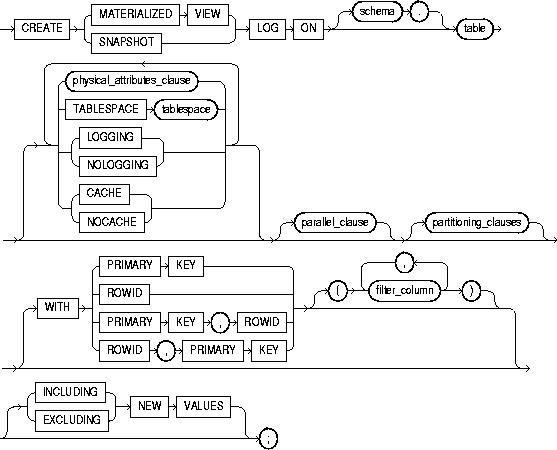
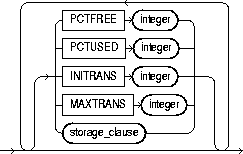
storage_clause: See "storage_clause".
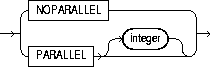
partitioning_clauses: See "CREATE TABLE".
To create a materialized view log. A materialized view log is a table associated with the master table of a materialized view. When changes are made to the master table's data, Oracle stores rows describing those changes in the materialized view log and then uses the materialized view log to refresh materialized views based on the master table. This process is called a fast refresh. Without a materialized view log, Oracle must reexecute the materialized view query to refresh the materialized view. This process is called a complete refresh. Usually, a fast refresh takes less time than a complete refresh.
A materialized view log is located in the master database in the same schema as the master table. You need only a single materialized view log for a master table. Oracle can use this materialized view log to perform fast refreshes for all fast-refreshable materialized views based on the master table. For more information on materialized views, including how Oracle refreshes materialized views, see "CREATE MATERIALIZED VIEW / SNAPSHOT", Oracle8i Tuning, and Oracle8i Replication.
To fast refresh a materialized join view (a materialized view containing a join), you must create a materialized view log for each of its base tables. For more information on materialized views, see "CREATE MATERIALIZED VIEW / SNAPSHOT" and Oracle8i Concepts.
For information on modifying a materialized view log, see "ALTER MATERIALIZED VIEW LOG / SNAPSHOT LOG". For information on dropping a materialized view log, see "DROP MATERIALIZED VIEW LOG / SNAPSHOT LOG". Some types of materialized views are refreshed using a direct loader log. For information on using direct loader logs, see Oracle8i Concepts.
The privileges required to create a materialized view log directly relate to the privileges necessary to create the underlying objects associated with a materialized view log.
In either case, the owner of the materialized view log must have sufficient quota in the tablespace intended to hold the materialized view log.
For detailed information about the prerequisites for creating a materialized view log, see Oracle8i Replication.
|
schema |
is the schema containing the materialized view log's master table. If you omit schema, Oracle assumes the master table is contained in your own schema. Oracle creates the materialized view log in the schema of its master table. You cannot create a materialized view log for a table in the schema of the user SYS. |
|
|
table |
is the name of the master table for which the materialized view log is to be created. You cannot create a materialized view log for a view. |
|
|
physical_attributes_clause |
establishes values for physical and storage characteristics for the materialized view log. See the descriptions of these parameters in "CREATE TABLE" and "storage_clause". |
|
|
TABLESPACE |
specifies the tablespace in which the materialized view log is to be created. If you omit this clause, Oracle creates the materialized view log in the default tablespace the owner of the materialized view log's schema. |
|
|
LOGGING | NOLOGGING |
establishes the logging characteristics for the materialized view log. For a description of logging characteristics, see "CREATE TABLE". |
|
|
CACHE | NOCACHE |
determines where in the buffer cache Oracle stores blocks retrieved for the materialized view log. For a description see "CREATE TABLE". |
|
|
parallel_clause |
causes creation of the materialized view log to be parallelized. For additional information, see the Notes to the parallel_clause of "CREATE TABLE". |
|
|
|
NOPARALLEL |
specifies serial execution. This is the default. |
|
|
PARALLEL |
causes Oracle to select a degree of parallelism equal to the number of CPUs available on all participating instances times the value of the PARALLEL_THREADS_PER_CPU initialization parameter. |
|
|
PARALLEL integer |
specifies the degree of parallelism, which is the number of parallel threads used in the parallel operation. Each parallel thread may use one or two parallel execution servers. Normally Oracle calculates the optimum degree of parallelism, so it is not necessary for you to specify integer. |
|
partitioning_clauses |
specifies that the materialized view log is partitioned on specified ranges of values or on a hash function. Partitioning of materialized view logs is the same as partitioning tables, as described in "CREATE TABLE". |
|
|
WITH |
specifies whether the materialized view log should record the primary key, rowid, or both primary key and rowid when rows in the master are updated. |
|
|
|
This clause also specifies whether the materialized view log records filter columns, which are non-primary-key columns referenced by subquery materialized views. |
|
|
|
PRIMARY KEY |
specifies that the primary key of all rows updated should be recorded in the materialized view log. The primary key of updated rows in the master table must be recorded in the materialized view log. |
|
|
ROWID |
specifies that the rowid of all rows updated should be recorded in the materialized view log. The rowid must be recorded in the materialized view log. |
|
|
filter_column |
is a comma-separated list that specifies the list of filter columns to be recorded in the materialized view log. For fast-refreshable primary-key materialized views defined with subqueries, all filter columns referenced by the defining subquery must be recorded in the materialized view log. |
|
|
Oracle records the primary key of all rows updated in the master by default. |
|
|
NEW VALUES |
specifies whether Oracle saves both old and new values in the materialized view log. |
|
|
|
INCLUDING |
saves old as well as new values in the log. If you are creating a log for a materialized aggregate view with only one master table, and if you want the materialized view to be eligible for fast refresh, you must specify INCLUDING. |
|
|
EXCLUDING |
saves only new values in the log. This is the default. To save overhead, use this clause for materialized join views and for materialized aggregate views with more than one master table. Such views do not require the old values. |
The following statement creates a materialized view log on an employee table that records only primary key values:
CREATE SNAPSHOT LOG ON emp WITH PRIMARY KEY;
Oracle can use this materialized view log to perform a fast refresh on any simple primary key materialized view subsequently created on the EMP table.
The following statement also creates a materialized view log that record only the primary keys of updated rows:
CREATE SNAPSHOT LOG ON emp
   PCTFREE 5
   TABLESPACE users
   STORAGE (INITIAL 10K NEXT 10K);
The following statement creates a materialized view log that records both primary keys and rowids of updated rows:
CREATE SNAPSHOT LOG ON sales WITH ROWID, PRIMARY KEY;
The following statement creates a materialized view log that records primary keys and updates to the filter column ZIP:
CREATE SNAPSHOT LOG ON address WITH (zip);
The following example creates a master table, then creates a materialized view log that specifies INCLUDING NEW VALUES:
CREATE TABLE agg
   (u NUMBER, a NUMBER, b NUMBER, c NUMBER, d NUMBER);

CREATE MATERIALIZED VIEW LOG ON agg
   WITH ROWID (u,a,b,c,d)
   INCLUDING NEW VALUES;
You could create the following materialized aggregate view to use the AGG log:
CREATE MATERIALIZED VIEW sn0
   REFRESH FAST ON COMMIT
   AS SELECT SUM(b+c), COUNT(*), a, d, COUNT(b+c)
         FROM agg
         GROUP BY a,d;
This materialized view is eligible for fast refresh because the log it uses includes both old and new values.


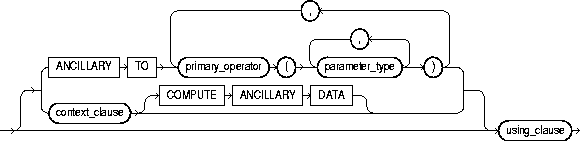


To create a new operator and define its bindings.
Operators can be referenced by indextypes and by DML and query SQL statements. The operators, in turn, reference functions, packages, types, and other user-defined objects. For a discussion of these dependencies, and of operators in general, see Oracle8i Data Cartridge Developer's Guide and Oracle8i Concepts.
To create an operator in your own schema, you must have CREATE OPERATOR system privilege. To create an operator in another schema, you must have the CREATE ANY OPERATOR system privilege. In either case, you must also have EXECUTE privilege on the functions and operators referenced.
|
OR REPLACE |
replaces the definition of the operator schema object. Restriction: You can replace the definition only if the operator has no dependent objects (for example, indextypes supporting the operator). |
|
|
schema |
is the schema containing the operator. If you omit schema, Oracle assumes the operator is in your own schema. |
|
|
operator |
is the name of the operator to be created. |
|
|
binding_clause |
specifies one or more parameter datatypes (parameter_type) for binding the operator to a function. The signature of each binding (that is, the sequence of the datatypes of the arguments to the corresponding function) must be unique according to the rules of overloading. For more information about overloading, see PL/SQL User's Guide and Reference. The parameter_type can itself be an object type. If it is, you can optionally qualify it with its schema. Restriction: You cannot specify a parameter_type of REF, LONG, or LONG RAW. |
|
|
RETURN |
specifies the return datatype (return_type) for the binding. The return_type can itself be an object type. If so, you can optionally qualify it with its schema. Restriction: You cannot specify a return_type of REF, LONG, or LONG RAW. |
|
|
implementation_clause |
||
|
|
ANCILLARY TO primary_operator |
specifies that the operator binding is ancillary to the specified primary operator binding (primary_operator). If you specify this clause, do not specify a previous binding with just one number parameter. |
|
|
context_clause |
specifies the name of the implementation type used by the function as scan context. |
|
|
COMPUTE ANCILLARY DATA |
specifies that the operator binding computes ancillary data. |
|
using_clause |
specifies the function that provides the implementation for the binding. |
|
|
|
function_name |
is the name of the function. The function can be a standalone function, packaged function, type method, or a synonym for any of these. |
This example creates an operator called MERGE in the SCOTT schema with two bindings. The first binding is for merging two VARCHAR2 values and returning a VARCHAR2 result. The second binding is for merging two geometries into a single geometry. The corresponding functional implementations for the bindings are also specified.
CREATE OPERATOR scott.merge
BINDING (varchar2, varchar2) RETURN varchar2
         USING text.merge,
   (spatial.geo, spatial.geo) RETURN spatial.geo
         USING spatial.merge;
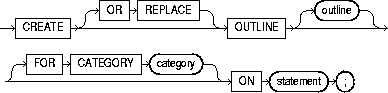
To create a stored outline, which is a set of attributes used by the optimizer to generate an execution plan. You can then instruct the optimizer to use a set of outlines to influence the generation of execution plans whenever a particular SQL statement is issued, regardless of changes in factors that can affect optimization. (To modify an outline so that it takes into account changes in these factors, see "ALTER OUTLINE".)
You enable or disable the use of stored outlines dynamically for an individual session or for the system. See "ALTER SESSION" and "ALTER SYSTEM".
For more information on outlines, see also Oracle8i Tuning.
To create an outline, you must have the CREATE ANY OUTLINE system privilege.
The following statement creates a stored outline by compiling the ON statement. The outline is called SALARIES and is stored in the category SPECIAL.
CREATE OUTLINE salaries FOR CATEGORY special
   ON SELECT ename, sal FROM emp;
When this same SELECT statement is subsequently compiled, if the USE_STORED_OUTLINES parameter is set to SPECIAL, Oracle generates the same execution plan as was generated when the outline SALARIES was created.
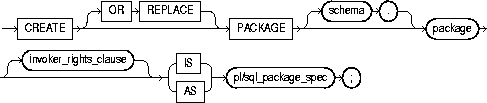
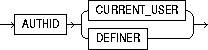
To create the specification for a stored package. A package is an encapsulated collection of related procedures, functions, and other program objects stored together in the database. The specification declares these objects.
For information on creating standalone functions and procedures, see "CREATE FUNCTION" and "CREATE PROCEDURE". For information on modifying a package, see "ALTER PACKAGE". For information on dropping a package, see "DROP PACKAGE".
For detailed discussions of packages and how to use them, see Oracle8i Application Developer's Guide - Fundamentals and Oracle8i Supplied Packages Reference.
Before a package can be created, the user SYS must run the SQL script DBMSSTDX.SQL. The exact name and location of this script depend on your operating system.
To create a package in your own schema, you must have CREATE PROCEDURE system privilege. To create a package in another user's schema, you must have CREATE ANY PROCEDURE system privilege.
To embed a CREATE PACKAGE statement inside an Oracle precompiler program, you must terminate the statement with the keyword END-EXEC followed by the embedded SQL statement terminator for the specific language.
For more information, see PL/SQL User's Guide and Reference.
|
OR REPLACE |
re-creates the package specification if it already exists. Use this clause to change the specification of an existing package without dropping, re-creating, and regranting object privileges previously granted on the package. If you change a package specification, Oracle recompiles it. For information on recompiling package specifications, see "ALTER PACKAGE". |
|
|
|
Users who had previously been granted privileges on a redefined package can still access the package without being regranted the privileges. If any function-based indexes depend on the package, Oracle marks the indexes DISABLED. |
|
|
schema |
is the schema to contain the package. If you omit schema, Oracle creates the package in your own schema. |
|
|
package |
is the name of the package to be created. If creating the package results in compilation errors, Oracle returns an error. You can see the associated compiler error messages with the SHOW ERRORS command. |
|
|
invoker_rights_clause |
lets you specify whether the functions and procedures in the package execute with the privileges and in the schema of the user who owns it or with the privileges and in the schema of CURRENT_USER. This specification applies to the corresponding package body as well. (For information on how CURRENT_USER is determined, see Oracle8i Concepts and Oracle8i Application Developer's Guide - Fundamentals.) This clause also determines how Oracle resolves external names in queries, DML operations, and dynamic SQL statements in the package. For more information refer to PL/SQL User's Guide and Reference. |
|
|
|
AUTHID CURRENT_USER |
specifies that the package executes with the privileges of CURRENT_USER. This clause creates an "invoker-rights package." This clause also specifies that external names in queries, DML operations, and dynamic SQL statements resolve in the schema of CURRENT_USER. External names in all other statements resolve in the schema in which the package resides. |
|
|
AUTHID DEFINER |
specifies that the package executes with the privileges of the owner of the schema in which the package resides and that external names resolve in the schema where the package resides. This is the default |
|
pl/sql_package_spec |
is the package specification, which can contain type definitions, cursor declarations, variable declarations, constant declarations, exception declarations, PL/SQL subprogram specifications, and call specifications (declarations of a C or Java routine expressed in PL/SQL). For a list of restrictions on user-defined functions in a package, see "Restrictions on User-Defined Functions". For more information on PL/SQL package program units, see PL/SQL User's Guide and Reference. For information on Oracle supplied packages, see Oracle8i Supplied Packages Reference. |
|
The following SQL statement creates the specification of the EMP_MGMT package:
CREATE PACKAGE emp_mgmt AS
   FUNCTION hire(ename VARCHAR2, job VARCHAR2, mgr NUMBER,
                 sal NUMBER, comm NUMBER, deptno NUMBER)
      RETURN NUMBER;
   FUNCTION create_dept(dname VARCHAR2, loc VARCHAR2)
      RETURN NUMBER;
   PROCEDURE remove_emp(empno NUMBER);
   PROCEDURE remove_dept(deptno NUMBER);
   PROCEDURE increase_sal(empno NUMBER, sal_incr NUMBER);
   PROCEDURE increase_comm(empno NUMBER, comm_incr NUMBER);
      no_comm EXCEPTION;
      no_sal EXCEPTION;
END emp_mgmt;
The specification for the EMP_MGMT package declares the following public program objects:
All of these objects are available to users who have access to the package. After creating the package, you can develop applications that call any of the package's public procedures or functions or raise any of the package's public exceptions.
Before you can call this package's procedures and functions, you must define these procedures and functions in the package body. For an example of a CREATE PACKAGE BODY statement that creates the body of the EMP_MGMT package, see "CREATE PACKAGE BODY".

To create the body of a stored package. A package is an encapsulated collection of related procedures, stored functions, and other program objects stored together in the database. The body defines these objects. For information on creating standalone functions and procedures, see "CREATE FUNCTION" and "CREATE PROCEDURE".
Packages are an alternative to creating procedures and functions as standalone schema objects. For a discussion of packages, including how to create packages, see "CREATE PACKAGE". For some illustrations, see "Examples".
For information on modifying a package, see "ALTER PACKAGE". For information on removing a package from the database, see "DROP PACKAGE".
Before a package can be created, the user SYS must run the SQL script DBMSSTDX.SQL. The exact name and location of this script depend on your operating system.
To create a package in your own schema, you must have CREATE PROCEDURE system privilege. To create a package in another user's schema, you must have CREATE ANY PROCEDURE system privilege.
To embed a CREATE PACKAGE BODY statement inside an Oracle precompiler program, you must terminate the statement with the keyword END-EXEC followed by the embedded SQL statement terminator for the specific language.
For more information, see PL/SQL User's Guide and Reference.
|
OR REPLACE |
re-creates the package body if it already exists. Use this clause to change the body of an existing package without dropping, re-creating, and regranting object privileges previously granted on it. If you change a package body, Oracle recompiles it. For information on recompiling package bodies, see "ALTER PACKAGE". |
|
|
|
Users who had previously been granted privileges on a redefined package can still access the package without being regranted the privileges. |
|
|
schema |
is the schema to contain the package. If you omit schema, Oracle creates the package in your current schema. |
|
|
package |
is the name of the package to be created. |
|
|
pl/sql_package_body |
is the package body, which can contain PL/SQL subprogram bodies or call specifications (declarations of a C or Java routine expressed in PL/SQL). For a list of restrictions on user-defined functions in a package, see "Restrictions on User-Defined Functions". For more information on writing a PL/SQL or C package program units, see Oracle8i Application Developer's Guide - Fundamentals. For information on JAVA package program units, see Oracle8i Java Stored Procedures Developer's Guide. |
|
This SQL statement creates the body of the EMP_MGMT package:
CREATE PACKAGE BODY emp_mgmt AS
   tot_emps  NUMBER;
   tot_depts NUMBER;

FUNCTION hire
   (ename VARCHAR2,
    job VARCHAR2,
    mgr NUMBER,
    sal NUMBER,
    comm NUMBER,
    deptno NUMBER)

RETURN NUMBER IS
   new_empno NUMBER(4);
BEGIN
   SELECT empseq.NEXTVAL
      INTO new_empno
      FROM DUAL;
   INSERT INTO emp
      VALUES (new_empno, ename, job, mgr, sal, comm, deptno,
         tot_emps := tot_emps + 1;
   RETURN(new_empno);
END;

FUNCTION create_dept(dname VARCHAR2, loc VARCHAR2)
   RETURN NUMBER IS
      new_deptno NUMBER(4);
   BEGIN
      SELECT deptseq.NEXTVAL
         INTO new_deptno
         FROM dual;
      INSERT INTO dept
         VALUES (new_deptno, dname, loc);
            tot_depts := tot_depts + 1;
      RETURN(new_deptno);
   END;

PROCEDURE remove_emp(empno NUMBER) IS
   BEGIN
      DELETE FROM emp
      WHERE emp.empno = remove_emp.empno;
         tot_emps := tot_emps - 1;
   END;

PROCEDURE remove_dept(deptno NUMBER) IS
   BEGIN
      DELETE FROM dept
      WHERE dept.deptno = remove_dept.deptno;
         tot_depts := tot_depts - 1;
      SELECT COUNT(*)
         INTO tot_emps
         FROM emp;
         /* In case Oracle deleted employees from the EMP table
         to enforce referential integrity constraints, reset
         the value of the variable TOT_EMPS to the total
         number of employees in the EMP table. */
   END;

PROCEDURE increase_sal(empno NUMBER, sal_incr NUMBER) IS
   curr_sal NUMBER(7,2);
   BEGIN
      SELECT sal
      INTO curr_sal
      FROM emp
      WHERE emp.empno = increase_sal.empno;
      IF curr_sal IS NULL
         THEN RAISE no_sal;
      ELSE
         UPDATE emp
         SET sal = sal + sal_incr
         WHERE empno = empno;
      END IF;
   END;

PROCEDURE increase_comm(empno NUMBER, comm_incr NUMBER) IS
      curr_comm NUMBER(7,2);
   BEGIN
      SELECT comm
      INTO curr_comm
      FROM emp
      WHERE emp.empno = increase_comm.empno
      IF curr_comm IS NULL
         THEN RAISE no_comm;
      ELSE
         UPDATE emp
         SET comm = comm + comm_incr;
      END IF;
   END;

END emp_mgmt;
This package body corresponds to the package specification in the example of the "CREATE PACKAGE" statement earlier in this chapter. The package body defines the public program objects declared in the package specification:
These objects are declared in the package specification, so they can be called by application programs, procedures, and functions outside the package. For example, if you have access to the package, you can create a procedure INCREASE_ALL_COMMS separate from the EMP_MGMT package that calls the INCREASE_COMM procedure.
These objects are defined in the package body, so you can change their definitions without causing Oracle to invalidate dependent schema objects. For example, if you subsequently change the definition of HIRE, Oracle need not recompile INCREASE_ALL_COMMS before executing it.
The package body in this example also declares private program objects, the variables TOT_EMPS and TOT_DEPTS. These objects are declared in the package body rather than the package specification, so they are accessible to other objects in the package, but they are not accessible outside the package. For example, you cannot develop an application that explicitly changes the value of the variable TOT_DEPTS. However, the function CREATE_DEPT is part of the package, so CREATE_DEPT can change the value of TOT_DEPTS.
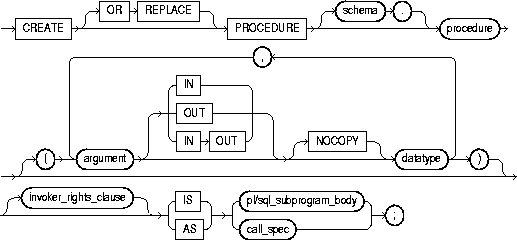
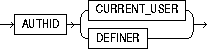
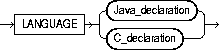
Java_declaration::=

C_declaration::=

To create a standalone stored procedure or a call specification.
A procedure is a group of PL/SQL statements that you can call by name. A call specification ("call spec") declares a Java method or a third-generation language (3GL) routine so that it can be called from SQL and PL/SQL. The call spec tells Oracle which Java method to invoke when a call is made. It also tells Oracle what type conversions to make for the arguments and return value.
Stored procedures offer advantages in the areas of development, integrity, security, performance, and memory allocation. For more information on stored procedures, including how to call stored procedures, see Oracle8i Application Developer's Guide - Fundamentals.
Stored procedures and stored functions are similar in many ways. For information specific to functions, see "CREATE FUNCTION".
The CREATE PROCEDURE statement creates a procedure as a standalone schema object. You can also create a procedure as part of a package. For information on creating packages, see "CREATE PACKAGE".
For information on modifying and dropping a standalone procedure, see "ALTER PROCEDURE" and "DROP PROCEDURE".
For more information about shared libraries, see "CREATE LIBRARY". For more information about registering external procedures, see the Oracle8i Application Developer's Guide - Fundamentals.
Before creating a procedure, the user SYS must run the SQL script DBMSSTDX.SQL. The exact name and location of this script depends on your operating system.
To create a procedure in your own schema, you must have the CREATE PROCEDURE system privilege. To create a procedure in another user's schema, you must have CREATE ANY PROCEDURE system privilege. To replace a procedure in another schema, you must have the ALTER ANY PROCEDURE system privilege.
To invoke a call spec, you may need additional privileges (for example, EXECUTE privileges on the C library for a C call spec). For more information on such prerequisites, refer to PL/SQL User's Guide and Reference or Oracle8i Java Stored Procedures Developer's Guide.
To embed a CREATE PROCEDURE statement inside an Oracle precompiler program, you must terminate the statement with the keyword END-EXEC followed by the embedded SQL statement terminator for the specific language.
|
OR REPLACE |
re-creates the procedure if it already exists. Use this clause to change the definition of an existing procedure without dropping, re-creating, and regranting object privileges previously granted on it. If you redefine a procedure, Oracle recompiles it. For information on recompiling procedures, see "ALTER PROCEDURE". |
|
|
|
Users who had previously been granted privileges on a redefined procedure can still access the procedure without being regranted the privileges. If any function-based indexes depend on the package, Oracle marks the indexes DISABLED. |
|
|
schema |
is the schema to contain the procedure. If you omit schema, Oracle creates the procedure in your current schema. |
|
|
procedure |
is the name of the procedure to be created. If creating the procedure results in compilation errors, Oracle returns an error. You can see the associated compiler error messages with the SQL*Plus command SHOW ERRORS. |
|
|
argument |
is the name of an argument to the procedure. If the procedure does not accept arguments, you can omit the parentheses following the procedure name. |
|
|
IN |
specifies that you must specify a value for the argument when calling the procedure. |
|
|
OUT |
specifies that the procedure passes a value for this argument back to its calling environment after execution. |
|
|
IN OUT |
specifies that you must specify a value for the argument when calling the procedure and that the procedure passes a value back to its calling environment after execution. |
|
|
|
If you omit IN, OUT, and IN OUT, the argument defaults to IN. |
|
|
NOCOPY |
instructs Oracle to pass this argument as fast as possible. This clause can significantly enhance performance when passing a large value like a record, a PL/SQL table, or a varray to an OUT or IN OUT parameter. (IN parameter values are always passed NOCOPY.) |
|
|
|
|
|
|
|
These effects may or may not occur on any particular call. You should use NOCOPY only when these effects would not matter. |
|
|
datatype |
is the datatype of the argument. An argument can have any datatype supported by PL/SQL. |
|
|
|
Datatypes cannot specify length, precision, or scale. For example, VARCHAR2(10) is not valid, but VARCHAR2 is valid. Oracle derives the length, precision, and scale of an argument from the environment from which the procedure is called. |
|
|
invoker_rights_clause |
lets you specify whether the procedure executes with the privileges and in the schema of the user who owns it or with the privileges and in the schema of CURRENT_USER. (For information on how CURRENT_USER is determined, see Oracle8i Concepts and Oracle8i Application Developer's Guide - Fundamentals.) This clause also determines how Oracle resolves external names in queries, DML operations, and dynamic SQL statements in the procedure. For more information refer to PL/SQL User's Guide and Reference. |
|
|
|
AUTHID CURRENT_USER |
specifies that the procedure executes with the privileges of CURRENT_USER. This clause creates an "invoker-rights procedure." This clause also specifies that external names in queries, DML operations, and dynamic SQL statements resolve in the schema of CURRENT_USER. External names in all other statements resolve in the schema in which the procedure resides. |
|
|
AUTHID DEFINER |
specifies that the procedure executes with the privileges of the owner of the schema in which the procedure resides, and that external names resolve in the schema where the procedure resides. This is the default. |
|
pl/sql_subprogram_body |
declares the procedure in a PL/SQL subprogram body. For more information on PL/SQL subprograms, see Oracle8i Application Developer's Guide - Fundamentals. |
|
|
call_spec |
maps a Java or C method name, parameter types, and return type to their SQL counterparts.
|
|
|
|
AS EXTERNAL |
is an alternative way of declaring a C method. This clause has been deprecated and is supported for backward compatibility only. Oracle Corporation recommends that you use the AS LANGUAGE C syntax. |
The following statement creates the procedure CREDIT in the schema SAM:
CREATE PROCEDURE sam.credit (acc_no IN NUMBER, amount IN NUMBER) AS
   BEGIN
      UPDATE accounts
      SET balance = balance + amount
      WHERE account_id = acc_no;
   END;
The CREDIT procedure credits a specified bank account with a specified amount. When you call the procedure, you must specify the following arguments:
|
|
is the number of the bank account to be credited. The argument's datatype is NUMBER. |
|
|
is the amount of the credit. The argument's datatype is NUMBER. |
The procedure uses an UPDATE statement to increase the value in the BALANCE column of the ACCOUNTS table by the value of the argument AMOUNT for the account identified by the argument ACC_NO.
In the following example, external procedure C_FIND_ROOT expects a pointer as a parameter. Procedure FIND_ROOT passes the parameter by reference using the BY REF phrase:
CREATE PROCEDURE find_root
   ( x IN REAL )
   IS LANGUAGE C
      NAME "c_find_root"
      LIBRARY c_utils
      PARAMETERS ( x BY REF );

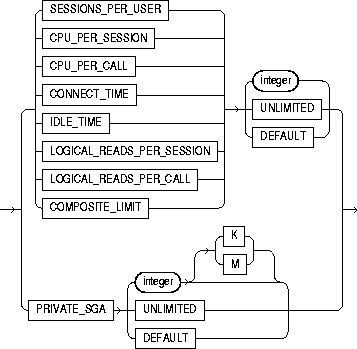
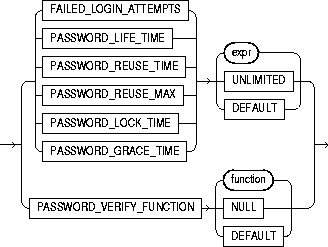
To create a profile. A profile is a set of limits on database resources. If you assign the profile to a user, that user cannot exceed these limits.
You must have CREATE PROFILE system privilege.
To specify resource limits for a user, you must:
|
profile |
is the name of the profile to be created. Use profiles to limit the database resources available to a user for a single call or a single session. |
|
|
|
Oracle enforces resource limits in the following ways:
|
|
|
|
Notes:
|
|
|
UNLIMITED |
When specified with a resource parameter, indicates that a user assigned this profile can use an unlimited amount of this resource. When specified with a password parameter, indicates that no limit has been set for the parameter. |
|
|
DEFAULT |
omits a limit for this resource in this profile. A user assigned this profile is subject to the limit for this resource specified in the DEFAULT profile. The DEFAULT profile initially defines unlimited resources. You can change those limits with the ALTER PROFILE statement. |
|
|
|
Any user who is not explicitly assigned a profile is subject to the limits defined in the DEFAULT profile. Also, if the profile that is explicitly assigned to a user omits limits for some resources or specifies DEFAULT for some limits, the user is subject to the limits on those resources defined by the DEFAULT profile. |
|
|
resource_parameters |
|
|
|
SESSIONS_PER_USER |
limits a user to integer concurrent sessions. |
|
|
CPU_PER_SESSION |
limits the CPU time for a session, expressed in hundredth of seconds. |
|
|
CPU_PER_CALL |
limits the CPU time for a call (a parse, execute, or fetch), expressed in hundredths of seconds. |
|
|
CONNECT_TIME |
limits the total elapsed time of a session, expressed in minutes. |
|
|
IDLE_TIME |
limits periods of continuous inactive time during a session, expressed in minutes. Long-running queries and other operations are not subject to this limit. |
|
|
LOGICAL_READS_PER_SESSION |
specifies the number of data blocks read in a session, including blocks read from memory and disk. |
|
|
LOGICAL_READS_PER_CALL |
specifies the number of data blocks read for a call to process a SQL statement (a parse, execute, or fetch). |
|
|
PRIVATE_SGA |
specifies the amount of private space a session can allocate in the shared pool of the system global area (SGA), expressed in bytes. Use K or M to specify this limit in kilobytes or megabytes. |
|
|
|
Note: This limit applies only if you are using multi-threaded server architecture. The private space for a session in the SGA includes private SQL and PL/SQL areas, but not shared SQL and PL/SQL areas. |
|
|
COMPOSITE_LIMIT |
specifies the total resources cost for a session, expressed in service units. Oracle calculates the total service units as a weighted sum of CPU_PER_SESSION, CONNECT_TIME, LOGICAL_READS_PER_SESSION, and PRIVATE_SGA. For information on how to specify the weight for each session resource, see "ALTER RESOURCE COST". |
|
|
password_parameters |
For a detailed description and explanation of how to use password management and protection, see Oracle8i Administrator's Guide. |
|
|
FAILED_LOGIN_ATTEMPTS |
specifies the number of failed attempts to log in to the user account before the account is locked. |
|
|
PASSWORD_LIFE_TIME |
limits the number of days the same password can be used for authentication. The password expires if it is not changed within this period, and further connections are rejected. |
|
|
PASSWORD_REUSE_TIME |
specifies the number of days before which a password cannot be reused. If you set PASSWORD_REUSE_TIME to an integer value, then you must set PASSWORD_REUSE_MAX to UNLIMITED. |
|
|
PASSWORD_REUSE_MAX |
specifies the number of password changes required before the current password can be reused. If you set PASSWORD_REUSE_MAX to an integer value, then you must set PASSWORD_REUSE_TIME to UNLIMITED. |
|
|
PASSWORD_LOCK_TIME |
specifies the number of days an account will be locked after the specified number of consecutive failed login attempts. |
|
|
PASSWORD_GRACE_TIME |
specifies the number of days after the grace period begins during which a warning is issued and login is allowed. If the password is not changed during the grace period, the password expires. |
|
|
PASSWORD_VERIFY_FUNCTION |
allows a PL/SQL password complexity verification script to be passed as an argument to the CREATE PROFILE statement. Oracle provides a default script, but you can create your own routine or use third-party software instead. |
|
|
|
function |
is the name of the password complexity verification routine. |
|
|
NULL |
indicates that no password verification is performed. |
|
Restrictions on password parameters:
|
||
The following statement creates the profile SYSTEM_MANAGER:
CREATE PROFILE system_manager
   LIMIT SESSIONS_PER_USER    UNLIMITED
   CPU_PER_SESSION            UNLIMITED
   CPU_PER_CALL               3000
   CONNECT_TIME               45
   LOGICAL_READS_PER_SESSION  DEFAULT
   LOGICAL_READS_PER_CALL     1000
   PRIVATE SGA                15K
   COMPOSITE_LIMIT            5000000;
If you then assign the SYSTEM_MANAGER profile to a user, the user is subject to the following limits in subsequent sessions:
The following statement creates the profile PROF:
CREATE PROFILE prof
  LIMIT PASSWORD_REUSE_MAX DEFAULT
        PASSWORD_REUSE_TIME UNLIMITED;
The following statement creates profile MYPROFILE with password profile limits values set:
CREATE PROFILE myprofile LIMIT
   FAILED_LOGIN_ATTEMPTS 5
   PASSWORD_LIFE_TIME 60
   PASSWORD_REUSE_TIME 60
   PASSWORD_REUSE_MAX UNLIMITED
   PASSWORD_VERIFY_FUNCTION verify_function
   PASSWORD_LOCK_TIME 1/24
   PASSWORD_GRACE_TIME 10;
