Release 8.1.5
A67779-01
 Library |
 Product |
 Contents |
 Index |
| Oracle8i SQL Reference Release 8.1.5 A67779-01 |
|


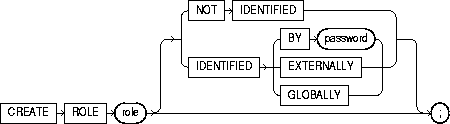
To create a role, which is a set of privileges that can be granted to users or to other roles. You can use roles to administer database privileges. You can add privileges to a role and then grant the role to a user. The user can then enable the role and exercise the privileges granted by the role.
A role contains all privileges granted to the role and all privileges of other roles granted to it. A new role is initially empty. You add privileges to a role with the GRANT statement. For information on granting roles, see "GRANT system_privileges_and_roles". For information on enabling roles, see "ALTER USER".
When you create a role that is NOT IDENTIFIED or is IDENTIFIED EXTERNALLY or BY password, Oracle grants you the role with ADMIN OPTION. However, when you create a role IDENTIFIED GLOBALLY, Oracle does not grant you the role.
For information on modifying a role, see"ALTER ROLE". For information on removing a role from the database, see "DROP ROLE". For information on enabling and disabling roles for the current session, see "SET ROLE". For a detailed description and explanation of using global roles, see Oracle8i Distributed Database Systems.
You must have CREATE ROLE system privilege.
|
role |
is the name of the role to be created. Oracle recommends that the role contain at least one single-byte character regardless of whether the database character set also contains multibyte characters. |
|
|
|
Some roles are defined by SQL scripts provided on your distribution media. For a list of these predefined roles, see "GRANT system_privileges_and_roles". |
|
|
NOT IDENTIFIED |
indicates that this role is authorized by the database and that no password is required to enable the role. |
|
|
IDENTIFIED |
indicates that a user must be authorized by the specified method before the role is enabled with the SET ROLE statement: |
|
|
|
BY password |
creates a local user and indicates that the user must specify the password to Oracle when enabling the role. The password can contain only single-byte characters from your database character set regardless of whether this character set also contains multibyte characters. |
|
|
EXTERNALLY |
creates an external user and indicates that a user must be authorized by an external service (such as an operating system or third-party service) before enabling the role. |
|
|
|
Depending on the operating system, the user may have to specify a password to the operating system before the role is enabled. |
|
|
GLOBALLY |
creates a global user and indicates that a user must be authorized to use the role by the enterprise directory service before the role is enabled with the SET ROLE statement, or at login. |
|
If you omit both the NOT IDENTIFIED clause and the IDENTIFIED clause, the role defaults to NOT IDENTIFIED. |
||
The following statement creates global role VENDOR:
CREATE ROLE vendor IDENTIFIED GLOBALLY;
The following statement creates the role TELLER:
CREATE ROLE teller
   IDENTIFIED BY cashflow;
Users who are subsequently granted the TELLER role must specify the password CASHFLOW to enable the role with the SET ROLE statement.
storage_clause: See "storage_clause".
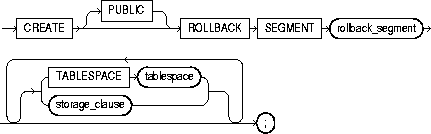
To create a rollback segment. A rollback segment is an object that Oracle uses to store data necessary to reverse, or undo, changes made by transactions.
For information on altering a rollback segment, see "ALTER ROLLBACK SEGMENT". For information on removing a rollback segment, see "DROP ROLLBACK SEGMENT".
You must have CREATE ROLLBACK SEGMENT system privilege.
|
PUBLIC |
specifies that the rollback segment is public and is available to any instance. If you omit this clause, the rollback segment is private and is available only to the instance naming it in its initialization parameter ROLLBACK_SEGMENTS. |
|
|
rollback_segment |
is the name of the rollback segment to be created. |
|
|
TABLESPACE |
identifies the tablespace in which the rollback segment is created. If you omit this clause, Oracle creates the rollback segment in the SYSTEM tablespace. Restriction: You cannot create a rollback segment in a tablespace that is system managed (that is, during creation you specified EXTENT MANAGEMENT LOCAL AUTOALLOCATE). See "CREATE TABLESPACE". |
|
|
|
Notes:
|
|
|
|
For more information on creating rollback segments and making them available, see Oracle8i Administrator's Guide. |
|
|
storage_clause |
specifies the characteristics for the rollback segment. See the "storage_clause". |
|
|
|
Notes: |
|
The following statement creates a rollback segment with default storage values in the system tablespace:
CREATE ROLLBACK SEGMENT rbs_2TABLESPACE system;
The above statement is equivalent to the following:
CREATE ROLLBACK SEGMENT rbs_2
   TABLESPACE system
   STORAGE
   ( INITIAL 10K
     NEXT 10K
     MAXEXTENTS UNLMIITED);

To create multiple tables and views and perform multiple grants in a single transaction.
To execute a CREATE SCHEMA statement, Oracle executes each included statement. If all statements execute successfully, Oracle commits the transaction. If any statement results in an error, Oracle rolls back all the statements.
|
Note: This statement does not actually create a schema. Oracle automatically creates a schema when you create a user (see "CREATE USER"). This statement lets you populate your schema with tables and views and grant privileges on those objects without having to issue multiple SQL statements in multiple transactions. |
The CREATE SCHEMA statement can include CREATE TABLE, CREATE VIEW, and GRANT statements. To issue a CREATE SCHEMA statement, you must have the privileges necessary to issue the included statements.
|
schema |
is the name of the schema. The schema name must be the same as your Oracle username. |
|
create_table_statement |
is a CREATE TABLE statement to be issued as part of this CREATE SCHEMA statement. See "CREATE TABLE". Do not end this statement with a semicolon (or other terminator character). |
|
create_view_statement |
is a CREATE VIEW statement to be issued as part of this CREATE SCHEMA statement. See "CREATE VIEW". Do not end this statement with a semicolon (or other terminator character). |
|
grant_statement |
is a GRANT object_privileges statement to be issued as part of this CREATE SCHEMA statement. See "GRANT object_privileges". Do not end this statement with a semicolon (or other terminator character). |
|
The CREATE SCHEMA statement supports the syntax of these statements only as defined by standard SQL, rather than the complete syntax supported by Oracle. The order in which you list the CREATE TABLE, CREATE VIEW, and GRANT statements is unimportant. The statements within a CREATE SCHEMA statement can reference existing objects or objects you create in other statements within the same CREATE SCHEMA statement. Restriction: The syntax of the parallel_clause is allowed for a CREATE TABLE statement in CREATE SCHEMA, but parallelism is not used when creating the objects. For more information, see the parallel_clause of "CREATE TABLE". |
|
The following statement creates a schema named BLAIR for the user BLAIR, creates the table SOX, creates the view RED_SOX, and grants SELECT privilege on the RED_SOX view to the user WAITES.
CREATE SCHEMA AUTHORIZATION blair
   CREATE TABLE sox
      (color VARCHAR2(10)  PRIMARY KEY, quantity NUMBER)
   CREATE VIEW red_sox
      AS SELECT color, quantity FROM sox WHERE color = 'RED'
   GRANT select ON red_sox TO waites;
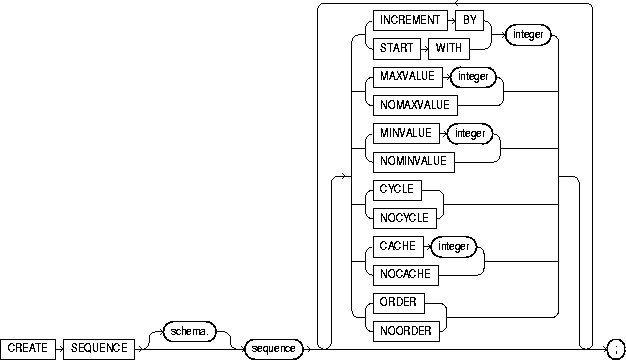
To create a sequence. A sequence is a database object from which multiple users may generate unique integers. You can use sequences to automatically generate primary key values.
When a sequence number is generated, the sequence is incremented, independent of the transaction committing or rolling back. If two users concurrently increment the same sequence, the sequence numbers each user acquires may have gaps because sequence numbers are being generated by the other user. One user can never acquire the sequence number generated by another user. Once a sequence value is generated by one user, that user can continue to access that value regardless of whether the sequence is incremented by another user.
Sequence numbers are generated independently of tables, so the same sequence can be used for one or for multiple tables. It is possible that individual sequence numbers will appear to be skipped, because they were generated and used in a transaction that ultimately rolled back. Additionally, a single user may not realize that other users are drawing from the same sequence.
Once a sequence is created, you can access its values in SQL statements with the CURRVAL pseudocolumn (which returns the current value of the sequence) or the NEXTVAL pseudocolumn (which increments the sequence and returns the new value). For more information on using the above pseudocolumns, see the section "Pseudocolumns".
For information on modifying or dropping a sequence, see "ALTER SEQUENCE" or "DROP SEQUENCE".
To create a sequence in your own schema, you must have CREATE SEQUENCE privilege.
To create a sequence in another user's schema, you must have CREATE ANY SEQUENCE privilege.
The following statement creates the sequence ESEQ:
CREATE SEQUENCE eseq
  INCREMENT BY 10;
The first reference to ESEQ.NEXTVAL returns 1. The second returns 11. Each subsequent reference will return a value 10 greater than the one previous.
In Oracle8i, "snapshots" are synonymous with "materialized views." Please see "CREATE MATERIALIZED VIEW / SNAPSHOT".
In Oracle8i, "snapshots" are synonymous with "materialized views." Please see "CREATE MATERIALIZED VIEW / SNAPSHOT".
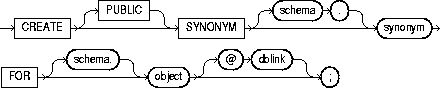
To create a synonym. A synonym is an alternative name for a table, view, sequence, procedure, stored function, package, materialized view, Java class schema object, or another synonym. For general information on synonyms, see Oracle8i Concepts.
Synonyms provide both data independence and location transparency. Synonyms permit applications to function without modification regardless of which user owns the table or view and regardless of which database holds the table or view.
Table 7-4 lists the SQL statements in which you can refer to synonyms.
| DML Statements | DDL Statements |
|
SELECT |
AUDIT |
|
INSERT |
NOAUDIT |
|
UPDATE |
GRANT |
|
DELETE |
REVOKE |
|
EXPLAIN PLAN |
COMMENT |
|
LOCK TABLE |
|
To create a private synonym in your own schema, you must have CREATE SYNONYM system privilege.
To create a private synonym in another user's schema, you must have CREATE ANY SYNONYM system privilege.
To create a PUBLIC synonym, you must have CREATE PUBLIC SYNONYM system privilege.
|
PUBLIC |
creates a public synonym. Public synonyms are accessible to all users. Oracle uses a public synonym only when resolving references to an object if the object is not prefaced by a schema and the object is not followed by a database link. |
|
|
If you omit this clause, the synonym is private and is accessible only within its schema. A private synonym name must be unique in its schema. |
|
schema |
is the schema to contain the synonym. If you omit schema, Oracle creates the synonym in your own schema. You cannot specify schema if you have specified PUBLIC. |
|
synonym |
is the name of the synonym to be created. |
|
FOR |
identifies the object for which the synonym is created. If you do not qualify object with schema, Oracle assumes that the schema object is in your own schema. The schema object can be of the following types:
The schema object need not currently exist and you need not have privileges to access the object. |
|
|
Restrictions: |
|
dblink |
You can use a complete or partial dblink to create a synonym for a schema object on a remote database where the object is located. For more information on referring to database links, see "Referring to Objects in Remote Databases". If you specify dblink and omit schema, the synonym refers to an object in the schema specified by the database link. Oracle Corporation recommends that you specify the schema containing the object in the remote database. For more information on database links, see "CREATE DATABASE LINK". |
|
|
If you omit dblink, Oracle assumes the object is located on the local database. Restriction: You cannot specify dblink for a Java class synonym. |
Oracle attempts to resolve references to objects at the schema level before resolving them at the PUBLIC synonym level. For example, assume the schemas SCOTT and BLAKE each contain tables named DEPT and the user SYSTEM creates a PUBLIC synonym named DEPT for BLAKE.DEPT. If the user SCOTT then issues the following statement, Oracle returns rows from SCOTT.DEPT:
SELECT * FROM dept;
To retrieve rows from BLAKE.DEPT, the user SCOTT must preface DEPT with the schema name:
SELECT * FROM blake.dept;
If the user ADAM's schema does not contain an object named DEPT, then ADAM can access the DEPT table in BLAKE's schema by using the public synonym DEPT:
SELECT * FROM dept;
To define the synonym MARKET for the table MARKET_RESEARCH in the schema SCOTT, issue the following statement:
CREATE SYNONYM market
   FOR scott.market_research;
To create a PUBLIC synonym for the EMP table in the schema SCOTT on the remote SALES database, you could issue the following statement:
CREATE PUBLIC SYNONYM emp
   FOR scott.emp@sales;
A synonym may have the same name as the base table, provided the base table is contained in another schema.
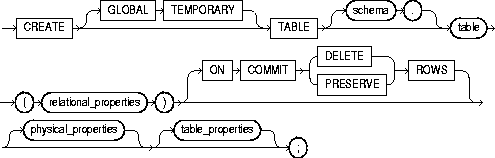
relational_table:
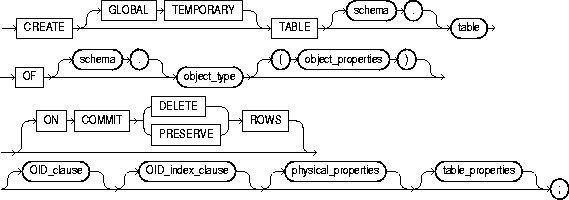
object_table:
relational_properties::=

object properties::=

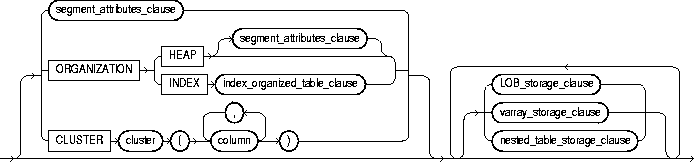
physical_properties::=
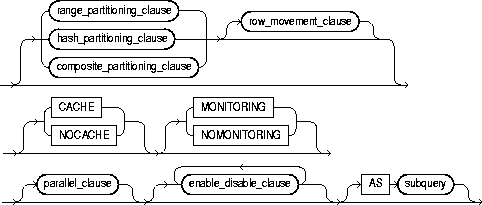
table_properties::=
subquery::= See "SELECT and Subqueries".
table_constraint, column_constraint, table_ref_constraint, column_ref_constraint, constraint_state: See the "constraint_clause"


storage_clause: See the "storage_clause".
index_organized_table_clause::=
index_organized_overflow_clause::=

LOB_parameters::=

nested_table_storage_clause::=

composite_partitioning_clause::=

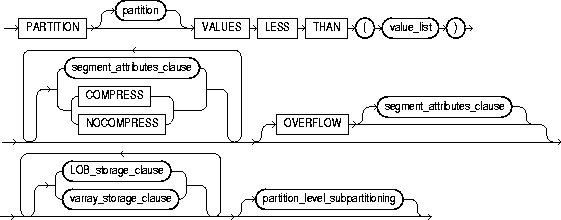
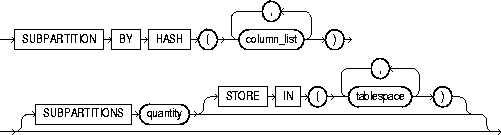
partition_level_subpartitioning::=
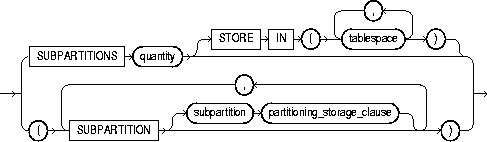
partitioning_storage_clause::=

To create a relational table, the basic structure to hold user data.
To create an object table or a table that uses an object type for a column definition. An object table is a table explicitly defined to hold object instances of a particular type.
You can also create an object type and then use it in a column when creating a relational table. For more information about creating objects, see Oracle8i Application Developer's Guide - Fundamentals and "CREATE TYPE".
Tables are created with no data unless a query is specified. You can add rows to a table with the INSERT statement. After creating a table, you can define additional columns, partitions, and integrity constraints with the ADD clause of the ALTER TABLE statement. You can change the definition of an existing column or partition with the MODIFY clause of the ALTER TABLE statement.
To create a relational table in your own schema, you must have CREATE TABLE system privilege. To create a table in another user's schema, you must have CREATE ANY TABLE system privilege. Also, the owner of the schema to contain the table must have either space quota on the tablespace to contain the table or UNLIMITED TABLESPACE system privilege.
In addition to the table privileges above, to create a table that uses types, the owner of the table must have the EXECUTE object privilege in order to access all types referenced by the table, or you must have the EXECUTE ANY TYPE system privilege. These privileges must be granted explicitly and not acquired through a role.
Additionally, if the table owner intends to grant access to the table to other users, the owner must have been granted the EXECUTE privileges to the referenced types with the GRANT OPTION, or have the EXECUTE ANY TYPE system privilege with the ADMIN OPTION. Without these privileges, the table owner has insufficient privileges to grant access on the table to other users.
To enable a UNIQUE or PRIMARY KEY constraint, you must have the privileges necessary to create an index on the table. You need these privileges because Oracle creates an index on the columns of the unique or primary key in the schema containing the table. See "CREATE INDEX".
For more information about the privileges required to create tables using types, see Oracle8i Application Developer's Guide - Fundamentals.
|
GLOBAL TEMPORARY |
specifies that the table is temporary and that its definition is visible to all sessions. The data in a temporary table is visible only to the session that inserts the data into the table. A temporary table has a definition that persists the same as the definitions of regular tables, but it contains either session-specific or transaction-specific data. You specify whether the data is session- or transaction-specific with the ON COMMIT keywords (below). For more information on temporary tables, please refer to Oracle8i Concepts. |
|
|
|
Restrictions: |
|
|
|
||
|
|
|
|
|
schema |
is the schema to contain the table. If you omit schema, Oracle creates the table in your own schema. |
|
|
table |
is the name of the table (or object table) to be created. A partitioned table cannot be a clustered table or an object table. |
|
|
OF object_type |
explicitly creates an object table of type object_type. The columns of an object table correspond to the top-level attributes of type object_type. Each row will contain an object instance, and each instance will be assigned a unique, system-generated object identifier (OID) when a row is inserted. If you omit schema, Oracle creates the object table in your own schema. For more information about creating objects, see "CREATE TYPE". |
|
|
|
Objects residing in an object table are referenceable. For more information about using REFs, see "User-Defined Type Categories", "User-Defined Functions", "Expressions", "CREATE TYPE", and Oracle8i Administrator's Guide. |
|
|
column |
specifies the name of a column of the table. If you also specify AS subquery, you can omit column and datatype unless you are creating an index-organized table (IOT). If you specify AS subquery when creating an IOT, you must specify column, and you must omit datatype. |
|
|
|
The absolute maximum number of columns in a table is 1000. However, when you create an object table (or a relational table with columns of object, nested table, varray, or REF type), Oracle maps the columns of the user-defined types to relational columns, creating in effect "hidden columns" that count toward the 1000-column limit. For details on how Oracle calculates the total number of columns in such a table, please refer to Oracle8i Administrator's Guide. |
|
|
attribute |
specifies the qualified column name of an item in an object. |
|
|
datatype |
is the datatype of a column. Oracle-supplied datatypes are defined in "Datatypes". Restrictions: |
|
|
|
You can omit datatype:
|
|
|
DEFAULT |
specifies a value to be assigned to the column if a subsequent INSERT statement omits a value for the column. The datatype of the expression must match the datatype of the column. The column must also be long enough to hold this expression. For the syntax of expr, see "Expressions". A DEFAULT expression cannot contain references to other columns, the pseudocolumns CURRVAL, NEXTVAL, LEVEL, and ROWNUM, or date constants that are not fully specified. |
|
|
column_ref_constraint |
These clauses let you further describe a column of type REF. The only difference between these clauses is that you specify table_ref from the table level, so you must identify the REF column or attribute you are defining. You specify column_ref after you have already identified the REF column or attribute. For syntax and description of these constraints, see the "constraint_clause". |
|
|
column_constraint |
defines an integrity constraint as part of the column definition. See the syntax description of column_constraint in the "constraint_clause". You can create UNIQUE, PRIMARY KEY, and REFERENCES constraints on scalar attributes of object type columns. You can also create NOT NULL constraints on object type columns, and CHECK constraints that reference object type columns or any attribute of an object type column. |
|
|
table_constraint |
defines an integrity constraint as part of the table definition. See the syntax description of table_constraint in the "constraint_clause". |
|
|
|
Note: You must specify a PRIMARY KEY constraint for an index-organized table. |
|
|
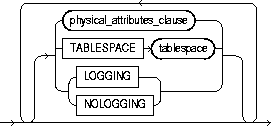
segment_attributes_clause: |
||
|
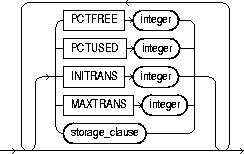
physical_attributes_clause |
specifies the value of the PCTFREE, PCTUSED, INITRANS, and MAXTRANS parameters and the storage characteristics of the table. |
|
|
|
|
|
|
PCTFREE |
specifies the percentage of space in each data block of the table, object table OID index, or partition reserved for future updates to the table's rows. The value of PCTFREE must be a value from 0 to 99. A value of 0 allows the entire block to be filled by inserts of new rows. The default value is 10. This value reserves 10% of each block for updates to existing rows and allows inserts of new rows to fill a maximum of 90% of each block. |
|
|
|
PCTFREE has the same function in the PARTITION description and in the statements that create and alter clusters, indexes, snapshots, and snapshot logs. The combination of PCTFREE and PCTUSED determines whether new rows will be inserted into existing data blocks or into new blocks. |
|
|
PCTUSED |
specifies the minimum percentage of used space that Oracle maintains for each data block of the table, object table OID index, or index-organized table overflow data segment. A block becomes a candidate for row insertion when its used space falls below PCTUSED. PCTUSED is specified as a positive integer from 1 to 99 and defaults to 40. |
|
|
|
PCTUSED has the same function in the PARTITION description and in the statements that create and alter clusters, snapshots, and snapshot logs. |
|
|
|
PCTUSED is not a valid table storage characteristic for an index-organized table (ORGANIZATION INDEX). |
|
|
|
The sum of PCTFREE and PCTUSED must be less than 100. You can use PCTFREE and PCTUSED together to utilize space within a table more efficiently. For information on the performance effects of different values PCTUSED and PCTFREE, see Oracle8i Tuning. |
|
|
INITRANS |
specifies the initial number of transaction entries allocated within each data block allocated to the table, object table OID index, partition, LOB index segment, or overflow data segment. This value can range from 1 to 255 and defaults to 1. In general, you should not change the INITRANS value from its default. |
|
|
|
Each transaction that updates a block requires a transaction entry in the block. The size of a transaction entry depends on your operating system. |
|
|
|
This parameter ensures that a minimum number of concurrent transactions can update the block and helps avoid the overhead of dynamically allocating a transaction entry. |
|
|
|
The INITRANS parameter serves the same purpose in the PARTITION description, clusters, indexes, snapshots, and snapshot logs as in tables. The minimum and default INITRANS value for a cluster or index is 2, rather than 1. |
|
|
MAXTRANS |
specifies the maximum number of concurrent transactions that can update a data block allocated to the table, object table OID index, partition, LOB index segment, or index-organized overflow data segment. This limit does not apply to queries. This value can range from 1 to 255 and the default is a function of the data block size. You should not change the MAXTRANS value from its default. |
|
|
|
If the number of concurrent transactions updating a block exceeds the INITRANS value, Oracle dynamically allocates transaction entries in the block until either the MAXTRANS value is exceeded or the block has no more free space. |
|
|
|
The MAXTRANS parameter serves the same purpose in the PARTITION description, clusters, snapshots, and snapshot logs as in tables. |
|
|
storage_clause |
specifies the storage characteristics for the table, object table OID index, partition, LOB storage, LOB index segment, or index-organized table overflow data segment. This clause has performance ramifications for large tables. Storage should be allocated to minimize dynamic allocation of additional space. See the "storage_clause". |
|
|
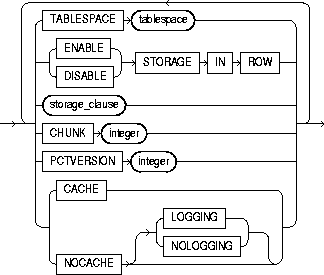
TABLESPACE |
specifies the tablespace in which Oracle creates the table, object table OID index, partition, LOB storage, LOB index segment, or index-organized table overflow data segment. If you omit TABLESPACE, then Oracle creates that item in the default tablespace of the owner of the schema containing the table. |
|
|
|
For heap-organized tables with one or more LOB columns, if you omit the TABLESPACE clause for LOB storage, Oracle creates the LOB data and index segments in the tablespace where the table is created. However, for an index-organized table with one or more LOB columns, if you omit TABLESPACE, the LOB data and index segments are created in the tablespace in which the primary key index segment of the index-organized table is created. |
|
|
|
For nonpartitioned tables, the value specified for TABLESPACE is the actual physical attribute of the segment associated with the table. For partitioned tables, the value specified for TABLESPACE is the default physical attribute of the segments associated with all partitions specified in the CREATE statement (and on subsequent ALTER TABLE ... ADD PARTITION statements), unless you specify TABLESPACE in the PARTITION description. |
|
|
|
For more information on tablespaces, see "CREATE TABLESPACE". |
|
|
LOGGING | NOLOGGING |
specifies whether the creation of the table (and any indexes required because of constraints), partition, or LOB storage characteristics will be logged in the redo log file.The logging attribute of the table is independent of that of its indexes. This attribute also specifies that subsequent Direct Loader (SQL*Loader) and direct-load INSERT operations against the table, partition, or LOB storage are logged (LOGGING) or not logged (NOLOGGING). |
|
|
|
If you omit LOGGING|NOLOGGING, the logging attribute of the table or table partition defaults to the logging attribute of the tablespace in which it resides. For LOBs, if you omit LOGGING|NOLOGGING,
For nonpartitioned tables, the value specified for LOGGING is the actual physical attribute of the segment associated with the table. For partitioned tables, the logging attribute value specified is the default physical attribute of the segments associated with all partitions specified in the CREATE statement (and in subsequent ALTER TABLE ... ADD PARTITION statements), unless you specify LOGGING|NOLOGGING in the PARTITION description. |
|
|
|
In NOLOGGING mode, data is modified with minimal logging (to mark new extents INVALID and to record dictionary changes). When applied during media recovery, the extent invalidation records mark a range of blocks as logically corrupt, because the redo data is not fully logged. Therefore, if you cannot afford to lose this table, you should take a backup after the NOLOGGING operation. |
|
|
|
The size of a redo log generated for an operation in NOLOGGING mode is significantly smaller than the log generated with the LOGGING attribute set. If the database is run in ARCHIVELOG mode, media recovery from a backup taken before the LOGGING operation restores the table. However, media recovery from a backup taken before the NOLOGGING operation does not restore the table. |
|
|
|
For more information about logging and parallel DML, see Oracle8i Concepts and Oracle8i Administrator's Guide. |
|
|
RECOVERABLE | UNRECOVERABLE |
These keywords are deprecated and have been replaced with LOGGING and NOLOGGING, respectively. Although RECOVERABLE and UNRECOVERABLE are supported for backward compatibility, Oracle Corporation strongly recommends that you use the LOGGING and NOLOGGING keywords. |
|
|
|
Restrictions: |
|
|
ORGANIZATION HEAP |
specifies that the data rows of table are stored in no particular order. This is the default. |
|
|
ORGANIZATION INDEX |
specifies that table is created as an index-organized table. In an index-organized table, the data rows are held in an index defined on the primary key for the table. |
|
|
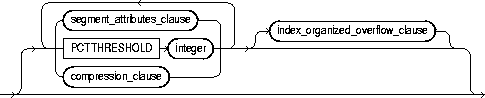
index_organized_table_clause |
specifies that Oracle should maintain the table rows (both primary key column values and non-key column values) in a B*-tree index built on the primary key. Index-organized tables are therefore best suited for primary key-based access and manipulation. An index-organized table is an alternative to |
|
|
|
Restrictions: |
|
|
|
Note: You must specify a primary key for an index-organized table, because the primary key uniquely identifies a row. Use the primary key instead of the rowid for directly accessing index-organized rows. |
|
|
PCTTHRESHOLD integer |
specifies the percentage of space reserved in the index block for an index-organized table row. Any portion of the row that exceeds the specified threshold is stored in the overflow segment. PCTTHRESHOLD must be a value from 1 to 50. Restriction: |
|
|
OVERFLOW |
specifies that index-organized table data rows exceeding the specified threshold are placed in the data segment listed in this clause. |
|
|
|
|
|
|
INCLUDING column_name |
specifies a column at which to divide an index-organized table row into index and overflow portions. All non-primary-key columns that follow column_name are stored in the overflow data segment. A column_name is either the name of the last primary-key column or any subsequent nonprimary-key column. Restriction: You cannot specify this clause for individual partitions of an index-organized table. |
|
|
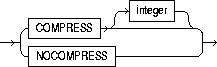
compression_clause |
enables or disables key compression. |
|
|
|
COMPRESS |
enables key compression, which eliminates repeated occurrence of primary key column values in index-organized tables. Use integer to specify the prefix length (number of prefix columns to compress). The valid range of prefix length values is from 1 to the number of primary key columns minus 1. The default prefix length is the number of primary key columns minus 1. Restriction: At the partition level, you can specify COMPRESS, but you cannot specify the prefix length with integer. |
|
|
NOCOMPRESS |
disables key compression in index-organized tables. This is the default. |
|
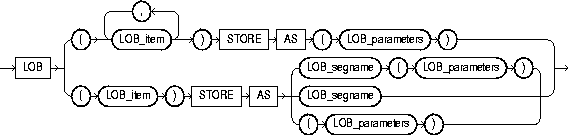
LOB_storage_clause |
specifies the storage attributes of LOB data segments. See also "LOB Column Example". |
|
|
|
||
|
|
|
|
|
|
|
|
|
|
|
|
|
|
Restrictions: |
|
|
|
For detailed information about LOBs, see Oracle8i Application Developer's Guide - Fundamentals. |
|
|
|
lob_item |
is the LOB column name or LOB object attribute for which you are explicitly defining tablespace and storage characteristics that are different from those of the table. Oracle automatically creates a system-managed index for each lob_item you create. Restriction: If table is partitioned, you cannot specify LOB storage for a LOB object attribute. |
|
STORE AS |
lob_segname |
specifies the name of the LOB data segment. You cannot use lob_segname if you specify more than one lob_item. |
|
lob_parameters |
ENABLE STORAGE IN ROW |
specifies that the LOB value is stored in the row (inline) if its length is less than approximately 4000 bytes minus system control information. This is the default. Restriction: For an index-organized table, you cannot specify this parameter unless you have specified an OVERFLOW segment in the index_organized_table_clause. |
|
|
DISABLE STORAGE IN ROW |
specifies that the LOB value is stored outside of the row regardless of the length of the LOB value. |
|
|
The LOB locator is always stored in the row regardless of where the LOB value is stored. You cannot change the value of STORAGE IN ROW once it is set. |
|
|
|
CHUNK integer |
specifies the number of bytes to be allocated for LOB manipulation. If integer is not a multiple of the database block size, Oracle rounds up (in bytes) to the next multiple. For example, if the database block size is 2048 and integer is 2050, Oracle allocates 4096 bytes (2 blocks). The maximum value is 32768 (32K), which is the largest Oracle block size allowed. The default CHUNK size is one Oracle database block. You cannot change the value of CHUNK once it is set. |
|
|
|
Note: The value of CHUNK must be less than or equal to the value of NEXT (either the default value or that specified in the storage_clause). If CHUNK exceeds the value of NEXT, Oracle returns an error. |
|
|
PCTVERSION integer |
is the maximum percentage of overall LOB storage space used for creating new versions of the LOB. The default value is 10, meaning that older versions of the LOB data are not overwritten until 10% of the overall LOB storage space is used. |
|
|
LOB_index_clause |
This clause is deprecated as of Oracle 8i. Oracle generates an index for each LOB column. The LOB indexes are system named and system managed. Although it is still possible for you to specify this clause, Oracle Corporation strongly recommends that you no longer do so. For information on how Oracle manages LOB indexes in tables migrated from earlier versions, see Oracle8i Migration. |
|
varray_storage_clause |
lets you specify separate storage characteristics for the LOB in which a varray will be stored. In addition, if you specify this clause, Oracle will always store the varray in a LOB, even if it is small enough to be stored inline. |
|
|
|
|
|
|
|
|
|
|
|
|
|
|
|
Restriction: You cannot specify the TABLESPACE parameter of lob_parameters as part of this clause. The LOB tablespace for a varray defaults to the containing table's tablespace. |
|
|
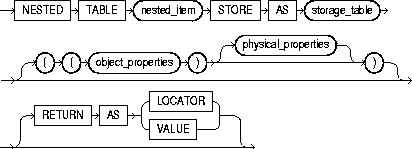
nested_table_storage_clause |
enables you to specify separate storage characteristics for a nested table, which in turn enables you to define the nested table as an index-organized table. The storage table is created in the same tablespace as its parent table (using the default storage characteristics) and stores the nested table values of the column for which it was created. You must include this clause when creating a table with columns or column attributes whose type is a nested table. (Clauses within this clause that function the same way they function for parent object tables are not repeated here.) |
|
|
|
Restrictions:
|
|
|
|
nested_item |
is the name of a column (or a top-level attribute of the table's object type) whose type is a nested table. |
|
|
storage_table |
is the name of the table where the rows of nested_item reside. The storage table is created in the same schema and the same tablespace as the parent table. |
|
|
|
You cannot query or perform DML statements on storage_table directly, but you can modify its storage characteristics by specifying its name in an ALTER TABLE statement. For information about modifying nested table column storage characteristics, see "ALTER TABLE". |
|
|
RETURN AS |
specifies what Oracle returns as the result of a query. |
|
|
|
Note: The locator is scoped to the session and cannot be used across sessions. Unlike a LOB locator, the collection locator cannot be used to modify the collection instance. |
|
|
||
|
|
If you do not specify the segment_attributes_clause or the LOB_storage_clause, the nested table is heap organized and is created with default storage characteristics. |
|
|
CLUSTER |
specifies that the table is to be part of cluster. The columns listed in this clause are the table columns that correspond to the cluster's columns. Generally, the cluster columns of a table are the column or columns that make up its primary key or a portion of its primary key. For more information, see "CREATE CLUSTER". |
|
|
|
Specify one column from the table for each column in the cluster key. The columns are matched by position, not by name. A clustered table uses the cluster's space allocation. Therefore, do not use the PCTFREE, PCTUSED, INITRANS, or MAXTRANS parameters, the TABLESPACE clause, or the storage_clause with the CLUSTER clause. |
|
|
|
Restriction: Object tables cannot be part of a cluster. |
|
|
ON COMMIT |
can be specified only if you are creating a temporary table. This clause specifies whether the data in the temporary table persists for the duration of a transaction or a session. |
|
|
|
DELETE ROWS |
specifies that the temporary table is transaction specific (this is the default). Oracle will truncate the table (delete all its rows) after each commit. |
|
|
PRESERVE ROWS |
specifies that the temporary table is session specific. Oracle will truncate the table (delete all its rows) when you terminate the session. |
|
OID_clause |
lets you specify whether the object identifier (OID) of the object table should be system generated or should be based on the primary key of the table. The default is SYSTEM GENERATED. Restrictions: |
|
|
|
Note: A primary key OID is locally (but not necessarily globally) unique. If you require a globally unique identifier, you must ensure that the primary key is globally unique. |
|
|
OID_index_clause |
This clause is relevant only if you have specified the OID_clause as SYSTEM GENERATED. It specifies an index, and optionally its storage characteristics, on the hidden object identifier column. |
|
|
|
index |
is the name of the index on the hidden system-generated object identifier column. If not specified, Oracle generates a name. |
|
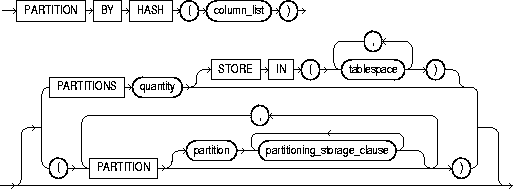
hash_partitioning_clause |
specifies that the table is to be partitioned using the hash method. Oracle assigns rows to partitions using a hash function on values found in columns designated as the partitioning key. For more information on hash partitioning, see Oracle8i Concepts. |
|
|
|
column_list |
is an ordered list of columns used to determine into which partition a row belongs (the partitioning key). |
|
|
|
Restrictions: |
|
|
You can specify hash partitioning in one of two ways:
|
|
|
|
Note: The only attribute you can specify for hash partitions (or subpartitions) is TABLESPACE. Hash partitions inherit all other attributes from table-level defaults. Hash subpartitions inherit any attributes specified at the partition level, and inherit all other attributes from the table-level defaults. Tablespace storage specified at the table level is overridden by tablespace storage specified at the partition level, which in turn is overridden by tablespace storage specified at the subpartition level. |
|
|
range_partitioning_clause |
PARTITION BY RANGE |
specifies that the table is partitioned on ranges of values from column_list. For an index-organized table, column_list must be a subset of the primary key columns of the table. |
|
|
column_list |
is an ordered list of columns used to determine into which partition a row belongs (the partitioning key). |
|
composite_partitioning_clause |
specifies that table is to be first range partitioned, and then the partitions further partitioned into hash subpartitions. This combination of range partitioning and hash subpartitioning is called composite partitioning. |
|
|
|
subpartition_clause |
specifies that Oracle should subpartition by hash each partition in table. The subpartitioning column_list is unrelated to the partitioning key. |
|
|
SUBPARTITIONS quantity |
specifies the default number of subpartitions in each partition of table, and optionally one or more tablespaces in which they are to be stored. The default value is 1. If you do not specify the subpartition_clause here, Oracle will create each partition with one hash subpartition unless you subsequently specify the partition_level_hash_subpartitioning clause. |
|
partition_definition |
PARTITION partition |
specifies the physical partition attributes. If partition is omitted, Oracle generates a name with the form SYS_Pn for the partition. The partition must conform to the rules for naming schema objects and their part as described in "Schema Object Naming Rules". |
|
|
Notes:
|
|
|
|
VALUES LESS THAN |
specifies the noninclusive upper bound for the current partition. |
|
|
value_list |
is an ordered list of literal values corresponding to column_list in the partition_by_range_clause. You can substitute the keyword MAXVALUE for any literal in value_list. MAXVALUE specifies a maximum value that will always sort higher than any other value, including NULL. Specifying a value other than MAXVALUE for the highest partition bound imposes an implicit integrity constraint on the table. See Oracle8i Concepts for more information about partition bounds. |
|
|
|
Note: If table is partitioned on a DATE column, and if the NLS date format does not specify the century with the year, you must use the TO_DATE function with a 4-character format mask for the year. The NLS date format is determined implicitly by NLS_TERRITORY or explicitly by NLS_DATE_FORMAT. For more information on these initialization parameters, see Oracle8i National Language Support Guide. See also "Partitioned Table Example". |
|
|
LOB_storage_clause |
lets you specify LOB storage characteristics for one or more LOB items in this partition. If you do not specify the LOB_storage_clause for a LOB item, Oracle generates a name for each LOB data partition. The system-generated names for LOB data and LOB index partitions take the form SYS_LOB_Pn and SYS_IL_Pn, respectively, where P stands for "partition" and n is a system-generated number. |
|
|
partition_level_subpartitioning |
lets you specify hash subpartitions for partition. This clause overrides the default settings established in the subpartition_clause. Restriction: You can specify this clause only for a composite-partitioned table. |
|
|
|
|
|
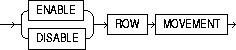
row_movement_clause |
determines whether a row can be moved to a different partition or subpartition because of a change to one or more of its key values during an update operation. Restriction: You can specify this clause only for a partitioned table. |
|
|
|
ENABLE |
allows Oracle to move a row to a different partition or subpartition as the result of an update to the partitioning or subpartitioning key. |
|
|
|
WARNING: Moving a row in the course of an UPDATE operation changes that row's ROWID. |
|
|
DISABLE |
returns an error if an update to a partitioning or subpartitioning key would result in a row moving to a different partition or subpartition. This is the default. |
|
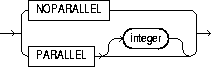
parallel_clause |
causes creation of the table to be parallelized, and sets the default degree of parallelism for queries and DML on the table after creation. |
|
|
|
NOPARALLEL |
specifies serial execution. This is the default. |
|
|
PARALLEL |
causes Oracle to select a degree of parallelism equal to the number of CPUs available on all participating instances times the value of the PARALLEL_THREADS_PER_CPU initialization parameter. |
|
|
PARALLEL integer |
specifies the degree of parallelism, which is the number of parallel threads used in the parallel operation. Each parallel thread may use one or two parallel execution servers. Normally Oracle calculates the optimum degree of parallelism, so it is not necessary for you to specify integer. |
|
|
Restriction: If table contains any columns of LOB or user-defined object type, this statement as well as subsequent INSERT, UPDATE, or DELETE operations on table are executed serially without notification. Subsequent queries, however, will be executed in parallel. |
|
|
|
Notes
|
|
|
|
For more information on parallelized operations, see Oracle8i Tuning, Oracle8i Concepts, and Oracle8i Parallel Server Concepts and Administration. |
|
|
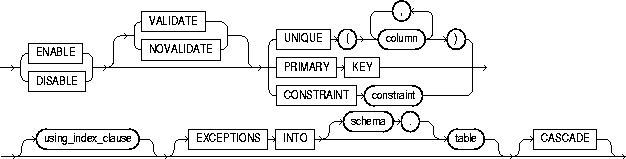
enable_disable_clause |
lets you specify whether Oracle should apply a constraint. By default, constraints are created in ENABLE VALIDATE state. For more information on constraints, see "constraint_clause". Restrictions: |
|
|
ENABLE |
specifies that the constraint will be applied to all new data in the table.
|
|
|
|
|
|
|
|
|
|
|
|
|
|
|
|
Restriction: You cannot enable a foreign key that references a unique or primary key that is disabled. |
|
|
DISABLE |
disables the integrity constraint. Disabled integrity constraints appear in the data dictionary along with enabled constraints. If you do not specify this clause when creating a constraint, Oracle automatically enables the constraint. |
|
|
|
|
|
|
|
|
|
|
|
|
|
|
|
||
|
UNIQUE |
enables or disables the unique constraint defined on the specified column or combination of columns. |
|
|
PRIMARY KEY |
enables or disables the table's primary key constraint. |
|
|
CONSTRAINT |
enables or disables the integrity constraint named constraint. |
|
|
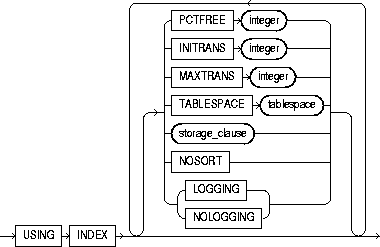
using_index_clause |
specifies parameters for the index Oracle creates to enforce a unique or primary key constraint. Oracle gives the index the same name as the constraint. You can choose the values of the INITRANS, MAXTRANS, TABLESPACE, STORAGE, and PCTFREE parameters for the index. These parameters are described earlier in this statement. For a description of NOSORT and of LOGGING|NOLOGGING in relation to indexes, see "CREATE INDEX". |
|
|
|
Restriction: Use these parameters only when enabling unique and primary key constraints. |
|
|
EXCEPTIONS INTO |
specifies a table into which Oracle places information about rows that violate the integrity constraint. The table must exist on your local database before you use this clause. If you omit schema, Oracle assumes the exception table is in your own schema. |
|
|
|
Note: You must create an appropriate exceptions report table to accept information from the EXCEPTIONS INTO clause of the enable_disable_clause before enabling the constraint. You can create an exception table by submitting the script UTLEXCPT1.SQL, which creates a table named EXCEPTIONS. You can create additional exceptions tables with different names by modifying and resubmitting the script. (You can use the UTLEXCPT1.SQL script with index-organized tables. You could not use earlier versions of the script for this purpose. See Oracle8i Migration for compatibility information.) For more information on identifying exceptions, see Oracle8i Application Developer's Guide - Fundamentals. |
|
|
CASCADE |
disables any integrity constraints that depend on the specified integrity constraint. To disable a primary or unique key that is part of a referential integrity constraint, you must specify this clause. Restriction: You can specify CASCADE only if you have specified DISABLE. |
|
|
CACHE |
for data that will be accessed frequently, specifies that the blocks retrieved for this table are placed at the most recently used end of the LRU list in the buffer cache when a full table scan is performed. This clause is useful for small lookup tables. |
|
|
|
As a parameter in the LOB_storage_clause, CACHE specifies that Oracle preallocates and retains LOB data values in memory for faster access. Restriction: You cannot specify CACHE for an index-organized table. |
|
|
NOCACHE |
for data that will not be accessed frequently, specifies that the blocks retrieved for this table are placed at the least recently used end of the LRU list in the buffer cache when a full table scan is performed. This is the default. For LOBs, the LOB value either is not brought into the buffer cache or is brought into the buffer cache and placed at the least recently used end of the LRU list. |
|
|
|
As a parameter in the LOB_storage_clause, NOCACHE specifies that LOB values are not preallocated in memory. Restriction: You cannot specify NOCACHE for an index-organized table. |
|
|
MONITORING |
specifies that modification statistics can be collected on this table. These statistics are estimates of the number of rows affected by DML statements over a particular period of time. They are available for use by the optimizer or for analysis by the user. Restriction: You cannot specify MONITORING for a temporary table. |
|
|
NOMONITORING |
specifies that the table will not have modification statistics collected. This is the default. Restriction: You cannot specify NOMONITORING for a temporary table. |
|
|
AS subquery |
inserts the rows returned by the subquery into the table upon its creation. See "SELECT and Subqueries". Restrictions:
|
|
|
|
If you specify the parallel_clause in this statement, Oracle will ignore any value you specify for the INITIAL storage parameter, and will instead use the value of the NEXT parameter. For information on these parameters, see the "storage_clause". |
|
|
|
Oracle derives datatypes and lengths from the subquery. Oracle also follows the following rules for integrity constraints: |
|
|
|
||
|
|
||
|
|
If all expressions in subquery are columns, rather than expressions, you can omit the columns from the table definition entirely. In this case, the names of the columns of table are the same as the columns in subquery. |
|
|
|
You can use subquery in combination with the TO_LOB function to convert the values in a LONG column in another table to LOB values in a column of the table you are creating. For a discussion of why and when to copy LONGs to LOBs, see Oracle8i Migration. For a description of how to use the TO_LOB function, see "Conversion Functions". |
|
|
|
Note: If subquery returns (in part or totally) the equivalent of an existing materialized view, Oracle may use the materialized view (for query rewrite) in place of one or more tables specified in subquery. For more information on materialized views and query rewrite, see Oracle8i Tuning. |
|
|
|
order_by_clause |
orders rows returned by the statements. For more information on the order_by_clause, refer to "SELECT and Subqueries". |
|
|
|
Note: When specified with CREATE TABLE, this clause does not necessarily order data cross the entire table. (For example, it does not order across partitions.) Specify this clause if you intend to create an index on the same key as the ORDER BY key column. Oracle will cluster data on the ORDER BY key so that it corresponds to the index key. |
|
|
For object tables, subquery can contain either one expression corresponding to the table type, or the number of top-level attributes of the table type. |
|
To define the EMP table owned by SCOTT, you could issue the following statement:
CREATE TABLE scott.emp
   (empno     NUMBER        CONSTRAINT pk_emp PRIMARY KEY,
    ename     VARCHAR2(10)  CONSTRAINT nn_ename NOT NULL
                            CONSTRAINT upper_ename
   CHECK (ename = UPPER(ename)),
       job        VARCHAR2(9),
       mgr        NUMBER       CONSTRAINT fk_mgr
                               REFERENCES scott.emp(empno),
       hiredate  DATE          DEFAULT SYSDATE,
       sal       NUMBER(10,2)  CONSTRAINT ck_sal
   CHECK (sal > 500),
          comm      NUMBER(9,0)   DEFAULT NULL,
          deptno    NUMBER(2)     CONSTRAINT nn_deptno NOT NULL
                                  CONSTRAINT fk_deptno
                                  REFERENCES scott.dept(deptno) )
   PCTFREE 5 PCTUSED 75;
This table contains eight columns. The EMPNO column is of datatype NUMBER and has an associated integrity constraint named PK_EMP. The HIRDEDATE column is of datatype DATE and has a default value of SYSDATE, and so on.
This table definition specifies a PCTFREE of 5 and a PCTUSED of 75, which is appropriate for a relatively static table. The definition also defines integrity constraints on some columns of the EMP table.
The following statement creates a temporary table FLIGHT_SCHEDULE for use in an automated airline reservation scheduling system. Each client has its own session and can store temporary schedules. The temporary schedules are deleted at the end of the session.
CREATE GLOBAL TEMPORARY TABLE flight_schedule (
   startdate DATE,
   enddate DATE,
   cost NUMBER)
   ON COMMIT PRESERVE ROWS;
To define the sample table SALGRADE in the HUMAN_RESOURCE tablespace with a small storage capacity and limited allocation potential, issue the following statement:
CREATE TABLE salgrade
   ( grade  NUMBER  CONSTRAINT pk_salgrade
                    PRIMARY KEY
                    USING INDEX TABLESPACE users_a,
     losal  NUMBER,
     hisal  NUMBER )
   TABLESPACE human_resource
   STORAGE (INITIAL     6144
         NEXT        6144
         MINEXTENTS     1
         MAXEXTENTS     5 );
The above statement also defines a primary key constraint on the GRADE column and specifies that the index Oracle creates to enforce this constraint is created in the USERS_A tablespace.
For more examples of defining integrity constraints, see the "constraint_clause".
The following statement creates a table using an optimum number of parallel execution servers to scan SCOTT.EMP and to populate EMP_DEPT:
CREATE TABLE emp_dept
   PARALLEL
   AS SELECT * FROM scott.emp
   WHERE deptno = 10;
Using parallelism speeds up the creation of the table because Oracle uses parallel execution servers to create the table. After the table is created, querying the table is also faster, because the same degree of parallelism is used to access the table.
The following statement creates a table serially. Subsequent DML and queries on the table will also be serially executed.
CREATE TABLE emp_dept
   AS SELECT * FROM scott.emp
   WHERE deptno = 10;
The following statement creates the DEPT table, defines a primary key constraint, and places it in ENABLE VALIDATE state:
CREATE TABLE dept
   (deptno  NUMBER (2) PRIMARY KEY,
    dname   VARCHAR2(10),
    loc     VARCHAR2(9) )
   TABLESPACE user_a;
The following statement creates the DEPT table and defines a disabled primary key constraint:
CREATE TABLE dept
   (deptno   NUMBER (2)   PRIMARY KEY DISABLE,
    dname    VARCHAR2(10),
    loc      VARCHAR2(9) );
The following example creates the ORDER_EXEPTIONS table to hold rows from an index-organized table ORDERS that violate integrity constraint CHECK_ORDERS:
CREATE TABLE orders
   (ord_num  NUMBER PRIMARY KEY,
    ord_quantity NUMBER)
   ORGANIZATION INDEX;

EXECUTE DBMS_IOT.BUILD_EXCEPTIONS_TABLE
   ('SCOTT', 'ORDERS', 'ORDER_EXCEPTIONS');

ALTER TABLE orders
   ADD CONSTRAINT CHECK_ORDERS CHECK (ord_quantity > 0)
   EXCEPTIONS INTO ORDER_EXCEPTIONS;
To specify an exception table, you must have the privileges necessary to insert rows into the table. For more information, see "INSERT". To examine the identified exceptions, you must have the privileges necessary to query the exceptions table. For information on these privileges, see "SELECT and Subqueries".
The following statement creates relational table EMPLOYEE with a nested table column PROJECTS:
CREATE TABLE employee
   (empno NUMBER, name CHAR(31), projects PROJ_TABLE_TYPE)
   NESTED TABLE projects STORE AS nested_proj_table(
      (PRIMARY KEY (nested_table_id, pno)) ORGANIZATION INDEX)
   RETURN AS LOCATOR;
The following statement creates table LOB_TAB with two LOB columns and specifies the LOB storage characteristics:
CREATE TABLE lob_tab (col1 BLOB, col2 CLOB)
   STORAGE (INITIAL 256 NEXT 256)
   LOB (col1, col2) STORE AS
      (TABLESPACE lob_seg_ts
       STORAGE (INITIAL 6144 NEXT 6144)
       CHUNK 4000
       NOCACHE LOGGING);
In the example, Oracle rounds the CHUNK up to 4096 (the nearest multiple of the block size of 2048).
The following statement creates an index-organized table:
CREATE TABLE docindex
  ( token                  CHAR(20),
    doc_oid                INTEGER,
    token_frequency        SMALLINT,
    token_occurrence_data  VARCHAR2(512),
       CONSTRAINT pk_docindex PRIMARY KEY (token, doc_oid) )
  ORGANIZATION INDEX TABLESPACE text_collection
  PCTTHRESHOLD 20 INCLUDING token_frequency
  OVERFLOW TABLESPACE text_collection_overflow;
The following statement creates a table with three partitions:
CREATE TABLE stock_xactions
      (stock_symbol CHAR(5),
       stock_series CHAR(1),
       num_shares NUMBER(10),
       price NUMBER(5,2),
       trade_date DATE)
   STORAGE (INITIAL 100K NEXT 50K) LOGGING
   PARTITION BY RANGE (trade_date)
     (PARTITION sx1992 VALUES LESS THAN (TO_DATE('01-JAN-1993','DD-MON-YYYY'))
        TABLESPACE ts0 NOLOGGING,
      PARTITION sx1993 VALUES LESS THAN (TO_DATE('01-JAN-1994','DD-MON-YYYY'))
        TABLESPACE ts1,
      PARTITION sx1994 VALUES LESS THAN (TO_DATE('01-JAN-1995','DD-MON-YYYY'))
        TABLESPACE ts2);
For information about partitioned table maintenance operations, see the Oracle8i Administrator's Guide.
This statement creates a partitioned table PT with two partitions P1 and P2, and three LOB columns, B, C, and D:
CREATE TABLE PT (A NUMBER, B BLOB, C CLOB, D CLOB)
   LOB (B,C,D) STORE AS (STORAGE (NEXT 20M))
   PARTITION BY RANGE (A)
   (PARTITION P1 VALUES LESS THAN (10) TABLESPACE TS1
      LOB (B,D) STORE AS (TABLESPACE TSA STORAGE (INITIAL 20M)),
   PARTITION P2 VALUES LESS THAN (20)
      LOB (B,C) STORE AS (TABLESPACE TSB)
   TABLESPACE TSX;
Partition P1 will be in tablespace TS1. The LOB data partitions for B and D will be in tablespace TSA. The LOB data partition for C will be in tablespace TS1. The storage attribute INITIAL is specified for LOB columns B and D; other attributes will be inherited from the default table-level specification. The default LOB storage attributes not specified at the table level will be inherited from the tablespace TSA for columns B and D and tablespace TS1 for column C. LOB index partitions will be in the same tablespaces as the corresponding LOB data partitions. Other storage attributes will be based on values of the corresponding attributes of the LOB data partitions and default attributes of the tablespace where the index partitions reside.
Partition P2 will be in the default tablespace TSX. The LOB data for B and C will be in tablespace TSB. The LOB data for D will be in tablespace TSX. The LOB index for columns B and C will be in tablespace TSB. The LOB index for column D will be in tablespace TSX.
This statement creates a table partitioned by hash on columns containing data about chemicals. The hash partitions are stored in tablespaces TBS1, TBS2, TBS3, and TBS4:
CREATE TABLE exp_data (
      d DATE, temperature NUMBER, Fe2O3_concentration NUMBER,
      HCl_concentration NUMBER, Au_concentration NUMBER,
      amps NUMBER, observation VARCHAR(4000))
   PARTITION BY HASH (HCl_concentration, Au_concentration)
   PARTITIONS 32 STORE IN (tbs1, tbs2, tbs3, tbs4);
This statement creates a composite-partitioned table. The range partitioning facilitates data and partition pruning by sale date. The hash subpartitioning enables subpartition elimination for queries by a specific item number. Most of the partitions consist of 8 subpartitions. However, the partition covering the slowest quarter will have 4 subpartitions, and the partition covering the busiest quarter will have 16 subpartitions.
CREATE TABLE sales (item INTEGER, qty INTEGER,
                    store VARCHAR(30),
                    dept NUMBER, sale_date DATE)
   PARTITION BY RANGE (sale_date)
   SUBPARTITION BY HASH(item)
   SUBPARTITIONS 8
   STORE IN (tbs1, tbs2, tbs3, tbs4, tbs5, tbs6, tbs7, tbs8)
   (PARTITION q1_1997
      VALUES LESS THAN (TO_DATE('01-apr-1997', 'dd-mon-yyyy')),
    PARTITION q2_1997
      VALUES LESS THAN (TO_DATE('01-jul-1997', 'dd-mon-yyyy')),
    PARTITION q3_1997
      VALUES LESS THAN (TO_DATE('01-oct-1997', 'dd-mon-yyyy'))
      (SUBPARTITION q3_1997_s1 TABLESPACE ts1,
       SUBPARTITION q3_1997_s2 TABLESPACE ts3,
       SUBPARTITION q3_1997_s3 TABLESPACE ts5,
       SUBPARTITION q3_1997_s4 TABLESPACE ts7),
    PARTITION q4_1997
      VALUES LESS THAN (TO_DATE('01-jan-1998', 'dd-mon-yyyy'))
      SUBPARTITIONS 16
      STORE IN (tbs1, tbs3, tbs5, tbs7, tbs8, tbs9, tbs10,
                tbs11),
    PARTITION q1_1998
      VALUES LESS THAN (TO_DATE('01-apr-1998', 'dd-mon-yyyy')));
Consider object type DEPT_T:
CREATE TYPE dept_t AS OBJECT
   ( dname VARCHAR2(100),
     address VARCHAR2(200) );
Object table DEPT holds department objects of type DEPT_T:
CREATE TABLE dept OF dept_t;
The following statement creates object table SALESREPS with a user-defined object type, SALESREP_T:
CREATE OR REPLACE TYPE salesrep_t AS OBJECT
  ( repId NUMBER,
    repName VARCHAR2(64));
CREATE TABLE salesreps OF salesrep_t;
The following statement creates relational table EMPLOYEE with a nested table column PROJECTS:
CREATE TABLE employee (empno NUMBER, name CHAR(31),
   projects PROJ_TABLE_TYPE)
   NESTED TABLE projects STORE AS nested_proj_table;
The following example creates object type DEPT_T and object table DEPT to store instances of all departments. A table with a scoped REF is then created.
CREATE TYPE dept_t AS OBJECT
   ( dname   VARCHAR2(100),
     address VARCHAR2(200) );

CREATE TABLE dept OF dept_t;

CREATE TABLE emp
   ( ename   VARCHAR2(100),
     enumber NUMBER,
     edept   REF dept_t SCOPE IS dept );
The following statement creates a table with a REF column which has a referential constraint defined on it:
CREATE TABLE emp
   ( ename   VARCHAR2(100),
     enumber NUMBER,
     edept   REF dept_t REFERENCES dept);
This example creates an object type and a corresponding object table whose OID is primary key based:
CREATE TYPE emp_t AS OBJECT (empno NUMBER, address CHAR(30));
CREATE TABLE emp OF emp_t (empno PRIMARY KEY)
   OBJECT IDENTIFIER IS PRIMARY KEY;
You can subsequently reference the EMP object table in either of the following two ways:
CREATE TABLE dept (dno NUMBER
                   mgr_ref REF emp_t SCOPE IS emp);
CREATE TABLE dept (
    dno NUMBER,
    mgr_ref REF emp_t CONSTRAINT mgr_in_emp REFERENCES emp);
CREATE TYPE address AS OBJECT
  ( hno NUMBER,
    street VARCHAR2(40),
    city VARCHAR2(20),
    zip VARCHAR2(5),
    phone VARCHAR2(10) );

CREATE TYPE person AS OBJECT
  ( name VARCHAR2(40),
    dateofbirth DATE,
    homeaddress address,
    manager REF person );

CREATE TABLE persons OF person
  ( homeaddress NOT NULL
      UNIQUE (homeaddress.phone),
      CHECK (homeaddress.zip IS NOT NULL),
      CHECK (homeaddress.city <> 'San Francisco') );
The following statement creates a table using 10 parallel execution servers, 5 to scan SCOTT.EMP and another 5 to populate EMP_DEPT:
CREATE TABLE emp_dept
   PARALLEL (5)
   AS SELECT * FROM scott.emp
   WHERE deptno = 10;
filespec: See "filespec".
storage_clause: See "storage_clause".
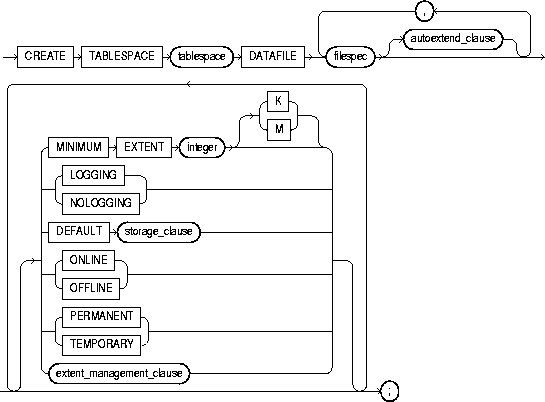
To create a tablespace. A tablespace is an allocation of space in the database that can contain schema objects. For information on tablespaces, see Oracle8i Concepts.
When you create a tablespace, it is initially a read-write tablespace. You can subsequently use the ALTER TABLESPACE statement to take the tablespace offline or online, add datafiles to it, or make it a read-only tablespace. See "ALTER TABLESPACE".
You can also drop a tablespace from the database with the DROP TABLESPACE statement. See "DROP TABLESPACE".
You must have CREATE TABLESPACE system privilege. Also, the SYSTEM tablespace must contain at least two rollback segments including the SYSTEM rollback segment.
Before you can create a tablespace you must create a database to contain it. See "CREATE DATABASE".
|
tablespace |
is the name of the tablespace to be created. |
|
|
DATAFILE filespec |
specifies the datafile or files to make up the tablespace. See "filespec". |
|
|
|
Note: For operating systems that support raw devices, the filespec REUSE keyword has no meaning when specifying a raw device as a datafile. Such a CREATE TABLESPACE statement will succeed whether or not you specify REUSE. |
|
|
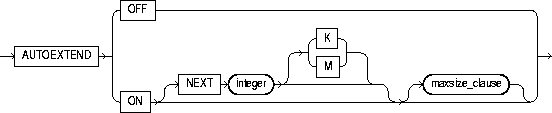
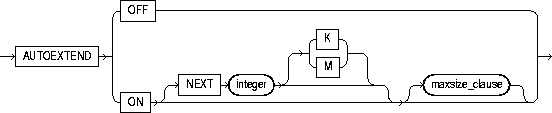
autoextend_clause |
enables or disables the automatic extension of the datafile. |
|
|
|
OFF |
disables autoextend if it is turned on. NEXT and MAXSIZE are set to zero. Values for NEXT and MAXSIZE must be respecified in further ALTER TABLESPACE AUTOEXTEND statements. |
|
|
ON |
enables autoextend. |
|
|
NEXT |
specifies the disk space to allocate to the datafile when more extents are required. |
|
|
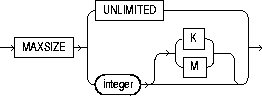
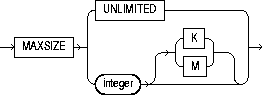
maxsize_clause |
specifies the maximum disk space allowed for allocation to the datafile. |
|
|
UNLIMITED |
sets no limit on allocating disk space to the datafile. |
|
MINIMUM EXTENT integer |
controls free space fragmentation in the tablespace by ensuring that every used or free extent size in a tablespace is at least as large as, and is a multiple of, integer. For more information about using MINIMUM EXTENT to control fragmentation, see Oracle8i Concepts. |
|
|
|
Note: This clause is not relevant for a dictionary-managed temporary tablespace. |
|
|
LOGGING| NOLOGGING |
specifies the default logging attributes of all tables, indexes, and partitions within the tablespace. LOGGING is the default. |
|
|
|
The tablespace-level logging attribute can be overridden by logging specifications at the table, index, and partition levels. Only the following operations support the NOLOGGING mode: DML: direct-load INSERT (serial or parallel), Direct Loader (SQL*Loader) DDL: CREATE TABLE ... AS SELECT, CREATE INDEX, ALTER INDEX ... REBUILD, ALTER INDEX ... REBUILD PARTITION, ALTER INDEX ... SPLIT PARTITION, ALTER TABLE ... SPLIT PARTITION, and ALTER TABLE ... MOVE PARTITION |
|
|
|
In NOLOGGING mode, data is modified with minimal logging (to mark new extents INVALID and to record dictionary changes). When applied during media recovery, the extent invalidation records mark a range of blocks as logically corrupt, because the redo data is not logged. Therefore, if you cannot afford to lose the object, you should take a backup after the NOLOGGING operation. |
|
|
DEFAULT storage_clause |
specifies the default storage parameters for all objects created in the tablespace. For a dictionary-managed temporary tablespace, Oracle considers only the NEXT parameter of the storage_clause. For information on storage parameters, see the "storage_clause". |
|
|
ONLINE |
makes the tablespace available immediately after creation to users who have been granted access to the tablespace. This is the default. |
|
|
OFFLINE |
makes the tablespace unavailable immediately after creation. |
|
|
|
The data dictionary view DBA_TABLESPACES indicates whether each tablespace is online or offline. |
|
|
PERMANENT |
specifies that the tablespace will be used to hold permanent objects. This is the default. |
|
|
TEMPORARY |
specifies that the tablespace will be used only to hold temporary objects, for example, segments used by implicit sorts to handle ORDER BY clauses. |
|
|
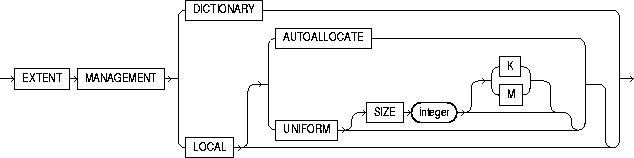
extent_management_clause |
specifies how the extents of the tablespace will be managed. |
|
|
|
DICTIONARY |
specifies that the tablespace is managed using dictionary tables. This is the default |
|
|
LOCAL |
specifies that tablespace is locally managed. Locally managed tablespaces have some part of the tablespace set aside for a bitmap. For a discussion of locally managed tablespaces, see Oracle8i Concepts. |
|
|
|
If you do not specify either AUTOALLOCATE or UNIFORM, then AUTOALLOCATE is the default. Restriction: If you specify LOCAL, you cannot specify DEFAULT storage_clause, MINIMUM EXTENT, or TEMPORARY. |
This statement creates a tablespace named TABSPACE_2 with one datafile:
CREATE TABLESPACE tabspace_2
   DATAFILE 'diska:tabspace_file2.dat' SIZE 20M
   DEFAULT STORAGE (INITIAL 10K NEXT 50K
                    MINEXTENTS 1 MAXEXTENTS 999)
   ONLINE;
This statement creates a tablespace named TABSPACE_3 with one datafile. When more space is required, 50 kilobyte extents will be added up to a maximum size of 10 megabytes:
CREATE TABLESPACE tabspace_5
   DATAFILE 'diskb:tabspace_file3.dat' SIZE 500K REUSE
   AUTOEXTEND ON NEXT 500K MAXSIZE 10M;
This statement creates tablespace TABSPACE_5 with one datafile and allocates every extent as a multiple of 64K:
CREATE TABLESPACE tabspace_3
   DATAFILE 'tabspace_file5.dbf' SIZE 2M
   MINIMUM EXTENT 64K
   DEFAULT STORAGE (INITIAL 128K NEXT 128K)
   LOGGING;
In the following statement, we assume that the database block size is 2K.
CREATE TABLESPACE tbs_1 DATAFILE 'file_1.f' SIZE 10M
   EXTENT MANAGEMENT LOCAL UNIFORM SIZE 128K;
This statement creates a locally managed tablespace in which every extent is 128K and each bit in the bit map describes 64 blocks.
filespec: See "filespec".
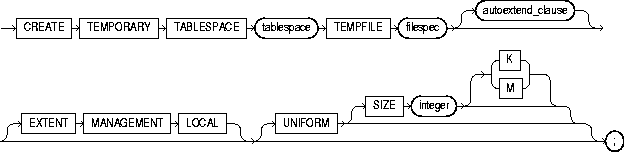
To create a temporary tablespace, which is an allocation of space in the database that can contain schema objects for the duration of a session.
You must have the CREATE TABLESPACE system privilege.
|
tablespace |
is the name of the temporary tablespace. |
|
|
TEMPFILE filespec |
specifies the tempfiles that make up the tablespace. See "filespec". |
|
|
|
Note: Media recovery does not recognize tempfiles. |
|
|
autoextend_clause |
enables or disables the automatic extension of the tempfile. |
|
|
|
OFF |
disables autoextend if it is turned on. NEXT and MAXSIZE are set to zero. Values for NEXT and MAXSIZE must be respecified in further ALTER TABLESPACE AUTOEXTEND statements. |
|
|
ON |
enables autoextend. |
|
|
NEXT |
specifies the disk space to allocate to the tempfile when more extents are required. |
|
|
maxsize_clause |
specifies the maximum disk space allowed for allocation to the tempfile. |
|
|
integer |
specifies in bytes the maximum disk space allowed for allocation to the tempfile. Use K or M to specify this space in kilobytes or megabytes. |
|
|
UNLIMITED |
sets no limit on allocating disk space to the tempfile. |
|
EXTENT MANAGEMENT LOCAL |
specifies that the tablespace is locally managed, meaning that some part of the tablespace is set aside for a bitmap. For a discussion of locally managed tablespaces, see Oracle8i Concepts. |
|
|
|
UNIFORM |
determines the size of the extents of the temporary tablespace in bytes. All extents of temporary tablespaces are the same size (uniform). If you do not specify this clause, Oracle uses uniform extents of 1M. |
|
|
SIZE |
specifies in bytes the size of the tablespace extents. Use K or M to specify the size in kilobytes or megabytes. If you do not specify SIZE, Oracle uses the default extent size of 1 M. |
This statement creates a temporary tablespace in which each extent is 16 M.
CREATE TEMPORARY TABLESPACE tbs_1 TEMPFILE 'file_1.f'
   EXTENT MANAGEMENT LOCAL UNIFORM SIZE 16M;
Click the "Next" button to see the next statement in this chapter.
