Release 8.1.5
A67779-01
 Library |
 Product |
 Contents |
 Index |
| Oracle8i SQL Reference Release 8.1.5 A67779-01 |
|


storage_clause: See "storage_clause".
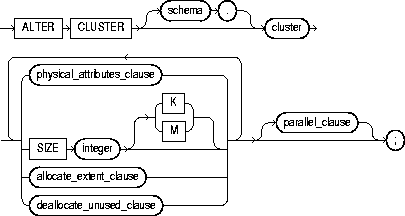
To redefine storage and parallelism characteristics of a cluster.
For information on creating a cluster, see "CREATE CLUSTER".
To remove tables from a cluster, see "DROP CLUSTER" and "DROP TABLE".
The cluster must be in your own schema or you must have ALTER ANY CLUSTER system privilege.
|
schema |
is the schema containing the cluster. If you omit schema, Oracle assumes the cluster is in your own schema. |
|
|
cluster |
is the name of the cluster to be altered. |
|
|
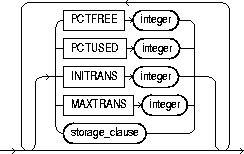
physical_attributes_clause |
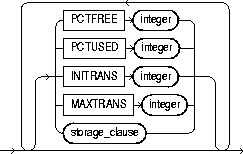
changes the values of the PCTUSED, PCTFREE, INITRANS, and MAXTRANS parameters of the cluster. For a description of these parameters, see "CREATE CLUSTER". |
|
|
|
storage_clause |
changes the storage characteristics for the cluster. See the "storage_clause". Restriction: You cannot change the values of the storage parameters INITIAL and MINEXTENTS for a cluster. |
|
SIZE integer |
determines how many cluster keys will be stored in data blocks allocated to the cluster. For a description of the SIZE parameter, see "CREATE CLUSTER". Restriction: You can change the SIZE parameter only for an indexed cluster, not for a hash cluster. |
|
|
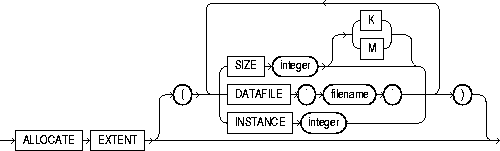
allocate_extent_clause |
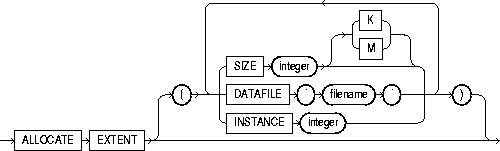
explicitly allocates a new extent for the cluster. Restriction: You can allocate a new extent only for an indexed cluster, not for a hash cluster. |
|
|
|
SIZE |
specifies the size of the extent in bytes. Use K or M to specify the extent size in kilobytes or megabytes. When you explicitly allocate an extent with this clause, Oracle does not evaluate the cluster's storage parameters and determine a new size for the next extent to be allocated (as it does when you create a table). Therefore, specify SIZE if you do not want Oracle to use a default value. |
|
|
DATAFILE |
specifies one of the datafiles in the cluster's tablespace to contain the new extent. If you omit this parameter, Oracle chooses the datafile. |
|
|
INSTANCE |
makes the new extent available to the specified instance. An instance is identified by the value of its initialization parameter INSTANCE_NUMBER. If you omit INSTANCE, the extent is available to all instances. Use this parameter only if you are using Oracle with the Parallel Server option in parallel mode. |
|
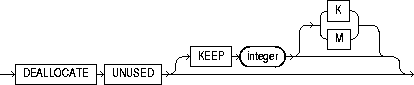
deallocate_unused_clause |
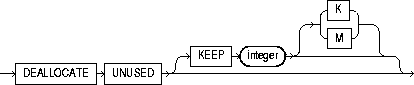
explicitly deallocates unused space at the end of the cluster and makes the freed space available for other segments. Only unused space above the high water mark can be freed. |
|
|
|
KEEP |
specifies the number of bytes above the high water mark that the cluster will have after deallocation. If the number of remaining extents is less than MINEXTENTS, then MINEXTENTS is set to the current number of extents. If the initial extent becomes smaller than INITIAL, then INITIAL is set to the value of the current initial extent. If you omit KEEP, all unused space is freed. |
|
|
For a more complete description of this clause, see "ALTER TABLE". |
|
|
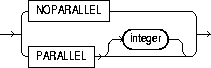
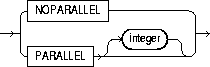
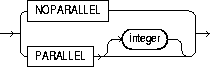
parallel_clause |
changes the default degree of parallelism for queries and DML on the cluster. For more detailed information, see the Notes to the parallel_clause of "CREATE TABLE". |
|
|
|
NOPARALLEL |
specifies serial execution. This is the default. |
|
|
PARALLEL |
causes Oracle to select a degree of parallelism equal to the number of CPUs available on all participating instances times the value of the PARALLEL_THREADS_PER_CPU initialization parameter. |
|
|
PARALLEL integer |
specifies the degree of parallelism, which is the number of parallel threads used in the parallel operation. Each parallel thread may use one or two parallel execution processes. Normally Oracle calculates the optimum degree of parallelism, so it is not necessary for you to specify integer. |
|
|
Restriction: If the tables in cluster contain any columns of LOB or user-defined object type, this statement as well as subsequent INSERT, UPDATE, or DELETE operations on cluster are executed serially without notification. |
|
The following statement alters the CUSTOMER cluster in the schema SCOTT:
ALTER CLUSTER scott.customer
    SIZE 512
    STORAGE (MAXEXTENTS 25);
Oracle allocates 512 bytes for each cluster key value. Assuming a data block size of 2 kilobytes, future data blocks within this cluster contain 4 cluster keys per data block, or 2 kilobytes divided by 512 bytes. The cluster can have a maximum of 25 extents.
The following statement deallocates unused space from the CUSTOMER cluster, keeping 30 kilobytes of unused space for future use:
ALTER CLUSTER scott.customer
    DEALLOCATE UNUSED KEEP 30 K;
recover_clauses::=


filespec: See "filespec".
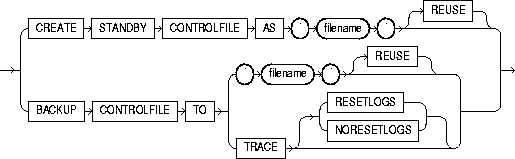
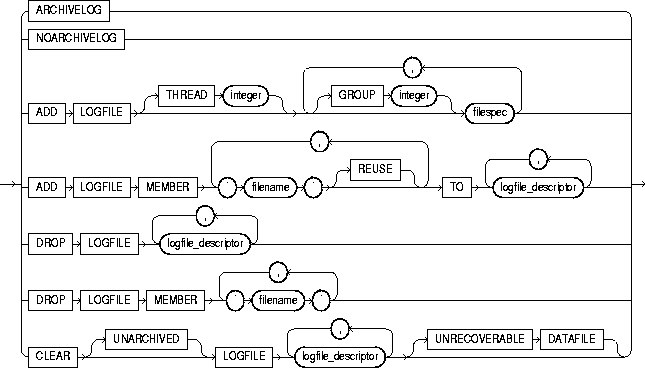
logfile_descriptor::=
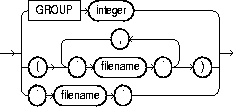
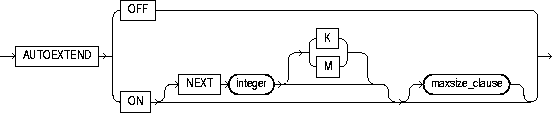
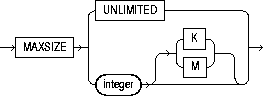
maxsize_clause::=
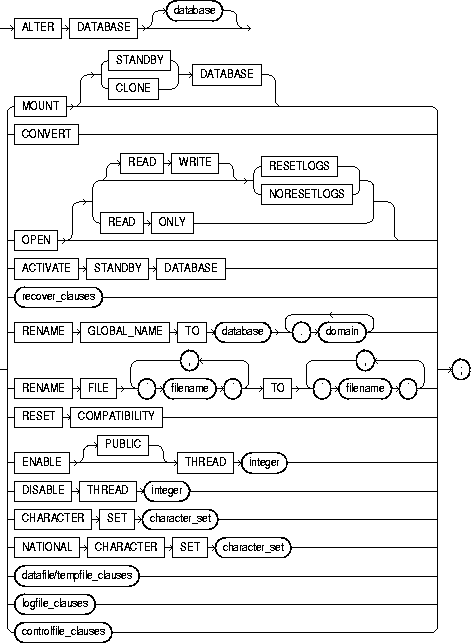
To modify, maintain, or recover an existing database.
For more information on using the ALTER DATABASE statement for database maintenance, see the Oracle8i Administrator's Guide.
For examples of performing media recovery, see Oracle8i Administrator's Guide and Oracle8i Backup and Recovery Guide.
For information on creating a database, see "CREATE DATABASE".
You must have ALTER DATABASE system privilege.
To specify the RECOVER clause, you must also have the OSDBA role enabled.
|
database |
identifies the database to be altered. The database name can contain only ASCII characters. If you omit database, Oracle alters the database identified by the value of the initialization parameter DB_NAME. You can alter only the database whose control files are specified by the initialization parameter CONTROL_FILES. The database identifier is not related to the Net8 database specification. |
|
|
You can use the following clauses only when the database is not mounted by your instance: |
||
|
MOUNT |
mounts the database. |
|
|
|
STANDBY DATABASE |
mounts the standby database. For more information, see the Oracle8i Backup and Recovery Guide. |
|
|
CLONE DATABASE |
mounts the clone database. For more information, see the Oracle8i Backup and Recovery Guide. |
|
CONVERT |
completes the conversion of the Oracle7 data dictionary. After you use this clause, the Oracle7 data dictionary no longer exists in the Oracle database. Use this clause only when you are migrating to Oracle8i. For more information, see Oracle8i Migration. |
|
|
ACTIVATE STANDBY DATABASE |
changes the state of a standby database to an active database. For more information, see Oracle8i Backup and Recovery Guide. |
|
|
OPEN |
opens the database, making it available for normal use. You must mount the database before you can open it. You must activate a standby database before you can open it. |
|
|
|
READ ONLY |
restricts users to read-only transactions, preventing them from generating redo logs. You can use this clause to make a standby database available for queries even while archive logs are being copied from the primary database site. |
|
|
|
Restrictions:
|
|
|
READ WRITE |
opens the database in read-write mode, allowing users to generate redo logs. This is the default. |
|
|
RESETLOGS |
resets the current log sequence number to 1 and discards any redo information that was not applied during recovery, ensuring that it will never be applied. This effectively discards all changes that are in the redo log, but not in the database. You must use this clause to open the database after performing media recovery with an incomplete recovery using the RECOVER clause or with a backup control file. After opening the database with this clause, you should perform a complete database backup. |
|
|
NORESETLOGS |
leaves the log sequence number and redo log files in their current state. |
|
|
Restriction: You can specify RESETLOGS and NORESETLOGS only after performing incomplete media recovery or complete media recovery with a backup control file. In any other case, Oracle uses the NORESETLOGS automatically. |
|
|
You can use any of the following clauses when your instance has the database mounted, open or closed, and the files involved are not in use: |
||
|
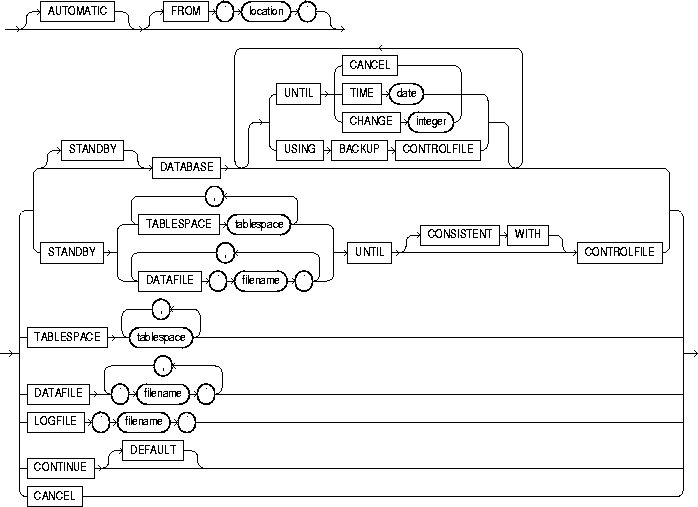
general_recovery_clause |
lets you design media recovery for the database or standby database, or for specified tablespaces or files. For more information on media recovery, see Oracle8i Backup and Recovery Guide. |
|
|
|
Note: If you do not have special media requirements, Oracle Corporation recommends that you use the SQL*Plus RECOVER statement. For more information, see SQL*Plus User's Guide and Reference. |
|
|
|
Restrictions:
|
|
|
AUTOMATIC |
automatically generates the name of the next archived redo log file needed to continue the recovery operation. Oracle uses the LOG_ARCHIVE_DEST (or LOG_ARCHIVE_DEST_1) and LOG_ARCHIVE_FORMAT parameters (or their defaults) to generate the target redo log filename. If the file is found, the redo contained in that file is applied. If the file is not found, Oracle prompts you for a filename, displaying the generated filename as a suggestion. |
|
|
|
If you specify neither AUTOMATIC nor LOGFILE, Oracle prompts you for a filename, displaying the generated filename as a suggestion. You can then accept the generated filename or replace it with a fully qualified filename. If you know the archived filename differs from what Oracle would generate, you can save time by using the LOGFILE clause. |
|
|
FROM 'location' |
specifies the location from which the archived redo log file group is read. The value of location must be a fully specified file location following the conventions of your operating system. If you omit this parameter, Oracle assumes the archived redo log file group is in the location specified by the initialization parameter LOG_ARCHIVE_DEST or LOG_ARCHIVE_DEST_1. |
|
|
STANDBY DATABASE |
recovers the standby database using the control file and archived redo log files copied from the primary database. The standby database must be mounted but not open. |
|
|
DATABASE |
recovers the entire database. This is the default. You can use this clause only when the database is closed. |
|
|
|
Note: This clause recovers only online datafiles. |
|
|
|
UNTIL |
specifies the duration of the recovery operation. |
|
|
|
|
|
|
|
|
|
|
|
|
|
|
USING BACKUP CONTROLFILE |
specifies that a backup control file is being used instead of the current control file. |
|
TABLESPACE |
recovers only the specified tablespaces. You can use this clause if the database is open or closed, provided the tablespaces to be recovered are offline. |
|
|
DATAFILE |
recovers the specified datafiles. You can use this clause when the database is open or closed, provided the datafiles to be recovered are offline. |
|
|
STANDBY TABLESPACE | DATAFILE |
reconstructs a lost or damaged datafile or tablespace in the standby database using archived redo log files copied from the primary database and a control file. |
|
|
|
UNTIL [CONSISTENT WITH] CONTROLFILE |
specifies that the recovery of an old standby datafile or tablespace uses the current standby database control file. However, any redo in advance of the standby controlfile will not be applied. The keywords CONSISTENT WITH are optional and are provided for semantic clarity. |
|
LOGFILE |
continues media recovery by applying the specified redo log file. |
|
|
CONTINUE |
continues multi-instance recovery after it has been interrupted to disable a thread. |
|
|
CONTINUE DEFAULT |
continues recovery using the redo log file that Oracle would automatically generate if no other logfile were specified. This clause is equivalent to specifying AUTOMATIC, except that Oracle does not prompt for a filename. |
|
|
CANCEL |
terminates cancel-based recovery. |
|
|
managed_recovery_clause |
specifies sustained standby recovery mode. This mode assumes that the standby database is an active component of an overall standby database architecture. A primary database actively archives its redo log files to the standby site. As these archived redo logs arrive at the standby site, they become available for use by a managed standby recovery operation. Sustained standby recovery is restricted to media recovery. For more information on the parameters of this clause, see Oracle8i Backup and Recovery Guide. Restrictions: The same restrictions apply as are listed under general_recovery_clause. |
|
|
TIMEOUT integer |
specifies in minutes the wait period of the sustained recovery operation. The recovery process waits for integer minutes for a requested archived log redo to be available for writing to the standby database. If the redo log file does not become available within that time, the recovery process terminates with an error message. You can then issue the statement again to return to sustained standby recovery mode. |
|
|
|
If you do not specify this clause, the database remains in sustained standby recovery mode until you reissue the statement with the RECOVER CANCEL clause or until instance shutdown or failure. |
|
|
CANCEL |
terminates the sustained recovery operation after applying all the redo in the current archived redo file. |
|
|
CANCEL IMMEDIATE |
terminates the sustained recovery operation after applying all the redo in the current archived redo file or after the next redo log file read, whichever comes first. Restriction: This clause cannot be issued from the same session that issued the RECOVER MANAGED STANDBY DATABASE statement. |
|
|
parallel_clause |
specifies whether the recovery of media will be parallelized. For additional information, see the Notes to the parallel_clause of "CREATE TABLE". |
|
|
|
NOPARALLEL |
specifies serial execution. This is the default. |
|
|
PARALLEL |
causes Oracle to select a degree of parallelism equal to the number of CPUs available on all participating instances times the value of the PARALLEL_THREADS_PER_CPU initialization parameter. |
|
|
PARALLEL integer |
specifies the degree of parallelism, which is the number of parallel threads used in the parallel operation. Each parallel thread may use one or two parallel execution processes. Normally Oracle calculates the optimum degree of parallelism, so it is not necessary for you to specify integer. |
|
RENAME GLOBAL_NAME |
changes the global name of the database. The database is the new database name and can be as long as eight bytes. The optional domain specifies where the database is effectively located in the network hierarchy. For more information on global names, see Oracle8i Distributed Database Systems. |
|
|
|
Note: Renaming your database does not change global references to your database from existing database links, synonyms, and stored procedures and functions on remote databases. Changing such references is the responsibility of the administrator of the remote databases. |
|
|
RENAME FILE |
renames datafiles, tempfiles, or redo log file members. This clause renames only files in the control file. It does not actually rename them on your operating system. You must specify each filename using the conventions for filenames on your operating system before specifying this clause. |
|
|
RESET COMPATIBILITY |
marks the database to be reset to an earlier version of Oracle when the database is next restarted. |
|
|
|
Note: RESET COMPATIBILITY works only if you have successfully disabled Oracle features that affect backward compatibility. For more information on downgrading to an earlier version of Oracle, see Oracle8i Migration. |
|
|
You can use the following clauses only when your instance has the database open: |
||
|
ENABLE THREAD |
in a parallel server, enables the specified thread of redo log file groups. The thread must have at least two redo log file groups before you can enable it. |
|
|
|
PUBLIC |
makes the enabled thread available to any instance that does not explicitly request a specific thread with the initialization parameter THREAD. If you omit PUBLIC, the thread is available only to the instance that explicitly requests it with the initialization parameter THREAD. |
|
DISABLE THREAD |
disables the specified thread, making it unavailable to all instances. You cannot disable a thread if an instance using it has the database mounted. |
|
|
NATIONAL CHARACTER SET |
CHARACTER SET changes the character set the database uses to store data. NATIONAL CHARACTER SET changes the national character set used to store data in columns specifically defined as NCHAR, NCLOB, or NVARCHAR2. Specify character_set without quotation marks. |
|
|
|
WARNING: You cannot roll back an ALTER DATABASE CHARACTER SET or ALTER DATABASE NATIONAL CHARACTER SET statement. Therefore, you should perform a full backup before issuing either of these statements. |
|
|
|
Restrictions:
|
|
|
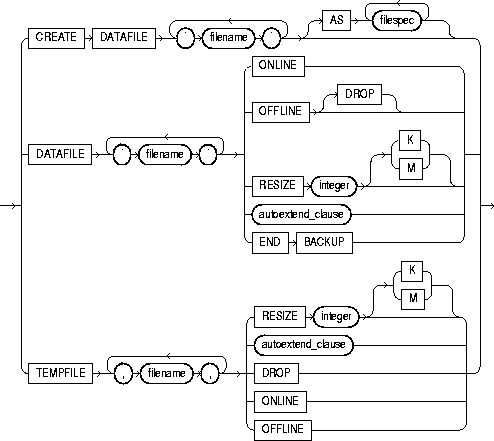
datafile/tempfile_clauses |
let you modify datafiles and tempfiles. |
|
|
You can use any of the following clauses when your instance has the database mounted, open or closed, and the files involved are not in use: |
||
|
CREATE DATAFILE |
creates a new empty datafile in place of an old one. You can use this clause to re-create a datafile that was lost with no backup. The 'filename' must identify a file that is or was once part of the database. The filespec specifies the name and size of the new datafile. If you omit the AS clause, Oracle creates the new file with the name and size as the file specified by 'filename'. |
|
|
|
During recovery, all archived redo logs written to since the original datafile was created must be applied to the new, empty version of the lost datafile. |
|
|
|
Oracle creates the new file in the same state as the old file when it was created. You must perform media recovery on the new file to return it to the state of the old file at the time it was lost. |
|
|
|
Restriction: You cannot create a new file based on the first datafile of the SYSTEM tablespace. |
|
|
DATAFILE |
affects your database files as follows: |
|
|
|
ONLINE |
brings the datafile online. |
|
|
OFFLINE |
takes the datafile offline. If the database is open, you must perform media recovery on the datafile before bringing it back online, because a checkpoint is not performed on the datafile before it is taken offline. |
|
|
|
DROP takes a datafile offline when the database is in NOARCHIVELOG mode. |
|
|
RESIZE |
attempts to increase or decrease the size of the datafile to the specified absolute size in bytes. Use K or M to specify this size in kilobytes or megabytes. There is no default, so you must specify a size. If sufficient disk space is not available for the increased size, or if the file contains data beyond the specified decreased size, Oracle returns an error. |
|
|
autoextend_clause |
enables or disables the automatic extension of a datafile. If you do not specify this clause, datafiles are not automatically extended. |
|
|
|
OFF disables autoextend if it is turned on. NEXT and MAXSIZE are set to zero. Values for NEXT and MAXSIZE must be respecified in further ALTER DATABASE AUTOEXTEND statements. |
|
|
|
ON enables autoextend. |
|
|
|
NEXT specifies in bytes the size of the next increment of disk space to be automatically allocated to the datafile when more extents are required. Use K or M to specify this size in kilobytes or megabytes. The default is one data block. |
|
|
|
MAXSIZE specifies the maximum disk space allowed for automatic extension of the datafile. |
|
|
|
UNLIMITED sets no limit on allocating disk space to the datafile. |
|
|
END BACKUP |
avoids media recovery on database startup after an online tablespace backup was interrupted by a system failure or instance failure or SHUTDOWN ABORT. |
|
|
WARNING: Do not use ALTER TABLESPACE ... END BACKUP if you have restored any of the files affected from a backup. Media recovery is fully described in Oracle8i Backup and Recovery Guide. |
|
|
TEMPFILE |
Lets you resize your temporary datafile or specify the autoextend_clause, with the same effect as with a permanent datafile. Restriction: You cannot specify TEMPFILE unless the database is open. |
|
|
|
DROP |
drops tempfile from the database. The tablespace remains. |
|
logfile_clauses |
lets you add, drop, or modify log files. |
|
|
ARCHIVELOG |
specifies that the contents of a redo log file group must be archived before the group can be reused. This mode prepares for the possibility of media recovery. Use this clause only after shutting down your instance normally or immediately with no errors and then restarting it, mounting the database in parallel server disabled mode. |
|
|
NOARCHIVELOG |
specifies that the contents of a redo log file group need not be archived so that the group can be reused. This mode does not prepare for recovery after media failure. |
|
|
Use the ARCHIVELOG clause and NOARCHIVELOG clause only if your instance has the database mounted in parallel server disabled mode, but not open. |
||
|
ADD LOGFILE |
adds one or more redo log file groups to the specified thread, making them available to the instance assigned the thread. |
|
|
|
THREAD integer |
is applicable only if you are using Oracle with the Parallel Server option in parallel mode. If you omit THREAD, the redo log file group is added to the thread assigned to your instance. |
|
|
GROUP integer |
uniquely identifies the redo log file group among all groups in all threads and can range from 1 to the MAXLOGFILES value. You cannot add multiple redo log file groups having the same GROUP value. If you omit this parameter, Oracle generates its value automatically. You can examine the GROUP value for a redo log file group through the dynamic performance view V$LOG. |
|
|
filespec |
Each filespec specifies a redo log file group containing one or more members, or copies. See the syntax description of filespec in "filespec". |
|
ADD LOGFILE MEMBER |
adds new members to existing redo log file groups. Each new member is specified by 'filename'. If the file already exists, it must be the same size as the other group members, and you must specify REUSE. If the file does not exist, Oracle creates a file of the correct size. You cannot add a member to a group if all of the group's members have been lost through media failure. |
|
|
|
You can specify an existing redo log file group in one of these ways: |
|
|
|
GROUP integer |
Specify the value of the GROUP parameter that identifies the redo log file group. |
|
|
list of filenames |
List all members of the redo log file group. You must fully specify each filename according to the conventions of your operating system. |
|
DROP LOGFILE |
drops all members of a redo log file group. Specify a redo log file group as indicated for the ADD LOGFILE MEMBER clause.
|
|
|
DROP LOGFILE MEMBER |
drops one or more redo log file members. Each 'filename' must fully specify a member using the conventions for filenames on your operating system.
|
|
|
CLEAR LOGFILE |
reinitializes an online redo log, optionally without archiving the redo log. CLEAR LOGFILE is similar to adding and dropping a redo log, except that the statement may be issued even if there are only two logs for the thread and also may be issued for the current redo log of a closed thread. |
|
|
|
UNARCHIVED |
You must specify UNARCHIVED if you want to reuse a redo log that was not archived. |
|
|
|
WARNING: Specifying UNARCHIVED makes backups unusable if the redo log is needed for recovery. |
|
|
Do not use CLEAR LOGFILE to clear a log needed for media recovery. If it is necessary to clear a log containing redo after the database checkpoint, you must first perform incomplete media recovery. The current redo log of an open thread can be cleared. The current log of a closed thread can be cleared by switching logs in the closed thread. |
|
|
|
If the CLEAR LOGFILE statement is interrupted by a system or instance failure, then the database may hang. If this occurs, reissue the statement after the database is restarted. If the failure occurred because of I/O errors accessing one member of a log group, then that member can be dropped and other members added. |
|
|
|
UNRECOVERABLE DATAFILE |
You must specify UNRECOVERABLE DATAFILE if you have taken the datafile offline with the database in ARCHIVELOG mode (that is, you specified ALTER DATABSE ... DATAFILE OFFLINE without the DROP keyword), and if the unarchived log to be cleared is needed to recover the datafile before bringing it back online. In this case, you must drop the datafile and the entire tablespace once the CLEAR LOGFILE statement completes. |
|
controlfile_clauses |
|
|
|
CREATE STANDBY CONTROLFILE |
creates a control file to be used to maintain a standby database. For more information, see Oracle8i Backup and Recovery Guide. If the file already exists, you must specify REUSE. |
|
|
BACKUP CONTROLFILE |
backs up the current control file. |
|
|
|
TO 'filename' |
specifies the file to which the control file is backed up. You must fully specify the filename using the conventions for your operating system. If the specified file already exists, you must specify REUSE. |
|
|
TO TRACE |
writes SQL statements to the database's trace file rather than making a physical backup of the control file. The SQL statements can start up the database, re-create the control file, and recover and open the database appropriately, based on the created control file. |
|
|
|
You can copy the statements from the trace file into a script file, edit the statements as necessary, and use the database if all copies of the control file are lost (or to change the size of the control file). |
|
|
|
|
|
|
|
|
The first statement below opens the database in read-only mode. The second statement returns the database to read-write mode and clears the online redo logs:
ALTER DATABASE OPEN READ ONLY;

ALTER DATABASE OPEN READ WRITE RESETLOGS;
The following statement performs tablespace recovery using parallel recovery processes:
ALTER DATABASE
   RECOVER TABLESPACE binky
   PARALLEL;
The following statement adds a redo log file group with two members and identifies it with a GROUP parameter value of 3:
ALTER DATABASE stocks
  ADD LOGFILE GROUP 3
    ('diska:log3.log' ,
     'diskb:log3.log') SIZE 50K;
The following statement adds a member to the redo log file group added in the previous example:
ALTER DATABASE stocks
   ADD LOGFILE MEMBER 'diskc:log3.log'
   TO GROUP 3;
The following statement drops the redo log file member added in the previous example:
ALTER DATABASE stocks
    DROP LOGFILE MEMBER 'diskc:log3.log';
The following statement renames a redo log file member:
ALTER DATABASE stocks
    RENAME FILE 'diskb:log3.log' TO 'diskd:log3.log';
The above statement only changes the member of the redo log group from one file to another. The statement does not actually change the name of the file 'DISKB:LOG3.LOG' to 'DISKD:LOG3.LOG'. You must perform this operation through your operating system.
The following statement drops all members of the redo log file group 3:
ALTER DATABASE stocks DROP LOGFILE GROUP 3;
The following statement adds a redo log file group containing three members to thread 5 (in an Oracle Parallel Server environment) and assigns it a GROUP parameter value of 4:
ALTER DATABASE stocks
    ADD LOGFILE THREAD 5 GROUP 4
        ('diska:log4.log',
        'diskb:log4:log',
        'diskc:log4.log' );
The following statement disables thread 5 in a parallel server:
ALTER DATABASE stocks
    DISABLE THREAD 5;
The following statement enables thread 5 in a parallel server, making it available to any Oracle instance that does not explicitly request a specific thread:
ALTER DATABASE stocks
    ENABLE PUBLIC THREAD 5;
The following statement creates a new datafile 'DISK2:DB1.DAT' based on the file 'DISK1:DB1.DAT':
ALTER DATABASE
    CREATE DATAFILE 'disk1:db1.dat' AS 'disk2:db1.dat';
The following statement changes the global name of the database and includes both the database name and domain:
ALTER DATABASE
    RENAME GLOBAL_NAME TO sales.australia.acme.com;
The following statements change the database character set and national character set to the WE8ISO8859P1 character set:
ALTER DATABASE db1 CHARACTER SET WE8ISO8859P1;
ALTER DATABASE db1 NATIONAL CHARACTER SET WE8ISO8859P1;
The database name is optional, and the character set name is specified without quotation marks.
The following statement attempts to change the size of datafile 'DISK1:DB1.DAT':
ALTER DATABASE
    DATAFILE 'disk1:db1.dat' RESIZE 10 M;
The following statement clears a log file:
ALTER DATABASE
    CLEAR LOGFILE 'disk3:log.dbf';
The following statement performs complete recovery of the entire database, letting Oracle generate the name of the next archived redo log file needed:
ALTER DATABASE
  RECOVER AUTOMATIC DATABASE;
The following statement explicitly names a redo log file for Oracle to apply:
ALTER DATABASE
    RECOVER LOGFILE 'diska:arch0006.arc';
The following statement performs time-based recovery of the database:
ALTER DATABASE
    RECOVER AUTOMATIC UNTIL TIME '1998-10-27:14:00:00';
Oracle recovers the database until 2:00 pm on October 27, 1998.
The following statement recovers the tablespace USER5:
ALTER DATABASE
    RECOVER TABLESPACE user5;
The following statement recovers the standby datafile /FINANCE/STBS_21.f, using the corresponding datafile in the original standby database, plus all relevant archived logs and the current standby database control file:
ALTER DATABASE
   RECOVER STANDBY DATAFILE '/finance/stbs_21.f'
   UNTIL CONTROLFILE;
The following statement recovers the standby database in managed (sustained) standby recovery mode:
ALTER DATABASE
   RECOVER MANAGED STANDBY DATABASE;
The following statement puts the database in managed standby recovery mode. The sustained recovery process will wait up to 60 minutes for the next archive log:
ALTER DATABASE
   RECOVER MANAGED STANDBY DATABASE TIMEOUT 60;
If each subsequent log arrives within 60 minutes of the last log, sustained recovery continues indefinitely or until manually terminated.
The following statement terminates the managed recovery operation:
ALTER DATABASE
   RECOVER MANAGED STANDBY DATABASE CANCEL IMMEDIATE;

The sustained recovery operation terminates before the next group of redo is read
from the current redo log file. Media recovery ends in the "middle" of applying
redo from the current redo log file.
level_clause::=

hierarchy_clause::=

join_clause::=

attribute_clause::=

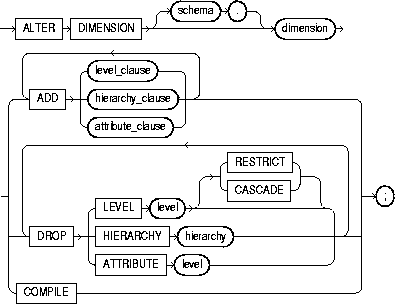
To change the hierarchical relationships or dimension attributes of a dimension. For more information on dimensions, see "CREATE DIMENSION".
The dimension must be in your schema or you must have the ALTER ANY DIMENSION system privilege to use this statement.
A dimension is always altered under the rights of the owner.
The following keywords and parameters have meaning unique to ALTER DIMENSION. The remaining keywords and parameters have the same functionality that they have in the CREATE DIMENSION statement. See "CREATE DIMENSION".
This example modifies the TIME dimension:
ALTER DIMENSION time
   DROP HIERARCHY week_month;
ALTER DIMENSION time
   DROP ATTRIBUTE cur_date;
ALTER DIMENSION time
   ADD LEVEL day IS time_tab.t_day
   ADD ATTRIBUTE day DETERMINES t_holiday;

To recompile an invalid standalone stored function. Explicit recompilation eliminates the need for implicit run-time recompilation and prevents associated run-time compilation errors and performance overhead.
The ALTER FUNCTION statement is similar to "ALTER PROCEDURE". For information on how Oracle recompiles functions and procedures, see Oracle8i Concepts.
|
Note: This statement does not change the declaration or definition of an existing function. To redeclare or redefine a function, use the CREATE FUNCTION statement with the OR REPLACE clause; see "CREATE FUNCTION". |
The function must be in your own schema or you must have ALTER ANY PROCEDURE system privilege.
To explicitly recompile the function GET_BAL owned by the user MERRIWEATHER, issue the following statement:
ALTER FUNCTION merriweather.get_bal
   COMPILE;
If Oracle encounters no compilation errors while recompiling GET_BAL, GET_BAL becomes valid. Oracle can subsequently execute it without recompiling it at run time. If recompiling GET_BAL results in compilation errors, Oracle returns an error, and GET_BAL remains invalid.
Oracle also invalidates all objects that depend upon GET_BAL. If you subsequently reference one of these objects without explicitly recompiling it first, Oracle recompiles it implicitly at run time.
storage_clause: See "storage_clause".
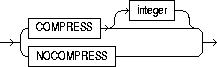
compression_clause::=
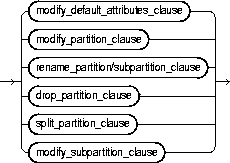
partitioning_clauses::=
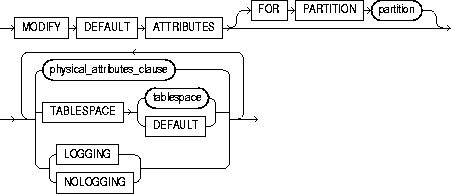
modify_default_attributes_clause::=
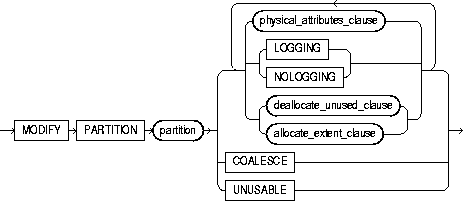
rename_partition/ subpartition_clause::=



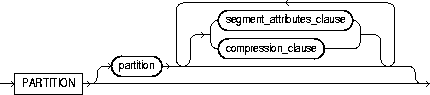
partition_description::=

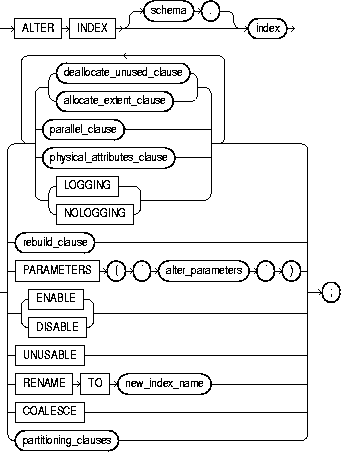
To change or rebuild an existing index.
For information on creating an index, see "CREATE INDEX".
The index must be in your own schema or you must have ALTER ANY INDEX system privilege.
Schema object privileges are granted on the parent index, not on individual index partitions or subpartitions.
You must have tablespace quota to modify, rebuild, or split an index partition or to modify or rebuild an index subpartition.
|
schema |
is the schema containing the index. If you omit schema, Oracle assumes the index is in your own schema. |
|
|
index |
is the name of the index to be altered. |
|
|
|
Restrictions:
|
|
|
deallocate_unused_clause |
explicitly deallocates unused space at the end of the index and makes the freed space available for other segments in the tablespace. Only unused space above the high water mark can be freed. For more information on this clause, see "ALTER TABLE". If index is range-partitioned or hash-partitioned, Oracle deallocates unused space from each index partition. If index is a local index on a composite-partitioned table, Oracle deallocates unused space from each index subpartition. Restrictions: |
|
|
|
KEEP |
specifies the number of bytes above the high water mark that the index will have after deallocation. If the number of remaining extents are less than MINEXTENTS, then MINEXTENTS is set to the current number of extents. If the initial extent becomes smaller than INITIAL, then INITIAL is set to the value of the current initial extent. If you omit KEEP, all unused space is freed. |
|
|
For a complete description of this clause, see "ALTER TABLE". |
|
|
allocate_extent_clause |
explicitly allocates a new extent for the index. For a local index on a hash-partitioned table, Oracle allocates a new extent for each partition of the index. Restriction: You cannot specify this clause for an index on a temporary table or for a range-partitioned or composite-partitioned index. |
|
|
|
SIZE |
specifies the size of the extent in bytes. Use K or M to specify the extent size in kilobytes or megabytes. If you omit SIZE, Oracle determines the size based on the values of the index's storage parameters. |
|
|
DATAFILE |
specifies one of the datafiles in the index's tablespace to contain the new extent. If you omit DATAFILE, Oracle chooses the datafile. |
|
|
INSTANCE |
makes the new extent available to the specified instance. An instance is identified by the value of its initialization parameter INSTANCE_NUMBER. If you omit this parameter, the extent is available to all instances. Use this parameter only if you are using Oracle with the Parallel Server option in parallel mode. |
|
|
Explicitly allocating an extent with this clause does not change the values of the NEXT and PCTINCREASE storage parameters, so does not affect the size of the next extent to be allocated. |
|
|
parallel_clause |
changes the default degree of parallelism for queries and DML on the index. For additional information, see the Notes to the parallel_clause of "CREATE TABLE". |
|
|
|
NOPARALLEL |
specifies serial execution. This is the default. |
|
|
PARALLEL |
causes Oracle to select a degree of parallelism equal to the number of CPUs available on all participating instances multiplied by the value of the PARALLEL_THREADS_PER_CPU initialization parameter. |
|
|
PARALLEL integer |
specifies the degree of parallelism, which is the number of parallel threads used in the parallel operation. Each parallel thread may use one or two parallel execution processes. Normally Oracle calculates the optimum degree of parallelism, so it is not necessary for you to specify integer. |
|
|
Restriction: You cannot specify this clause for an index on a temporary table. |
|
|
physical_attributes_clause |
lets you change the values of parameters for a nonpartitioned index, all partitions and subpartitions of a partitioned index, a specified partition, or all subpartitions of a specified partition. See these parameters in "CREATE TABLE". Restrictions:
|
|
|
|
storage_clause |
changes the storage parameters for a nonpartitioned index, index partition, or all partitions of a partitioned index, or default values of these parameters for a partitioned index. See the "storage_clause". |
|
LOGGING| NOLOGGING |
LOGGING|NOLOGGING specifies that subsequent Direct Loader (SQL*Loader) and direct-load INSERT operations against a nonpartitioned index, a range or hash index partition, or all partitions or subpartitions of a composite-partitioned index will be logged (LOGGING) or not logged (NOLOGGING) in the redo log file. |
|
|
|
In NOLOGGING mode, data is modified with minimal logging (to mark new extents invalid and to record dictionary changes). When applied during media recovery, the extent invalidation records mark a range of blocks as logically corrupt, because the redo data is not logged. Therefore, if you cannot afford to lose this index, you must take a backup after the operation in NOLOGGING mode. |
|
|
|
If the database is run in ARCHIVELOG mode, media recovery from a backup taken before an operation in LOGGING mode will re-create the index. However, media recovery from a backup taken before an operation in NOLOGGING mode will not re-create the index. |
|
|
|
An index segment can have logging attributes different from those of the base table and different from those of other index segments for the same base table. Restriction: You cannot specify this clause for an index on a temporary table. |
|
|
|
For more information about LOGGING and parallel DML, see Oracle8i Concepts and the Oracle8i Parallel Server Concepts and Administration. |
|
|
RECOVERABLE| UNRECOVERABLE |
These keywords are deprecated and have been replaced with LOGGING and NOLOGGING, respectively. Although RECOVERABLE and UNRECOVERABLE are supported for backward compatibility, Oracle Corporation strongly recommends that you use the LOGGING and NOLOGGING keywords. |
|
|
|
RECOVERBLE is not a valid keyword for creating partitioned tables or LOB storage characteristics. UNRECOVERABLE is not a valid keyword for creating partitioned or index-organized tables. Also, it can be specified only with the AS subquery clause of CREATE INDEX. |
|
|
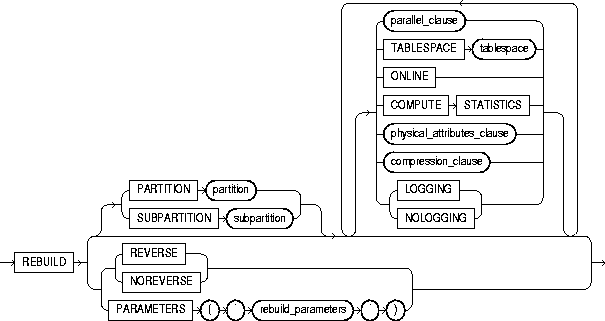
rebuild_clause |
re-creates an existing index or one of its partitions or subpartitions. For a function-based index, this clause also enables the index. If the function on which the index is based does not exist, the rebuild statement will fail. |
|
|
|
Restrictions:
|
|
|
|
PARTITION partition |
rebuilds one partition of an index. You can also use this clause to move an index partition to another tablespace or to change a create-time physical attribute. For more information about partition maintenance operations, see the Oracle8i Administrator's Guide. Restriction: You cannot specify this clause for a local index on a composite-partitioned table. Instead, use the REBUILD SUBPARTITION clause. |
|
|
SUBPARTITION subpartition |
rebuilds one subpartition of an index. You can also use this clause to move an index subpartition to another tablespace. If you do not specify TABLESPACE, the subpartition is rebuilt in the same tablespace. Restrictions: The only parameters you can specify for a subpartition are TABLESPACE and the parallel_clause. |
|
|
REVERSE | NOREVERSE |
specifies whether the bytes of the index block are stored in reverse order.
|
|
|
|
Restrictions: |
|
|
TABLESPACE |
specifies the tablespace where the rebuilt index, index partition, or index subpartition will be stored. The default is the default tablespace where the index or partition resided before you rebuilt it. |
|
|
COMPRESS |
enables key compression, which eliminates repeated occurrence of key column values. Use integer to specify the prefix length (number of prefix columns to compress).
Oracle compresses only nonpartitioned indexes that are nonunique or unique indexes of at least two columns. Restriction: You cannot specify COMPRESS for a bitmapped index. |
|
|
NOCOMPRESS |
disables key compression. This is the default. |
|
|
ONLINE |
specifies that DML operations on the table or partition are allowed during rebuilding of the index. Restriction: Parallel DML is not supported during online index building. If you specify ONLINE and then issue parallel DML statements, Oracle returns an error. |
|
|
COMPUTE STATISTICS |
enables you to collect statistics at relatively little cost during the rebuilding of an index. These statistics are stored in the data dictionary for ongoing use by the optimizer in choosing a plan of execution for SQL statements. The types of statistics collected depend on the type of index you are rebuilding. |
|
|
|
Note: If you create an index using another index (instead of a table), the original index might not provide adequate statistical information. Therefore, Oracle generally uses the base table to compute the statistics, which will improve the statistics but may negatively affect performance. |
|
|
. |
Additional methods of collecting statistics are available in PL/SQL packages and procedures. See Oracle8i Supplied Packages Reference. |
|
|
LOGGING | NOLOGGING |
specifies whether |
|
PARAMETERS |
applies only to domain indexes. This clause specifies the parameter string for altering the index (or, in the rebuild_clause, rebuilding the index). The maximum length of the parameter string is 1000 characters. This string is passed uninterpreted to the appropriate indextype routine. For more information on these routines, see Oracle8i Data Cartridge Developer's Guide. For more information on domain indexes, see "CREATE INDEX". |
|
|
|
Restrictions: |
|
|
ENABLE |
applies only to a function-based index that has been disabled because a user-defined function used by the index was dropped or replaced. This clause enables such an index if
Restriction: You cannot specify any other clauses of ALTER INDEX in the same statement with ENABLE. |
|
|
DISABLE |
applies only to a function-based index. This clause enables you to disable the use of a function-based index. You might want to do so, for example, while working on the body of the function. Afterward you can either rebuild the index or specify another ALTER INDEX statement with the ENABLE keyword. |
|
|
UNUSABLE |
marks the index or index partition(s) or index subpartition(s) UNUSABLE. An unusable index must be rebuilt, or dropped and re-created, before it can be used. While one partition is marked UNUSABLE, the other partitions of the index are still valid. You can execute statements that require the index if the statements do not access the unusable partition. You can also split or rename the unusable partition before rebuilding it. Restriction: You cannot specify this clause for an index on a temporary table. |
|
|
RENAME TO |
renames index to new_index_name. The new_index_name is a single identifier and does not include the schema name. |
|
|
COALESCE |
instructs Oracle to merge the contents of index blocks where possible to free blocks for reuse. For more information on space management and coalescing indexes, see Oracle8i Administrator's Guide. Restriction: You cannot specify this clause for an index on a temporary table. |
|
|
partitioning_clauses: The remainder of the clauses of the ALTER INDEX statement are valid only for partitioned indexes. |
||
|
|
Restrictions:
|
|
|
modify_default_attributes_clause |
specifies new values for the default attributes of a partitioned index. Restriction: The only attribute you can specify for an index on a hash-partitioned or composite-partitioned table is TABLESPACE. |
|
|
|
TABLESPACE |
specifies the default tablespace for new partitions of an index or subpartitions of an index partition. |
|
|
LOGGING | NOLOGGING |
specifies the default logging attribute of a partitioned index or an index partition. |
|
|
FOR PARTITION partition |
specifies the default attributes for the subpartitions of a partition of a local index on a composite-partitioned table. |
|
modify_partition_clause |
modifies the real physical attributes, logging attribute, or storage characteristics of index partition partition or its subpartitions. Restriction: You cannot specify the physical_attributes_clause for an index on a hash-partitioned table. |
|
|
|
Note: If the index is a local index on a composite-partitioned table, the changes you specify here will override any attributes specified earlier for the subpartitions of index, as well as establish default values of attributes for future subpartitions of that partition. To change the default attributes of the partition without overriding the attributes of subpartitions, use ALTER TABLE ... MODIFY DEFAULT ATTRIBUTES OF PARTITION. |
|
|
rename_partition/ subpartition_clause |
renames index partition or subpartition to new_name. |
|
|
drop_partition_clause |
removes a partition and the data in it from a partitioned global index. When you drop a partition of a global index, Oracle marks the index's next partition UNUSABLE. You cannot drop the highest partition of a global index. |
|
|
split_partition_clause |
splits a partition of a global partitioned index into two partitions, adding a new partition to the index. Splitting a partition marked UNUSABLE results in two partitions, both marked UNUSABLE. You must rebuild the partitions before you can use them. |
|
|
|
Splitting a usable partition results in two partitions populated with index data. Both new partitions are usable. |
|
|
|
AT (value_list) |
specifies the new noninclusive upper bound for split_partition_1. The value_list must evaluate to less than the presplit partition bound for partition_name_old and greater than the partition bound for the next lowest partition (if there is one). |
|
|
INTO |
describes the two partitions resulting from the split. |
|
partition_description |
specifies (optionally) the name and physical attributes of each of two partitions resulting from a split. |
|
|
modify_subpartition_clause |
lets you mark UNUSABLE or allocate or deallocate storage for a subpartition of a local index on a composite-partitioned table. All other attributes of such a subpartition are inherited from partition-level default attributes. |
|
This statement alters SCOTT's CUSTOMER index so that future data blocks within this index use 5 initial transaction entries and an incremental extent of 100 kilobytes:
ALTER INDEX scott.customer
    INITRANS 5
    STORAGE (NEXT 100K);
If the SCOTT.CUSTOMER index is partitioned, this statement also alters the default attributes of future partitions of the index. New partitions added in the future will use 5 initial transaction entries and an incremental extent of 100K.
The following statement drops index partition IX_ANTARTICA:
ALTER INDEX sales_area_ix
  DROP PARTITION ix_antarctica;
This statement alters the default attributes of local partitioned index SALES_IX3. New partitions added in the future will use 5 initial transaction entries and an incremental extent of 100K:
ALTER INDEX sales_ix3
  MODIFY DEFAULT ATTRIBUTES INITRANS 5 STORAGE ( NEXT 100K );
The following statement marks the IDX_ACCTNO index as UNUSABLE:
ALTER INDEX idx_acctno UNUSABLE;
The following statement marks partition IDX_FEB96 of index IDX_ACCTNO as UNUSABLE:
ALTER INDEX idx_acctno MODIFY PARTITION idx_feb96 UNUSABLE;
The following statement changes the maximum number of extents for partition BRIX_NY and changes the logging attribute:
ALTER INDEX branch_ix MODIFY PARTITION brix_ny
  STORAGE( MAXEXTENTS 30 ) LOGGING;
The following statement sets the parallel attributes for index ARTIST_IX so that scans on the index will not be parallelized:
ALTER INDEX artist_ix NOPARALLEL;
The following statement rebuilds partition P063 in index ARTIST_IX. The rebuilding of the index partition will not be logged:
ALTER INDEX artist_ix
  REBUILD PARTITION p063 NOLOGGING;
The following statement renames an index:
ALTER INDEX emp_ix1 RENAME TO employee_ix1;
The following statement renames an index partition:
ALTER INDEX employee_ix1 RENAME PARTITION emp_ix1_p3
  TO employee_ix1_p3;
The following statement splits partition PARTNUM_IX_P6 in partitioned index PARTNUM_IX into PARTNUM_IX_P5 and PARTNUM_IX_P6:
ALTER INDEX partnum_ix
  SPLIT PARTITION partnum_ix_p6 AT ( 5001 )
  INTO ( PARTITION partnum_ix_p5 TABLESPACE ts017 LOGGING,
         PARTITION partnum_ix_p6 TABLESPACE ts004 );
The second partition retains the name of the old partition.
The following statement rebuilds index EMP_IX so that the bytes of the index block are stored in REVERSE order:
ALTER INDEX emp_ix REBUILD REVERSE;
The following statement collects statistics on the nonpartitioned EMP_INDX index:
ALTER INDEX emp_indx REBUILD COMPUTE STATISTICS;
The type of statistics collected depends on the type of index you are rebuilding. For more information, refer to Oracle8i Concepts.
The following statement causes the index to be rebuilt from the existing index by using parallel parallel execution processes to scan the old and to build the new index:
ALTER INDEX emp_idx
   REBUILD
   PARALLEL;
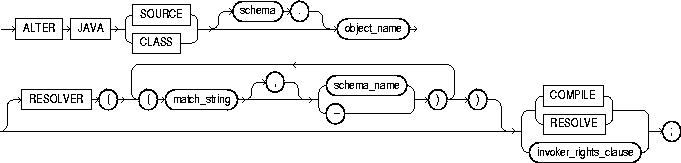
To force the resolution of a Java class schema object or compilation of a Java source schema object. (You cannot call the methods of a Java class before all its external references to Java names are associated with other classes.)
For more information on resolving Java classes and compiling Java sources, see Oracle8i Java Stored Procedures Developer's Guide.
The Java source or class must be in your own schema, or you must have the ALTER ANY PROCEDURE system privilege. You must also have the EXECUTE object privilege on Java classes.
|
JAVA SOURCE |
compiles a Java source schema object. |
|
|
JAVA CLASS |
resolves a Java class schema object. |
|
|
object_name |
specifies a previously created Java class or source schema object. |
|
|
RESOLVER |
specifies how schemas are searched for referenced fully specified Java names, using the mapping pairs specified when the Java class or source was created. For more information, see "CREATE JAVA". |
|
|
RESOLVE | COMPILE |
are synonymous keywords. They specify that Oracle should attempt to resolve the primary Java class schema object. |
|
|
invoker_rights_clause |
specifies whether the methods of the class execute with the privileges and in the schema of the user who defined it or with the privileges and in the schema of CURRENT_USER. For information on how CURRENT_USER is determined, see Oracle8i Concepts and Oracle8i Application Developer's Guide - Fundamentals. This clause also determines how Oracle resolves external names in queries, DML operations, and dynamic SQL statements in the member functions and procedures of the type. For more information refer to Oracle8i Java Stored Procedures Developer's Guide. |
|
|
|
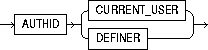
AUTHID CURRENT_USER |
specifies that the methods of the class execute with the privileges of CURRENT_USER. This clause is the default and creates an "invoker-rights class." This clause also specifies that external names in queries, DML operations, and dynamic SQL statements resolve in the schema of CURRENT_USER. External names in all other statements resolve in the schema in which the methods reside. |
|
|
AUTHID DEFINER |
specifies that the methods of the class execute with the privileges of the user who defined it. This clause also specifies that external names resolve in the schema where the methods reside. |
The following statement forces the resolution of a Java class:
ALTER JAVA CLASS "Agent"
   RESOLVER (("/home/java/bin/*" scott)(* public))
   RESOLVE;
LOB_storage_clause: See "ALTER TABLE".
modify_LOB_storage_clause: See "ALTER TABLE".
partitioning_clauses: See "ALTER TABLE".
storage_clause: See the "storage_clause".
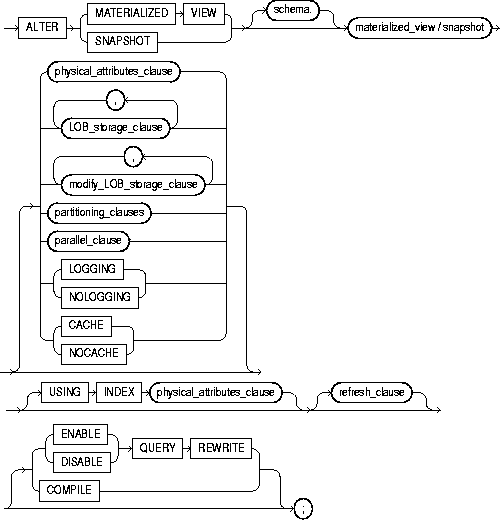
To change the storage characteristics, refresh mode or time, or type of an existing materialized view.
To enable or disable query rewrite.
The terms "snapshot" and "materialized view" are synonymous. Both refer to a table that contains the results of a query of one or more tables, each of which may be located on the same or on a remote database.
Replication and warehouse environments sometimes use different terms to describe the same thing. In this reference, master tables (a replication term) and detail tables (a warehouse term) both refer to the tables referenced by a materialized view.
For more information on materialized views, including a brief description of the different types of materialized views, see "CREATE MATERIALIZED VIEW / SNAPSHOT". For information on materialized views in a replication environment, see Oracle8i Replication. For information on materialized views in a data warehousing environment, see Oracle8i Tuning.
To alter a materialized view's storage parameters, the materialized view must be contained in your own schema, or you must have the ALTER ANY SNAPSHOT or ALTER ANY MATERIALIZED VIEW system privilege.
To enable a materialized view for query rewrite:
For detailed information about the prerequisites for ALTER MATERIALIZED VIEW, see Oracle8i Replication.
|
schema |
is the schema containing the materialized view. If you omit schema, Oracle assumes the materialized view is in your own schema. |
|
|
materialized view / snapshot |
is the name of the materialized view to be altered. |
|
|
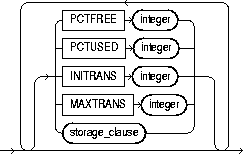
physical_attributes_clause |
change the values of the PCTFREE, PCTUSED, INITRANS, and MAXTRANS parameters and the storage characteristics for the internal table that Oracle uses to maintain the materialized view's data. For more information, see "ALTER TABLE" and the "storage_clause". |
|
|
LOGGING| NOLOGGING |
specifies the logging attribute. For information about LOGGING and NOLOGGING, see "ALTER TABLE". |
|
|
CACHE| NOCACHE |
For data that will be accessed frequently, specifies whether the blocks retrieved for this table are placed at the most recently used end of the LRU list in the buffer cache when a full table scan is performed. This attribute is useful for small lookup tables. For information about specifying CACHE or NOCACHE, see "ALTER TABLE". |
|
|
LOB_storage_clause |
specifies the LOB storage characteristics. For information about specifying the parameters of this clause, see "ALTER TABLE". |
|
|
modify_LOB_storage_clause |
modifies the physical attributes of the LOB attribute lob_item or LOB object attribute. For information about specifying the parameters of this clause, see "ALTER TABLE". |
|
|
partitioning_clauses: |
The syntax and general functioning of the following partitioning clauses is the same as for the ALTER TABLE statement. See "ALTER TABLE". Restrictions: |
|
|
|
Note: After dropping or truncating a table partition, all materialized views on the table must be refreshed manually. A fast refresh will probably produce incorrect results, but Oracle will not raise an error. |
|
|
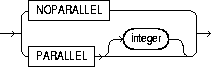
parallel_clause |
specifies the degree of parallelism for the materialized view. For additional information, see the Notes to the parallel_clause of "CREATE TABLE". When this clause is set for master tables, performance for materialized view creation and refresh may improve (depending on the materialized view definition query). |
|
|
|
NOPARALLEL |
specifies serial execution. This is the default. |
|
|
PARALLEL |
causes Oracle to select a degree of parallelism equal to the number of CPUs available on all participating instances times the value of the PARALLEL_THREADS_PER_CPU initialization parameter. |
|
|
PARALLEL integer |
specifies the degree of parallelism, which is number of parallel threads used in the parallel operation. Each parallel thread may use one or two parallel execution processes. Normally Oracle calculates the optimum degree of parallelism, so it is not necessary for you to specify integer. |
|
MODIFY PARTITION UNUSABLE LOCAL INDEXES |
||
|
|
marks UNUSABLE all the local index partitions associated with partition. |
|
|
MODIFY PARTITION REBUILD UNUSABLE LOCAL INDEXES |
||
|
|
rebuilds the unusable local index partitions associated with partition. |
|
|
USING INDEX |
changes the value of INITRANS, MAXTRANS, and STORAGE parameters for the index Oracle uses to maintain the materialized view's data. If USING INDEX is not specified, then default values are used for the index. Restriction: You cannot specify the PCTUSED or PCTFREE parameters in this clause. |
|
|
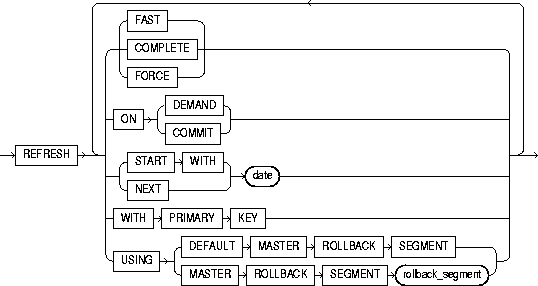
refresh_clause |
changes the mode and times for automatic refreshes. |
|
|
|
FAST |
specifies a fast refresh. A fast refresh uses the materialized view log associated with the detail table or, if you also specify ON DEMAND, with the direct loader log. Oracle creates the direct loader log automatically. No user intervention is needed. |
|
|
|
Several restrictions exist on the types of materialized views that you can fast refresh. For a complete explanation of when you can fast refresh a materialized view used for replication, see Oracle8i Replication. For a complete explanation of when you can fast refresh a materialized view used for data warehousing, see Oracle8i Tuning. |
|
|
COMPLETE |
specifies a complete refresh, or a refresh that re-creates the materialized view during each refresh. |
|
|
FORCE |
specifies a fast refresh if one is possible or a complete refresh if a fast refresh is not possible. Oracle decides whether a fast refresh is possible at refresh time. |
|
|
ON COMMIT |
specifies that the refresh is to occur automatically at the next COMMIT operation. Restriction: This clause is supported only for materialized views that either include no aggregations or that include no joins. For more information, see Oracle8i Tuning. |
|
|
ON DEMAND |
specifies that a refresh will occur when you explicitly invoke a refresh procedure. This method is also called "warehouse refresh", and you can also specify it by calling the DBMS_MVIEW.REFRESH procedure. The types of materialized views you can create by specifying refresh on demand are described in Oracle8i Tuning. Alternatively, this clause specifies that a fast refresh will occur only if you add data using a direct-path method. |
|
|
If you specify ON COMMIT or ON DEMAND, you cannot also specify START WITH or NEXT. |
|
|
|
START WITH |
specifies a date expression for the next automatic refresh time. |
|
|
NEXT |
specifies a new date expression for calculating the interval between automatic refreshes. |
|
|
START WITH and NEXT values must evaluate to times in the future. |
|
|
|
WITH PRIMARY KEY |
changes a rowid materialized view to a primary key materialized view. Primary key materialized views allow materialized view master tables to be reorganized without affecting the materialized view's ability to continue to fast refresh. The master table must contain an enabled primary key constraint. For detailed information about primary key materialized views, see Oracle8i Replication. |
|
|
USING ROLLBACK SEGMENT |
changes the remote rollback segment to be used during materialized view refresh; rollback_segment is the name of the rollback segment to be used. |
|
|
|
|
|
|
|
The master rollback segment is stored on a per-materialized-view basis and is validated during materialized view creation and refresh. If the materialized view is complex, the master rollback segment, if specified, is ignored. |
|
QUERY REWRITE |
specifies whether the materialized view is eligible to be used for query rewrite. |
|
|
|
ENABLE |
enables the materialized view for query rewrite. For more information on query rewrite, see Oracle8i Concepts. |
|
|
|
Restrictions:
|
|
|
DISABLE |
specifies that the materialized view is not eligible for use by query rewrite. (If a materialized view is in invalid state, it is not eligible for use by query rewrite, whether or not it is disabled.) However, a disabled materialized view can be refreshed. |
|
COMPILE |
explicitly revalidates a materialized view. If an object upon which the materialized view depends is dropped or altered, the materialized view remains accessible, but it is invalidated for purposes of query rewrite. You can use this clause to explicitly revalidate the materialized view to make it eligible for query rewrite. If the materialized view fails to revalidate, it cannot be either fast refreshed ON DEMAND or used for query rewrite. |
|
The following statement changes the automatic refresh mode for the HQ_EMP materialized view to FAST:
ALTER SNAPSHOT hq_emp
   REFRESH FAST;
The next automatic refresh of the materialized view will be a fast refresh provided it is a simple materialized view and its master table has a materialized view log that was created before the materialized view was created or last refreshed.
Because the REFRESH clause does not specify START WITH or NEXT values, the refresh intervals established by the REFRESH clause when the HQ_EMP materialized view was created or last altered are still used.
The following statement stores a new interval between automatic refreshes for the BRANCH_EMP materialized view:
ALTER SNAPSHOT branch_emp
   REFRESH NEXT SYSDATE+7;
Because the REFRESH clause does not specify a START WITH value, the next automatic refresh occurs at the time established by the START WITH and NEXT values specified when the BRANCH_EMP materialized view was created or last altered.
At the time of the next automatic refresh, Oracle refreshes the materialized view, evaluates the NEXT expression SYSDATE+7 to determine the next automatic refresh time, and continues to refresh the materialized view automatically once a week.
Because the REFRESH clause does not explicitly specify a refresh mode, Oracle continues to use the refresh mode specified by the REFRESH clause of a previous CREATE MATERIALIZED VIEW or ALTER MATERIALIZED VIEW statement.
The following statement specifies a new refresh mode, next refresh time, and new interval between automatic refreshes of the SF_EMP materialized view:
ALTER SNAPSHOT sf_emp
   REFRESH COMPLETE
   START WITH TRUNC(SYSDATE+1) + 9/24
   NEXT SYSDATE+7;
The START WITH value establishes the next automatic refresh for the materialized view to be 9:00 a.m. tomorrow. At that point, Oracle performs a complete refresh of the materialized view, evaluates the NEXT expression, and subsequently refreshes the materialized view every week.
The following statement enables query rewrite on the materialized view MV1 and explicitly revalidates it.
ALTER MATERIALIZED VIEW mv1
   ENABLE QUERY REWRITE COMPILE;
The following statement changes the remote master rollback segment used during materialized view refresh to MASTER_SEG:
ALTER SNAPSHOT inventory
   REFRESH USING MASTER ROLLBACK SEGMENT master_seg;
The following statement changes the remote master rollback segment used during materialized view refresh to one chosen by Oracle:
ALTER SNAPSHOT sales REFRESH USING DEFAULT MASTER ROLLBACK SEGMENT;
The following statement changes a rowid materialized view to a primary key materialized view:
ALTER SNAPSHOT emp_rs
   REFRESH WITH PRIMARY KEY;
The following statement recompiles the materialized view STORE_MV:
ALTER MATERIALIZED VIEW store_mv COMPILE;
The following statement enables query rewrite on the materialized view STORE_MV:
ALTER MATERIALIZED VIEW store_mv ENABLE QUERY REWRITE;
The following statement changes the refresh method of materialized view STORE_MV to FAST;
ALTER MATERIALIZED VIEW store_mv refresh fast;
storage_clause: See "storage_clause".
partitioning_clauses: See "ALTER TABLE".
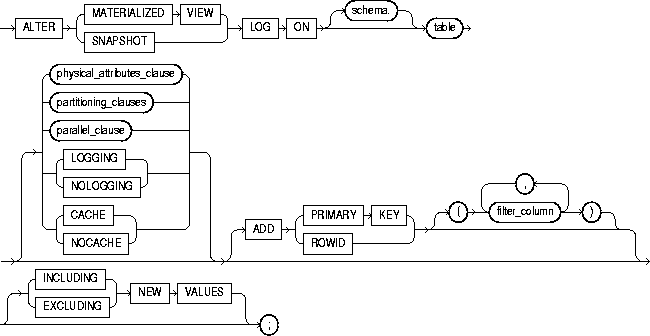
To alter the storage characteristics, refresh mode or time, or type of an existing materialized view log.
The terms "snapshot" and "materialized view" are synonymous. Both refer to a table that contains the results of a query of one or more tables, each of which may be located on the same or on a remote database. For more information on materialized views, including refreshing them, see "ALTER MATERIALIZED VIEW / SNAPSHOT". For a description of the various types of materialized views, see "CREATE MATERIALIZED VIEW / SNAPSHOT".
Only the owner of the master table or a user with the SELECT privilege for the master table can alter a materialized view log. For detailed information about the prerequisites for ALTER SNAPSHOT LOG, see Oracle8i Replication.
|
schema |
is the schema containing the master table. If you omit schema, Oracle assumes the materialized view log is in your own schema. |
|
|
table |
is the name of the master table associated with the materialized view log to be altered. |
|
|
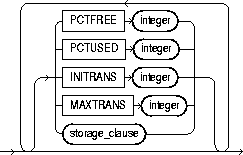
physical_attributes_clause |
changes the value of PCTFREE, PCTUSED, INITRANS, and MAXTRANS parameters for the table, partition, the overflow data segment, or the default characteristics of a partitioned table. For a description of these parameters, see "CREATE TABLE". See also the "Storage Example". |
|
|
partitioning_clauses |
The syntax and general functioning of the partitioning clauses is the same as for the ALTER TABLE statement; see "ALTER TABLE". Restrictions: |
|
|
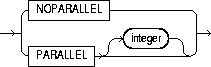
parallel_clause |
specifies the degree of parallelism for the materialized view. For additional information, see the Notes to the parallel_clause of "CREATE TABLE". When this clause is set for master tables, performance for materialized view creation and refresh may improve (depending on the materialized view definition query). |
|
|
|
NOPARALLEL |
specifies serial execution. This is the default. |
|
|
PARALLEL |
causes Oracle to select a degree of parallelism equal to the number of CPUs available on all participating instances times the value of the PARALLEL_THREADS_PER_CPU initialization parameter. |
|
|
PARALLEL integer |
specifies the degree of parallelism, which is number of parallel threads used in the parallel operation. Each parallel thread may use one or two parallel execution processes. Normally Oracle calculates the optimum degree of parallelism, so it is not necessary for you to specify integer. |
|
LOGGING | NOLOGGING |
specifies the logging attribute. For information about specifying this attribute, see "ALTER TABLE". |
|
|
CACHE | NOCACHE |
for data that will be accessed frequently, specifies whether the blocks retrieved for this table are placed at the most recently used end of the LRU list in the buffer cache when a full table scan is performed. This attribute is useful for small lookup tables. For information about specifying CACHE or NOCACHE, see "ALTER TABLE". |
|
|
ADD |
changes the materialized view log so that it records the primary key values or rowid values when rows in the materialized view master table are updated. This clause can also be used to record additional filter columns. To stop recording any of this information, you must first drop the materialized view log and then re-create it. Dropping the materialized view log and then re-creating it forces all existing materialized views on the master table to complete refresh. |
|
|
|
PRIMARY KEY |
specifies that the primary-key values of all rows updated should be recorded in the materialized view log. |
|
|
ROWID |
specifies that the rowid values of all rows updated should be recorded in the materialized view log. |
|
|
filter_column(s) |
are non-primary-key columns referenced by materialized views. For information about filter columns, see Oracle8i Replication. |
|
NEW VALUES |
specifies whether Oracle saves both old and new values in the materialized view log. |
|
|
|
INCLUDING |
saves old as well as new values in the log. If you are creating a log for a materialized aggregate view with only one master table, and if you want the materialized view to be eligible for fast refresh, you must specify INCLUDING. |
|
|
EXCLUDING |
saves only new values in the log. This is the default. To save overhead, use this clause for materialized join views and for materialized aggregate views with more than one master table. Such views do not require the old values. |
The following statement changes the MAXEXTENTS value of a materialized view log:
ALTER SNAPSHOT LOG ON dept
   STORAGE MAXEXTENTS 50;
The following statement alters an existing rowid materialized view log to also record primary key information:
ALTER SNAPSHOT LOG ON sales
   ADD PRIMARY KEY;

To rename a stored outline, reassign it to a different category, or regenerate it by compiling the outline's SQL statement and replacing the old outline data with the outline created under current conditions.
For more information on outlines, see "CREATE OUTLINE" and Oracle8i Tuning.
To modify an outline, you must have the ALTER ANY OUTLINE system privilege.
The following statement regenerates a stored outline called SALARIES by compiling the outline's text and replacing the old outline data with the outline created under current conditions.
ALTER OUTLINE salaries REBUILD;

To explicitly recompile either a package specification, body, or both. Explicit recompilation eliminates the need for implicit run-time recompilation and prevents associated run-time compilation errors and performance overhead.
Because all objects in a package are stored as a unit, the ALTER PACKAGE statement recompiles all package objects together. You cannot use the ALTER PROCEDURE statement or ALTER FUNCTION statement to recompile individually a procedure or function that is part of a package.
|
Note: This statement does not change the declaration or definition of an existing package. To redeclare or redefine a package, use the "CREATE PACKAGE" or the "CREATE PACKAGE BODY" statement with the OR REPLACE clause. |
The package must be in your own schema or you must have ALTER ANY PROCEDURE system privilege.
|
schema |
is the schema containing the package. If you omit schema, Oracle assumes the package is in your own schema. |
|
package |
is the name of the package to be recompiled. |
|
COMPILE |
recompiles the package specification or body. The COMPILE keyword is required. If recompiling the package results in compilation errors, Oracle returns an error and the body remains invalid. You can see the associated compiler error messages with the SQL*Plus command SHOW ERRORS. |
|
SPECIFICATION |
recompiles only the package specification, regardless of whether it is invalid. You might want to recompile a package specification to check for compilation errors after modifying the specification. When you recompile a package specification, Oracle invalidates any local objects that depend on the specification, such as procedures that call procedures or functions in the package. The body of a package also depends on its specification. If you subsequently reference one of these dependent objects without first explicitly recompiling it, Oracle recompiles it implicitly at run time. |
|
BODY |
recompiles only the package body regardless of whether it is invalid. You might want to recompile a package body after modifying it. Recompiling a package body does not invalidate objects that depend upon the package specification. When you recompile a package body, Oracle first recompiles the objects on which the body depends, if any of those objects are invalid. If Oracle recompiles the body successfully, the body becomes valid. |
|
PACKAGE |
recompiles both the package specification and the package body if one exists, regardless of whether they are invalid. This is the default. The recompilation of the package specification and body lead to the invalidation and recompilation as described above for SPECIFICATION and BODY. For information on how Oracle maintains dependencies among schema objects, including remote objects, see Oracle8i Concepts. |
|
DEBUG |
instructs the PL/SQL compiler to generate and store the code for use by the PL/SQL debugger. For information on debugging packages, see Oracle8i Application Developer's Guide - Fundamentals. |
This statement explicitly recompiles the specification and body of the ACCOUNTING package in the schema BLAIR:
ALTER PACKAGE blair.accounting
   COMPILE PACKAGE;
If Oracle encounters no compilation errors while recompiling the ACCOUNTING specification and body, ACCOUNTING becomes valid. BLAIR can subsequently call or reference all package objects declared in the specification of ACCOUNTING without run-time recompilation. If recompiling ACCOUNTING results in compilation errors, Oracle returns an error and ACCOUNTING remains invalid.
Oracle also invalidates all objects that depend upon ACCOUNTING. If you subsequently reference one of these objects without explicitly recompiling it first, Oracle recompiles it implicitly at run time.
To recompile the body of the ACCOUNTING package in the schema BLAIR, issue the following statement:
ALTER PACKAGE blair.accounting
   COMPILE BODY;
If Oracle encounters no compilation errors while recompiling the package body, the body becomes valid. BLAIR can subsequently call or reference all package objects declared in the specification of ACCOUNTING without run-time recompilation. If recompiling the body results in compilation errors, Oracle returns an error message and the body remains invalid.
Because this statement recompiles the body and not the specification of ACCOUNTING, Oracle does not invalidate dependent objects.

To explicitly recompile a stand-alone stored procedure. Explicit recompilation eliminates the need for implicit run-time recompilation and prevents associated run-time compilation errors and performance overhead.
To recompile a procedure that is part of a package, recompile the entire package using the ALTER PACKAGE statement (see "ALTER PACKAGE").
|
Note: This statement does not change the declaration or definition of an existing procedure. To redeclare or redefine a procedure, use the CREATE PROCEDURE statement with the OR REPLACE clause (see "CREATE PROCEDURE") |
The ALTER PROCEDURE statement is quite similar to the ALTER FUNCTION statement (see "ALTER FUNCTION").
The procedure must be in your own schema or you must have ALTER ANY PROCEDURE system privilege.
|
schema |
is the schema containing the procedure. If you omit schema, Oracle assumes the procedure is in your own schema. |
|
procedure |
is the name of the procedure to be recompiled. |
|
COMPILE |
causes Oracle to recompile the procedure. The COMPILE keyword is required. Oracle recompiles the procedure regardless of whether it is valid or invalid.
For information on how Oracle maintains dependencies among schema objects, including remote objects, see Oracle8i Concepts. |
|
DEBUG |
instructs the PL/SQL compiler to generate and store the code for use by the PL/SQL debugger. For information on debugging procedures, see Oracle8i Application Developer's Guide - Fundamentals. |
To explicitly recompile the procedure CLOSE_ACCT owned by the user HENRY, issue the following statement:
ALTER PROCEDURE henry.close_acct
   COMPILE;
If Oracle encounters no compilation errors while recompiling CLOSE_ACCT, CLOSE_ACCT becomes valid. Oracle can subsequently execute it without recompiling it at run time. If recompiling CLOSE_ACCT results in compilation errors, Oracle returns an error and CLOSE_ACCT remains invalid.
Oracle also invalidates all dependent objects. These objects include any procedures, functions, and package bodies that call CLOSE_ACCT. If you subsequently reference one of these objects without first explicitly recompiling it, Oracle recompiles it implicitly at run time.

resource_parameters::=
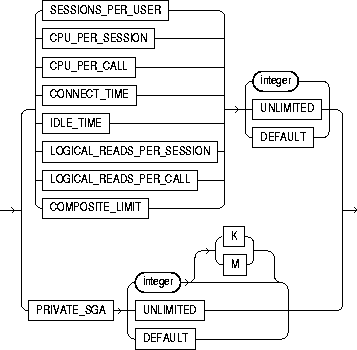
password_parameters::=
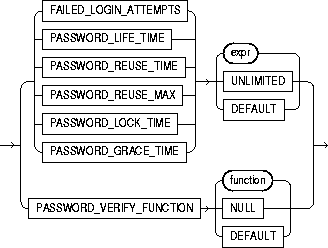
To add, modify, or remove a resource limit or password management parameter in a profile.
Changes made to a profile with an ALTER PROFILE statement affect users only in their subsequent sessions, not in their current sessions.
For information on creating a profile, see "CREATE PROFILE".
You must have ALTER PROFILE system privilege to change profile resource limits. To modify password limits and protection, you must have ALTER PROFILE and ALTER USER system privileges.
The keywords and parameters in the ALTER PROFILE statement all have the same meaning as in the CREATE PROFILE statement. See "CREATE PROFILE".
The following statement makes a password unavailable for reuse for 90 days:
ALTER PROFILE prof
   LIMIT PASSWORD_REUSE_TIME 90
   PASSWORD_REUSE_MAX UNLIMITED;
The following statement defaults the PASSWORD_REUSE_TIME value to its defined value in the DEFAULT profile:
ALTER PROFILE prof
   LIMIT PASSWORD_REUSE_TIME DEFAULT
   PASSWORD_REUSE_MAX UNLIMITED;
The following statement alters profile PROF with FAILED_LOGIN_ATTEMPTS set to 5 and PASSWORD_LOCK_TIME set to 1:
ALTER PROFILE prof LIMIT
   FAILED_LOGIN_ATTEMPTS 5
   PASSWORD_LOCK_TIME 1;
This statement causes PROF's account to become locked for 1 day after 5 unsuccessful login attempts.
The following statement modifies profile PROF's PASSWORD_LIFE_TIME to 60 days and PASSWORD_GRACE_TIME to 10 days:
ALTER PROFILE prof LIMIT
   PASSWORD_LIFE_TIME 60
   PASSWORD_GRACE_TIME 10;
This statement defines a new limit of 5 concurrent sessions for the ENGINEER profile:
ALTER PROFILE engineer LIMIT SESSIONS_PER_USER 5;
If the ENGINEER profile does not currently define a limit for SESSIONS_PER_USER, the above statement adds the limit of 5 to the profile. If the profile already defines a limit, the above statement redefines it to 5. Any user assigned the ENGINEER profile is subsequently limited to 5 concurrent sessions.
This statement removes the IDLE_TIME limit from the ENGINEER profile:
ALTER PROFILE engineer LIMIT IDLE_TIME DEFAULT;
Any user assigned the ENGINEER profile is subject in their subsequent sessions to the IDLE_TIME limit defined in the DEFAULT profile.
This statement defines a limit of 2 minutes of idle time for the DEFAULT profile:
ALTER PROFILE default LIMIT IDLE_TIME 2;
This IDLE_TIME limit applies to these users:
This statement defines unlimited idle time for the ENGINEER profile:
ALTER PROFILE engineer LIMIT IDLE_TIME UNLIMITED;
Any user assigned the ENGINEER profile is subsequently permitted unlimited idle time.
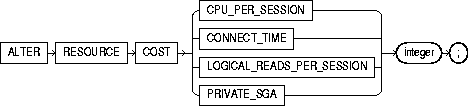
To specify or change the formula by which Oracle calculates the total resource cost used in a session. The weight that you assign to each resource determines how much the use of that resource contributes to the total resource cost. If you do not assign a weight to a resource, the weight defaults to 0 and use of the resource subsequently does not contribute to the cost. The weights you assign apply to all subsequent sessions in the database.
Oracle calculates the total resource cost by first multiplying the amount of each resource used in the session by the resource's weight, and then summing the products for all four resources. For any session, this cost is limited by the value of the COMPOSITE_LIMIT parameter in the user's profile. Both the products and the total cost are expressed in units called service units.
Although Oracle monitors the use of other resources, only the four resources shown in the syntax can contribute to the total resource cost for a session. For information on all resources, see "CREATE PROFILE".
Once you have specified a formula for the total resource cost, you can limit this cost for a session with the COMPOSITE_LIMIT parameter of the CREATE PROFILE statement. If a session's cost exceeds the limit, Oracle aborts the session and returns an error. For information on establishing resource limits, see "CREATE PROFILE". If you use the ALTER RESOURCE COST statement to change the weight assigned to each resource, Oracle uses these new weights to calculate the total resource cost for all current and subsequent sessions.
You must have ALTER RESOURCE COST system privilege.
The following statement assigns weights to the resources CPU_PER_SESSION and CONNECT_TIME:
ALTER RESOURCE COST
   CPU_PER_SESSION 100
   CONNECT_TIME      1;
The weights establish this cost formula for a session:
T = (100 * CPU_PER_SESSION) + (1 * CONNECT_TIME)
where the values of CPU_PER_SESSION and CONNECT_TIME are either values in the DEFAULT profile or in the profile of the user of the session.
Because the above statement assigns no weight to the resources LOGICAL_READS_PER_SESSION and PRIVATE_SGA, these resources do not appear in the formula.
If a user is assigned a profile with a COMPOSITE_LIMIT value of 500, a session exceeds this limit whenever T exceeds 500. For example, a session using 0.04 seconds of CPU time and 101 minutes of elapsed time exceeds the limit. A session 0.0301 seconds of CPU time and 200 minutes of elapsed time also exceeds the limit.
You can subsequently change the weights with another ALTER RESOURCE statement:
ALTER RESOURCE COST
   LOGICAL_READS_PER_SESSION 2
   CONNECT_TIME 0;
These new weights establish a new cost formula:
T = (100 * CPU_PER_SESSION) + (2 * LOGICAL_READ_PER_SECOND)
where the values of CPU_PER_SESSION and LOGICAL_READS_PER_SECOND are either the values in the DEFAULT profile or in the profile of the user of this session.
This ALTER RESOURCE COST statement changes the formula in these ways:
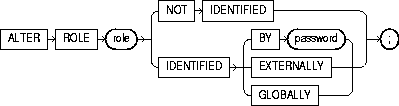
To change the authorization needed to enable a role. For information on creating a role, see "CREATE ROLE". For information on enabling or disabling a role for your session, see "SET ROLE".
You must either have been granted the role with the ADMIN OPTION or have ALTER ANY ROLE system privilege.
Before you alter a role to IDENTIFIED GLOBALLY, you must:
The one exception to this rule is that you should not revoke the role from the user who is currently altering the role.
The keywords and parameters in the ALTER ROLE statement all have the same meaning as in the CREATE ROLE statement. See "CREATE ROLE".
The following statement changes the role ANALYST to IDENTIFIED GLOBALLY:
ALTER ROLE analyst IDENTIFIED GLOBALLY;
This statement changes the password on the TELLER role to LETTER:
ALTER ROLE teller
   IDENTIFIED BY letter;
Users granted the TELLER role must subsequently enter the new password "letter" to enable the role.
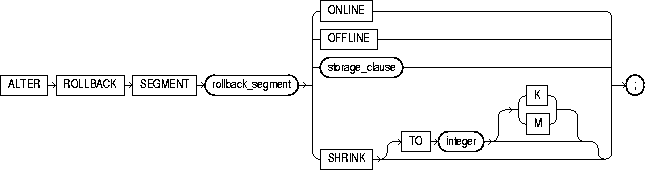
storage_clause: See "storage_clause".
To bring a rollback segment online or offline, to change its storage characteristics, or to shrink it to an optimal or specified size.
For information on creating a rollback segment, see "CREATE ROLLBACK SEGMENT".
You must have ALTER ROLLBACK SEGMENT system privilege.
|
rollback_segment |
specifies the name of an existing rollback segment. |
|
ONLINE |
brings the rollback segment online. When you create a rollback segment, it is initially offline and not available for transactions. This clause brings the rollback segment online, making it available for transactions by your instance. You can also bring a rollback segment online when you start your instance with the initialization parameter ROLLBACK_SEGMENTS. |
|
OFFLINE |
takes the rollback segment offline.
Once the rollback segment is offline, it can be brought online by any instance. |
|
|
To see whether a rollback segment is online or offline, query the data dictionary view DBA_ROLLBACK_SEGS. Online rollback segments have a STATUS value of IN_USE. Offline rollback segments have a STATUS value of AVAILABLE. For more information on making rollback segments available and unavailable, see Oracle8i Administrator's Guide. Restriction: You cannot take the SYSTEM rollback segment offline. |
|
storage_clause |
changes the rollback segment's storage characteristics. See the "storage_clause" for syntax and additional information. Restriction: You cannot change the values of the INITIAL and MINEXTENTS for an existing rollback segment. |
|
SHRINK |
attempts to shrink the rollback segment to an optimal or specified size. The success and amount of shrinkage depend on the available free space in the rollback segment and how active transactions are holding space in the rollback segment. The value of integer is in bytes, unless you specify K or M for kilobytes or megabytes. If you do not specify TO integer, then the size defaults to the OPTIMAL value of the storage_clause of the CREATE ROLLBACK SEGMENT statement that created the rollback segment. If OPTIMAL was not specified, then the size defaults to the MINEXTENTS value of the storage_clause of the CREATE ROLLBACK SEGMENT statement. |
|
|
Regardless of whether you specify TO integer:
To determine the actual size of a rollback segment after attempting to shrink it, query the BYTES, BLOCKS, and EXTENTS columns of the DBA_SEGMENTS view. Restriction: For a parallel server, you can shrink only rollback segments that are online to your instance. |
This statement brings the rollback segment RSONE online:
ALTER ROLLBACK SEGMENT rsone ONLINE;
This statement changes the STORAGE parameters for RSONE:
ALTER ROLLBACK SEGMENT rsone
   STORAGE (NEXT 1000 MAXEXTENTS 20);
This statement attempts to resize a rollback segment to 100 megabytes:
ALTER ROLLBACK SEGMENT rsone
   SHRINK TO 100 M;
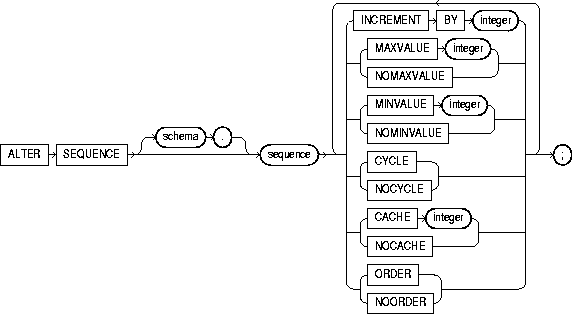
To change the increment, minimum and maximum values, cached numbers, and behavior of an existing sequence. This statement affects only future sequence numbers. For additional information on sequences, see "CREATE SEQUENCE".
The sequence must be in your own schema, or you must have the ALTER object privilege on the sequence, or you must have the ALTER ANY SEQUENCE system privilege.
The keywords and parameters in this statement serve the same purposes described in "CREATE SEQUENCE". In addition:
This statement sets a new maximum value for the ESEQ sequence:
ALTER SEQUENCE eseq
   MAXVALUE 1500;
This statement turns on CYCLE and CACHE for the ESEQ sequence:
ALTER SEQUENCE eseq
   CYCLE
   CACHE 5;
