Release 8.1.5
A67779-01
 Library |
 Product |
 Contents |
 Index |
| Oracle8i SQL Reference Release 8.1.5 A67779-01 |
|


Functions are similar to operators in that they manipulate data items and return a result. Functions differ from operators in the format in which they appear with their arguments. This format allows them to operate on zero, one, two, or more arguments:
function(argument, argument, ...)
This chapter describes two types of functions:
SQL functions are built into Oracle and are available for use in various appropriate SQL statements. Do not confuse SQL functions with user functions written in PL/SQL. User functions are described in "User-Defined Functions". For information about functions used with Oracle interMedia, see Oracle8i interMedia Audio, Image, and Video User's Guide and Reference.
If you call a SQL function with an argument of a datatype other than the datatype expected by the SQL function, Oracle implicitly converts the argument to the expected datatype before performing the SQL function. See "Data Conversion".
If you call a SQL function with a null argument, the SQL function automatically returns null. The only SQL functions that do not follow this rule are CONCAT, DECODE, DUMP, NVL, and REPLACE.
In the syntax diagrams for SQL functions, arguments are indicated by their datatypes, following the conventions described in "Syntax Diagrams and Notation" in the Preface of this reference. When the parameter "function" appears in SQL syntax, replace it with one of the functions described in this section. Functions are grouped by the datatypes of their arguments and their return values. The general syntax is as follows:
function::=
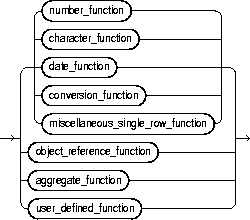
Table 4-1 lists the built-in SQL functions in each of the groups illustrated above except user-defined functions. All of the built-in SQL functions are then described in alphabetical order. User-defined functions are described at the end of this chapter.
| Group | Functions | Description | |
|---|---|---|---|
|
Single-Row Functions |
Single-row functions return a single result row for every row of a queried table or view. Single-row functions can appear in select lists (if the SELECT statement does not contain a GROUP BY clause), WHERE clauses, START WITH clauses, and CONNECT BY clauses. |
||
|
Number functions accept numeric input and return numeric values. Most of these functions return values that are accurate to 38 decimal digits. The transcendental functions COS, COSH, EXP, LN, LOG, SIN, SINH, SQRT, TAN, and TANH are accurate to 36 decimal digits. The transcendental functions ACOS, ASIN, ATAN, and ATAN2 are accurate to 30 decimal digits. |
|||
|
Character functions that return character values, unless otherwise noted, return values with the datatype VARCHAR2 and are limited in length to 4000 bytes. Functions that return values of datatype CHAR are limited in length to 2000 bytes. If the length of the return value exceeds the limit, Oracle truncates it and returns the result without an error message. |
|||
|
All of the functions listed below return number values. |
|||
|
Date functions operate on values of the DATE datatype. All date functions return a value of DATE datatype, except the MONTHS_BETWEEN function, which returns a number. |
|||
|
Conversion functions convert a value from one datatype to another. Generally, the form of the function names follows the convention datatype TO datatype. The first datatype is the input datatype. The second datatype is the output datatype. This section lists the SQL conversion functions. |
|||
|
The following single-row functions do not fall into any of the other single-row function categories. |
|||
|
|
|||
|
Object Reference Functions |
Object functions manipulate REFs, which are references to objects of specified object types. For more information about REFs, see Oracle8i Concepts and Oracle8i Application Developer's Guide - Fundamentals. |
||
|
|
|||
|
Aggregate Functions |
Aggregate functions return a single row based on groups of rows, rather than on single rows. Aggregate functions can appear in select lists and HAVING clauses. If you use the GROUP BY clause in a SELECT statement, Oracle divides the rows of a queried table or view into groups. In a query containing a GROUP BY clause, all elements of the select list must be expressions from the GROUP BY clause, expressions containing aggregate functions, or constants. Oracle applies the aggregate functions in the select list to each group of rows and returns a single result row for each group. If you omit the GROUP BY clause, Oracle applies aggregate functions in the select list to all the rows in the queried table or view. You use aggregate functions in the HAVING clause to eliminate groups from the output based on the results of the aggregate functions, rather than on the values of the individual rows of the queried table or view. For more information on the GROUP BY clause and HAVING clauses, see the "GROUP BY Examples" and the "HAVING" clause. |
||
|
|
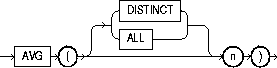
Many aggregate functions accept these options:
For example, the DISTINCT average of 1, 1, 1, and 3 is 2; the ALL average is 1.5. If neither option is specified, the default is ALL. |
||
|
|
All aggregate functions except COUNT(*) and GROUPING ignore nulls. You can use the NVL in the argument to an aggregate function to substitute a value for a null. If a query with an aggregate function returns no rows or only rows with nulls for the argument to the aggregate function, the aggregate function returns null. |
||
|
|
|||
|
Syntax |

|
|
Purpose |
Returns the absolute value of n. |
|
Example |
SELECT ABS(-15) "Absolute" FROM DUAL; Absolute ---------- 15 |
|
Syntax |
|
|
Purpose |
Returns average value of n. See also "Aggregate Functions". |
|
Example |
SELECT AVG(sal) "Average" FROM emp; Average ---------- 2077.21429 |
|
Syntax |

|
|
|
Purpose |
Returns a BFILE locator that is associated with a physical LOB binary file on the server's file system. A directory is an alias for a full pathname on the server's file system where the files are actually located, and 'filename' is the name of the file in the server's file system. Neither 'directory' nor 'filename' needs to point to an existing object on the file system at the time you specify BFILENAME. However, you must associate a BFILE value with a physical file before performing subsequent SQL, PL/SQL, DBMS_LOB package, or OCI operations. For more information, see "CREATE DIRECTORY". For more information about LOBs, see Oracle8i Application Developer's Guide - Large Objects (LOBs) and Oracle Call Interface Programmer's Guide. |
|
|
Example |
INSERT INTO file_tbl VALUES (BFILENAME ('lob_dir1', 'image1.gif')); |
|
|
Syntax |

|
|
Purpose |
Returns smallest integer greater than or equal to n. |
|
Example |
SELECT CEIL(15.7) "Ceiling" FROM DUAL; Ceiling ---------- 16 |
|
Syntax |

|
|
Purpose |
Converts a value from CHAR or VARCHAR2 datatype to ROWID datatype. |
|
Example |
SELECT ename FROM emp WHERE ROWID = CHARTOROWID('AAAAfZAABAAACp8AAO'); ENAME ---------- LEWIS |
|
Syntax |

|
|
Purpose |
Returns char1 concatenated with char2. This function is equivalent to the concatenation operator (||). For information on this operator, see "Concatenation Operator". |
|
Example |
This example uses nesting to concatenate three character strings: SELECT CONCAT(CONCAT(ename, ' is a '), job) "Job" FROM emp WHERE empno = 7900; Job ----------------- JAMES is a CLERK |
|
Syntax |

|
|
Purpose |
Returns the cosine of n (an angle expressed in radians). |
|
Example |
SELECT COS(180 * 3.14159265359/180) "Cosine of 180 degrees" FROM DUAL; Cosine of 180 degrees --------------------- -1 |
|
Syntax |

|
|
Purpose |
Returns the hyperbolic cosine of n. |
|
Example |
SELECT COSH(0) "Hyperbolic cosine of 0" FROM DUAL; Hyperbolic cosine of 0 ---------------------- 1 |
|
Syntax |
|
|
Purpose |
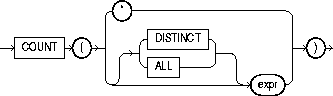
Returns the number of rows in the query. If you specify expr, this function returns rows where expr is not null. You can count either all rows, or only distinct values of expr. If you specify the asterisk (*), this function returns all rows, including duplicates and nulls. See also "Aggregate Functions". |
|
Example 1 |
SELECT COUNT(*) "Total" FROM emp; Total ---------- 18 |
|
Example 2 |
SELECT COUNT(job) "Count" FROM emp; Count ---------- 14 |
|
Example 3 |
SELECT COUNT(DISTINCT job) "Jobs" FROM emp; Jobs ---------- 5 |
|
Syntax
|
||
|
Purpose |
Returns a VARCHAR2 value containing the datatype code, length in bytes, and internal representation of expr. The returned result is always in the database character set. For the datatype corresponding to each code, see Table 2-1. The argument return_fmt specifies the format of the return value and can have any of the values listed below. |
|
|
|
By default, the return value contains no character set information. To retrieve the character set name of expr, specify any of the format values below, plus 1000. For example, a return_fmt of 1008 returns the result in octal, plus provides the character set name of expr. |
|
|
|
8 |
returns result in octal notation. |
|
|
10 |
returns result in decimal notation. |
|
|
16 |
returns result in hexadecimal notation. |
|
|
17 |
returns result as single characters. |
|
|
The arguments start_position and length combine to determine which portion of the internal representation to return. The default is to return the entire internal representation in decimal notation. If expr is null, this function returns 'NULL'. |
|
|
Example 1 |
SELECT DUMP('abc', 1016) FROM DUAL; DUMP('ABC',1016) ------------------------------------------ Typ=96 Len=3 CharacterSet=WE8DEC: 61,62,63 |
|
|
Example 2 |
SELECT DUMP(ename, 8, 3, 2) "OCTAL" FROM emp WHERE ename = 'SCOTT'; OCTAL ---------------------------- Type=1 Len=5: 117,124 |
|
|
Example 3 |
SELECT DUMP(ename, 10, 3, 2) "ASCII" FROM emp WHERE ename = 'SCOTT'; ASCII ---------------------------- Type=1 Len=5: 79,84 |
|
|
Syntax |

|
|
Purpose |
Returns e raised to the nth power, where e = 2.71828183 ... |
|
Example |
SELECT EXP(4) "e to the 4th power" FROM DUAL; e to the 4th power ------------------ 54.59815 |
|
Syntax |

|
|
Purpose |
Returns largest integer equal to or less than n. |
|
Example |
SELECT FLOOR(15.7) "Floor" FROM DUAL; Floor ---------- 15 |
|
Syntax |

|
|
Purpose |
Converts char containing hexadecimal digits to a raw value. |
|
Example |
INSERT INTO graphics (raw_column) SELECT HEXTORAW('7D') FROM DUAL; |
|
Syntax |

|
|
Purpose |
Returns the natural logarithm of n, where n is greater than 0. |
|
Example |
SELECT LN(95) "Natural log of 95" FROM DUAL; Natural log of 95 ----------------- 4.55387689 |
|
Syntax |
|
|
Purpose |
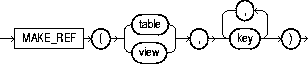
Creates a REF to a row of an object view or a row in an object table whose object identifier is primary key based. For more information about object views, see Oracle8i Application Developer's Guide - Fundamentals. |
|
Example |
CREATE TABLE emp (eno NUMBER, ename VARCHAR2(20), salary NUMBER, PRIMARY KEY (eno, ename)); CREATE TYPE emp_type AS OBJECT (eno NUMBER, ename CHAR(20), salary NUMBER); CREATE VIEW emp_view OF emp_type WITH OBJECT IDENTIFIER (eno, ename) AS SELECT * FROM emp; SELECT MAKE_REF(emp_view, 1, 'jack') FROM DUAL; MAKE_REF(EMP_VIEW,1,'JACK') ------------------------------------------------------ 000067030A0063420D06E06F3C00C1E03400400B40DCB10000001C2 60100010002002900000000000F0600810100140100002A0007000A 8401FE0000001F02C102146A61636B2020202020202020202020202 02020200000000000000000000000000000000000000000 |
|
Syntax |
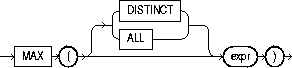
|
|
Purpose |
Returns maximum value of expr. See also "Aggregate Functions". |
|
Example |
SELECT MAX(sal) "Maximum" FROM emp; Maximum ---------- 5000 |
|
Syntax |
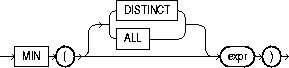
|
|
Purpose |
Returns minimum value of expr. See also "Aggregate Functions". |
|
Example |
SELECT MIN(hiredate) "Earliest" FROM emp; Earliest --------- 17-DEC-80 |
|
Syntax |

|
|
Purpose |
Returns the NLS character set ID number corresponding to NLS character set name, text. The text argument is a run-time VARCHAR2 value. The text value 'CHAR_CS' returns the server's database character set ID number. The text value 'NCHAR_CS' returns the server's national character set ID number. Invalid character set names return null. For a list of character set names, see Oracle8i Reference. |
|
Example I |
SELECT NLS_CHARSET_ID('ja16euc') FROM DUAL; NLS_CHARSET_ID('JA16EUC') ------------------------- 830 |
|
Example 2 |
SELECT NLS_CHARSET_ID('char_cs') FROM DUAL; NLS_CHARSET_ID('CHAR_CS') ------------------------- 2 |
|
Example 3 |
SELECT NLS_CHARSET_ID('nchar_cs') FROM DUAL; NLS_CHARSET_ID('NCHAR_CS') -------------------------- 2 |
|
Syntax |

|
|
Purpose |
Returns the name of the NLS character set corresponding to ID number n. The character set name is returned as a VARCHAR2 value in the database character set. If n is not recognized as a valid character set ID, this function returns null. For a list of character set IDs, see Oracle8i Reference. |
|
Example |
SELECT NLS_CHARSET_NAME(2) FROM DUAL; NLS_CH ------ WE8DEC |
|
Syntax |

|
|
Purpose |
Returns char, with the first letter of each word in uppercase, all other letters in lowercase. Words are delimited by white space or characters that are not alphanumeric. The value of 'nlsparam' can have this form: 'NLS_SORT = sort' where sort is either a linguistic sort sequence or BINARY. The linguistic sort sequence handles special linguistic requirements for case conversions. Note that these requirements can result in a return value of a different length than the char. If you omit 'nlsparam', this function uses the default sort sequence for your session. For information on sort sequences, see Oracle8i Reference. |
|
Example |
SELECT NLS_INITCAP
   ('ijsland', 'NLS_SORT = XDutch') "Capitalized"
   FROM DUAL;

Capital
-------
|
|
Syntax |

|
|
Purpose |
Returns the string of bytes used to sort char. The value of 'nlsparams' can have the form where sort is a linguistic sort sequence or BINARY. If you omit 'nlsparams', this function uses the default sort sequence for your session. If you specify BINARY, this function returns char. For information on sort sequences, see Oracle8i National Language Support Guide. |
|
Example |
This function can be used to specify comparisons based on a linguistic sort sequence rather on the binary value of a string: SELECT ename FROM emp WHERE NLSSORT (ename, 'NLS_SORT = German') > NLSSORT ('S', 'NLS_SORT = German') ORDER BY ename; ENAME ---------- SCOTT SMITH TURNER WARD |
|
Syntax |

|
|
Purpose |
Converts raw to a character value containing its hexadecimal equivalent. |
|
Example |
SELECT RAWTOHEX(raw_column) "Graphics" FROM graphics; Graphics -------- 7D |
|
Syntax |

|
|
Purpose |
In a SQL statement, REF takes as its argument a correlation variable (table alias) associated with a row of an object table or an object view. A REF value is returned for the object instance that is bound to the variable or row. For more information about REFs, see Oracle8i Concepts. |
|
Examples |
CREATE TYPE emp_type AS OBJECT (eno NUMBER, ename VARCHAR2(20), salary NUMBER); CREATE TABLE emp_table OF emp_type (primary key (eno, ename)); INSERT INTO emp_table VALUES (10, 'jack', 50000); SELECT REF(e) FROM emp_table e; REF(E) ----------------------------------------------------- 0000280209420D2FEABD9400C3E03400400B40DCB1420D2FEABD930 0C3E03400400B40DCB1004049EE0000 |
|
Syntax |

|
|
Purpose |
Returns d rounded to the unit specified by the format model fmt. If you omit fmt, d is rounded to the nearest day. See "ROUND and TRUNC Date Functions" for the permitted format models to use in fmt. |
|
Example |
SELECT ROUND (TO_DATE ('27-OCT-92'),'YEAR')
   "New Year" FROM DUAL;

New Year
---------
01-JAN-93 |
|
Syntax |

|
|
Purpose |
Returns char, with all the rightmost characters that appear in set removed; set defaults to a single blank. If char is a character literal, you must enclose it in single quotes. RTRIM works similarly to LTRIM. See "LTRIM". |
|
Example |
SELECT RTRIM('BROWNINGyxXxy','xy') "RTRIM e.g." FROM DUAL; RTRIM e.g ------------- BROWNINGyxX |
|
Syntax |

|
|
Purpose |
If n<0, the function returns -1. If n=0, the function returns 0. If n>0, the function returns 1. |
|
Example |
SELECT SIGN(-15) "Sign" FROM DUAL; Sign ---------- -1 |
|
Syntax |

|
|
Purpose |
Returns the sine of n (an angle expressed in radians). |
|
Example |
SELECT SIN(30 * 3.14159265359/180) "Sine of 30 degrees" FROM DUAL; Sine of 30 degrees ------------------ .5 |
|
Syntax |

|
|
Purpose |
Returns the hyperbolic sine of n. |
|
Example |
SELECT SINH(1) "Hyperbolic sine of 1" FROM DUAL; Hyperbolic sine of 1 -------------------- 1.17520119 |
|
Syntax |

|
|
Purpose |
Returns square root of n. The value n cannot be negative. SQRT returns a "real" result. |
|
Example |
SELECT SQRT(26) "Square root" FROM DUAL; Square root ----------- 5.09901951 |
|
Syntax |
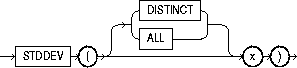
|
|
Purpose |
Returns standard deviation of x, a number. Oracle calculates the standard deviation as the square root of the variance defined for the VARIANCE aggregate function. See also "Aggregate Functions". |
|
Example |
SELECT STDDEV(sal) "Deviation" FROM emp; Deviation ---------- 1182.50322 |
|
Syntax |
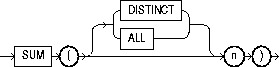
|
|
Purpose |
Returns sum of values of n. See also "Aggregate Functions". |
|
Example |
SELECT SUM(sal) "Total" FROM emp; Total ---------- 29081 |
|
Syntax |

|
|
|
Purpose |
Returns the value of attribute_name as defined in the package currently associated with the context namespace. See "CREATE CONTEXT". The argument attribute_name can have any of the following predefined values: |
|
|
|
|
returns the territory |
|
|
|
returns the currency symbol |
|
|
|
returns the NLS calendar used for dates |
|
|
|
returns the current date format |
|
|
|
returns the language used for days of the week, months, and so forth, in dates |
|
|
|
indicates whether the sort base is binary or linguistic |
|
|
|
returns the name of the user who logged on |
|
|
|
returns the current session user name, which may be different from SESSION_USER from within a stored procedure (such as an invoker-rights procedure). |
|
|
|
returns the current schema name, which may be changed with an ALTER SESSION SET SCHEMA statement. |
|
|
|
returns the current schema ID |
|
|
|
returns the logged on user ID |
|
|
|
returns the current session user ID |
|
|
You can also specify |
|
|
Example |
The following example returns the group number specified as the value for the attribute GROUP_NO in the PL/SQL package that was associated with the context ABC when ABC was created: SELECT SYS_CONTEXT ('abc', 'group_no') "User Group" FROM DUAL; User Group ---------- Sales |
|
|
Syntax |

|
|
Purpose |
Returns the hyperbolic tangent of n. |
|
Example |
SELECT TANH(.5) "Hyperbolic tangent of .5" FROM DUAL; Hyperbolic tangent of .5 ------------------------ .462117157 |
|
Syntax |

|
|
Purpose |
Converts d of DATE datatype to a value of VARCHAR2 datatype in the format specified by the date format fmt. If you omit fmt, d is converted to a VARCHAR2 value in the default date format. For information on date formats, see "Format Models". |
|
|
The 'nlsparams' specifies the language in which month and day names and abbreviations are returned. This argument can have this form:
If you omit nlsparams, this function uses the default date language for your session. |
|
Example |
SELECT TO_CHAR(HIREDATE, 'Month DD, YYYY') "New date format" FROM emp WHERE ename = 'BLAKE'; New date format ------------------ May 01, 1981 |
|
Syntax |

|
|
|
Converts n of NUMBER datatype to a value of VARCHAR2 datatype, using the optional number format fmt. If you omit fmt, n is converted to a VARCHAR2 value exactly long enough to hold its significant digits. For information on number formats, see "Format Models". |
|
The 'nlsparams' specifies these characters that are returned by number format elements: This argument can have this form: 'NLS_NUMERIC_CHARACTERS = ''dg'' NLS_CURRENCY = ''text'' NLS_ISO_CURRENCY = territory ' |
|
|
|
The characters d and g represent the decimal character and group separator, respectively. They must be different single-byte characters. Note that within the quoted string, you must use two single quotation marks around the parameter values. Ten characters are available for the currency symbol. |
|
|
If you omit 'nlsparams' or any one of the parameters, this function uses the default parameter values for your session. |
|
Example 1 |
In this example, the output is blank padded to the left of the currency symbol. SELECT TO_CHAR(-10000,'L99G999D99MI') "Amount" FROM DUAL; Amount -------------- $10,000.00- |
Example 2 |
SELECT TO_CHAR(-10000,'L99G999D99MI', 'NLS_NUMERIC_CHARACTERS = '',.'' NLS_CURRENCY = ''AusDollars'' ') "Amount" FROM DUAL; Amount ------------------- AusDollars10.000,00- |
|
Note: In the optional number format fmt, L designates local currency symbol and MI designates a trailing minus sign. See Table 2-7 for a complete listing of number format elements. |
|
|
Syntax |

|
|
Purpose |
Converts char of CHAR or VARCHAR2 datatype to a value of DATE datatype. The fmt is a date format specifying the format of char. If you omit fmt, char must be in the default date format. If fmt is 'J', for Julian, then char must be an integer. For information on date formats, see "Format Models". The 'nlsparams' has the same purpose in this function as in the TO_CHAR function for date conversion. Do not use the TO_DATE function with a DATE value for the char argument. The returned DATE value can have a different century value than the original char, depending on fmt or the default date format. For information on date formats, see "Date Format Models". |
|
Example |
INSERT INTO bonus (bonus_date) SELECT TO_DATE( 'January 15, 1989, 11:00 A.M.', 'Month dd, YYYY, HH:MI A.M.', 'NLS_DATE_LANGUAGE = American') FROM DUAL; |
|
Syntax |

|
|
Purpose |
Converts LONG or LONG RAW values in the column long_column to LOB values. You can apply this function only to a LONG or LONG RAW column, and only in the SELECT list of a subquery in an INSERT statement (see "INSERT"). Before using this function, you must create a LOB column to receive the converted LONG values. To convert LONGs, the LOB column must be of type CLOB or NCLOB. To convert LONG RAWs, the LOB column must be of type BLOB. |
|
Example |
Given the following tables: CREATE TABLE long_table (n NUMBER, long_col LONG); CREATE TABLE lob_table (n NUMBER, lob_col CLOB); use this function to convert LONG to LOB values as follows: INSERT INTO lob_table SELECT n, TO_LOB(long_col) FROM long_table; |
|
Syntax |

|
|
Purpose |
Converts char, a value of CHAR or VARCHAR2 datatype containing a number in the format specified by the optional format model fmt, to a value of NUMBER datatype. |
|
Example 1 |
UPDATE emp SET sal = sal + TO_NUMBER('100.00', '9G999D99') WHERE ename = 'BLAKE'; |
|
|
The 'nlsparams' string in this function has the same purpose as it does in the TO_CHAR function for number conversions. See also "TO_CHAR (number conversion)". |
|
Example 2 |
SELECT TO_NUMBER('-AusDollars100','L9G999D99', ' NLS_NUMERIC_CHARACTERS = '',.'' NLS_CURRENCY = ''AusDollars'' ') "Amount" FROM DUAL; Amount ---------- -100 |
|
Syntax |

|
|
Purpose |
Returns d with the time portion of the day truncated to the unit specified by the format model fmt. If you omit fmt, d is truncated to the nearest day. See "ROUND and TRUNC Date Functions" for the permitted format models to use in fmt. |
|
Example |
SELECT TRUNC(TO_DATE('27-OCT-92','DD-MON-YY'), 'YEAR') "New Year" FROM DUAL; New Year --------- 01-JAN-92 |
|
Syntax |

|
|
Purpose |
Returns an integer that uniquely identifies the current user. |
|
Syntax |

|
|
Purpose |
Returns char, with all letters uppercase. The return value has the same datatype as the argument char. |
|
Example |
SELECT UPPER('Large') "Uppercase" FROM DUAL; Upper ----- LARGE |
|
Syntax |

|
|
|
Purpose |
Returns information of VARCHAR2 datatype about the current session. This information can be useful for writing an application-specific audit trail table or for determining the language-specific characters currently used by your session. You cannot use USERENV in the condition of a CHECK constraint. The argument option can have any of these values: |
|
|
|
'ISDBA' |
returns 'TRUE' if you currently have the ISDBA role enabled and 'FALSE' if you do not. |
|
|
'LANGUAGE' |
returns the language and territory currently used by your session along with the database character set in this form: language_territory.characterset |
|
|
'TERMINAL' |
returns the operating system identifier for your current session's terminal. In distributed SQL statements, this option returns the identifier for your local session. In a distributed environment, this is supported only for remote SELECTs, not for remote INSERTs, UPDATEs, or DELETEs. |
|
|
'SESSIONID' |
returns your auditing session identifier. You cannot use this option in distributed SQL statements. |
|
|
'ENTRYID' |
returns available auditing entry identifier. You cannot use this option in distributed SQL statements. To use this keyword in USERENV, the initialization parameter AUDIT_TRAIL must be set to TRUE. |
|
|
'LANG' |
Returns the ISO abbreviation for the language name, a shorter form than the existing 'LANGUAGE' parameter. |
|
|
'INSTANCE' |
Returns the instance identification number of the current instance. |
|
|
'CLIENT_INFO' |
returns up to 64 bytes of user session information that can be stored by an application using the DBMS_APPLICATION_INFO package. |
|
|
|
CAUTION: Some commercial applications may be using this context value. Check the applicable documentation for those applications to determine what restrictions they may impose on use of this context area. |
|
|
|
Oracle recommends that you use the application context feature or the SYS_CONTEXT function with the USERENV option. These alternatives are more secure and flexible. For information on application context, see Oracle8i Concepts. See also "CREATE CONTEXT" and "SYS_CONTEXT". |
|
Example |
SELECT USERENV('LANGUAGE') "Language" FROM DUAL; Language ----------------------------------- AMERICAN_AMERICA.WE8DEC |
|
|
Syntax |
|
|
|
Purpose |
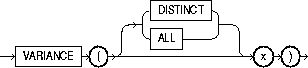
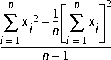
Returns variance of x, a number. Oracle calculates the variance of x using this formula: |
|
|
|
|
|
|
|
xi is one of the elements of x. n is the number of elements in the set x. If n is 1, the variance is defined to be 0. See also "Aggregate Functions". |
|
|
Example |
SELECT VARIANCE(sal) "Variance" FROM emp; Variance ---------- 1389313.87 |
|
Table 4-2 lists the format models you can use with the ROUND and TRUNC date functions and the units to which they round and truncate dates. The default model, 'DD', returns the date rounded or truncated to the day with a time of midnight.
The starting day of the week used by the format models DAY, DY, and D is specified implicitly by the initialization parameter NLS_TERRITORY. For information on this parameter, see Oracle8i Reference.
You can write user functions in PL/SQL or Java to provide functionality that is not available in SQL or SQL functions. User functions can appear in a SQL statement anywhere SQL functions can appear, that is, wherever an expression can occur.
For example, user functions can be used in the following:
For information on creating functions, including restrictions on user-defined functions, see "CREATE FUNCTION". For a complete description on the creation and use of user functions, see Oracle8i Application Developer's Guide - Fundamentals.
User functions must be created as top-level functions or declared with a package specification before they can be named within a SQL statement. Create user functions as top-level functions by using the CREATE FUNCTION statement described in "CREATE FUNCTION". To specify packaged functions, see "CREATE PACKAGE".
To use a user function in a SQL expression, you must own or have EXECUTE privilege on the user function. To query a view defined with a user function, you must have SELECT privileges on the view. No separate EXECUTE privileges are needed to select from the view.
Within a SQL statement, the names of database columns take precedence over the names of functions with no parameters. For example, if user SCOTT creates the following two objects in his own schema:
CREATE TABLE emp(new_sal NUMBER, ...);
CREATE FUNCTION new_sal RETURN NUMBER IS BEGIN ... END;
then in the following two statements, the reference to NEW_SAL refers to the column EMP.NEW_SAL:
SELECT new_sal FROM emp;
SELECT emp.new_sal FROM emp;
To access the function NEW_SAL, you would enter:
SELECT scott.new_sal FROM emp;
Here are some sample calls to user functions that are allowed in SQL expressions.
circle_area (radius)
payroll.tax_rate (empno)
scott.payroll.tax_rate (dependent, empno)@ny
For example, to call the TAX_RATE user function from schema SCOTT, execute it against the SS_NO and SAL columns in TAX_TABLE, and place the results in the variable INCOME_TAX, specify the following:
SELECT scott.tax_rate (ss_no, sal)
    INTO income_tax
    FROM tax_table
    WHERE ss_no = tax_id;
If only one of the optional schema or package names is given, the first identifier can be either a schema name or a package name. For example, to determine whether PAYROLL in the reference PAYROLL.TAX_RATE is a schema or package name, Oracle proceeds as follows:
You can also refer to a stored top-level function using any synonym that you have defined for it.