Release 8.1.5
A68023-01
 Library |
 Product |
 Contents |
 Index |
| Pro*COBOL Precompiler Programmer's Guide Release 8.1.5 A68023-01 |
|


This appendix contains descriptions of both SQL92 embedded SQL statements and directives as well as the Oracle8i embedded SQL extensions. These statements and directives are prefaced in your source code with the keywords, EXEC SQL.
Note: Only statements which differ in syntax from non-embedded SQL are described in this appendix. For details of the non-embedded SQL statements, see the Oracle8i SQL Reference.
This appendix contains the following sections:
Embedded SQL statements place DDL, DML, and Transaction Control statements within a procedural language program. Embedded SQL is supported by the Oracle Precompilers. Table F-1 provides a functional summary of the embedded SQL statements and directives.
The type column in Table F-1 is displayed in the format, source/type, where:
| source | Is either SQL92 standard SQL (S) or an Oracle extension (O). |
| type | Is either an executable (E) statement or a directive (D). |
The directives, and statements appear alphabetically. The description of each contains the following sections:
Syntax diagrams are used to illustrate embedded SQL syntax. They are drawings that depict valid syntax.
Trace each diagram from left to right, in the direction shown by the arrows.
Statements keywords appear in UPPER CASE inside rectangles. Type them exactly as shown in the rectangles. Parameters appear in lower case inside ovals. Variables are used for the parameters. Operators, delimiters, and terminators appear inside circles.
If the syntax diagram has more than one path, you can choose any path to travel.
If you have the choice of more than one keyword, operator, or parameter, your options appear in a vertical list. In the following example, you can travel down the vertical line as far as you like, then continue along any horizontal line:
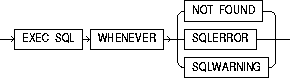
According to the diagram, all of the following statements are valid:
EXEC SQL WHENEVER NOT FOUND ...
EXEC SQL WHENEVER SQLERROR ...
EXEC SQL WHENEVER SQLWARNING ...
In all Pro*COBOL EXEC SQL diagrams, each statement is understood to end with the token END-EXEC.
Required keywords and parameters can appear singly or in a vertical list of alternatives. Single required keywords and parameters appear on the main path, that is, on the horizontal line you are currently traveling. In the following example, cursor is a required parameter:

If there is a cursor named EMPCURSOR, then, according to the diagram, the following statement is valid:
EXEC SQL CLOSE EMPCURSOR END-EXEC.
If any of the keywords or parameters in a vertical list appears on the main path, one of them is required. That is, you must choose one of the keywords or parameters, but not necessarily the one that appears on the main path. In the following example, you must choose one of the four actions:
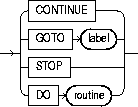
If keywords and parameters appear in a vertical list above the main path, they are optional. In the following example, instead of traveling down a vertical line, you can continue along the main path:

If there is a database named oracle2, then, according to the diagram, all of the following statements are valid:
     EXEC SQL ROLLBACK END-EXEC.
     EXEC SQL ROLLBACK WORK END-EXEC.
     EXEC SQL AT ORACLE2 ROLLBACK END-EXEC.
Loops let you repeat the syntax within them as many times as you like. In the following example, column_name is inside a loop. So, after choosing one column name, you can go back repeatedly to choose another.

If DEBIT, CREDIT, and BALANCE are column names, then, according to the diagram, all of the following statements are valid:
EXEC SQL SELECT DEBIT INTO ...
EXEC SQL SELECT CREDIT, BALANCE INTO ...
EXEC SQL SELECT DEBIT, CREDIT, BALANCE INTO ...
Read a multi-part diagram as if all the main paths were joined end-to-end. The following example is a two-part diagram:
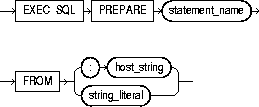
According to the diagram, the following statement is valid:
EXEC SQL PREPARE statement_name FROM :host_string END-EXEC.
The names of Oracle identifiers, such as tables and columns, must not exceed 30 characters in length. The first character must be a letter, but the rest can be any combination of letters, numerals, dollar signs ($), pound signs (#), and underscores (_).
However, if an Oracle identifier is enclosed by quotation marks ("), it can contain any combination of legal characters, including spaces but excluding quotation marks.
Oracle identifiers are not case-sensitive except when enclosed by quotation marks.
To allocate a cursor variable to be referenced in a PL/SQL block.
A cursor variable (see Chapter 6, "Embedded PL/SQL") of type SQL-CURSOR must be declared before allocating memory for the cursor variable.

Whereas a cursor is static, a cursor variable is dynamic because it is not tied to a specific query. You can open a cursor variable for any type-compatible query.
For more information on this statement, see PL/SQL User's Guide and Reference and Oracle8i SQL Reference.
This partial example illustrates the use of the ALLOCATE statement:
       ...
 01  EMP-CUR       SQL-CURSOR.
 01  EMP-REC.
     ...
     EXEC SQL ALLOCATE :EMP-CUR END-EXEC.
     ...
CLOSE (Executable Embedded SQL).
EXECUTE (Executable Embedded SQL).
FETCH (Executable Embedded SQL).
FREE (Executable Embedded SQL Extension).
An ANSI dynamic SQL statement that allocates a descriptor.
None.
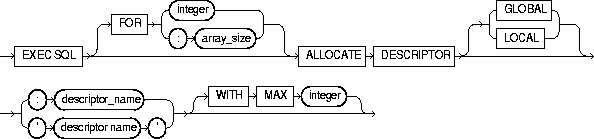
Use DYNAMIC=ANSI precompiler option. For information on using this statement, see "ALLOCATE DESCRIPTOR".
     EXEC SQL
       FOR :batch ALLOCATE DESCRIPTOR GLOBAL :binddes WITH MAX 25
     END-EXEC.
DESCRIBE DESCRIPTOR (Executable Embedded SQL).
GET DESCRIPTOR (Executable Embedded SQL).
SET DESCRIPTOR (Executable Embedded SQL).
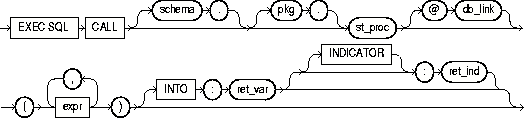
To call a stored procedure.
An active database connection must exist.
|
schema |
Is the schema containing the procedure. If you omit schema, Oracle8i assumes the procedure is in your own schema. |
|
pkg |
The package where the procedure is stored. |
|
st_proc |
The stored procedure to be called. |
|
db_link |
The complete or partial name of a database link to a remote database where the procedure is located. For information on referring to database links, see the Oracle8 SQL Reference. |
|
expr |
The list of expressions that are the parameters of the procedure. |
|
ret_var |
The host variable that receives the returned value of a function. |
|
ret_ind |
The indicator variable for ret_var. |
For more about this statement, see Calling a Stored PL/SQL or Java Subprogram.
For a complete discussion of stored procedures, see Oracle8i Application Developer's Guide - Fundamentals, "External Routines" chapter.
 ...
     05  EMP-NAME      PIC X(10) VARYING.
     05  EMP-NUMBER    PIC S9(4) COMP VALUE ZERO.
     05  SALARY        PIC S9(5)V99 COMP-3 VALUE ZERO.
...
      05  D-EMP-NUMBER  PIC 9(4).
...
      ACCEPT D-EMP-NUMBER.
      EXEC SQL
        CALL mypkge.getsal(:EMP-NUMBER, :D-EMP-NUMBER, :EMP-NAME) INTO :SALARY
      END-EXEC.
...
None
To disable a cursor, freeing the resources acquired by opening the cursor, and releasing parse locks.
The cursor or cursor variable must be open and MODE=ANSI.

|
cursor |
The cursor to be closed. |
|
cusor_variable |
The cursor variable to be closed. |
Rows cannot be fetched from a closed cursor. A cursor need not be closed to be reopened. The HOLD_CURSOR and RELEASE_CURSOR precompiler options alter the effect of the CLOSE statement. For information on these options, see Chapter 14, "Precompiler Options".
This example illustrates the use of the CLOSE statement:
EXEC SQL CLOSE EMP-CUR END-EXEC.
DECLARE CURSOR (Embedded SQL Directive).
OPEN (Executable Embedded SQL).
PREPARE (Executable Embedded SQL).
To end your current transaction, making permanent all its changes to the database and optionally freeing all resources and disconnecting from the database server.
To commit your current transaction, no privileges are necessary.
To manually commit a distributed in-doubt transaction that you originally committed, you must have FORCE TRANSACTION system privilege. To manually commit a distributed in-doubt transaction that was originally committed by another user, you must have FORCE ANY TRANSACTION system privilege.
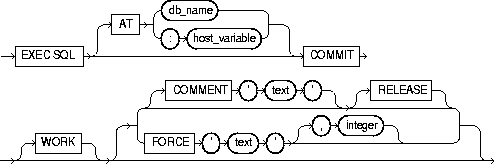
Always explicitly commit or rollback the last transaction in your program by using the COMMIT or ROLLBACK statement and the RELEASE option. Oracle8i automatically rolls back changes if the program terminates abnormally.
The COMMIT statement has no effect on host variables or on the flow of control in the program. For more information on this statement, see "Using the COMMIT Statement".
This example illustrates the use of the embedded SQL COMMIT statement:
EXEC SQL AT SALESDB COMMIT RELEASE END-EXEC.
ROLLBACK (Executable Embedded SQL).
SAVEPOINT (Executable Embedded SQL).
To logon to an Oracle8i database.
You must have CREATE SESSION system privilege in the specified database.
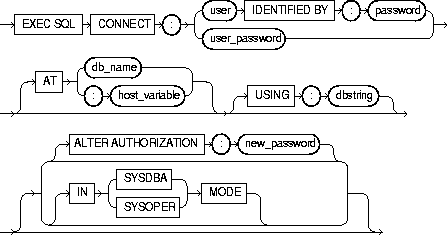
A program can have multiple connections, but can only connect once to your default database. For more information on this statement, see "Advanced Connection Options".
The following example illustrate the use of CONNECT:
     EXEC SQL CONNECT :USERNAME
          IDENTIFIED BY :PASSWORD
     END-EXEC.
You can also use this statement in which the value of :userid is the value of :username and :password separated by a "/" such as 'SCOTT/TIGER':
EXEC SQL CONNECT :USERID END-EXEC.
COMMIT (Executable Embedded SQL).
DECLARE DATABASE (Oracle Embedded SQL Directive).
ROLLBACK (Executable Embedded SQL).
To initialize a SQLLIB runtime context that is referenced in an EXEC SQL CONTEXT USE statement.
The runtime context must be declared of type SQL-CONTEXT.

|
context |
The SQLLIB runtime context for which memory is to be allocated. |
For more information on this statement, see "User-Specified Runtime Contexts".
This example illustrates the use of a CONTEXT ALLOCATE statement in a Pro*C/C++ embedded SQL program:
EXEC SQL CONTEXT ALLOCATE :ctx1 END-EXEC.
CONTEXT FREE (Executable Embedded SQL Extension).
CONTEXT USE (Oracle Embedded SQL Directive).
To free all memory associated with a runtime context and place a null pointer in the host program variable.
The CONTEXT ALLOCATE statement must be used to allocate memory for the specified runtime context before the CONTEXT FREE statement can free the memory allocated for it.

|
context |
The allocated runtime context for which the memory is to be deallocated. |
For more information on this statement, see "User-Specified Runtime Contexts".
This example illustrates the use of a CONTEXT FREE statement in a Pro*C/C++ embedded SQL program:
EXEC SQL CONTEXT FREE :ctx1 END-EXEC.
CONTEXT ALLOCATE (Executable Embedded SQL Extension).
CONTEXT USE (Oracle Embedded SQL Directive).
To instruct the precompiler to use the specified SQLLIB runtime context on subsequent executable SQL statementsPrerequisites
The runtime context specified by the CONTEXT USE directive must be previously declared.

This statement has no effect on declarative statements such as EXEC SQL INCLUDE or EXEC ORACLE OPTION. It works similarly to the EXEC SQL WHENEVER directive in that it affects all executable SQL statements which positionally follow it in a given source file without regard to standard C scope rules.
For more information on this statement, see "User-Specified Runtime Contexts".
This example illustrates the use of a CONTEXT USE directive in a Pro*C/C++ program:
EXEC SQL CONTEXT USE :ctx1 END-EXEC.
CONTEXT ALLOCATE (Executable Embedded SQL Extension).
CONTEXT FREE (Executable Embedded SQL Extension).
An ANSI dynamic SQL statement that deallocates a descriptor area to free memory.
The descriptor specified by the DEALLOCATE DESCRIPTOR statement must be previously allocated using the ALLOCATE DESCRIPTOR statement.

Use DYNAMIC=ANSI precompiler option.
For more information on this statement, see "DEALLOCATE DESCRIPTOR".
EXEC SQL DEALLOCATE DESCRIPTOR GLOBAL 'SELDES' END-EXEC.
ALLOCATE DESCRIPTOR (Executable Embedded SQL).
DESCRIBE DESCRIPTOR (Executable Embedded SQL).
GET DESCRIPTOR (Executable Embedded SQL).
PREPARE (Executable Embedded SQL).
SET DESCRIPTOR (Executable Embedded SQL).
To declare a cursor, giving it a name and associating it with a SQL statement or a PL/SQL block.
If you associate the cursor with an identifier for a SQL statement or PL/SQL block, you must have declared this identifier in a previous DECLARE STATEMENT statement.
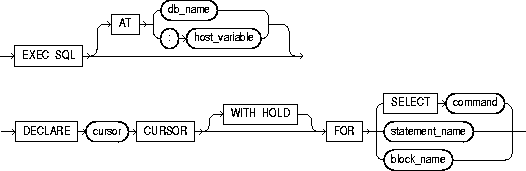
You must declare a cursor before referencing it in other embedded SQL statements. The scope of a cursor declaration is global within its precompilation unit and the name of each cursor must be unique in its scope. You cannot declare two cursors with the same name in a single precompilation unit.
You can reference the cursor in the WHERE clause of an UPDATE or DELETE statement using the CURRENT OF syntax, provided that the cursor has been opened with an OPEN statement and positioned on a row with a FETCH statement. For more information on this statement, see "WITH HOLD Clause in DECLARE CURSOR Statements".
This example illustrates the use of a DECLARE CURSOR statement:
     EXEC SQL DECLARE EMPCURSOR CURSOR
         FOR SELECT ENAME, EMPNO, JOB, SAL
         FROM EMP
         WHERE DEPTNO = :DEPTNO
         FOR UPDATE OF SAL
     END-EXEC.
CLOSE (Executable Embedded SQL).
DECLARE DATABASE (Oracle Embedded SQL Directive).
DECLARE STATEMENT (Embedded SQL Directive).
DELETE (Executable Embedded SQL).
FETCH (Executable Embedded SQL).
OPEN (Executable Embedded SQL).
PREPARE (Executable Embedded SQL).
SELECT (Executable Embedded SQL).
UPDATE (Executable Embedded SQL).
To declare an identifier for a non-default database to be accessed in subsequent embedded SQL statements.
You must have access to a username on the non-default database.

|
db_name |
The identifier established for the non-default database. |
You declare a db_name for a non-default database so that other embedded SQL statements can refer to that database using the AT clause. Before issuing a CONNECT statement with an AT clause, you must declare a db_name for the non-default database with a DECLARE DATABASE statement.
For more information on this statement, see "Using Username/Password".
This example illustrates the use of a DECLARE DATABASE directive:
EXEC SQL DECLARE ORACLE3 DATABASE END-EXEC.
COMMIT (Executable Embedded SQL)
CONNECT (Executable Embedded SQL Extension).
DECLARE CURSOR (Embedded SQL Directive).
DECLARE STATEMENT (Embedded SQL Directive).
DELETE (Executable Embedded SQL).
EXECUTE (Executable Embedded SQL).
EXECUTE IMMEDIATE (Executable Embedded SQL).
INSERT (Executable Embedded SQL).
SELECT (Executable Embedded SQL).
UPDATE (Executable Embedded SQL).
To declare an identifier for a SQL statement or PL/SQL block to be used in other embedded SQL statements.
None.

You must declare an identifier for a SQL statement or PL/SQL block with a DECLARE STATEMENT statement only if a DECLARE CURSOR statement referencing the identifier appears physically (not logically) in the embedded SQL program before the PREPARE statement that parses the statement or block and associates it with its identifier.
The scope of a statement declaration is global within its precompilation unit, like a cursor declaration. For more information on this statement, see "DECLARE".
This example illustrates the use of the DECLARE STATEMENT statement:
     EXEC SQL AT REMOTEDB
         DECLARE MYSTATEMENT STATEMENT
     END-EXEC.
     EXEC SQL PREPARE MYSTATEMENT FROM :MY-STRING
     END-EXEC.
     EXEC SQL EXECUTE MYSTATEMENT END-EXEC.
In this example from a Pro*COBOL embedded SQL program, the DECLARE STATEMENT statement is required because the DECLARE CURSOR statement precedes the PREPARE statement:
     EXEC SQL DECLARE MYSTATEMENT STATEMENT END-EXEC.
     EXEC SQL DECLARE EMPCURSOR CURSOR FOR MYSTATEMENT END-EXEC.
     EXEC SQL PREPARE MYSTATEMENT FROM :MY-STRING END-EXEC.
     ...
CLOSE (Executable Embedded SQL).
DECLARE DATABASE (Oracle Embedded SQL Directive).
FETCH (Executable Embedded SQL).
OPEN (Executable Embedded SQL).
PREPARE (Executable Embedded SQL).
To define the structure of a table or view, including each column's datatype, default value, and NULL or NOT NULL specification for semantic checking by the precompiler when option SQLCHECK=SEMANTICS (or FULL).
None.
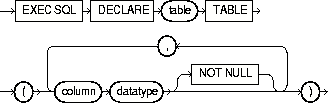
|
table |
The name of the declared table. |
|
column |
A column of the table. |
|
datatype |
The datatype of a column. For information on Oracle8i datatypes, see "The Oracle8i Datatypes". |
|
NOT NULL |
Specifies that a column cannot contain nulls. |
Datatypes can only use integers (not expressions) for length, precision, scale. For more information on using this statement, see "Specifying SQLCHECK=SEMANTICS" on page E-3.
The following statement declares the PARTS table with the PARTNO, BIN, and QTY columns:
     EXEC SQL DECLARE PARTS TABLE
         (PARTNO  NUMBER  NOT NULL,
          BIN     NUMBER,
          QTY     NUMBER)
     END-EXEC.
None.
To remove rows from a table or from a view's base table.
For you to delete rows from a table, the table must be in your own schema or you must have DELETE privilege on the table.
For you to delete rows from the base table of a view, the owner of the schema containing the view must have DELETE privilege on the base table. Also, if the view is in a schema other than your own, you must be granted DELETE privilege on the view.
The DELETE ANY TABLE system privilege also allows you to delete rows from any table or any view's base table.
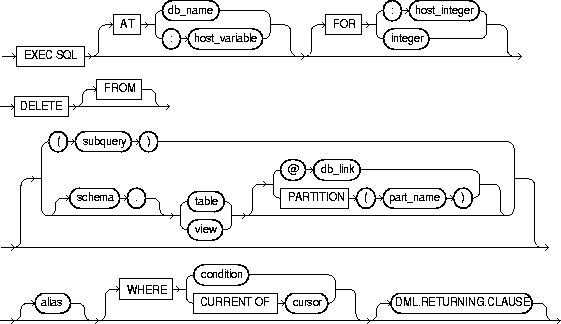
where the DML Returning clause is:

 Keywords and Parameters
|
AT |
Identifies the database to which the DELETE statement is issued. The database can be identified by either: |
|
|
|
db_name |
A database identifier declared in a previous DECLARE DATABASE statement. |
|
|
host_variable |
A host variable whose value is a previously declared db_name. |
|
|
If you omit this clause, the DELETE statement is issued to your default database. |
|
|
integer |
Limits the number of times the statement is executed if the WHERE clause contains array host variables. If you omit this clause, Oracle8i executes the statement once for each component of the smallest array. |
|
|
schema |
The schema containing the table or view. If you omit schema, Oracle8i assumes the table or view is in your own schema. |
|
|
table view |
The name of a table from which the rows are to be deleted. If you specify view, Oracle8i deletes rows from the view's base table. |
|
|
dblink |
The complete or partial name of a database link to a remote database where the table or view is located. For information on referring to database links, see Chapter 2 of the Oracle8i SQL Reference. You can only delete rows from a remote table or view if you are using Oracle8i with the distributed option. If you omit dblink, Oracle8 assumes that the table or view is located on the local database. |
|
|
part_name |
Name of partition in the table |
|
|
alias |
The alias assigned to the table. Aliases are generally used in DELETE statements with correlated queries. |
|
|
WHERE |
Specifies which rows are deleted: |
|
|
|
condition |
Deletes only rows that satisfy the condition. This condition can contain host variables and optional indicator variables. See the syntax description of condition in the Oracle8i SQL Reference. |
|
|
|
Deletes only the row most recently fetched by the cursor. The cursor cannot be associated with a SELECT statement that performs a join, unless its FOR UPDATE clause specifically locks only one table. |
|
|
If you omit this clause entirely, Oracle8i deletes all rows from the table or view. |
|
|
DML returning clause |
See "DML Returning Clause" for a discussion. |
|
The host variables in the WHERE clause must be either all scalars or all arrays. If they are scalars, Oracle8i executes the DELETE statement only once. If they are arrays, Oracle8i executes the statement once for each set of array components. Each execution may delete zero, one, or multiple rows.
Array host variables in the WHERE clause can have different sizes. In this case, the number of times Oracle8i executes the statement is determined by the smaller of the following values:
If no rows satisfy the condition, no rows are deleted and the SQLCODE returns a NOT_FOUND condition.
The cumulative number of rows deleted is returned through the SQLCA. If the WHERE clause contains array host variables, this value reflects the total number of rows deleted for all components of the array processed by the DELETE statement.
If no rows satisfy the condition, Oracle8i returns an error through the SQLCODE of the SQLCA. If you omit the WHERE clause, Oracle8i raises a warning flag in the fifth component of SQLWARN in the SQLCA. For more information on this statement and the SQLCA, see "Using the SQL Communications Area".
You can use comments in a DELETE statement to pass instructions, or hints, to the Oracle8i optimizer. The optimizer uses hints to choose an execution plan for the statement. For more information on hints, see Oracle8i Tuning.
This example illustrates the use of the DELETE statement within a Pro*COBOL program:
     EXEC SQL DELETE FROM EMP
        WHERE DEPTNO = :DEPTNO
        AND JOB = :JOB
    END-EXEC.
    EXEC SQL DECLARE EMPCURSOR CURSOR
        FOR SELECT EMPNO, COMM
        FROM EMP
    END-EXEC.
    EXEC SQL OPEN EMPCURSOR END-EXEC.
    EXEC SQL FETCH EMPCURSOR
        INTO :EMP-NUMBER, :COMMISSION
    END-EXEC.
    EXEC SQL DELETE FROM EMP
        WHERE CURRENT OF EMPCURSOR
    END-EXEC.
DECLARE DATABASE (Oracle Embedded SQL Directive).
DECLARE STATEMENT (Embedded SQL Directive).
To initialize a descriptor to hold descriptions of host variables for an Oracle dynamic SQL statement or PL/SQL block.
You must have prepared the SQL statement or PL/SQL block in a previous embedded SQL PREPARE statement.
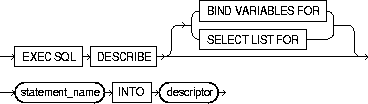
You must issue a DESCRIBE statement before manipulating the bind or select descriptor within an embedded SQL program.
You cannot describe both input variables and output variables into the same descriptor.
The number of variables found by a DESCRIBE statement is the total number of placeholders in the prepare SQL statement or PL/SQL block, rather than the total number of uniquely named placeholders. For more information on this statement, see "The DESCRIBE Statement".
This example illustrates the use of the DESCRIBE statement in a Pro*COBOL embedded SQL program:
     EXEC SQL PREPARE MYSTATEMENT FROM :MY-STRING END-EXEC.
     EXEC SQL DECLARE EMPCURSOR
         FOR SELECT EMPNO, ENAME, SAL, COMM
         FROM EMP
         WHERE DEPTNO = :DEPT-NUMBER
     END-EXEC.
     EXEC SQL DESCRIBE BIND VARIABLES FOR MYSTATEMENT
         INTO BINDDESCRIPTOR
     END-EXEC.
     EXEC SQL OPEN EMPCURSOR
         USING BINDDESCRIPTOR
     END-EXEC.
     EXEC SQL DESCRIBE SELECT LIST FOR MY-STATEMENT
         INTO SELECTDESCRIPTOR
     END-EXEC.
     EXEC SQL FETCH EMPCURSOR
         INTO SELECTDESCRIPTOR
     END-EXEC.
PREPARE (Executable Embedded SQL).
Used to obtain information about an ANSI SQL statement, and to store it in a descriptor.
You must have prepared the SQL statement in a previous embedded SQL PREPARE statement.
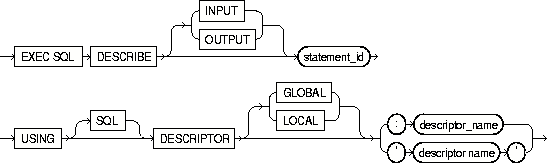
Use DYNAMIC=ANSI precompiler option. Only COUNT and NAME are implemented for the INPUT descriptor.
The number of variables found by a DESCRIBE statement is the total number of place-holders in the prepare SQL statement or PL/SQL block, rather than the total number of uniquely named place-holders. For more information on this statement, see Chapter 13, "Oracle Dynamic SQL".
     EXEC SQL PREPARE s FROM :my_stament END-EXEC.
     EXEC SQL DESCRIBE INPUT s USING DESCRIPTOR 'in' END-EXEC.
ALLOCATE DESCRIPTOR (Executable Embedded SQL).
DEALLOCATE DESCRIPTOR (Embedded SQL Statement).
GET DESCRIPTOR (Executable Embedded SQL).
PREPARE (Executable Embedded SQL).
SET DESCRIPTOR (Executable Embedded SQL).
To embed an anonymous PL/SQL block into an Oracle Pro*COBOL program.
None.

|
AT |
Identifies the database on which the PL/SQL block is executed. The database can be identified by either: |
|
|
|
db_name |
A database identifier declared in a previous DECLARE DATABASE statement. |
|
|
host_variable |
A host variable whose value is a previously declared db_name. |
|
|
If you omit this clause, the PL/SQL block is executed on your default database. |
|
|
pl/sql_block |
For information on PL/SQL, including how to write PL/SQL blocks, see the PL/SQL User's Guide and Reference. |
|
|
END-EXEC |
Must appear after the embedded PL/SQL block. The keyword END-EXEC must be followed by the statement terminator for COBOL, ".". |
|
Since the Oracle Precompilers treat an embedded PL/SQL block like a single embedded SQL statement, you can embed a PL/SQL block anywhere in an Oracle Precompiler program that you can embed a SQL statement. For more information on embedding PL/SQL blocks in Oracle Precompiler programs, see Chapter 6, "Embedded PL/SQL".
Placing this EXECUTE statement in an Oracle Precompiler program embeds a PL/SQL block in the program:
     EXEC SQL EXECUTE
     BEGIN
        SELECT ENAME, JOB, SAL
            INTO :EMP-NAME:IND-NAME, :JOB-TITLE, :SALARY
            FROM EMP
            WHERE EMPNO = :EMP-NUMBER;
        IF :EMP-NAME:IND-NAME IS NULL
            THEN RAISE NAME-MISSING;
        END IF;
     END;
     END-EXEC.
EXECUTE IMMEDIATE (Executable Embedded SQL).
In Oracle dynamic SQL, to execute a DELETE, INSERT, or UPDATE statement or a PL/SQL block that has been previously prepared with an embedded SQL PREPARE statement.
You must first prepare the SQL statement or PL/SQL block with an embedded SQL PREPARE statement.
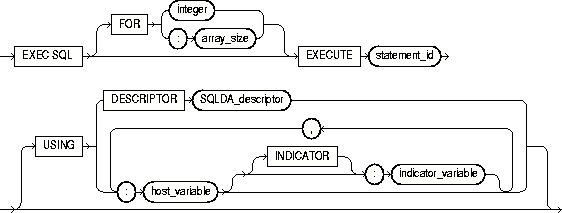
For more information on this statement, see Chapter 9, "Oracle Dynamic SQL".
This example illustrates the use of the EXECUTE statement in a Pro*COBOL embedded SQL program:
     EXEC SQL PREPARE MY-STATEMENT FROM MY-STRING END-EXEC.
     EXEC SQL EXECUTE MY-STATEMENT USING :MY-VAR END-EXEC.
DECLARE DATABASE (Oracle Embedded SQL Directive).
PREPARE (Executable Embedded SQL).
In ANSI SQL Method 4, to execute a DELETE, INSERT, or UPDATE statement or a PL/SQL block that has been previously prepared with an embedded SQL PREPARE statement.
You must first prepare the SQL statement or PL/SQL block with an embedded SQL PREPARE statement.
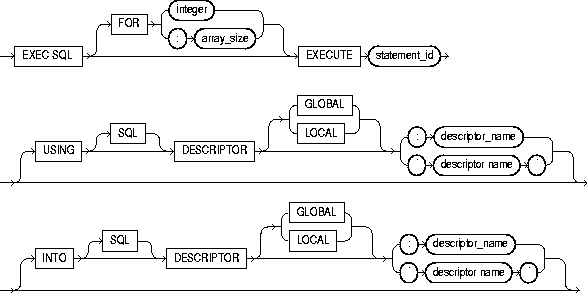
For more information on this statement, see "EXECUTE".
The ANSI dynamic SQL Method 4 allows DML RETURNING in a SELECT to be supported by the INTO clause in EXECUTE:
EXEC SQL EXECUTE S2 USING DESCRIPTOR :bv1 INTO DESCRIPTOR 'SELDES' END-EXEC.
DECLARE DATABASE (Oracle Embedded SQL Directive).
PREPARE (Executable Embedded SQL).
To prepare and execute a DELETE, INSERT, or UPDATE statement or a PL/SQL block containing no host variables.
None.
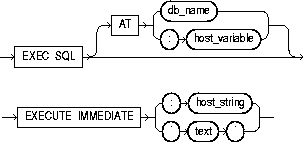
When you issue an EXECUTE IMMEDIATE statement, Oracle8i parses the specified SQL statement or PL/SQL block, checking for errors, and executes it. If any errors are encountered, they are returned in the SQLCODE component of the SQLCA.
For more information on this statement, see "The EXECUTE IMMEDIATE Statement".
This example illustrates the use of the EXECUTE IMMEDIATE statement:
     EXEC SQL
         EXECUTE IMMEDIATE 'DELETE FROM EMP WHERE EMPNO = 9460'
     END-EXEC.
PREPARE (Executable Embedded SQL).
EXECUTE (Executable Embedded SQL).
In Oracle dynamic SQL, to retrieve one or more rows returned by a query, assigning the select list values to host variables. For ANSI Dynamic SQL Method 4, see "FETCH DESCRIPTOR (Executable Embedded SQL)".
You must first open the cursor with an the OPEN statement.
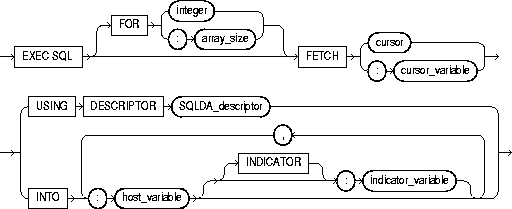
The FETCH statement reads the rows of the active set and names the output variables which contain the results. Indicator values are set to -1 if their associated host variable is null. The first FETCH statement for a cursor also sorts the rows of the active set, if necessary.
The number of rows retrieved is specified by the size of the output host variables and the value specified in the FOR clause. The host variables to receive the data must be either all scalars or all arrays. If they are scalars, Oracle8i fetches only one row. If they are arrays, Oracle8i fetches enough rows to fill the arrays.
Array host variables can have different sizes. In this case, the number of rows Oracle8i fetches is determined by the smaller of the following values:
Of course, the number of rows fetched can be further limited by the number of rows that actually satisfy the query.
If a FETCH statement does not retrieve all rows returned by the query, the cursor is positioned on the next returned row. When the last row returned by the query has been retrieved, the next FETCH statement results in an error code returned in the SQLCODE element of the SQLCA.
Note that the FETCH statement does not contain an AT clause. You must specify the database accessed by the cursor in the DECLARE CURSOR statement.
You can only move forward through the active set with FETCH statements. If you want to revisit any of the previously fetched rows, you must reopen the cursor and fetch each row in turn. If you want to change the active set, you must assign new values to the input host variables in the cursor's query and reopen the cursor.
This example illustrates the FETCH statement in a Pro*COBOL embedded SQL program:
     EXEC SQL DECLARE EMPCURSOR CURSOR FOR
         SELECT JOB, SAL FROM EMP WHERE DEPTNO = 30
     END-EXEC.
     ...
     EXEC SQL WHENEVER NOT FOUND GOTO ...
 LOOP.
     EXEC SQL FETCH EMPCURSOR INTO :JOB-TITLE1, :SALARY1 END-EXEC.
     EXEC SQL FETCH EMPCURSOR INTO :JOB-TITLE2, :SALARY2 END-EXEC.
     ...
     GO TO LOOP.
     ...
CLOSE (Executable Embedded SQL).
DECLARE CURSOR (Embedded SQL Directive).
OPEN (Executable Embedded SQL).
PREPARE (Executable Embedded SQL).
To retrieve one or more rows returned by a query, assigning the select list values to host variables. Used in ANSI Dynamic SQL Method 4.
You must first open the cursor with an the OPEN statement.
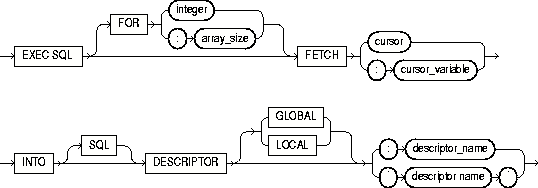
The number of rows retrieved is specified by the size of the output host variables and the value specified in the FOR clause. The host variables to receive the data must be either all scalars or all arrays. If they are scalars, Oracle8i fetches only one row. If they are arrays, Oracle8i fetches enough rows to fill the arrays.
Array host variables can have different sizes. In this case, the number of rows Oracle8i fetches is determined by the smaller of the following values:
Of course, the number of rows fetched can be further limited by the number of rows that actually satisfy the query.
If a FETCH statement does not retrieve all rows returned by the query, the cursor is positioned on the next returned row. When the last row returned by the query has been retrieved, the next FETCH statement results in an error code returned in the SQLCODE element of the SQLCA.
Note that the FETCH statement does not contain an AT clause. You must specify the database accessed by the cursor in the DECLARE CURSOR statement.
You can only move forward through the active set with FETCH statements. If you want to revisit any of the previously fetched rows, you must reopen the cursor and fetch each row in turn. If you want to change the active set, you must assign new values to the input host variables in the cursor's query and reopen the cursor.
Use DYNAMIC=ANSI precompiler option for the ANSI SQL Method 4 application. For more information, see "FETCH" for the ANSI SQL Method 4 application.
...
EXEC SQL ALLOCATE DESCRIPTOR 'output_descriptor' END-EXEC.
...
EXEC SQL PREPARE S FROM :dyn_statement END-EXEC.
EXEC SQL DECLARE mycursor CURSOR FOR S END-EXEC.
...
EXEC SQL FETCH mycursor INTO DESCRIPTOR 'output_descriptor' END-EXEC.
...
To free memory used by a cursor.
The memory has to have been already allocated.

See "Cursors" and "Cursor Variables".
* CURSOR VARIABLE EXAMPLE
...
 01  CUR      SQL-CURSOR.
...
     EXEC SQL ALLOCATE :CUR END-EXEC.
...
     EXEC SQL CLOSE :CUR END-EXEC.
     EXEC SQL FREE  :CUR END-EXEC.
...
ALLOCATE (Executable Embedded SQL Extension).
CLOSE (Executable Embedded SQL).
DECLARE CURSOR (Embedded SQL Directive).
To obtain information about host variables from a SQL descriptor area.
Use only with value semantics and ANSI dynamic SQL Method 4.
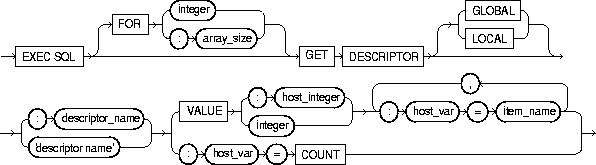
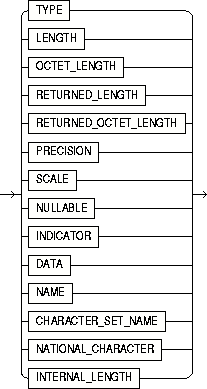
where item_name can be one of these choices:
|
integer |
Host variable containing the number of rows to be processed. Number of rows to be processed. |
|
:descriptor_name |
Host variable containing the name of the allocated ANSI descriptor. |
|
'descriptor name' |
Name of the allocated ANSI descriptor. |
|
GLOBAL | LOCAL |
LOCAL (the default) means file scope, as opposed to GLOBAL, which means application scope. |
|
host_var=COUNT |
Host variable containing the total number of input or output variables. |
|
integer |
Total number of input or output variables. |
|
VALUE :host_integer |
Host variable containing the position of the referenced input or output variable. |
|
VALUE integer |
The position of the referenced input or output variable. |
|
host_var |
Host variable which will receive the item's value. |
|
item_name |
The item_name is found in Table 10-4, and Table 10-5, under the "Descriptor Item Name" column heading. |
Use DYNAMIC=ANSI precompiler option. The array size clause can be used with DATA, RETURNED_LENGTH, and INDICATOR item names. See "GET DESCRIPTOR".
EXEC SQL GET DESCRIPTOR GLOBAL 'mydesc' :mydesc_num_vars = COUNT END-EXEC.
ALLOCATE DESCRIPTOR (Executable Embedded SQL).
DESCRIBE DESCRIPTOR (Executable Embedded SQL).
SET DESCRIPTOR (Executable Embedded SQL).
To add rows to a table or to a view's base table.
For you to insert rows into a table, the table must be in your own schema or you must have INSERT privilege on the table.
For you to insert rows into the base table of a view, the owner of the schema containing the view must have INSERT privilege on the base table. Also, if the view is in a schema other than your own, you must have INSERT privilege on the view.
The INSERT ANY TABLE system privilege also allows you to insert rows into any table or any view's base table.
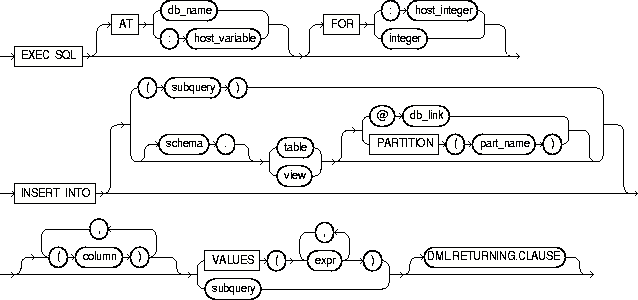
where DML returning clause is:

|
AT |
Identifies the database on which the INSERT statement is executed. The database can be identified by either: |
|
|
|
db_name |
A database identifier declared in a previous DECLARE DATABASE statement. |
|
|
host_variable |
A host variable whose value is a previously declared db_name |
|
|
If you omit this clause, the INSERT statement is executed on your default database. |
|
|
FOR :host_integer |
Limits the number of times the statement is executed if the VALUES clause contains array host variables. If you omit this clause, Oracle8i executes the statement once for each component in the smallest array. |
|
|
schema |
The schema containing the table or view. If you omit schema, Oracle8i assumes the table or view is in your own schema. |
|
|
view |
The name of the table into which rows are to be inserted. If you specify view, Oracle8i inserts rows into the view's base table. |
|
|
db_link |
A complete or partial name of a database link to a remote database where the table or view is located. For information on referring to database links, see the Oracle8i SQL Reference. You can only insert rows into a remote table or view if you are using Oracle8i with the distributed option. If you omit db_link, Oracle8i assumes that the table or view is on the local database. |
|
|
part_name |
The name of partition in the table |
|
|
column |
A column of the table or view. In the inserted row, each column in this list is assigned a value from the VALUES clause or the query. If you omit one of the table's columns from this list, the column's value for the inserted row is the column's default value as specified when the table was created. If you omit the column list altogether, the VALUES clause or query must specify values for all columns in the table. |
|
|
VALUES |
Specifies a row of values to be inserted into the table or view. See the syntax description of expr in the Oracle8i SQL Reference. Note that the expressions can be host variables with optional indicator variables. You must specify an expression in the VALUES clause for each column in the column list. |
|
|
subquery |
A subquery that returns rows that are inserted into the table. The select list of this subquery must have the same number of columns as the column list of the INSERT statement. For the syntax description of a subquery, see "SELECT" in the Oracle8i SQL Reference. |
|
|
DML returning clause |
See "DML Returning Clause" for a discussion. |
|
Any host variables that appear in the WHERE clause must be either all scalars or all arrays. If they are scalars, Oracle8 executes the INSERT statement once. If they are arrays, Oracle8i executes the INSERT statement once for each set of array components, inserting one row each time.
Array host variables in the WHERE clause can have different sizes. In this case, the number of times Oracle8i executes the statement is determined by the smaller of the following values:
For more information on this statement, see "The Basic SQL Statements".
This example illustrates the use of the embedded SQL INSERT statement:
     EXEC SQL
         INSERT INTO EMP (ENAME, EMPNO, SAL)
         VALUES (:ENAME, :EMPNO, :SAL)
     END-EXEC.
This example shows an embedded SQL INSERT statement with a subquery:
     EXEC SQL
         INSERT INTO NEWEMP (ENAME, EMPNO, SAL)
         SELECT ENAME, EMPNO, SAL FROM EMP
         WHERE DEPTNO = :DEPTNO
     END-EXEC.
DECLARE DATABASE (Oracle Embedded SQL Directive).
To append a LOB to the end of another LOB.
LOB buffering must not be enabled.The destination LOB must have been initialized.

For usage notes as well as keywords, parameters, and examples, see "APPEND".
See the other LOB statements.
To assign a LOB or BFILE locator to another locator.

For usage notes as well as keywords, parameters, and examples, see "ASSIGN".
See the other LOB statements.
To close an open LOB or BFILE.

For usage notes as well as keywords, parameters, and examples, see "CLOSE" .
See the other LOB statements.
To copy all or part of a LOB value into another LOB.
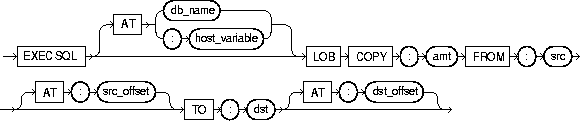
For usage notes as well as keywords, parameters, and examples, see "COPY".
See the other LOB statements.
To create a temporary LOB.

For usage notes as well as keywords, parameters, and examples, see "CREATE TEMPORARY".
See the other LOB statements.
To retrieve attributes from a LOB.
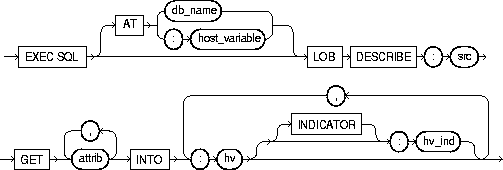
where attrib is:
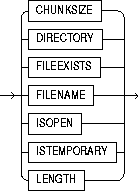
For usage notes as well as keywords, parameters, and examples, see "DESCRIBE".
See the other LOB statements.
To disable LOB buffering.

For usage notes as well as keywords, parameters, and examples, see "DISABLE BUFFERING".
See the other LOB statements.
To enable LOB buffering.

For usage notes as well as keywords, parameters, and examples, see ENABLE BUFFERING
See the other LOB statements.
To erase a given amount of LOB data starting from a given offset.
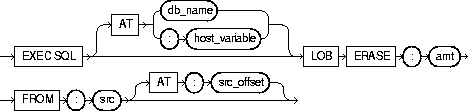
For usage notes as well as keywords, parameters, and examples, see "ERASE".
See the other LOB statements.
To close all open BFILEs in the current session.

For usage notes as well as keywords, parameters, and examples, see "FILE CLOSE ALL".
See the other LOB statements.
To set DIRECTORY and FILENAME in a BFILE locator.
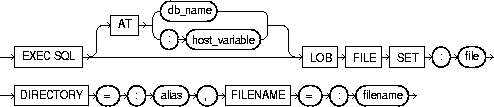
For usage notes as well as keywords, parameters, and examples, see "FILE SET".
See the other LOB statements.
To write the LOB buffers to the database server.

For usage notes as well as keywords, parameters, and examples, see "FLUSH BUFFER".
See the other LOB statements.
To free temporary space for the LOB locator.

For usage notes as well as keywords, parameters, and examples, see "FREE TEMPORARY".
See the other LOB statements.
To copy all or part of a BFILE into an internal LOB.
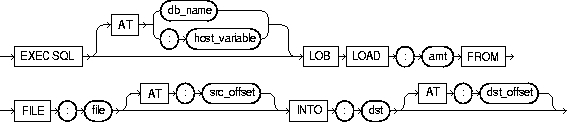
For usage notes as well as keywords, parameters, and examples, see "LOAD FROM FILE".
See the other LOB statements.
To open a LOB or BFILE for read or read/write access.

For usage notes as well as keywords, parameters, and examples, see "OPEN".
See the other LOB statements.
To read all or part of a LOB or BFILE into a buffer.
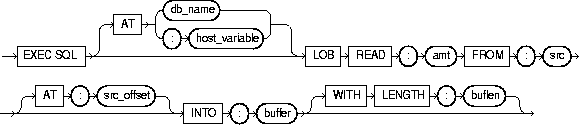
For usage notes as well as keywords, parameters, and examples, see "READ".
See the other LOB statements.
To truncate a LOB value.

For usage notes as well as keywords, parameters, and examples, see "TRIM".
See the other LOB statements.
To write the contents of a buffer to a LOB.
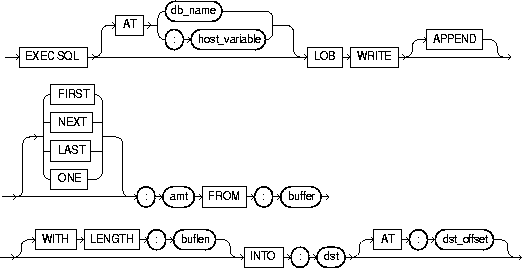
For usage notes as well as keywords, parameters, and examples, see "WRITE".
See the other LOB statements.
To open a cursor, evaluating the associated query and substituting the host variable names supplied by the USING clause into the WHERE clause of the query. For the ANSI Dynamic SQL syntax, see "OPEN DESCRIPTOR (Executable Embedded SQL)".
You must declare the cursor with a DECLARE CURSOR embedded SQL statement before opening it.
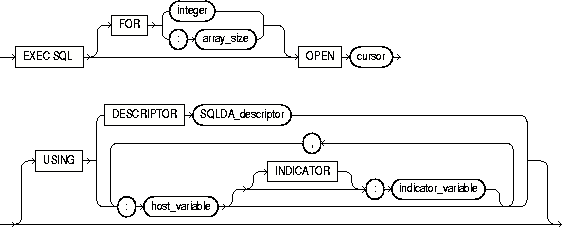
The OPEN statement defines the active set of rows and initializes the cursor just before the first row of the active set. The values of the host variables at the time of the OPEN are substituted in the statement. This statement does not actually retrieve rows; rows are retrieved by the FETCH statement.
Once you have opened a cursor, its input host variables are not reexamined until you reopen the cursor. To change any input host variables and therefore the active set, you must reopen the cursor.
All cursors in a program are in a closed state when the program is initiated or when they have been explicitly closed using the CLOSE statement.
You can reopen a cursor without first closing it. For more information on this statement, see "Opening a Cursor".
This example illustrates the use of the OPEN statement in a Pro*COBOL program:
     EXEC SQL DECLARE EMPCURSOR CURSOR FOR
         SELECT ENAME, EMPNO, JOB, SAL
         FROM EMP
         WHERE DEPTNO = :DEPTNO
     END-EXEC.
     EXEC SQL OPEN EMPCURSOR END-EXEC.
CLOSE (Executable Embedded SQL) .
DECLARE CURSOR (Embedded SQL Directive) .
FETCH (Executable Embedded SQL).
PREPARE (Executable Embedded SQL) .
To open a cursor (for ANSI Dynamic SQL Method 4), evaluating the associated query and substituting the input host variable names supplied by the USING clause into the WHERE clause of the query. The INTO clause denotes the output descriptor.
You must declare the cursor with a DECLARE CURSOR embedded SQL statement before opening it.
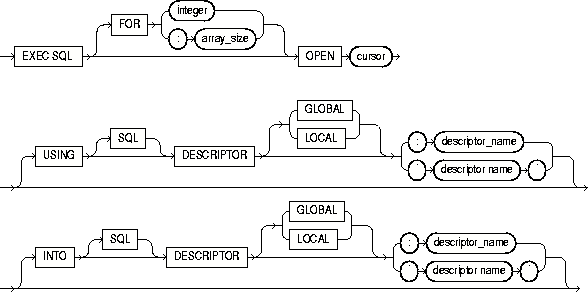
Set the precompiler option DYNAMIC to ANSI.
The OPEN statement defines the active set of rows and initializes the cursor just before the first row of the active set. The values of the host variables at the time of the OPEN are substituted in the statement. This statement does not actually retrieve rows; rows are retrieved by the FETCH statement.
Once you have opened a cursor, its input host variables are not reexamined until you reopen the cursor. To change any input host variables and therefore the active set, you must reopen the cursor.
All cursors in a program are in a closed state when the program is initiated or when they have been explicitly closed using the CLOSE statement.
You can reopen a cursor without first closing it. For more information on this statement, see "Inserting Rows".
 01 DYN-STATEMENT PIC X(58) VALUE "SELECT ENAME, EMPNO FROM EMP WHERE
       DEPTNO =:DEPTNO-DAT".
 01 DEPTNO-DAT PIC S9(9) COMP VALUE 10.
 ...
     EXEC SQL ALLOCATE DESCRIPTOR 'input-descriptor' END-EXEC.
     EXEC SQL ALLOCATE DESCRIPTOR 'output-descriptor'
     ...
     EXEC SQL PREPARE S FROM :DYN-STATEMENT END-EXEC.
     EXEC SQL DECLARE C CURSOR FOR S END-EXEC.
     ...
     EXEC SQL OPEN C USING DESCRIPTOR 'input-descriptor' END-EXEC.
     ...
CLOSE (Executable Embedded SQL).
DECLARE CURSOR (Embedded SQL Directive).
FETCH DESCRIPTOR (Executable Embedded SQL) .
PREPARE (Executable Embedded SQL).
To parse a SQL statement or PL/SQL block specified by a host variable and associate it with an identifier.
None.

Any variables that appear in the host_string or text are placeholders. The actual host variable names are assigned in the USING clause of the OPEN statement (input host variables) or in the INTO clause of the FETCH statement (output host variables).
A SQL statement is prepared only once, but can be executed any number of times.
This example illustrates the use of a PREPARE statement in a Pro*COBOL embedded SQL program:
     EXEC SQL PREPARE MYSTATEMENT FROM :MY-STRING END-EXEC.
     EXEC SQL EXECUTE MYSTATEMENT END-EXEC.
CLOSE (Executable Embedded SQL).
DECLARE CURSOR (Embedded SQL Directive).
FETCH (Executable Embedded SQL).
OPEN (Executable Embedded SQL).
To undo work done in the current transaction. You can also use this statement to manually undo the work done by an in-doubt distributed transaction.
To roll back your current transaction, no privileges are necessary.
To manually roll back an in-doubt distributed transaction that you originally committed, you must have FORCE TRANSACTION system privilege. To manually roll back an in-doubt distributed transaction originally committed by another user, you must have FORCE ANY TRANSACTION system privilege.
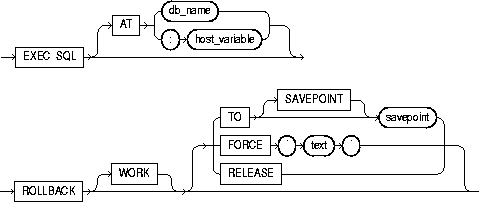
A transaction (or a logical unit of work) is a sequence of SQL statements that Oracle8i treats as a single unit. A transaction begins with the first executable SQL statement after a COMMIT, ROLLBACK or connection to the database. A transaction ends with a COMMIT statement, a ROLLBACK statement, or disconnection (intentional or unintentional) from the database. Note that Oracle8i issues an implicit COMMIT statement before and after processing any Data Definition Language statement.
Using the ROLLBACK statement without the TO SAVEPOINT clause performs the following operations:
Using the ROLLBACK statement with the TO SAVEPOINT clause performs the following operations:
It is recommended that you explicitly end transactions in application programs using either a COMMIT or ROLLBACK statement. If you do not explicitly commit the transaction and the program terminates abnormally, Oracle8i rolls back the last uncommitted transaction.
The following statement rolls back your entire current transaction:
EXEC SQL ROLLBACK END-EXEC.
The following statement rolls back your current transaction to savepoint SP5:
EXEC SQL ROLLBACK TO SAVEPOINT SP5 END-EXEC.
Oracle8i with the distributed option allows you to perform distributed transactions, or transactions that modify data on multiple databases. To commit or roll back a distributed transaction, you need only issue a COMMIT or ROLLBACK statement as you would any other transaction.
If there is a network failure during the commit process for a distributed transaction, the state of the transaction may be unknown, or in-doubt. After consultation with the administrators of the other databases involved in the transaction, you may decide to manually commit or roll back the transaction on your local database. You can manually roll back the transaction on your local database by issuing a ROLLBACK statement with the FORCE clause.
For more information on when to roll back in-doubt transactions, see Oracle8i Distributed Database Systems.
You cannot manually roll back an in-doubt transaction to a savepoint.
A ROLLBACK statement with a FORCE clause only rolls back the specified transaction. Such a statement does not affect your current transaction.
The following statement manually rolls back an in-doubt distributed transaction:
EXEC SQL ROLLBACK WORK FORCE '25.32.87' END-EXEC.
COMMIT (Executable Embedded SQL).
SAVEPOINT (Executable Embedded SQL).
To identify a point in a transaction to which you can later roll back.
None.

For more information on this statement, see "Using the SAVEPOINT Statement".
This example illustrates the use of the embedded SQL SAVEPOINT statement:
EXEC SQL SAVEPOINT SAVE3 END-EXEC.
COMMIT (Executable Embedded SQL).
ROLLBACK (Executable Embedded SQL).
To retrieve data from one or more tables, views, or snapshots, assigning the selected values to host variables.
For you to select data from a table or snapshot, the table or snapshot must be in your own schema or you must have SELECT privilege on the table or snapshot.
For you to select rows from the base tables of a view, the owner of the schema containing the view must have SELECT privilege on the base tables. Also, if the view is in a schema other than your own, you must have SELECT privilege on the view.
The SELECT ANY TABLE system privilege also allows you to select data from any table or any snapshot or any view's base table.
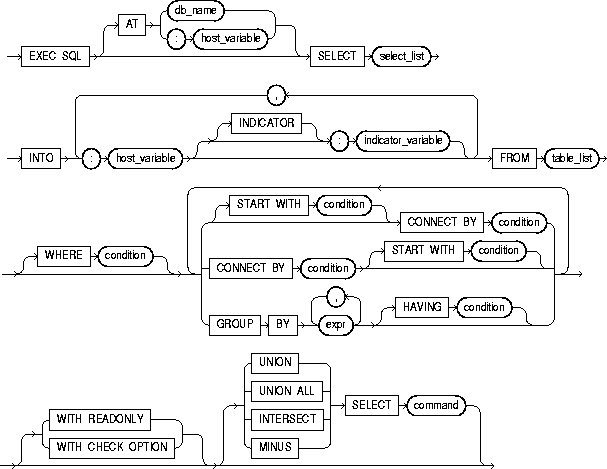
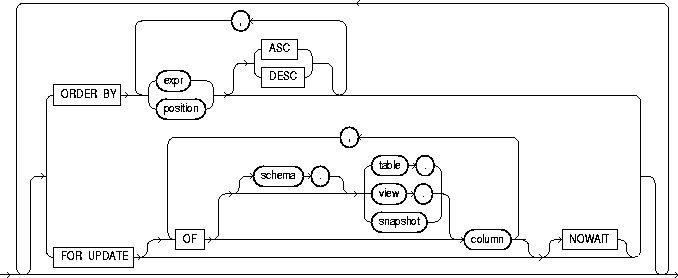
|
AT |
Identifies the database to which the SELECT statement is issued. The database can be identified by either: |
|
|
|
db_name |
A database identifier declared in a previous DECLARE DATABASE statement. |
|
|
host_variable |
A host variable whose value is a previously declared db_name. |
|
|
If you omit this clause, the SELECT statement is issued to your default database. |
|
|
select_list |
Identical to the non-embedded SELECT statement except that a host variables can be used in place of literals. |
|
|
INTO |
Specifies output host variables and optional indicator variables to receive the data returned by the SELECT statement. Note that these variables must be either all scalars or all arrays, but arrays need not have the same size. |
|
|
WHERE |
Restricts the rows returned to those for which the condition is TRUE. See the syntax description of condition in the Oracle8i SQL Reference. The condition can contain host variables, but cannot contain indicator variables. These host variables can be either scalars or arrays. |
|
All other keywords and parameters are identical to the non-embedded SQL SELECT statement.
If no rows meet the WHERE clause condition, no rows are retrieved and Oracle8i returns an error code through the SQLCODE component of the SQLCA.
You can use comments in a SELECT statement to pass instructions, or hints, to the Oracle8i optimizer. The optimizer uses hints to choose an execution plan for the statement. For more information on hints, see Oracle8i Tuning.
This example illustrates the use of the embedded SQL SELECT statement:
     EXEC SQL SELECT ENAME, SAL + 100, JOB
         INTO :ENAME, :SAL, :JOB
         FROM EMP
         WHERE EMPNO = :EMPNO
     END-EXEC.
DECLARE CURSOR (Embedded SQL Directive).
DECLARE DATABASE (Oracle Embedded SQL Directive).
EXECUTE (Executable Embedded SQL).
FETCH (Executable Embedded SQL).
PREPARE (Executable Embedded SQL).
Use this ANSI dynamic SQL statement to set information in the descriptor area from host variables.
Use after a DESCRIBE DESCRIPTOR.
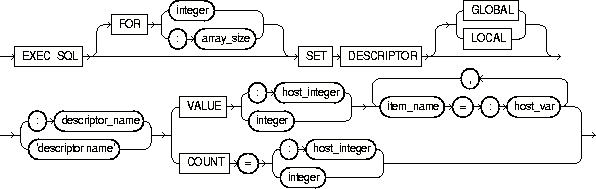
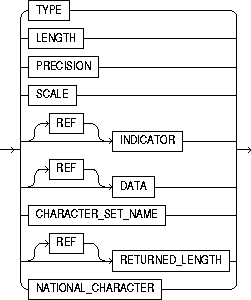
where item_name can be one of these choices:
|
integer |
Host variable containing the number of rows to be processed. Number of rows to be processed. The array size clause can only be used with DATA, RETURNED_LENGTH and INDICATOR item names. |
|
GLOBAL | LOCAL |
LOCAL (the default) means file scope, as opposed to GLOBAL, which means application scope. |
|
'descriptor name' |
Host variable containing the name of the allocated ANSI descriptor. Name of the allocated ANSI descriptor. |
|
COUNT |
The total number of input or output variables. |
|
VALUE |
The position of the referenced host variable in the statement. |
|
item_name |
See Table 10-6, and Table 10-7 for lists of the item_names, and their descriptions. |
|
host_var |
Host variable containing the total number of input or output variables. |
|
integer |
Total number of input or output variables. |
|
host_var |
The host variables used to set the item. |
|
REF |
Reference semantics are to be used. Can be used only with RETURNED_LENGTH, DATA, and INDICATOR item names. Must be used to set RETURNED_LENGTH. |
Use DYNAMIC=ANSI precompiler option. Set CHARACTER_SET_NAME to UTF16 for client-side Unicode support. See "SET DESCRIPTOR" for complete details, including tables of descriptor item names.
EXEC SQL SET DESCRIPTOR GLOBAL :mydescr COUNT = 3 END-EXEC.
ALLOCATE DESCRIPTOR (Executable Embedded SQL).
DEALLOCATE DESCRIPTOR (Embedded SQL Statement).
DESCRIBE DESCRIPTOR (Executable Embedded SQL).
GET DESCRIPTOR (Executable Embedded SQL).
PREPARE (Executable Embedded SQL).
To change existing values in a table or in a view's base table.
For you to update values in a table or snapshot, the table must be in your own schema or you must have UPDATE privilege on the table.
For you to update values in the base table of a view, the owner of the schema containing the view must have UPDATE privilege on the base table. Also, if the view is in a schema other than your own, you must have UPDATE privilege on the view.
The UPDATE ANY TABLE system privilege also allows you to update values in any table or any view's base table.
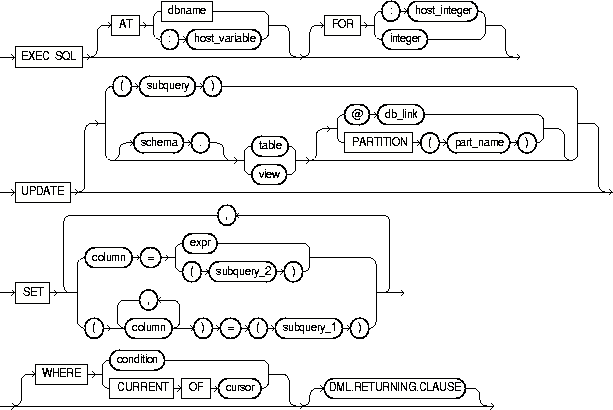
where DML returning clause is:

|
AT |
identifies the database to which the UPDATE statement is issued. The database can be identified by either: |
|
|
|
dbname |
A database identifier declared in a previous DECLARE DATABASE statement. |
|
|
host_variable |
A host variable whose value is a previously declared dbname. |
|
|
If you omit this clause, the UPDATE statement is issued to your default database. |
|
|
FOR :host_integer |
Limits the number of times the UPDATE statement is executed if the SET and WHERE clauses contain array host variables. If you omit this clause, Oracle8i executes the statement once for each component of the smallest array. |
|
|
schema |
The schema containing the table or view. If you omit schema, Oracle8i assumes the table or view is in your own schema. |
|
|
table view |
The name of the table to be updated. If you specify view, Oracle8i updates the view's base table. |
|
|
dblink |
A complete or partial name of a database link to a remote database where the table or view is located. For information on referring to database links, see the Oracle8i SQL Reference. You can only use a database link to update a remote table or view if you are using Oracle8i with the distributed option. |
|
|
part_name |
Name of partition in the table |
|
|
alias |
A name used to reference the table, view, or subquery elsewhere in the statement. |
|
|
column |
The name of a column of the table or view that is to be updated. If you omit a column of the table from the SET clause, that column's value remains unchanged. |
|
|
expr |
The new value assigned to the corresponding column. This expression can contain host variables and optional indicator variables. See the syntax of expr in the Oracle8i SQL Reference. |
|
|
subquery_1 |
A subquery that returns new values that are assigned to the corresponding columns. For the syntax of a subquery, see "SELECT" in the Oracle8i SQL Reference. |
|
|
subquery_2 |
A subquery that return a new value that is assigned to the corresponding column. For the syntax of a subquery, see "SELECT" in the Oracle8i SQL Reference. |
|
|
WHERE |
Specifies which rows of the table or view are updated: |
|
|
|
condition |
Updates only rows for which this condition is true. This condition can contain host variables and optional indicator variables. See the syntax of condition in the Oracle8i SQL Reference. |
|
|
CURRENT OF |
Updates only the row most recently fetched by the cursor. The cursor cannot be associated with a SELECT statement that performs a join unless its FOR UPDATE clause explicitly locks only one table. |
|
|
If you omit this clause entirely, Oracle8i updates all rows of the table or view. |
|
|
DML returning clause |
See "DML Returning Clause" for a discussion. |
|
Host variables in the SET and WHERE clauses must be either all scalars or all arrays. If they are scalars, Oracle8i executes the UPDATE statement only once. If they are arrays, Oracle8i executes the statement once for each set of array components. Each execution may update zero, one, or multiple rows.
Array host variables can have different sizes. In this case, the number of times Oracle8i executes the statement is determined by the smaller
of the following values:
The cumulative number of rows updated is returned through the third element of the SQLERRD component of the SQLCA. When arrays are used as input host variables, this count reflects the total number of updates for all components of the array processed in the UPDATE statement. If no rows satisfy the condition, no rows are updated and Oracle8i returns an error message through the SQLCODE element of
the SQLCA. If you omit the WHERE clause, all rows are updated and Oracle8i raises a warning flag in the fifth component of the SQLWARN element of the SQLCA.
You can use comments in an UPDATE statement to pass instructions, or hints, to the Oracle8i optimizer. The optimizer uses hints to choose an execution plan for the statement. For more information on hints, see Oracle8i Tuning.
For more information on this statement, see "The Basic SQL Statements" andChapter 3, "Database Concepts".
The following examples illustrate the use of the embedded SQL UPDATE statement:
     EXEC SQL UPDATE EMP
         SET SAL = :SAL, COMM = :COMM INDICATOR :COMM-IND
         WHERE ENAME = :ENAME
     END-EXEC.

     EXEC SQL UPDATE EMP
         SET (SAL, COMM) =
             (SELECT AVG(SAL)*1.1, AVG(COMM)*1.1
             FROM EMP)
         WHERE ENAME = 'JONES'
     END-EXEC.
DECLARE DATABASE (Oracle Embedded SQL Directive).
To perform host variable equivalencing, or to assign a specific Oracle8i external datatype to an individual host variable, overriding the default datatype assignment. There is an optional clause, CONVBUFSZ , that specifies the size of a buffer for character set conversion.
The host variable must be previously declared in the embedded SQL program.
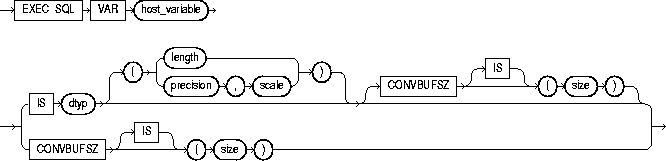
 Keywords and Parameters
|
host_variable |
The host variable to be assigned an Oracle8i external datatype. |
|
dtyp |
An Oracle8i external datatype recognized by Pro*COBOL (not an Oracle8i internal datatype). The datatype may include a length, precision, or scale. This external datatype is assigned to the host_variable. For a list of external datatypes, see "External Datatypes". |
|
size |
The size in bytes of a buffer in the Oracle8i runtime library used to perform conversion between character sets of the host_variable. |
Host variable equivalencing is one kind of datatype equivalencing. Datatype equivalencing is useful for any of the following purposes:
For more information about Oracle datatypes, see "Sample Program 4: Datatype Equivalencing".
This example equivalences the host variable DEPT_NAME to the datatype STRING and the host variable BUFFER to the datatype RAW(200):
     EXEC SQL BEGIN DECLARE SECTION END-EXEC.
     ...
     01 DEPT-NAME  PIC X(15).
* -- default datatype is CHAR
     EXEC SQL VAR DEPT-NAME IS STRING END-EXEC.
* -- reset to STRING
     ...
     01 BUFFER-VAR.
          05 BUFFER  PIC X(200).
* -- default datatype is CHAR
     EXEC SQL VAR BUFFER IS RAW(200) END-EXEC.
* -- refer to RAW
     ...
     EXEC SQL END DECLARE SECTION END-EXEC.
None.
To specify the action to be taken when an error or warning results from executing an embedded SQL program.
None.
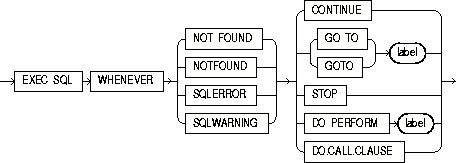
where DO.CALL.CLAUSE is:

The WHENEVER directive allows your program to teke one of several possible actions in the event an embedded SQL statement results in an error or warning.
The scope of a WHENEVER statement is positional, rather than logical. A WHENEVER statement applies to all embedded SQL statements that textually follow it in the source file, not in the flow of the program logic. A WHENEVER statement remains in effect until it is superseded by another WHENEVER statement checking for the same condition.
For more information about and examples of the conditions and actions of this directive, see "WHENEVER Directive".
Do not confuse the WHENEVER embedded SQL directive with the WHENEVER SQL*Plus command.
The following example illustrates the use of the WHENEVER directive in a Pro*COBOL embedded SQL program:
     EXEC SQL WHENEVER NOT FOUND CONTINUE END-EXEC.
     ...
     EXEC SQL WHENEVER SQLERROR GOTO SQL-ERROR END-EXEC.
     ...
 SQL-ERROR.
     EXEC SQL WHENEVER SQLERROR CONTINUE END-EXEC.
     DISPLAY "ORACLE ERROR DETECTED.".
     EXEC SQL ROLLBACK RELEASE END-EXEC.
     STOP RUN.
None
