Release 8.1.5
A68023-01
 Library |
 Product |
 Contents |
 Index |
| Pro*COBOL Precompiler Programmer's Guide Release 8.1.5 A68023-01 |
|


An application program must anticipate runtime errors and attempt to recover from them. This chapter provides an in-depth discussion of error reporting and recovery. You learn how to handle warnings and errors using the status variables SQLCODE, SQLSTATE, and SQLCA (SQL Communications Area), and the WHENEVER statement. You also learn how to diagnose problems using the status variable ORACA (Oracle Communications Area). The following topics are discussed:
A significant part of every application program must be devoted to error handling. The main benefit of error handling is that it allows your program to continue operating in the presence of errors. Errors arise from design faults, coding mistakes, hardware failures, invalid user input, and many other sources
You cannot anticipate all possible errors, but you can plan to handle certain kinds of errors meaningful to your program. For Pro*COBOL, error handling means detecting and recovering from SQL statement execution errors.
You can also prepare to handle warnings such as "value truncated" and status changes such as "end of data." It is especially important to check for error and warning conditions after every data manipulation statement, because an INSERT, UPDATE, or DELETE statement might fail before processing all eligible rows in a table.
Pro*COBOL supports four status variables that serve as error handling mechanisms:
The precompiler MODE option governs ANSI/ISO compliance. The availability of the SQLCODE, SQLSTATE, and SQLCA variables depends on the MODE setting. You can declare and use the ORACA variable regardless of the MODE setting. For more information, see "Using the Oracle Communications Area".
When MODE={ORACLE | ANSI13}, you must declare the SQLCA status variable. SQLCODE and SQLSTATE declarations are accepted (not recommended) but are not recognized as status variables. For more information, see "Using the SQL Communications Area".
When MODE={ANSI | ANSI14}, you can use any one, two, or all three of the SQLCODE, SQLSTATE, and SQLCA variables. To determine which variable (or variable combination) is best for your application, see "Using Status Variables when MODE={ANSI | ANSI14}".
With Release 1.5 of Pro*COBOL, the SQLCODE status variable was introduced as the SQL89 standard ANSI/ISO error reporting mechanism. The SQL92 standard listed SQLCODE as a deprecated feature and defined a new status variable, SQLSTATE (introduced with Release 1.6 of Pro*COBOL), as the preferred ANSI/ISO error reporting mechanism.
SQLCODE stores error codes and the "not found" condition. It is retained only for compatibility with SQL89 and is likely to be removed from future versions of the standard.
Unlike SQLCODE, SQLSTATE stores error and warning codes and uses a standardized coding scheme. After executing a SQL statement, the database server returns a status code to the SQLSTATE variable currently in scope. The status code indicates whether a SQL statement executed successfully or raised an exception (error or warning condition). To promote interoperability (the ability of systems to exchange information easily), SQL92 pre-defines all the common SQL exceptions.
The SQLCA is a record-like, host-language data structure. Oracle8i updates the SQLCA after every executable SQL statement. (SQLCA values are undefined after a declarative statement.) By checking return codes stored in the SQLCA, your program can determine the outcome of a SQL statement. This can be done in two ways:
You can use WHENEVER statements, code explicit checks on SQLCA variables, or do both. Generally, using WHENEVER statements is preferable because it is easier, more portable, and ANSI-compliant.
In nested programs, the included SQLCA definition provided will be declared as global, so the declaration of SQLCA will only be required within the higher-level program. SQLCA can change every time a new SQL statement is executed. The SQLCA provided can always be modified to remove the global specification by the user if the user wishes to declare additional SQLCAs in the nested programs. This applies to SQLDA and ORACA.
When more information is needed about runtime errors than the SQLCA provides, you can use the ORACA, which contains cursor statistics, SQL statement data, option settings, and system statistics.
The ORACA is optional and can be declared regardless of the MODE setting. For more information about the ORACA status variable, see "Using the Oracle Communications Area".
When MODE={ANSI | ANSI14}, you must declare at least one -- you may declare two -- of the following status variables:
You cannot declare SQLCODE if SQLCA is declared. Likewise, you cannot declare SQLCA if SQLCODE is declared. The field in the SQLCA data structure that stores the error code for is also called SQLCODE, so errors will occur if both status variables are declared.
Your program can get the outcome of the most recent executable SQL statement by checking SQLCODE and/or SQLSTATE explicitly with your own code after executable SQL and PL/SQL statements. Your program can also check SQLCA implicitly (with the WHENEVER SQLERROR and WHENEVER SQLWARNING statements) or it can check the SQLCA variables explicitly.
Note: When MODE={ORACLE | ANSI13 | ANSI14}, you must declare the SQLCA status variable. For more information, see "Using the SQL Communications Area".
The treatment of status variables and variable combinations by Pro*COBOL has evolved beginning with Release 1.5.
Pro*COBOL, Release 1.5, presumed there was a status variable SQLCODE whether or not it was declared; in fact, Pro*COBOL never noted whether SQLCODE was declared or not -- it just presumed it was. SQLCA would be used as a status variable if and only if there was an INCLUDE of the SQLCA.
Beginning with Pro*COBOL, Release 1.6, the precompiler no longer presumes that there is a SQLCODE status variable and it is not required. Pro*COBOL requires that at least one of SQLCODE or SQLSTATE be declared.
SQLCODE is recognized as a status variable if and only if at least one of the following criteria is satisfied:
If Pro*COBOL finds a SQLSTATE declaration (of exactly the right type of course) or finds an INCLUDE of the SQLCA, it will not presume SQLCODE is declared.
Because Pro*COBOL, Release 1.5, allowed the SQLCODE variable to be declared outside of a Declare Section while also declaring SQLCA, Pro*COBOL, Release 1.6 and greater, is presented with a compatibility problem. A new option, ASSUME_SQLCODE={YES | NO} (default NO), was added to fix this in Release 1.6.7 and is documented as a new feature in Release 1.7.
Beginning with release 8.0, the Declare Section is now optional. For details of the ASSUME_SQLCODE option, see "ASSUME_SQLCODE".
This section describes how to declare SQLCODE and SQLSTATE. For information about declaring the SQLCA status variable, see "Declaring the SQLCA".
SQLCODE must be declared as a 4-byte integer variable either inside or outside the Declare Section, as shown in the following example:
*    Declare host and indicator variables.
     EXEC SQL BEGIN DECLARE SECTION END-EXEC.
     ...
     EXEC SQL END DECLARE SECTION END-EXEC.
*    Declare the SQLCODE status variable.
 01  SQLCODE  PIC S9(9) COMP.
If declared outside the Declare Section, SQLCODE is recognized as a status variable if and only if ASSUME_SQLCODE=YES. When MODE={ORACLE | ANSI13 | ANSI14}, declarations of the SQLCODE variable are ignored.
Warning: Do not declare SQLCODE if SQLCA is declared. Likewise, do not declare SQLCA if SQLCODE is declared. The status variable declared by the SQLCA structure is also called SQLCODE, so errors will occur if both error-reporting mechanisms are used.
After every SQL operation, Oracle8i returns a status code to the SQLCODE variable. So, your program can learn the outcome of the most recent SQL operation by checking SQLCODE explicitly, or implicitly with the WHENEVER statement.
When you declare SQLCODE instead of the SQLCA in a particular compilation unit, Pro*COBOL allocates an internal SQLCA for that unit. Your host program cannot access the internal SQLCA.
SQLSTATE must be declared as a five-character alphanumeric string, as shown in the following example:
*    Declare the SQLSTATE status variable.
     EXEC SQL BEGIN DECLARE SECTION END-EXEC.
       ...
 01 SQLSTATE PIC X(5).
       ...
     EXEC SQL END DECLARE SECTION END-EXEC.
When MODE={ORACLE | ANSI13 | ANSI14}, SQLSTATE declarations are ignored. Declaring the SQLCA is optional.
When MODE={ANSI | ANSI14}, the behavior of the status variables depends on the following:
Table 8-1 and Table 8-2 describe the resulting behavior of each status variable combination when ASSUME_SQLCODE=NO and when ASSUME_SQLCODE=YES, respectively.
For both Tables: when DECLARE_SECTION=NO, any declaration of a status variable is treated as IN as far as these tables are concerned.
Do not use ASSUME_SQLCODE=YES with DECLARE_SECTION=NO.
This section describes the values for the SQLCODE and SQLSTATE status variables. For information about the SQLCA status variable, see "Key Components of Error Reporting".
After every SQL operation, Oracle8i returns a status code to the SQLCODE variable currently in scope. The status code, which indicates the outcome of the SQL operation, can be any of the following numbers:'
You can learn the outcome of the most recent SQL operation by checking SQLCODE explicitly with your own code or implicitly with the WHENEVER statement.
When you declare SQLCODE instead of the SQLCA in a particular precompilation unit, Pro*COBOL allocates an internal SQLCA for that unit. Your host program cannot access the internal SQLCA.
Note: When MODE={ORACLE | ANSI13}, declarations of SQLCODE are ignored.
SQLSTATE status codes consist of a two-character class code followed by a three-character subclass code. Aside from class code 00 (successful completion), the class code denotes a category of exceptions. Aside from subclass code 000 (not applicable), the subclass code denotes a specific exception within that category. For example, the SQLSTATE value '22012' consists of class code 22 (data exception) and subclass code 012 (division by zero).
Each of the five characters in a SQLSTATE value is a digit (0..9) or an uppercase Latin letter (A..Z). Class codes that begin with a digit in the range 0..4 or a letter in the range A..H are reserved for predefined conditions (those defined in SQL92). All other class codes are reserved for implementation-defined conditions. Within predefined classes, subclass codes that begin with a digit in the range 0..4 or a letter in the range A..H are reserved for predefined sub-conditions. All other subclass codes are reserved for implementation-defined sub-conditions. Figure 8-1 shows the coding scheme:
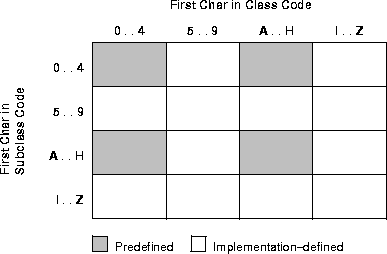
Table 8-3 shows the classes predefined by SQL92
Note: The class code HZ is reserved for conditions defined in International Standard ISO/IEC DIS 9579-2, Remote Database Access.
Table 8-4 shows how errors map to SQLSTATE status codes. In some cases, several errors map to the status code. In other cases, no error maps to the status code (so the last column is empty). Status codes in the range 60000 .. 99999 are implementation-defined.
Oracle8i uses the SQL Communications Area (SQLCA) to store status information passed to your program at run time. The SQLCA is a record-like, COBOL data structure that is a updated after each executable SQL statement, so it always reflects the outcome of the most recent SQL operation. Its fields contain error, warning, and status information updated by Oracle8i whenever a SQL statement is executed.To determine that outcome, you can check variables in the SQLCA explicitly with your own COBOL code or implicitly with the WHENEVER statement.
Note: When your application uses SQL*Net to access a combination of local and remote databases concurrently, all the databases write to one SQLCA. There is not a different SQLCA for each database. For more information, see "Concurrent Logons"
When MODE={ORACLE | ANSI13}, the SQLCA is required; if the SQLCA is not declared, compile-time errors will occur. The SQLCA is optional when MODE={ANSI | ANSI14}, but you cannot use the WHENEVER SQLWARNING statement without the SQLCA. So, if you want to use the WHENEVER SQLWARNING statement, you must declare the SQLCA.
Note: If you declare SQLCODE instead of the SQLCA in a particular compilation unit, Pro*COBOL allocates an internal SQLCA for that unit. Your host program cannot access the internal SQLCA.
When MODE={ANSI | ANSI14}, you must declare either SQLSTATE (see "Declaring SQLSTATE") or SQLCODE (see "Declaring SQLCODE") or both. The SQLSTATE status variable supports the SQLSTATE status variable specified by the SQL92 standard. You can use the SQLSTATE status variable with or without SQLCODE.
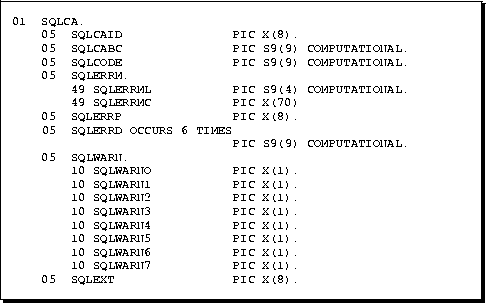
The SQLCA contains runtime information about the execution of SQL statements, such as error codes, warning flags, event information, rows-processed count, and diagnostics.
Figure 8-2 shows all the variables in the SQLCA. However, SQLWARN2, SQLWARN5, SQLWARN6, SQLWARN7, and SQLEXT are not currently in use.
To declare the SQLCA, simply include it (using an EXEC SQL INCLUDE statement) in your Pro*COBOL source file outside the Declare Section as follows:
*    Include the SQL Communications Area (SQLCA).
     EXEC SQL INCLUDE SQLCA END-EXEC.
The SQLCA must be declared outside the Declare Section.
Warning: Do not declare SQLCODE if SQLCA is declared. Likewise, do not declare SQLCA if SQLCODE is declared. The status variable declared by the SQLCA structure is also called SQLCODE, so errors will occur if both error-reporting mechanisms are used.
When you precompile your program, the INCLUDE SQLCA statement is replaced by several variable declarations that allow Oracle8i to communicate with the program.
The key components of Pro*COBOL error reporting depend on several fields in the SQLCA.
Every executable SQL statement returns a status code in the SQLCA variable SQLCODE, which you can check implicitly with WHENEVER SQLERROR or explicitly with your own COBOL code.
Warning flags are returned in the SQLCA variables SQLWARN0 through SQLWARN7, which you can check with WHENEVER SQLWARNING or with your own COBOL code. These warning flags are useful for detecting runtime conditions that are not considered errors.
The number of rows processed by the most recently executed SQL statement is returned in the SQLCA variable SQLERRD(3). For repeated FETCHes on an OPEN cursor, SQLERRD(3) keeps a running total of the number of rows fetched.
Before executing a SQL statement, Oracle8i must parse it; that is, examine it to make sure it follows syntax rules and refers to valid database objects. If Oracle8i finds an error, an offset is stored in the SQLCA variable SQLERRD(5), which you can check explicitly. The offset specifies the character position in the SQL statement at which the parse error begins. The first character occupies position zero. For example, if the offset is 9, the parse error begins at the tenth character.
If your SQL statement does not cause a parse error, Oracle8i sets SQLERRD(5) to zero. Oracle8i also sets SQLERRD(5) to zero if a parse error begins at the first character (which occupies position zero). So, check SQLERRD(5) only if SQLCODE is negative, which means that an error has occurred.
The error code and message for errors are available in the SQLCA variable SQLERRMC. For example, you might place the following statements in an error-handling routine:
*    Handle SQL execution errors.
     MOVE SQLERRMC TO ERROR-MESSAGE.
     DISPLAY ERROR-MESSAGE.
At most, the first 70 characters of message text are stored. For messages longer than 70 characters, you must call the SQLGLM subroutine, which is discussed in "Getting the Full Text of Error Messages".
This section describes the structure of the SQLCA, its fields, and the values they can store.
This string field is initialized to "SQLCA" to identify the SQL Communications Area.
This integer field holds the length, in bytes, of the SQLCA structure.
This integer field holds the status code of the most recently executed SQL statement. The status code, which indicates the outcome of the SQL operation, can be any of the following numbers:
|
0 |
Oracle8i executed the statement without detecting an error or exception. |
|
> 0 |
Oracle8i executed the statement but detected an exception. This occurs when Oracle8i cannot find a row that meets your WHERE-clause search condition or when a SELECT INTO or FETCH returns no rows. |
|
< 0 |
When MODE={ANSI | ANSI14 | ANSI113}, +100 is returned to SQLCODE after an INSERT of no rows. This can happen when a subquery returns no rows to process. Oracle8i did not execute the statement because of a database, system, network, or application error. Such errors can be fatal. When they occur, the current transaction should, in most cases, be rolled back. Negative return codes correspond to error codes listed in Oracle8i Error Messages. |
This sub-record contains the following two fields:
This string field is reserved for future use.
This table of binary integers has six elements. Descriptions of the fields in SQLERRD follow:
This table of single characters has eight elements. They are used as warning flags. Oracle8i sets a flag by assigning it a "W" (for warning) character value. The flags warn of exceptional conditions.
For example, a warning flag is set when Oracle8i assigns a truncated column value to an output host character variable.
Note: While Figure 8-2, "SQLCA Variable Declarations for Pro*COBOL" illustrates SQLWARN as a table, it is implemented in Pro*COBOL as a group item with elementary PIC X items named SQLWARN0 through SQLWARN7.
Descriptions of the fields in SQLWARN follow:
This string field is reserved for future use.
When your Pro*COBOL program executes an embedded PL/SQL block, not all fields in the SQLCA are set. For example, if the block fetches several rows, the rows-processed count, sqlerrd(3), is set to 1, not the actual number of rows fetched. So, you should rely only on the SQLCODE and SQLERRM fields in the SQLCA after executing a PL/SQL block.
The SQLCA can accommodate error messages up to 70 characters long. To get the full text of longer (or nested) error messages, you need the SQLGLM subroutine.
If connected a database, you can call SQLGLM using the syntax
CALL "SQLGLM" USING MSG-TEXT, MAX-SIZE, MSG-LENGTH
where:
The maximum length of an error message is 512 characters including the error code, nested messages, and message inserts such as table and column names. The maximum length of an error message returned by SQLGLM depends on the value specified for MAX-SIZE.
The following example uses SQLGLM to get an error message of up to 200 characters in length:
     ...
*    Declare variables for the SQL-ERROR subroutine call.
 01  MSG-TEXT    PIC X(200).
 01  MAX-SIZE    PIC S9(9) COMP VALUE 200.
 01  MSG-LENGTH  PIC S9(9) COMP.
     ...
 PROCEDURE DIVISION.
 MAIN.
     EXEC SQL WHENEVER SQLERROR GOTO SQL-ERROR END-EXEC.
     ...
 SQL-ERROR.
*    Clear the previous message text.
     MOVE SPACES TO MSG-TEXT.
*    Get the full text of the error message.
     CALL "SQLGLM" USING MSG-TEXT, MAX-SIZE, MSG-LENGTH.
     DISPLAY MSG-TEXT.
In the example, SQLGLM is called only when a SQL error has occurred. Always make sure SQLCODE is negative before calling SQLGLM. If you call SQLGLM when SQLCODE is zero, you get the message text associated with a prior SQL statement.
Note: If your application calls SQLGLM to get message text or your Oracle*Forms user exit calls SQLIEM to display a failure message, the message length must be passed. Do not use the SQLCA variable SQLERRML. SQLERRML is a PIC S9(4) COMP integer while SQLGLM and SQLIEM expect a PIC S9(9) COMP integer. Instead, use another variable declared as PIC S9(9) COMP.
DB2 provides an assembler routine called DSNTIAR to obtain a form of the SQLCA that can be displayed. For users migrating to Oracle from DB2, Pro*COBOL provides DSNTIAR. DSNTIAR's implementation is a wrapper around SQLGLM. The DSNTIAR interface is as follows
CALL 'DSNTIAR' USING SQLCA MESSAGE LRECL
where MESSAGE is the output message area, in VARCHAR form of size greater than or equal to 240, and LRECL is a full word containing the length of the output messages, between 72 and 240. The first half-word of the MESSAGE argument contains the length of the remaining area. The possible error codes returned by DSNTIAR are:
By default, Pro*COBOL ignores error and warning conditions and continues processing, if possible. To do automatic condition checking and error handling, you need the WHENEVER statement.
With the WHENEVER statement you can specify actions to be taken when Oracle8i detects an error, warning condition, or "not found" condition. These actions include continuing with the next statement, PERFORMing a paragraph, branching to a paragraph, or stopping.
You can have Oracle8i automatically check the SQLCA for any of the following conditions.
SQLWARN(0) is set because Oracle8i returned a warning (one of the warning flags, SQLWARN(1) through SQLWARN(7), is also set) or SQLCODE has a positive value other than +1403. For example, SQLWARN(1) is set when Oracle8 assigns a truncated column value to an output host variable.
Declaring the SQLCA is optional when MODE={ANSI | ANSI14}. To use WHENEVER SQLWARNING, however, you must declare the SQLCA.
SQLCODE has a negative value because Oracle8i returned an error.
SQLCODE has a value of +1403 (+100 when MODE={ANSI | ANSI14 | ANSI13}), because Oracle8i could not find a row that meets the search condition of a WHERE clause, or a SELECT INTO or FETCH returned no rows. When MODE={ANSI | ANSI14 | ANSI13}, +100 is returned to SQLCODE after an INSERT of no rows.
Since DB2 returns a SQLCODE value of 100 when an END-OF-FETCH condition occurs after a SQL statement execution, Pro*COBOL provides a new command line option for explicit control over the value returned when the END-OF-FETCH condition occurs. This option is:
END_OF_FETCH = 100 | 1403 (default 1403)
The END_OF_FETCH option must be used on the command line or in a configuration file. For more details, see "END_OF_FETCH"
If the user specifies MODE=ANSI in a configuration file, Pro*COBOL will implement the 100 at the END_OF_FETCH, overriding the default END_OF_FETCH=1403. If the user specifies MODE=ANSI and END_OF_FETCH=1403 in the configuration file, then Pro*COBOL will implement the 1403 at the END_OF_FETCH. If the user specifies MODE=ANSI in the configuration file and END_OF_FETCH=1403 on the command line, Pro*COBOL will again implement the 1403 at the END_OF_FETCH.
When Oracle8i detects one of the preceding conditions, you can have your program take any of the following actions.
Your program continues to run with the next statement if possible. This is the default action, equivalent to not using the WHENEVER statement. You can use it to "turn off" condition checking.
Your program calls a nested subprogram. When the end of the subprogram is reached, control transfers to the statement that follows the failed SQL statement.
Your program transfers control to a COBOL paragraph. When the end of the paragraph is reached, control transfers to the statement that follows the failed SQL statement.
     EXEC SQL
         WHENEVER <condition> DO PERFORM <paragraph_name>
     END-EXEC.
Your program branches to a labeled statement.
Your program stops running and uncommitted work is rolled back.
Be careful. The STOP action displays no messages before logging off.
Code the WHENEVER statement using the following syntax:
     EXEC SQL
         WHENEVER <condition> <action>
     END-EXEC.
When using the WHENEVER ... DO PERFORM statement, the usual rules for PERFORMing a paragraph apply. However, you cannot use the THRU, TIMES, UNTIL, or VARYING clauses.
For example, the following WHENEVER ... DO statement is invalid:
 PROCEDURE DIVISION.
*    Invalid statement
     EXEC SQL WHENEVER SQLERROR DO
         PERFORM DISPLAY-ERROR THRU LOG-OFF
     END-EXEC.
     ...
 DISPLAY-ERROR.
     ...
 LOG-OFF.
     ...
In the following example, WHENEVER SQLERROR DO PERFORM statements are used to handle specific errors:
 PROCEDURE DIVISION.
 MAIN.
     ...
     EXEC SQL
         WHENEVER SQLERROR DO PERFORM INS-ERROR
     END-EXEC.
     EXEC SQL
         INSERT INTO EMP (EMPNO, ENAME, DEPTNO)
         VALUES (:EMP-NUMBER, :EMP-NAME, :DEPT-NUMBER)
     END-EXEC.
     EXEC SQL
         WHENEVER SQLERROR DO PERFORM DEL-ERROR
     END-EXEC.
     EXEC SQL
         DELETE FROM DEPT
         WHERE DEPTNO = :DEPT-NUMBER
     END-EXEC.
     ...
*    Error-handling paragraphs.
 INS-ERROR.
*    Check for "duplicate key value" Oracle8 error
     IF SQLCA.SQLCODE = -1
     ...
*    Check for "value too large" Oracle8 error
     ELSE IF SQLCA.SQLCODE = -1401
     ...
     ELSE
     ...
     END-IF.
     ...
 DEL-ERROR.
*    Check for the number of rows processed.
     IF SQLCA.SQLERRD(3) = 0
     ...
     ELSE
     ...
     END-IF.
     ...
Notice how the paragraphs check variables in the SQLCA to determine a course of action.
This clause calls an action subprogram. Here is the syntax of this clause:
     EXEC SQL
         WHENEVER <condition> DO CALL <subprogram_name>
         [USING <param1> ...]
     END-EXEC.
The following restrictions or rules apply:
Here is an example of a program that can call the error subprogram SQL-ERROR from inside the subprogram LOGON, or inside the MAIN program, without having to repeat code in two places, as when using the DO PERFORM clause:
IDENTIFICATION DIVISION.
            PROGRAM-ID. MAIN.
            ENVIRONMENT DIVISION.
        ...
            PROCEDURE DIVISION.
            BEGIN-PGM.
                EXEC SQL
                    WHENEVER SQLERROR DO CALL "SQL-ERROR"
                END-EXEC.
                CALL "LOGON".
        ...
            IDENTIFICATION DIVISION.
            PROGRAM-ID. LOGON.
            DATA DIVISION.
            WORKING-STORAGE SECTION.
            01  USERNAME          PIC X(15) VARYING.
            01  PASSWD            PIC X(15) VARYING.
            PROCEDURE DIVISION.
                MOVE "SCOTT" TO USERNAME-ARR.
                MOVE 5 TO USERNAME-LEN.
                MOVE "TIGER" TO PASSWD-ARR.
                MOVE 5 TO PASSWD-LEN.
                EXEC SQL
                   CONNECT :USERNAME IDENTIFIED BY :PASSWD
                END-EXEC.
                DISPLAY " ".
                DISPLAY "CONNECTED TO ORACLE AS USER:  ", USERNAME-ARR.
            END PROGRAM LOGON.
        ...
            IDENTIFICATION DIVISION.
            PROGRAM-ID. SQL-ERROR COMMON.
            PROCEDURE DIVISION.
                EXEC SQL
                    WHENEVER SQLERROR CONTINUE
                END-EXEC.
                DISPLAY " ".
                DISPLAY SQLERRMC.
                EXEC SQL
                    ROLLBACK WORK RELEASE
                END-EXEC.
                END PROGRAM SQL-ERROR.
            END PROGRAM MAIN.
Because WHENEVER is a declarative statement, its scope is positional, not logical. It tests all executable SQL statements that follow it in the source file, not in the flow of program logic. So, code the WHENEVER statement before the first executable SQL statement you want to test.
A WHENEVER statement stays in effect until superseded by another WHENEVER statement checking for the same condition.
Suggestion: You can place WHENEVER statements at the beginning of each program unit that contains SQL statements. That way, SQL statements in one program unit will not reference WHENEVER actions in another program unit, causing errors at compile or run time.
Careless use of the WHENEVER statement can cause problems. For example, the following code enters an infinite loop if the DELETE statement sets the NOT FOUND condition, because no rows meet the search condition:
*    Improper use of WHENEVER.
     EXEC SQL
         WHENEVER NOT FOUND GOTO NO-MORE
     END-EXEC.
     PERFORM GET-ROWS UNTIL DONE = "YES".
     ...
 GET-ROWS.
     EXEC SQL
         FETCH EMP-CURSOR INTO :EMP-NAME, :SALARY
     END-EXEC.
     ...
 NO-MORE.
     MOVE "YES" TO DONE.
     EXEC SQL
         DELETE FROM EMP WHERE EMPNO = :EMP-NUMBER
     END-EXEC.
     ...
In the next example, the NOT FOUND condition is properly handled by resetting the GOTO target:
*    Proper use of WHENEVER.
     EXEC SQL WHENEVER NOT FOUND GOTO NO-MORE END-EXEC.
     PERFORM GET-ROWS UNTIL DONE = "YES".
     ...
 GET-ROWS.
     EXEC SQL
         FETCH EMP-CURSOR INTO :EMP-NAME, :SALARY
     END-EXEC.
     ...
 NO-MORE.
     MOVE "YES" TO DONE.
     EXEC SQL WHENEVER NOT FOUND GOTO NONE-FOUND END-EXEC.
     EXEC SQL
        DELETE FROM EMP WHERE EMPNO = :EMP-NUMBER
     END-EXEC.
     ...
 NONE-FOUND.
     ...
In many Pro*COBOL applications, it is convenient to know the text of the statement being processed, its length, and the SQL command (such as INSERT or SELECT) that it contains. This is especially true for applications that use dynamic SQL.
The routine SQLGLS, which is part of the SQLLIB runtime library, returns the following information:
You can call SQLGLS after issuing a static SQL statement. With dynamic SQL Method 1, you can call SQLGLS after the SQL statement is executed. With dynamic SQL Method 2, 3, or 4, you can call SQLGLS after the statement is prepared.
To call SQLGLS, you use the following syntax:
CALL "SQLGLS" USING SQLSTM STMLEN SQLFC.
Table 8-6 shows the host-language datatypes available for the parameters in the SQLGLS argument list.
| Parameter | Datatype |
|---|---|
|
SQLSTM |
PIC X(n) |
|
STMLEN |
PIC S9(9) COMP |
|
SQLFC |
PIC S9(9) COMP |
All parameters must be passed by reference. This is usually the default parameter passing convention; you need not take special action.
The parameter SQLSTM is a blank-padded (not null-terminated) character buffer that holds the returned text of the SQL statement. Your program must statically declare the buffer or dynamically allocate memory for it.
The length parameter STMLEN is a four-byte integer. Before calling SQLGLS, set this parameter to the actual size (in bytes) of the SQLSTM buffer. When SQLGLS returns, the SQLSTM buffer contains the SQL statement text blank padded to the length of the buffer. STMLEN returns the actual number of bytes in the returned statement text, not counting the blank padding. However, STMLEN returns a zero if an error occurred.
Some possible errors follow:
The parameter SQLFC is a four-byte integer that returns the SQL function code for the SQL command in the statement. A complete table of the function code for each SQL command is found in Oracle Call Interface Programmer's Guide.
There are no SQL function codes for these statements:
The SQLCA handles standard SQL communications. The Oracle Communications Area (ORACA) is a similar structure that you can include in your program to handle Oracle8i-specific communications. When you need more runtime information than the SQLCA provides, use the ORACA.
Besides helping you to diagnose problems, the ORACA lets you monitor your program's use of resources such as the SQL Statement Executor and the cursor cache, an area of memory reserved for cursor management.
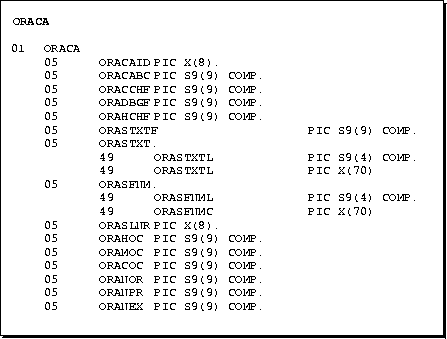
The ORACA contains option settings, system statistics, and extended diagnostics. Figure 8-3 shows all the variables in the ORACA:
To declare the ORACA, simply include it (using an EXEC SQL INCLUDE statement) in your Pro*COBOL source file outside the Declare Section as follows:
*    Include the Oracle Communications Area (ORACA).
     EXEC SQL INCLUDE ORACA END-EXEC.
To enable the ORACA, you must set the ORACA precompiler option to YES on the command line or in a configuration file with
ORACA=YES
or inline with
EXEC Oracle OPTION (ORACA=YES) END-EXEC.
Then, you must choose appropriate runtime options by setting flags in the ORACA. Enabling the ORACA is optional because it adds to runtime overhead. The default setting is ORACA=NO.
The ORACA includes several option flags. Setting these flags by assigning them non-zero values allows you to:
The descriptions below will help you choose the options you need.
This section describes the structure of the ORACA, its fields, and the values they can store.
This string field is initialized to "ORACA" to identify the Oracle Communications Area.
This integer field holds the length, expressed in bytes, of the ORACA data structure.
If the master DEBUG flag (ORADBGF) is set, this flag lets you check the cursor cache for consistency before every cursor operation.
The runtime library does the consistency checking andcan issue error messages, which are listed in Oracle8i Error Messages.
This flag has the following settings:
|
0 |
Disable cache consistency checking (the default). |
|
1 |
Enable cache consistency checking. |
This master flag lets you choose all the DEBUG options. It has the following settings:
|
0 |
Disable all DEBUG operations (the default). |
|
1 |
Enable all DEBUG operations. |
If the master DEBUG flag (ORADBGF) is set, this flag tells the runtime library to check the heap for consistency every time Pro*COBOL dynamically allocates or frees memory. This is useful for detecting program bugs that upset memory.
This flag must be set before the CONNECT command is issued and, once set, cannot be cleared; subsequent change requests are ignored. It has the following settings:
|
0 |
Disable all DEBUG operations (the default). |
|
1 |
Enable all DEBUG operations. |
This flag lets you specify when the text of the current SQL statement is saved. It has the following settings:
|
0 |
Never save the SQL statement text (the default). |
|
1 |
Save the SQL statement text on SQLERROR only. |
|
2 |
Save the SQL statement text on SQLERROR or SQLWARNING. |
|
3 |
Always save the SQL statement text. |
The SQL statement text is saved in the ORACA sub-record named ORASTXT.
The ORACA provides an enhanced set of diagnostics; the following variables help you to locate errors quickly.
This sub-record helps you find faulty SQL statements. It lets you save the text of the last SQL statement parsed by Oracle8i. It contains the following two fields:
|
ORASTXTL |
This integer field holds the length of the current SQL statement. |
|
ORASTXTC |
This string field holds the text of the current SQL statement. At most, the first 70 characters of text are saved. |
Statements parsed by Pro*COBOL, such as CONNECT, FETCH, and COMMIT, are not saved in the ORACA.
This sub-record identifies the file containing the current SQL statement and so helps you find errors when multiple files are precompiled for one application. It contains the following two fields:
|
ORASFNML |
This integer field holds the length of the filename stored in ORASFNMC. |
|
ORASFNMC |
This string field holds the filename. At most, the first 70 characters are stored. |
This integer field identifies the line at (or near) which the current SQL statement can be found.
The variables below let you gather cursor cache statistics. They are automatically set by every COMMIT or ROLLBACK statement your program issues. Internally, there is a set of these variables for each CONNECTed database. The current values in the ORACA pertain to the database against which the last commit or rollback was executed.
This integer field records the highest value to which MAXOPENCURSORS was set during program execution.
This integer field records the maximum number of open cursors required by your program. This number can be higher than ORAHOC if MAXOPENCURSORS was set too low, which forced Pro*COBOL to extend the cursor cache.
This integer field records the current number of open cursors required by your program.
This integer field records the number of cursor cache reassignments required by your program. This number shows the degree of "thrashing" in the cursor cache and should be kept as low as possible.
This integer field records the number of SQL statement parses required by your program.
This integer field records the number of SQL statement executions required by your program. The ratio of this number to the ORANPR number should be kept as high as possible. In other words, avoid unnecessary re-parsing. For help, see Appendix D, "Performance Tuning".
The following program prompts for a department number, inserts the name and salary of each employee in that department into one of two tables, then displays diagnostic information from the ORACA:
 IDENTIFICATION DIVISION.
 PROGRAM-ID. ORACAEX.
 ENVIRONMENT DIVISION.
 DATA DIVISION.
 WORKING-STORAGE SECTION.
     EXEC SQL INCLUDE SQLCA END-EXEC.
     EXEC SQL INCLUDE ORACA END-EXEC.

     EXEC ORACLE OPTION (ORACA=YES) END-EXEC.

     EXEC SQL BEGIN DECLARE SECTION END-EXEC.
 01 USERNAME       PIC X(20).
 01 PASSWORD       PIC X(20).
 01 EMP-NAME       PIC X(10) VARYING.
 01 DEPT-NUMBER    PIC S9(4) COMP.
 01 SALARY         PIC S9(6)V99
                          DISPLAY SIGN LEADING SEPARATE.
     EXEC SQL END DECLARE SECTION END-EXEC.

 PROCEDURE DIVISION.
     DISPLAY "Username? " WITH NO ADVANCING.
     ACCEPT USERNAME.
     DISPLAY "Password? " WITH NO ADVANCING.
     ACCEPT PASSWORD.
     EXEC SQL
         WHENEVER SQLERROR GOTO SQL-ERROR
     END-EXEC.
     EXEC SQL
         CONNECT :USERNAME IDENTIFIED BY :PASSWORD
     END-EXEC.
     DISPLAY "Connected to Oracle".

* -- set flags in the ORACA
* -- enable debug operations
     MOVE 1 TO ORADBGF.
* -- enable cursor cache consistency check
     MOVE 1 TO ORACCHF.
* -- always save the SQL statement
     MOVE 3 TO ORASTXTF.
     DISPLAY "Department number? " WITH NO ADVANCING.
     ACCEPT DEPT-NUMBER.
     EXEC SQL DECLARE EMPCURSOR CURSOR FOR
         SELECT ENAME, SAL + NVL(COMM,0)
         FROM EMP
         WHERE DEPTNO = :DEPT-NUMBER
     END-EXEC.
     EXEC SQL OPEN EMPCURSOR END-EXEC.
     EXEC SQL
         WHENEVER NOT FOUND GOTO NO-MORE
     END-EXEC.
 LOOP.
     EXEC SQL
         FETCH EMPCURSOR INTO :EMP-NAME, :SALARY
     END-EXEC.
     IF SALARY < 2500
         EXEC SQL
             INSERT INTO PAY1 VALUES (:EMP-NAME, :SALARY)
         END-EXEC
     ELSE
         EXEC SQL
             INSERT INTO PAY2 VALUES (:EMP-NAME, :SALARY)
         END-EXEC
     END-IF.
     GO TO LOOP.

 NO-MORE.
     EXEC SQL CLOSE EMPCURSOR END-EXEC.
     EXEC SQL WHENEVER SQLERROR CONTINUE END-EXEC.
     EXEC SQL COMMIT WORK RELEASE END-EXEC.
     DISPLAY "(NO-MORE.) Last SQL statement: ", ORASTXTC.
     DISPLAY "... at or near line number:  ", ORASLNR.
     DISPLAY  " ".
     DISPLAY "          Cursor Cache Statistics".
     DISPLAY "-------------------------------------------".
     DISPLAY "Maximum value of MAXOPENCURSORS     ", ORAHOC.
     DISPLAY "Maximum open cursors required:      ", ORAMOC.
     DISPLAY "Current number of open cursors:     ", ORACOC.
     DISPLAY "Number of cache reassignments:      ", ORANOR.
     DISPLAY "Number of SQL statement parses:     ", ORANPR.
     DISPLAY "Number of SQL statement executions: ", ORANEX.
     STOP RUN.

 SQL-ERROR.
     EXEC SQL WHENEVER SQLERROR CONTINUE END-EXEC.
     EXEC SQL ROLLBACK WORK RELEASE END-EXEC.
     DISPLAY "(SQL-ERROR.) Last SQL statement: ", ORASTXTC.
     DISPLAY "... at or near line number:  ", ORASLNR.
     DISPLAY " ".
     DISPLAY "          Cursor Cache Statistics".
     DISPLAY "-------------------------------------------".
     DISPLAY "MAXIMUM VALUE OF MAXOPENCURSORS     ", ORAHOC.
     DISPLAY "Maximum open cursors required:      ", ORAMOC.
     DISPLAY "Current number of open cursors:     ", ORACOC.
     DISPLAY "Number of cache reassignments:      ", ORANOR.
     DISPLAY "Number of SQL statement parses:     ", ORANPR.
     DISPLAY "Number of SQL statement executions: ", ORANEX.
     STOP RUN.
