Release 8.1.5
A67775-01
 Library |
 Product |
 Contents |
 Index |
| Oracle8i Tuning Release 8.1.5 A67775-01 |
|


This chapter explains how to avoid I/O bottlenecks that could prevent Oracle from performing at its maximum potential. This chapter covers the following topics:
This section introduces I/O performance issues. It covers:
The performance of many software applications is inherently limited by disk input/output (I/O). Often, CPU activity must be suspended while I/O activity completes. Such an application is said to be "I/O bound". Oracle is designed so that performance need not be limited by I/O.
Tuning I/O can enhance performance if a disk containing database files is operating at its capacity. However, tuning I/O cannot help performance in "CPU bound" cases--or cases in which your computer's CPUs are operating at their capacity.
It is important to tune I/O after following the recommendations presented in Chapter 19, "Tuning Memory Allocation". That chapter explains how to allocate memory so as to reduce I/O to a minimum. After reaching this minimum, follow the instructions in this chapter to achieve more efficient I/O performance.
When designing a new system, you should analyze I/O needs from the top down, determining what resources you will require in order to achieve the desired performance.
For an existing system, you should approach I/O tuning from the bottom up:
This section explains how to determine your system's I/O requirements.
Begin by figuring out the number of reads and writes involved in each transaction, and distinguishing the objects against which each operation is performed.
In an OLTP application, for example, each transaction might involve:
One transaction in this example thus requires 2 reads and 1 write, all to different objects.
In this example, the designer might specify that 100 tps would constitute an acceptable level of performance. To achieve this, the system must be able to perform 300 I/Os per second:
To do this, ascertain the number of I/Os that each disk can perform per second. This numbers depends on three factors:
In general, disk speed tends to have the following characteristics:
| Disk Speed: | File System | Raw Devices |
|
Reads per second |
fast |
slow |
|
Writes per second |
slow |
fast |
Table 20-2 Disk I/O Analysis Worksheet
| Disk Speed: | File System | Raw Devices |
|
Reads per second |
|
|
|
Writes per second |
|
|
Table 20-3 Sample Disk I/O Analysis
| Disk Speed: | File System | Raw Devices |
|
Reads per second |
50 |
45 |
|
Writes per second |
20 |
50 |
Table 20-4 Disk I/O Requirements Worksheet
| Object | If Stored on File System | If Stored on Raw Devices | ||||
| R/W Needed per Sec. | Disk R/W Capabil. per Sec. | Disks Needed | R/W Needed per Sec. | Disk R/W Capabil. per Sec. | Disks Needed | |
|
A |
|
|
|
|
|
|
|
B |
|
|
|
|
|
|
|
C |
|
|
|
|
|
|
|
Disks Req'd |
|
|
|
|
||
Table 20-5 shows the values from this example:
This section explains how to determine whether your application will run best by:
Use the following approach to design file storage:
These steps are described in detail under the following headings.
Evaluate your application to determine how often it requires each type of I/O operation. Table 20-6 shows the types of read and write operations performed by each of the background processes, by foreground processes, and by parallel execution servers.
| Operation | Process | |||||||
| LGWR | DBWn | ARCH | SMON | PMON | CKPT | Fore-ground | PQ Processes | |
|
Sequential Read |
|
|
X |
X |
|
X |
X |
X |
|
Sequential Write |
X |
|
X |
|
|
X |
|
|
|
Random Read |
|
|
|
X |
|
|
X |
|
|
Random Write |
|
X |
|
|
|
|
|
|
In this discussion, a sample application might involve 50% random reads, 25% sequential reads, and 25% random writes.
This section illustrates relative performance of read/write operations by a particular test system. On raw devices, reads and writes are done on the character level; on block devices, these operations are done on the block level. (Many concurrent processes may generate overhead due to head and arm movement of the disk drives.)
Table 20-7 and Figure 20-1 show speed of sequential read in milliseconds per I/O, for each of the three disk layout options on a test system.
Doing research like this helps determine the correct stripe size. In this example, it takes at most 5.3 milliseconds to read 16KB. If your data were in chunks of 256KB, you could stripe the data over 16 disks (as described) and maintain this low read time.
By contrast, if all your data were on one disk, read time would be 80 milliseconds. Thus the test results show that on this particular set of disks, things look quite different from what might be expected: it is sometimes beneficial to have a smaller stripe size, depending on the size of the I/O.
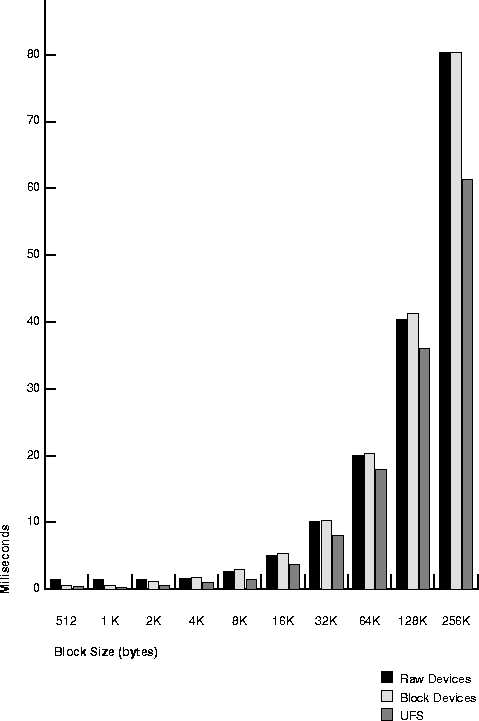
Table 20-8 and Figure 20-2 show speed of sequential write in milliseconds per I/O, for each of the three disk layout options on the test system.
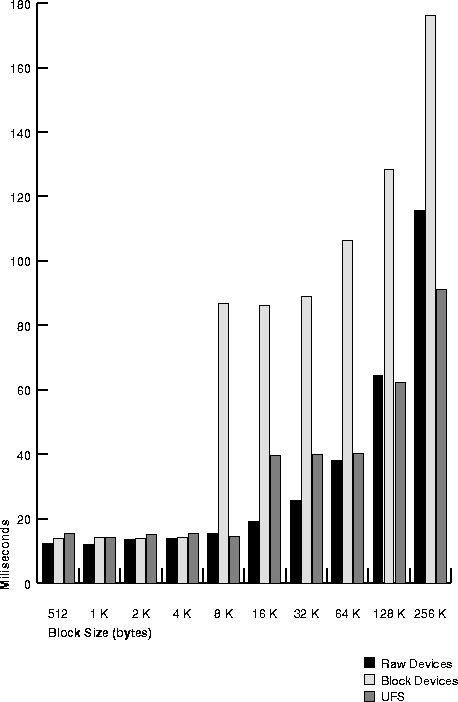
Table 20-9 and Figure 20-3 show speed of random read in milliseconds per I/O, for each of the three disk layout options on the test system.
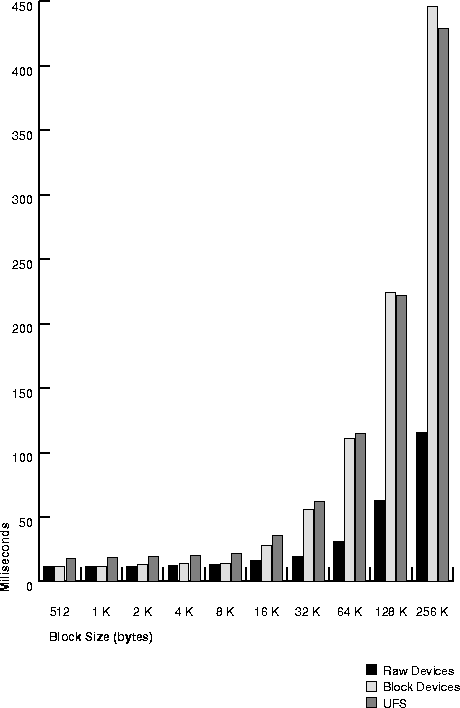
Table 20-10 and Figure 20-4 show speed of random write in milliseconds per I/O, for each of the three disk layout options on the test system.
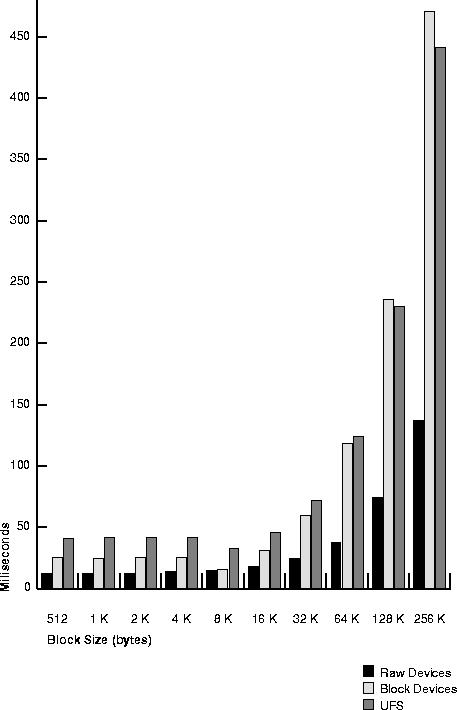
Knowing the types of operation that predominate in your application and the speed with which your system can process the corresponding I/Os, you can choose the disk layout that will maximize performance.
For example, with the sample application and test system described previously, the UNIX file system would be a good choice. With random reads predominating (50% of all I/O operations), 8KB would be a good block size. Raw devices with UNIX file systems provide comparable performance of random reads at this block size. Furthermore, the UNIX file system in this example processes sequential reads (25% of all I/O operations) almost twice as fast as raw devices, given an 8KB block size.
Table data in the database is stored in data blocks. This section describes how to allocate space within data blocks for best performance. With single block I/O (random read), retrieve all desired data from a single block in one read for best performance. How you store the data determines whether this performance objective will be achieved. It depends on two factors: storage of the rows, and block size.
The operating system I/O size should be equal to or greater than the database block size. Sequential read performance will improve if operating system I/O size is twice or three times the database block size (as in the example in "Testing the Performance of Your Disks"). This assumes that the operating system can buffer the I/O so that the next block will be read from that particular buffer.
Figure 20-5 illustrates the suitability of various block sizes to online transaction processing (OLTP) or decision support (DSS) applications.

This section describes advantages and disadvantages of different block sizes.
The number of I/Os a disk can perform depends on whether the operations involve reading or writing to objects stored on raw devices or on the file system. This affects the number of disks you must use to achieve the desired level of performance.
This section describes two tasks to perform if you suspect a problem with I/O usage:
Oracle compiles file I/O statistics that reflect disk access to database files. These statistics report only the I/O utilization of Oracle sessions--yet every process affects the available I/O resources. Tuning non-Oracle factors can thus improve performance.
Use operating system monitoring tools to determine what processes are running on the system as a whole, and to monitor disk access to all files. Remember that disks holding datafiles and redo log files may also hold files that are not related to Oracle. Try to reduce any heavy access to disks that contain database files. Access to non-Oracle files can be monitored only through operating system facilities rather than through the V$FILESTAT view.
Tools such as sar -d on many UNIX systems enable you to examine the iostat I/O statistics for your entire system. (Some UNIX-based platforms have an iostat command.) On NT systems, use Performance Monitor.
This section identifies the views and processes that provide Oracle I/O statistics, and shows how to check statistics using V$FILESTAT.
Table 20-12 shows dynamic performance views to check for I/O statistics relating to Oracle database files, log files, archive files, and control files.
Table 20-13 lists processes whose statistics reflect I/O throughput for the different Oracle file types.
| File | Process | |||||||
| LGWR | DBWn | ARCH | SMON | PMON | CKPT | Fore-ground | PQ Process | |
|
Database Files |
|
X |
|
X |
X |
X |
X |
X |
|
Log Files |
X |
|
|
|
|
|
|
|
|
Archive Files |
|
|
X |
|
|
|
|
|
|
Control Files |
X |
X |
X |
X |
X |
X |
X |
X |
V$SYSTEM_EVENT, for example, shows the total number of I/Os and average duration, by type of I/O. You can thus determine which types of I/O are too slow. If there are Oracle-related I/O problems, tune them. But if your process is not consuming the available I/O resources, then some other process is. Go back to the system to identify the process that is using up so much I/O, and determine why. Then tune this process.
Examine disk access to database files through the dynamic performance view V$FILESTAT. This view shows the following information for database I/O (but not for log file I/O):
By default, this view is available only to the user SYS and to users granted SELECT ANY TABLE system privilege, such as SYSTEM. The following column values reflect the number of disk accesses for each datafile:
|
PHYWRTS |
The number of writes to each database file. |
Use the following query to monitor these values over some period of time while your application is running:
SELECT name, phyrds, phywrts
   FROM v$datafile df, v$filestat fs
   WHERE df.file# = fs.file#;
This query also retrieves the name of each datafile from the dynamic performance view V$DATAFILE. Sample output might look like this:
NAME                                             PHYRDS    PHYWRTS
-------------------------------------------- ---------- ----------
/oracle/ora70/dbs/ora_system.dbf                   7679       2735
/oracle/ora70/dbs/ora_temp.dbf                       32        546
The PHYRDS and PHYWRTS columns of V$FILESTAT can also be obtained through SNMP.
The total I/O for a single disk is the sum of PHYRDS and PHYWRTS for all the database files managed by the Oracle instance on that disk. Determine this value for each of your disks. Also determine the rate at which I/O occurs for each disk by dividing the total I/O by the interval of time over which the statistics were collected.
The rest of this chapter describes various techniques of solving I/O problems:
This section describes how to reduce disk contention.
Disk contention occurs when multiple processes try to access the same disk simultaneously. Most disks have limits on both the number of accesses and the amount of data they can transfer per second. When these limits are reached, processes may have to wait to access the disk.
In general, consider the statistics in the V$FILESTAT view and your operating system facilities. Consult your hardware documentation to determine the limits on the capacity of your disks. Any disks operating at or near full capacity are potential sites for disk contention. For example, 40 or more I/Os per second is excessive for most disks on VMS or UNIX operating systems.
To reduce the activity on an overloaded disk, move one or more of its heavily accessed files to a less active disk. Apply this principle to each of your disks until they all have roughly the same amount of I/O. This is referred to as distributing I/O.
Oracle processes constantly access datafiles and redo log files. If these files are on common disks, there is potential for disk contention. Place each datafile on a separate disk. Multiple processes can then access different files concurrently without disk contention.
Place each set of redo log files on a separate disk with no other activity. Redo log files are written by the Log Writer process (LGWR) when a transaction is committed. Information in a redo log file is written sequentially. This sequential writing can take place much faster if there is no concurrent activity on the same disk. Dedicating a separate disk to redo log files usually ensures that LGWR runs smoothly with no further tuning attention. Performance bottlenecks related to LGWR are rare. For information on tuning LGWR, see the section "Detecting Contention for Redo Log Buffer Latches".
Dedicating separate disks and mirroring redo log files are important safety precautions. Dedicating separate disks to datafiles and redo log files ensures that the datafiles and the redo log files cannot both be lost in a single disk failure. Mirroring redo log files ensures that a redo log file cannot be lost in a single disk failure.
Striping, or spreading a large table's data across separate datafiles on separate disks, can also help to reduce contention. This strategy is fully discussed in the section "Striping Disks".
It is not necessary to separate a frequently used table from its index. During the course of a transaction, the index is read first, and then the table is read. Because these I/Os occur sequentially, the table and index can be stored on the same disk without contention.
If possible, eliminate I/O unrelated to Oracle on disks that contain database files. This measure is especially helpful in optimizing access to redo log files. Not only does this reduce disk contention, it also allows you to monitor all activity on such disks through the dynamic performance table V$FILESTAT.
This section describes:
"Striping" divides a large table's data into small portions and stores these portions in separate datafiles on separate disks. This permits multiple processes to access different portions of the table concurrently without disk contention. Striping is particularly helpful in optimizing random access to tables with many rows. Striping can either be done manually (described below), or through operating system striping utilities.
Benchmark tuners in the past tried hard to ensure that the I/O load was evenly balanced across the available devices. Currently, operating systems are providing the ability to stripe a heavily used container file across many physical devices. However, such techniques are productive only where the load redistribution eliminates or reduces some form of queue.
If I/O queues exist or are suspected, then load distribution across the available devices is a natural tuning step. Where larger numbers of physical drives are available, consider dedicating two drives to carrying redo logs (two because redo logs should always be mirrored either by the operating system or using Oracle redo log group features). Because redo logs are written serially, drives dedicated to redo log activity normally require limited head movement. This significantly accelerates log writing.
When archiving, it is beneficial to use extra disks so that LGWR and ARCH do not compete for the same read/write head. This is achieved by placing logs on alternating drives.
Mirroring can also be a cause of I/O bottlenecks. The process of writing to each mirror is normally done in parallel, and does not cause a bottleneck. However, if each mirror is striped differently, then the I/O is not completed until the slowest mirror member is finished. To avoid I/O problems, stripe using the same number of disks for the destination database, or the copy, as you used for the source database.
For example, if you have 160KB of data striped over 8 disks, but the data is mirrored onto only one disk, then regardless of how quickly the data is processed on the 8 disks, the I/O is not completed until 160KB has been written onto the mirror disk. It might thus take 20.48 milliseconds to write the database, but 137 milliseconds to write the mirror.
To stripe disks manually, you need to relate an object's storage requirements to its I/O requirements.
For example, if an object requires 5GB in Oracle storage space, you need one 5GB disk or two 4GB disks to accommodate it. On the other hand, if the system is configured with 1GB or 2GB disks, the object may require 5 or 3 disks, respectively.
For example, if the storage requirement is 5 disks (1GB each), and the I/O requirement is 2 disks, then your application requires the higher value: 5 disks.
CREATE TABLESPACE stripedtabspace
   DATAFILE 'file_on_disk_1' SIZE 1GB,
      'file_on_disk_2' SIZE 1GB,
      'file_on_disk_3' SIZE 1GB,
      'file_on_disk_4' SIZE 1GB,
      'file_on_disk_5' SIZE 1GB;
Also specify the size of the table extents in the STORAGE clause. Store each extent in a separate datafile. The table extents should be slightly smaller than the datafiles in the tablespace to allow for overhead. For example, when preparing for datafiles of 1GB (1024MB), you can set the table extents to be 1023MB:
CREATE TABLE stripedtab (
   col_1  NUMBER(2),
   col_2  VARCHAR2(10) )
   TABLESPACE stripedtabspace
   STORAGE ( INITIAL 1023MB  NEXT 1023MB
      MINEXTENTS 5  PCTINCREASE 0 );
(Alternatively, you can stripe a table by entering an ALTER TABLE ALLOCATE EXTENT statement, with a DATAFILE 'size' SIZE clause.)
These steps result in the creation of table STRIPEDTAB. STRIPEDTAB has 5 initial extents, each of size 1023MB. Each extent takes up one of the datafiles named in the DATAFILE clause of the CREATE TABLESPACE statement. Each of these files is on a separate disk. The 5 extents are all allocated immediately, because MINEXTENTS is 5.
|
See Also:
Oracle8i SQL Reference for more information on MINEXTENTS and the other storage parameters. |
As an alternative to striping disks manually, use operating system striping software, such as an LVM (logical volume manager), to stripe disks. With striping software, the concern is choosing the right stripe size. This depends on the Oracle block size and disk access method.
In striping, uniform access to the data is assumed. If the stripe size is too large, can a hot spot may appear on one disk or on a small number of disks. Avoid this by reducing the stripe size, thus spreading the data over more disks.
Consider an example in which 100 rows of fixed size are evenly distributed over 5 disks, with each disk containing 20 sequential rows. If you application only requires access to rows 35 through 55, then only 2 disks must perform the I/O. At this rate, the system cannot achieve the desired level of performance.
Correct this problem by spreading rows 35 through 55 across more disks. In the current example, if there were two rows per block, then we could place rows 35 and 36 on the same disk, and rows 37 and 38 on a different disk. Taking this approach, we could spread the data over all the disks and I/O throughput would improve.
Redundant arrays of inexpensive disks (RAID) can offer significant advantages in their failure resilience features. They also permit striping to be achieved quite easily, but do not appear to provide any significant performance advantage. In fact, they may impose a higher cost in I/O overhead.
In some instances, performance can be improved by not using the full features of RAID technology. In other cases, RAID technology's resilience to single component failure may justify its cost in terms of performance.
When you create an object such as a table or rollback segment, Oracle allocates space in the database for the data. This space is called a segment. If subsequent database operations cause the data volume to increase and exceed the space allocated, Oracle extends the segment. Dynamic extension then reduces performance.
This section discusses:
Dynamic extension causes Oracle to execute SQL statements in addition to those SQL statements issued by user processes. These SQL statements are called recursive calls because Oracle issues these statements itself. Recursive calls are also generated by these activities:
Examine the RECURSIVE CALLS statistic through the dynamic performance view V$SYSSTAT. By default, this view is available only to user SYS and to users granted the SELECT ANY TABLE system privilege, such as SYSTEM. Use the following query to monitor this statistic over a period of time:
SELECT name, valueFROM v$sysstat WHERE NAME = 'recursive calls';
Oracle responds with something similar to:
NAME                                                         VALUE
------------------------------------------------------- ----------
recursive calls                                             626681
If Oracle continues to make excessive recursive calls while your application is running, determine whether these recursive calls are due to an activity, other than dynamic extension, that generates recursive calls. If you determine that the recursive calls are caused by dynamic extension, reduce this extension by allocating larger extents.
Follow these steps to avoid dynamic extension:
Larger extents tend to benefit performance for these reasons:
However, since large extents require more contiguous blocks, Oracle may have difficulty finding enough contiguous space to store them. To determine whether to allocate only a few large extents or many small extents, evaluate the benefits and drawbacks of each in consideration of plans for the growth and use of your objects.
Automatically re-sizable datafiles can also cause problems with dynamic extension. Avoid using the automatic extension. Instead, manually allocate more space to a datafile during times when the system is relatively inactive.
Even though an object may have unlimited extents, this does not mean that having a large number of small extents is acceptable. For optimal performance you may decide to reduce the number of extents.
Extent maps list all extents for a particular segment. The number of extents per Oracle block depends on operating system block size and platform. Although an extent is a data structure inside Oracle, the size of this data structure depends on the platform. Accordingly, this affects the number of extents Oracle can store in a single operating system block. Typically, this value is as follows:
| Block Size (KB) | Max. Number of Extents |
|
2 |
121 |
|
4 |
255 |
|
8 |
504 |
|
16 |
1032 |
|
32 |
2070 |
For optimal performance, you should be able to read the extent map with a single I/O. Performance degrades if multiple I/Os are necessary for a full table scan to get the extent map.
Avoid dynamic extension in dictionary-mapped tablespaces. For dictionary-mapped tablespaces, do not let the number of extents exceed 1,000. If extent allocation is local, do not have more than 2,000 extents. Having too many extents reduces performance when dropping or truncating tables.
The optimal choice in most situations is to enable AUTOEXTEND. You can also use a proven value for allocating extents if you are sure the value provides optimal performance.
This section explains various ramifications of using multiple extents.
The size of rollback segments can affect performance. Rollback segment size is determined by the rollback segment's storage parameter values. Your rollback segments must be large enough to hold the rollback entries for your transactions. As with other objects, you should avoid dynamic space management in rollback segments.
Use the SET TRANSACTION statement to assign transactions to rollback segments of the appropriate size based on the recommendations in the following sections. If you do not explicitly assign a transaction to a rollback segment, Oracle automatically assigns it to a rollback segment.
For example, the following statement assigns the current transaction to the rollback segment OLTP_13:
SET TRANSACTION USE ROLLBACK SEGMENT oltp_13
Also monitor the shrinking, or dynamic deallocation, of rollback segments based on the OPTIMAL storage parameter. For information on choosing values for this parameter, monitoring rollback segment shrinking, and adjusting the OPTIMAL parameter, please see the Oracle8i Administrator's Guide.
Assign large rollback segments to transactions that modify data that is concurrently selected by long queries. Such queries may require access to rollback segments to reconstruct a read-consistent version of the modified data. The rollback segments must be large enough to hold all the rollback entries for the data while the query is running.
Assign large rollback segments to transactions that modify large amounts of data. A large rollback segment can improve the performance of such a transaction, because the transaction generates large rollback entries. If a rollback entry does not fit into a rollback segment, Oracle extends the segment. Dynamic extension reduces performance and should be avoided whenever possible.
OLTP applications are characterized by frequent concurrent transactions, each of which modifies a small amount of data. Assign OLTP transactions to small rollback segments, provided that their data is not concurrently queried. Small rollback segments are more likely to remain stored in the buffer cache where they can be accessed quickly. A typical OLTP rollback segment might have 2 extents, each approximately 10 kilobytes in size. To best avoid contention, create many rollback segments and assign each transaction to its own rollback segment.
If an UPDATE statement increases the amount of data in a row so that the row no longer fits in its data block, Oracle tries to find another block with enough free space to hold the entire row. If such a block is available, Oracle moves the entire row to the new block. This is called migrating a row. If the row is too large to fit into any available block, Oracle splits the row into multiple pieces and stores each piece in a separate block. This is called chaining a row. Rows can also be chained when they are inserted.
Dynamic space management, especially migration and chaining, is detrimental to performance:
Identify migrated and chained rows in a table or cluster using the ANALYZE statement with the LIST CHAINED ROWS option. This statement collects information about each migrated or chained row and places this information into a specified output table.
The definition of a sample output table named CHAINED_ROWS appears in a SQL script available on your distribution medium. The common name of this script is UTLCHAIN.SQL, although its exact name and location varies depending on your platform. Your output table must have the same column names, datatypes, and sizes as the CHAINED_ROWS table.
You can also detect migrated or chained rows by checking the TABLE FETCH CONTINUED ROW column in V$SYSSTAT. Increase PCTFREE to avoid migrated rows. If you leave more free space available in the block, the row will have room to grow. You can also reorganize or re-create tables and indexes with high deletion rates.
To reduce migrated and chained rows in an existing table, follow these steps:
ANALYZE TABLE order_hist LIST CHAINED ROWS;
SELECT *
   FROM chained_rows
   WHERE table_name = 'ORDER_HIST';

OWNER_NAME  TABLE_NAME  CLUST... HEAD_ROWID          TIMESTAMP
----------  ----------  -----... ------------------  ---------
SCOTT       ORDER_HIST       ... AAAAluAAHAAAAA1AAA  04-MAR-96
SCOTT       ORDER_HIST       ... AAAAluAAHAAAAA1AAB  04-MAR-96
SCOTT       ORDER_HIST       ... AAAAluAAHAAAAA1AAC  04-MAR-96
The output lists all rows that are either migrated or chained.
CREATE TABLE int_order_hist
   AS SELECT *
      FROM order_hist
      WHERE ROWID IN
         (SELECT head_rowid
            FROM chained_rows
            WHERE table_name = 'ORDER_HIST');
DELETE FROM order_hist
   WHERE ROWID IN
      (SELECT head_rowid
         FROM chained_rows
         WHERE table_name = 'ORDER_HIST');
INSERT INTO order_hist
   SELECT *
      FROM int_order_hist;
DROP TABLE int_order_history;
DELETE FROM chained_rows
   WHERE table_name = 'ORDER_HIST';
Retrieval of migrated rows is resource intensive; therefore, all tables subject to UPDATE should have their distributed free space set to allow enough space within the block for the likely update.
The SQL.BSQ file runs when you issue the CREATE DATABASE statement. This file contains the table definitions that make up the Oracle server. The views you use as a DBA are based on these tables. Oracle recommends that you strictly limit modifications to SQL.BSQ.
There is a trade-off between performance and memory usage. For best performance, most sorts should occur in memory; sorts written to disk adversely affect performance. If the sort area size is too large, too much memory may be used. If the sort area size is too small, sorts may have to be written to disk which, as, mentioned, can severely degrade performance.
This section describes:
The default sort area size is adequate to hold all the data for most sorts. However, if your application often performs large sorts on data that does not fit into the sort area, you may want to increase the sort area size. Large sorts can be caused by any SQL statement that performs a sort on many rows.
Oracle collects statistics that reflect sort activity and stores them in the dynamic performance view V$SYSSTAT. By default, this view is available only to the user SYS and to users granted the SELECT ANY TABLE system privilege. These statistics reflect sort behavior:
Use the following query to monitor these statistics over time:
SELECT name, value
   FROM v$sysstat
   WHERE name IN ('sorts (memory)', 'sorts (disk)');
The output of this query might look like this:
NAME                                                         VALUE
------------------------------------------------------- ----------
sorts(memory)                                                  965
sorts(disk)                                                      8
The information in V$SYSSTAT can also be obtained through the SNMP (Simple Network Management Protocol).
SORT_AREA_SIZE is a dynamically modifiable initialization parameter that specifies the maximum amount of memory to use for each sort. If a significant number of sorts require disk I/O to temporary segments, your application's performance may benefit from increasing the size of the sort area. In this case, increase the value of SORT_AREA_SIZE.
The maximum value of this parameter depends on your operating system. You need to determine how large a SORT_AREA_SIZE makes sense. If you set SORT_AREA_SIZE to an adequately large value, most sorts should not have to go to disk (unless, for example, you are sorting a 10-gigabyte table).
As mentioned, increasing sort area size decreases the chances that sorts go to disk. Therefore, with a larger sort area, most sorts will process quickly without I/O.
When Oracle writes sort operations to disk, it writes out partially sorted data in sorted runs. Once all the data has been received by the sort, Oracle merges the runs to produce the final sorted output. If the sort area is not large enough to merge all the runs at once, subsets of the runs are merged in several merge passes. If the sort area is larger, there will be fewer, longer runs produced. A larger sort area also means the sort can merge more runs in one merge pass.
Increasing sort area size causes each Oracle sort process to allocate more memory. This increase reduces the amount of memory for private SQL and PL/SQL areas. It can also affect operating system memory allocation and may induce paging and swapping. Before increasing the size of the sort area, be sure enough free memory is available on your operating system to accommodate a larger sort area.
If you increase sort area size, consider decreasing the value for the SORT_AREA_RETAINED_SIZE parameter. This parameter controls the lower limit to which Oracle reduces the size of the sort area when Oracle completes some or all of a sort process. That is, Oracle reduces the size of the sort area once the sort has started sending the sorted data to the user or to the next part of the query. A smaller retained sort area reduces memory usage but causes additional I/O to write and read data to and from temporary segments on disk.
If you sort to disk, make sure that PCTINCREASE is set to zero for the tablespace used for sorting. Also, INITIAL and NEXT should be the same size. This reduces fragmentation of the tablespaces used for sorting. You set these parameters using the STORAGE option of ALTER TABLE.
Optimize sort performance by performing sorts in temporary tablespaces. To create temporary tablespaces, use the CREATE TABLESPACE or ALTER TABLESPACE statements with the TEMPORARY keyword.
Normally, a sort may require many space allocation calls to allocate and deallocate temporary segments. If you specify a tablespace as TEMPORARY, Oracle caches one sort segment in that tablespace for each instance requesting a sort operation. This scheme bypasses the normal space allocation mechanism and greatly improves performance of medium-sized sorts that cannot be done completely in memory.
You cannot use the TEMPORARY keyword with tablespaces containing permanent objects such as tables or rollback segments.
|
See Also:
Oracle8i SQL Reference for more information about the syntax of the CREATE TABLESPACE and ALTER TABLESPACE statements. |
Stripe the temporary tablespace over many disks, preferably using an operating system striping tool. For example, if you only stripe the temporary tablespace over 2 disks with a maximum of 50 I/Os per second on each disk, then Oracle can only perform 100 I/Os per second. This restriction could lengthen the duration of sort operations.
For the previous example, you could accelerate sort processing fivefold if you striped the temporary tablespace over 10 disks. This would enable 500 I/Os per second.
Another way to improve sort performance using temporary tablespaces is to tune the parameter SORT_MULTIBLOCK_READ_COUNT. For temporary segments, SORT_MULTIBLOCK_READ_COUNT has nearly the same effect as the parameter DB_FILE_MULTIBLOCK_READ_COUNT.
Increasing the value of SORT_MULTIBLOCK_READ_COUNT forces the sort process to read a larger section of each sort run from disk to memory during each merge pass. This also forces the sort process to reduce the merge width, or number of runs, that can be merged in one merge pass. This may increase in the number of merge passes.
Because each merge pass produces a new sort run to disk, an increase in the number of merge passes causes an increase in the total amount of I/O performed during the sort. Carefully balance increases in I/O throughput obtained by increasing the SORT_MULTIBLOCK_READ_COUNT parameter with possible increases in the total amount of I/O performed.
One cause of sorting is the creation of indexes. Creating an index for a table involves sorting all rows in the table based on the values of the indexed columns. Oracle also allows you to create indexes without sorting. If the rows in the table are loaded in ascending order, you can create the index faster without sorting.
To create an index without sorting, load the rows into the table in ascending order of the indexed column values. Your operating system may provide a sorting utility to sort the rows before you load them. When you create the index, use the NOSORT option on the CREATE INDEX statement. For example, this CREATE INDEX statement creates the index EMP_INDEX on the ENAME column of the EMP table without sorting the rows in the EMP table:
CREATE INDEX emp_index
   ON emp(ename)
   NOSORT;
Presorting your data and loading it in order may not always be the fastest way to load a table.
Sorting can be avoided when performing a GROUP BY operation when you know that the input data is already ordered so that all rows in each group are clumped together. This may be the case, for example, if the rows are being retrieved from an index that matches the grouped columns, or if a sort-merge join produces the rows in the right order. ORDER BY sorts can be avoided in the same circumstances. When no sort takes place, the EXPLAIN PLAN output indicates GROUP BY NOSORT.
A checkpoint is an operation that Oracle performs automatically. This section explains:
Checkpoints affect:
Frequent checkpoints can reduce instance recovery time in the event of an instance failure. If checkpoints are relatively frequent, then relatively few changes to the database are made between checkpoints. In this case, relatively few changes must be rolled forward for instance recovery.
Checkpoints can momentarily reduce run-time performance because checkpoints cause DBWn processes to perform I/O. However, the overhead associated with checkpoints is usually small and affects performance only while Oracle performs the checkpoint.
Choose a checkpoint frequency based on your performance concerns. If you are more concerned with efficient run-time performance than recovery time, choose a lower checkpoint frequency. If you are more concerned with having fast instance recovery than with achieving optimal run-time performance, choose a higher checkpoint frequency.
Because checkpoints are necessary for redo log maintenance, you cannot eliminate checkpoints entirely. However, you can reduce checkpoint frequency to a minimum by setting these parameters:
You can also control performance by setting a limit on the number of I/O operations as described under the following heading, "Fast-Start Checkpointing".
In addition to setting these parameters, also consider the size of your log files. Maintaining small log files can increase checkpoint activity and reduce performance.
The Fast-Start Checkpointing feature limits the number of dirty buffers and thereby limits the amount of time required for instance recovery. If Oracle must process an excessive number of I/O operations to perform instance recovery, performance can be adversely affected. You can control this overhead by setting an appropriate value for the parameter FAST_START_IO_TARGET.
FAST_START_IO_TARGET limits the number of I/O operations that Oracle should allow for instance recovery. If the number of operations required for recovery at any point in time exceeds this limit, Oracle writes dirty buffers to disk until the number of I/O operations needed for instance recovery is reduced to the limit set by FAST_START_IO_TARGET.
You can control the duration of instance recovery because the number of operations required to recover indicates how much time this process takes. Disable this aspect of checkpointing by setting FAST_START_IO_TARGET to zero (0).
This section describes how to tune I/O for the log writer and database writer background processes:
Applications with many INSERTs or with LONG/RAW activity may benefit from tuning LGWR I/O. The size of each I/O write depends on the size of the log buffer which is set by the initialization parameter LOG_BUFFER. It is thus important to choose the right log buffer size. LGWR starts writing if the buffer is one third full, or when it is posted by a foreground process such as a COMMIT. Too large a log buffer size might delay the writes. Too small a log buffer might also be inefficient, resulting in frequent, small I/Os.
If the average size of the I/O becomes quite large, the log file could become a bottleneck. To avoid this problem, you can stripe the redo log files, going in parallel to several disks. You must use an operating system striping tool, because manual striping is not possible in this situation.
Stripe size is likewise important. You can figure an appropriate value by dividing the average redo I/O size by the number of disks over which you want to stripe the buffer.
If you have a large number of datafiles or are in a high OLTP environment, you should always have the CHECKPOINT_PROCESS initialization parameter set to TRUE. This setting enables the CKPT process, ensuring that during a checkpoint LGWR keeps on writing redo information, while the CKPT process updates the datafile headers.
Incremental checkpointing improves the performance of crash and instance recovery, but not media recovery. An incremental checkpoint records the position in the redo thread (log) from which crash/instance recovery needs to begin. This log position is determined by the oldest dirty buffer in the buffer cache. The incremental checkpoint information is maintained periodically with minimal or no overhead during normal processing.
The duration of instance recovery is most influenced by the number of data blocks the recovery process must read from disk. You can control the duration of recovery processing using the parameter DB_BLOCK_MAX_DIRTY_TARGET. This parameter allows you to restrict the number of blocks the instance recovery process must read from disk during recovery.
To set an appropriate value for DB_BLOCK_MAX_DIRTY_TARGET, first determine how long your system takes to read one block from disk. Then divide your desired instance recovery period duration by this value. For example, if it takes 10 milliseconds to read one block and you do not want your recovery process to last longer than 30 seconds, set the value for DB_BLOCK_MAX_DIRTY_TARGET to 3000. The reduced instance recovery time achieved by setting DB_BLOCK_MAX_DIRTY_TARGET to a lower value is obtained at the cost of more writes during normal processing.
Setting this parameter to a smaller value imposes higher overhead during normal processing because Oracle must write more buffers to disk. On the other hand, the smaller the value of this parameter, the better the recovery performance, because fewer blocks need to be recovered. You can also use DB_BLOCK_MAX_DIRTY_TARGET to limit the number of blocks read during instance recovery and thus influence the duration of recovery processing.
Incremental checkpoint information is maintained automatically by Oracle without affecting other checkpoints, such as user-specified checkpoints. In other words, incremental checkpointing occurs independently of other checkpoints occurring in the instance.
Incremental checkpointing is beneficial for recovery in a single instance as well as a multi-instance environment.
This section describes the following issues of tuning DBW I/O:
Using the DB_WRITER_PROCESSES initialization parameter, you can create multiple database writer processes (from DBW0 to DBW9). These may be useful for high-end systems such as NUMA machines and SMP systems that have a large number of CPUs. These background processes are not the same as the I/O server processes (set with DBWR_IO_SLAVES); the latter can die without the instance failing. You cannot concurrently run I/O server processes and multiple DBWn processes on the same system.
Database writer (DBWn) process(es) use the internal write batch size, which is set to the lowest of the following three values (A, B, or C):

Setting the internal write batch size too large may result in uneven response times.
For best results, you can influence the internal write batch size by changing the parameter values by which Value A in the formula above is calculated. Take the following approach:
When you have multiple database writer (DBWn) processes and only one buffer pool, the buffer cache is divided up among the processes by LRU (least recently used) latches; each LRU latch is for one LRU list.
The default value of the DB_BLOCK_LRU_LATCHES parameter is the number of CPUs in the system. You can adjust this value to be equal to, or a multiple of, the number of CPUs. The objective is to cause each DBWn process to have the same number of LRU lists, so that they have equivalent loads.
For example, if you have 2 database writer processes and 4 LRU lists (and thus 4 latches), the DBWn processes obtain latches in a round-robin fashion. DBW0 obtains latch 1, DBW1 obtains latch 2, then DBW2 obtains latch 3 and DBW3 obtains latch 4. Similarly, if your system has 8 CPUs and 3 DBWn processes, you should have 9 latches.
However, if you are using multiple buffer pools and multiple database writer (DBWn) processes, the number of latches in each pool (DEFAULT, KEEP, and RECYCLE) should be equal to, or a multiple of, the number of processes. This is recommended so that each DBWn process will be equally loaded.
Consider the example in Figure 20-6 where there are 3 DBWn processes and 2 latches for each of the 3 buffer pools, for a total of 6 latches. Each buffer pool would obtain a latch in round robin fashion.
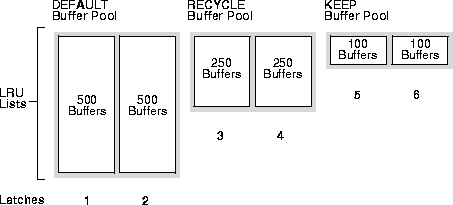
The DEFAULT buffer pool has 500 buffers for each LRU list. The RECYCLE buffer pool has 250 buffers for each LRU list. The KEEP buffer pool has 100 buffers for each LRU.
Thus the load carried by each of the DBWn processes differs, and performance suffers. If, however, there are 3 latches in each pool, the DBWn processes have equal loads and performance is optimized.
The different buffer pools have different rates of block replacement. Ordinarily, blocks are rarely modified in the KEEP pool and frequently modified in the RECYCLE pool; which means you need to write out blocks more frequently from the RECYCLE pool than from the KEEP pool. As a result, owning 100 buffers from one pool is not the same as owning 100 buffers from the other pool. To be perfectly load balanced, each DBWn process should have the same number of LRU lists from each type of buffer pool.
A well configured system might have 3 DBWn processes and 9 latches, with 3 latches in each buffer pool
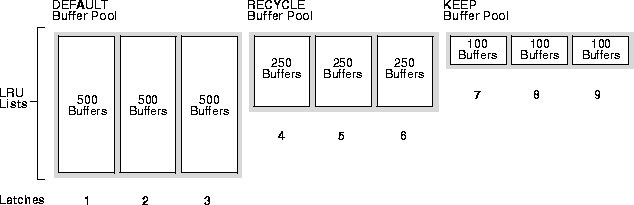
The DEFAULT buffer pool has 500 buffers for each LRU list. The RECYCLE buffer pool has 250 buffers for each LRU list. The KEEP buffer pool has 100 buffers for each LRU list.
The primary goal of backup and restore tuning is create an adequate flow of data between disk and storage device. Tuning backup and restore operations requires that you complete the following tasks:
Typically, you perform backups and restore operations in three phases:
It is unlikely that all phases take the same amount of time. Therefore, the slowest of the three phases is the bottleneck.
Oracle backup and restore uses two types of I/O: disk and tape. When performing a backup, the input files are read using disk I/O, and the output backup file is written using either disk or tape I/O. When performing restores, these roles reverse. Both disk and tape I/O can be synchronous or asynchronous; each is independent of the other.
When using synchronous I/O, you can easily determine how much time backup jobs require because devices only perform one I/O task at a time. When using asynchronous I/O, it is more difficult to measure the bytes-per-second rate, for the following reasons:
The following sections explain how to use the V$BACKUP_SYNC_IO and V$BACKUP_ASYNC_IO views to determine the bottleneck in a backup.
With synchronous I/O, it is difficult to identify specific bottlenecks because all synchronous I/O is a bottleneck to the process. The only way to tune synchronous I/O is to compare the bytes-per-second rate with the device's maximum throughput rate. If the bytes-per-second rate is lower than that device specifies, consider tuning that part of the backup/restore process. Use the V$BACKUP_SYNC_IO.DISCRETE_BYTES_PER_SECOND column to see the I/O rate.
If the combination of LONG_WAITS and SHORT_WAITS is a significant fraction of IO_COUNT, then the file indicated in V$BACKUP_SYNCH_IO and V$BACKUP_ASYNCH_IO is probably a bottleneck. Some platforms' implementation of asynchronous I/O can cause the caller to wait for I/O completion when performing a non-blocking poll for I/O. Because this behavior can vary among platforms, the V$BACKUP_ASYNC_IO view shows the total time for both "short" and " long" waits.
"Long" waits are the number of times the backup/restore process told the operating system to wait until an I/O was complete. "Short" waits are the number of times the backup/restore process made an operating system call to poll for I/O completion in a non-blocking mode. Both types of waits the operating system should respond immediately.
If the SHORT_WAIT_TIME_TOTAL column is equal to or greater than the LONG_WAIT_TIME_TOTAL column, then your platform probably blocks for I/O completion when performing "non-blocking" I/O polling. In this case, the SHORT_WAIT_TIME_TOTAL represents real I/O time for this file. If the SHORT_WAIT_TIME_TOTAL is low compared to the total time for this file, then the delay is most likely caused by other factors, such as process swapping. If possible, tune your operating system so the I/O wait time appears up in the LONG_WAIT_TIME_TOTAL column.
Use V$BACKUP_SYNC_IO and V$BACKUP_ASYNC_IO to determine the source of backup or restore bottlenecks and to determine the progress of backup jobs.
V$BACKUP_SYNC_IO contains rows when the I/O is synchronous to the process (or "thread," on some platforms) performing the backup. V$BACKUP_ASYNC_IO contains rows when the I/O is asynchronous. Asynchronous I/O is obtained either with I/O processes or because it is supported by the underlying operating system.
Table 20-16 lists columns and their descriptions that are common to the V$BACKUP_SYNC_IO and V$BACKUP_ASYNC_IO views.
Table 20-17 lists columns specific to the V$BACKUP_SYNC_IO view.
Table 20-18 lists columns specific to the V$BACKUP_ASYNC_IO view.
In optimally tuned backups, tape components should create the only bottleneck. You should keep the tape and its device "streaming", or constantly rotating. If the tape is not streaming, the data flow to the tape may be inadequate.
This section contains the following topics to maintain streaming by improving backup throughput:
The rate at which the host sends data to keep the tape streaming depends on these factors:
Tape device raw capacity is the smallest amount of data required to keep the tape streaming.
Compression is implemented either in the tape hardware or by the media management software. If you do not use compression, then the raw capacity of the tape device keeps it streaming. If you use compression, then the amount of data that must be sent to stream the tape is the raw device capacity multiplied by the compression factor. The compression factor varies for different types of data.
To determine whether your tape is streaming when the I/O is synchronous, query the EFFECTIVE_BYTES_PER_SECOND column in the V$BACKUP_SYNC_IO view:
If the I/O is asynchronous, the tape is streaming if the combination of LONG_WAITS and SHORT_WAITS is a significant fraction of I/O count. Place more importance on SHORT_WAITS if the time indicated in the SHORT_WAIT_TIME_TOTAL column is equal or greater than the LONG_WAIT_TIME_TOTAL column.
If the tape is not streaming, the basic strategy is to supply more bytes-per-second to the tape. Modify this strategy depending on the how many blocks Oracle must read from disk and how many disks Oracle must access.
Using the DISKRATIO parameter of the BACKUP statement to distribute backup I/O across multiple volumes, specify how many disk drives RMAN uses to distribute file reads when backing up multiple concurrent datafiles. For example, assume that your system uses 10 disks, the disks supply data at 10 byes/second, and the tape drive requires 50 bytes/second to keep streaming. In this case, set DISKRATIO equal to 5 to spread the backup load onto 5 disks.
When setting DISKRATIO, spread the I/O over only as many disks as needed to keep the tape streaming: any more can increase the time it would take to restore a single file and provides no performance benefit. Note that if you do not specify DISKRATIO but specify FILESPERSET, DISKRATIO defaults to FILESPERSET. If neither is specified, DISKRATIO defaults to 4.
When performing a full backup of files that are largely empty or performing an incremental backup when few blocks have changed, you may not be able to supply data to the tape fast enough to keep it streaming.
In this case, achieve optimal performance by using:
The latter takes advantage of asynchronous read-ahead that fills input buffers from one file while processing data from others.
|
See Also::
For more information about the RMAN SET statement, see the Oracle8i Backup and Recovery Guide. |
When you perform a full backup of files that are mostly full and the tape is not streaming, you can improve performance in several ways as shown in Table 20-19:
Table 20-19 Throughput performance improvement methods
You can optionally configure the large pool so Oracle has a separate pool from which it can request large memory allocations. This prevents competition with other subsystems for the same memory.
As Oracle allocates more shared pool memory for the multi-threaded server session memory, the amount of shared pool memory available for the shared SQL cache decreases. If you allocate session memory from another area of shared memory, Oracle can use the shared pool primarily for caching shared SQL and not incur the performance overhead from shrinking the shared SQL cache.
For I/O server processes and backup and restore operations, Oracle allocates buffers that are a few hundred kilobytes in size. Although the shared pool may be unable to satisfy this request, the large pool will be able to do so. The large pool does not have an LRU list; Oracle will not attempt to age memory out of the large pool.
Use the LARGE_POOL_SIZE parameter to configure the large pool. To see in which pool (shared pool or large pool) the memory for an object resides, see the column POOL in V$SGASTAT.
|
See Also:
Oracle8i Concepts for further information about the large pool and the Oracle8i Reference for complete information about initialization parameters. |
