Release 8.1.5
A67775-01
 Library |
 Product |
 Contents |
 Index |
| Oracle8i Tuning Release 8.1.5 A67775-01 |
|


Parallel execution dramatically reduces response time for data-intensive operations on large databases typically associated with Decision Support Systems (DSS). You can also implement parallel execution on certain types of OLTP (Online Transaction Processing) and hybrid systems.
This chapter explains how to implement parallel execution and tune your system to optimize parallel execution performance.
|
See Also:
Oracle8i Concepts, for basic parallel execution concepts and your platform-specific Oracle documentation for more information about tuning parallel execution. |
This chapter discusses parallel execution in 4 phases. In Phase One, you determine whether to use automated or manual tuning. For many applications, automated tuning provides acceptable performance by automatically setting default values for parameters based on your system configuration.
Phase Two describes how to take advantage of parallelism and partitioning. In Phase Two, you determine the best type parallelism to use based on your needs. This phase also discusses how to take the best advantage of Oracle's partitioning features.
Phase Three describes how to create, populate, and refresh your database. Phase Four explains how to monitor and fine-tune parallel execution for optimal performance.
The phases and their contents are:
Phase One - Initializing and Tuning Parameters for Parallel Execution
Phase Two - Tuning Physical Database Layouts for Parallel Execution
Phase Three - Creating, Populating, and Refreshing the Database
Phase Four - Monitoring Parallel Execution Performance
Parallel execution is useful for many types of operations accessing significant amounts of data. Parallel execution improves processing for:
You can also use parallel execution to access object types within an Oracle database. For example, you can use parallel execution to access LOBs (Large Binary Objects).
Parallel execution benefits systems if they have all of the following characteristics:
If your system lacks any of these characteristics, parallel execution may not significantly improve performance. In fact, parallel execution can reduce system performance on over-utilized systems or systems with small I/O bandwidth.
|
See Also:
For more information about the Oracle Parallel Server, please refer to Oracle8i Parallel Server Concepts and Administration. |
Parallel execution provides the greatest performance improvements in Decision Support Systems (DSS). However, Online Transaction Processing (OLTP) systems also benefit from parallel execution, but usually only during batch processing.
During the day, most OLTP systems should probably not use parallel execution. During off-hours, however, parallel execution can effectively process high-volume batch operations. For example, a bank might use parallelized batch programs to perform millions of updates to apply interest to accounts.
The more common example of using parallel execution is for DSS. Complex queries, such as those involving joins of several tables or searches for very large tables, are often best executed in parallel. It is for this reason that the remainder of this chapter discusses parallel execution with an emphasis on DSS environments.
You can initialize and automatically tune parallel execution by setting the parameter PARALLEL_AUTOMATIC_TUNING to TRUE. Once enabled, automated parallel execution controls values for all parameters related to parallel execution. These parameters affect several aspects of server processing, namely, the DOP (degree of parallelism), the adaptive multi-user feature, and memory sizing.
With parallel automatic tuning enabled, Oracle determines parameter settings for each environment based on the number of CPUs on your system and the value set for PARALLEL_THREADS_PER_CPU. The default values Oracle sets for parallel execution processing when PARALLEL_AUTOMATIC_TUNING is TRUE are usually optimal for most environments. In most cases, Oracle's automatically derived settings are at least as effective as manually derived settings.
You can also manually tune parallel execution parameters, however, Oracle recommends using automated parallel execution. Manual tuning of parallel execution is more complex than using automated tuning for two reasons: Manual parallel execution tuning requires more attentive administration than automated tuning, and manual tuning is prone to user load and system resource miscalculations.
Initializing and tuning parallel execution involves the three steps described under the following headings. These steps are:
Step Three is a discussion of tuning general parameters. You may find the general parameters information useful if your parallel execution performance requires further tuning after you complete the first two steps.
Several examples describing parallel execution tuning appear at the end of this section. The example scenarios describe configurations that range from completely automated to completely manual systems.
There are several ways to initialize and tune parallel execution. You can make your environment fully automated for parallel execution, as mentioned, by setting PARALLEL_AUTOMATIC_TUNING to TRUE. You can further customize this type of environment by overriding some of the automatically derived values.
You can also leave PARALLEL_AUTOMATIC_TUNING at its default value of FALSE and manually set the parameters that affect parallel execution. For most OLTP environments and other types of systems that would not benefit from parallel execution, do not enable parallel execution.
When PARALLEL_AUTOMATIC_TUNING is TRUE, Oracle automatically sets other parameters as shown in Table 26-1. For most systems, you do not need to make further adjustments to have an adequately tuned, fully automated parallel execution environment.
As mentioned, you can manually adjust the parameters shown in Table 26-1, even if you set PARALLEL_AUTOMATIC_TUNING to TRUE. You might need to do this if you have a highly customized environment or if your system does not perform optimally using the completely automated settings.
Because parallel execution improves performance for a wide range of system types, you might want to use the examples at the end of this section as starting points. After observing your system's performance using these initial settings, you can further customize your system for parallel execution.
In this step, establish your system's degree of parallelism (DOP) and consider whether to enable adaptive multi-user.
DOP specifies the number of available processes, or threads, used in parallel operations. Each parallel thread may use one or two query processes depending on the query's complexity.
The adaptive multi-user feature adjusts DOP based on user load. For example, you may have a table with a DOP of 5. This DOP may be acceptable with 10 users. But if 10 more users enter the system and you enable the PARALLEL_ADAPTIVE_MULTI_USER feature, Oracle reduces the DOP to spread resources more evenly according to the perceived system load.
It is best to use the parallel adaptive multi-user feature when users process simultaneous parallel execution operations. If you enable PARALLEL_AUTOMATIC_TUNING, Oracle automatically sets PARALLEL_ADAPTIVE_MULTI_USER to TRUE.
The adaptive multi-user algorithm has several inputs. The algorithm first considers the number of allocated threads as calculated by the database resource manager. The algorithm then considers the default settings for parallelism as set in INIT.ORA, as well as parallelism options used in CREATE TABLE and ALTER TABLE commands and SQL hints.
When a system is overloaded and the input DOP is larger than the default DOP, the algorithm uses the default degree as input. The system then calculates a reduction factor that it applies to the input DOP.
The DOP of tables involved in parallel operations affect the DOP for operations on those tables. Therefore, after setting parallel tuning-related parameters, enable parallel execution for each table you want parallelized using the PARALLEL option of the CREATE TABLE or ALTER TABLE commands. You can also use the PARALLEL hint with SQL statements to enable parallelism for that operation only.
When you parallelize tables, you can also specify the DOP or allow Oracle to set it automatically based on the value of PARALLEL_THREADS_PER_CPU.
The initialization parameter PARALLEL_THREADS_PER_CPU affects algorithms controlling both the DOP and the adaptive multi-user feature. Oracle multiplies the value of PARALLEL_THREADS_PER_CPU by the number of CPUs per instance to derive the number of threads to use in parallel operations.
The adaptive multi-user feature also uses the default DOP to compute the target number of query server processes that should exist in a system. When a system is running more processes than the target number, the adaptive algorithm reduces the DOP of new queries as required. Therefore, you can also use PARALLEL_THREADS_PER_CPU to control the adaptive algorithm.
The default for PARALLEL_THREADS_PER_CPU is appropriate for most systems. However, if your I/O subsystem cannot keep pace with the processors, you may need to increase the value for PARALLEL_THREADS_PER_CPU. In this case, you need more processes to achieve better system scalability. If too many processes are running, reduce the number.
The default for PARALLEL_THREADS_PER_CPU on most platforms is 2. However, the default for machines with relatively slow I/O subsystems can be as high as 8.
This section discusses the following types of parameters:
The parameters that establish resource limits are:
The recommended value is 2 x DOP x number_of_concurrent_users.
The PARALLEL_MAX_SEVERS parameter sets a resource limit on the maximum number of processes available for parallel execution. If you set PARALLEL_AUTOMATIC_TUNING to FALSE, you need to manually specify a value for PARALLEL_MAX_SERVERS.
Most parallel operations need at most twice the number of query server processes as the maximum DOP attributed to any table in the operation.
If PARALLEL_AUTOMATIC_TUNING is FALSE, the default value for PARALLEL_MAX_SERVERS is 5. This is sufficient for some minimal operations, but not enough for executing parallel execution. If you manually set the parameter PARALLEL_MAX_SERVERS, set it to 10 times the number of CPUs. This is a reasonable starting value.
To support concurrent users, add more query server processes. You probably want to limit the number of CPU-bound processes to be a small multiple of the number of CPUs: perhaps 4 to 16 times the number of CPUs. This would limit the number of concurrent parallel execution statements to be in the range of 2 to 8.
If a database's users initiate too many concurrent operations, Oracle may not have enough query server processes. In this case, Oracle executes the operations sequentially or displays an error if PARALLEL_MIN_PERCENT is set to another value other than the default value of 0 (zero).
When concurrent users have too many query server processes, memory contention (paging), I/O contention, or excessive context switching can occur. This contention can reduce system throughput to a level lower than if parallel execution were not used. Increase the PARALLEL_MAX_SERVERS value only if your system has sufficient memory and I/O bandwidth for the resulting load. Limiting the total number of query server processes may restrict the number of concurrent users that can execute parallel operations, but system throughput tends to remain stable.
To increase the number of concurrent users, you could restrict the number of concurrent sessions that resource consumer groups can have. For example:
For more information about resource consumer groups, refer to discussions on the "Database Resource Manager" in the Oracle8i Administrator's Guide and Oracle8i Concepts.
See Also:
You can limit the amount of parallelism available to a given user by establishing resource consumer group for the user. Do this to limit the number of sessions, concurrent logons, and the number of parallel processes that any one or group of users can have.
Each query server process working on a parallel execution statement is logged on with a session ID; each process counts against the user's limit of concurrent sessions. For example, to limit a user to 10 processes, set the user's limit to 11. One process is for the parallel coordinator and there remain 10 parallel processes that consist of two sets of query server servers. The user's maximum DOP would thus be 5.
|
See Also:
"Formula for Memory, Users, and Parallel Execution Server Processes" for more information on balancing concurrent users, DOP, and resources consumed. Also refer to the Oracle8i Administrator's Guide for more information about managing resources with user profiles and Oracle8i Parallel Server Concepts and Administration for more information on querying GV$ views. |
The recommended value is 0 (zero).
The system parameter PARALLEL_MIN_SERVERS allows you to specify the number of processes to be started and reserved for parallel operations at startup in a single instance. The syntax is:
PARALLEL_MIN_SERVERS=n
Where n is the number of processes you want to start and reserve for parallel operations.
Setting PARALLEL_MIN_SERVERS balances the startup cost against memory usage. Processes started using PARALLEL_MIN_SERVERS do not exit until the database is shutdown. This way, when a query is issued the processes are likely to be available. It is desirable, however, to recycle query server processes periodically since the memory these processes use can become fragmented and cause the high water mark to slowly increase. When you do not set PARALLEL_MIN_SERVERS, processes exit after they are idle for 5 minutes.
The following discussion of how to tune the large pool is also true for tuning the shared pool, except as noted under the heading "SHARED_POOL_SIZE". You must also increase the value for this memory setting by the amount you determine
There is no recommended value for LARGE_POOL_SIZE. Instead, Oracle recommends leaving this parameter unset and having Oracle to set it for you by setting the PARALLEL_AUTOMATIC_TUNING parameter to TRUE. The exception to this is when the system-assigned value is inadequate for your processing requirements.
Oracle automatically computes LARGE_POOL_SIZE if PARALLEL_AUTOMATIC_TUNING is TRUE. To manually set a value for LARGE_POOL_SIZE, query the V$SGASTAT view and increase or decrease the value for LARGE_POOL_SIZE depending on your needs.
For example, if Oracle displays the following error on startup:
   ORA-27102: out of memory
   SVR4 Error: 12: Not enough space
Consider reducing the value for LARGE_POOL_SIZE low enough so your database starts. If after lowering the value of LARGE_POOL_SIZE you see the error:
   ORA-04031: unable to allocate 16084 bytes of shared memory ("large
   pool","unknown object","large pool hea","PX msg pool")
Execute the following query to determine why Oracle could not allocate the 16,084 bytes:
   SELECT NAME, SUM(BYTES) FROM V$SGASTAT WHERE POOL='LARGE POOL' GROUP BY
   ROLLUP (NAME) ;
Oracle should respond with output similar to:
   NAME                       SUM(BYTES)
   -------------------------- ----------
   PX msg pool                   1474572
   free memory                    562132
                                 2036704
   3 rows selected.
To resolve this, increase the value for LARGE_POOL_SIZE. This example shows the LARGE_POOL_SIZE to be about 2MB. Depending on the amount of memory available, you could increase the value of LARGE_POOL_SIZE to 4MB and attempt to start your database. If Oracle continues to display an ORA-4031 message, gradually increase the value for LARGE_POOL_SIZE until startup is successful.
After you determine the initial setting for the large or shared pool, you must calculate additional memory requirements for message buffers and determine how much additional space you need for cursors.
You must increase the value for the LARGE_- or the SHARED_POOL_SIZE parameters to accommodate message buffers. The message buffers allow query server processes to communicate with each other. If you enable automatic parallel tuning, Oracle allocates space for the message buffer from the large pool. Otherwise, Oracle allocates space from the shared pool.
Oracle uses a fixed number of buffers per virtual connection between producer and consumer query servers. Connections increase as the square of the DOP increases. For this reason, the maximum amount of memory used by parallel execution is bound by the highest DOP allowed on your system. You can control this value using either the PARALLEL_MAX_SERVERS parameter or by using policies and profiles.
Calculate how much additional memory you need for message buffers according the following 5 steps. These 5 steps are nearly the same steps Oracle performs when you set the PARALLEL_AUTOMATIC_TUNING parameter to TRUE. If you enable automatic tuning and check the computed value, you will get the same result.
Most SMP systems use the following formula:

Where CONNECTIONS = (DOP2 + 2 x DOP).
If you are using OPS and the value for INSTANCES is greater than 1, use the following formula. This formula calculates the number of buffers needed for local virtual connections as well as for remote physical connections. You can use the value of REMOTE as the number of remote connections among nodes to help tune your operating system. The formula is:

Where:
Each instance uses the memory computed by the formula.
Add this amount to your original setting for the large or shared pool. However, before setting a value for either of these memory structures, you must also consider additional memory for cursors as explained under the following heading.
Parallel execution plans consume more space in the SQL area than serial execution plans. You should regularly monitor shared pool resource use to ensure both structures have enough memory to accommodate your system's processing requirements.
|
See Also:
For more information about execution plans, please refer to Chapter 13, "Using EXPLAIN PLAN". For more information about how query servers communicate, please refer to Oracle8i Concepts. |
The formulae in this section are just starting points. Whether you are using automated or manual tuning, you should monitor usage on an on-going basis to make sure the size of memory is not too large or too small. To do this, tune the large and shared pools pool after examining the size of structures in the large pool using a query syntax of:
   SELECT POOL, NAME, SUM(BYTES) FROM V$SGASTAT WHERE POOL LIKE '%pool%'
   GROUP BY ROLLUP (POOL, NAME);
Oracle responds with output similar to:
POOL        NAME                       SUM(BYTES)
----------- -------------------------- ----------
large pool  PX msg pool                  38092812
large pool  free memory                    299988
large pool                               38392800
shared pool Checkpoint queue                38496
shared pool KGFF heap                        1964
shared pool KGK heap                         4372
shared pool KQLS heap                     1134432
shared pool LRMPD SGA Table                 23856
shared pool PLS non-lib hp                   2096
shared pool PX subheap                     186828
shared pool SYSTEM PARAMETERS               55756
shared pool State objects                 3907808
shared pool character set memory            30260
shared pool db_block_buffers               200000
shared pool db_block_hash_buckets           33132
shared pool db_files                       122984
shared pool db_handles                      52416
shared pool dictionary cache               198216
shared pool dlm shared memory             5387924
shared pool enqueue_resources               29016
shared pool event statistics per sess      264768
shared pool fixed allocation callback        1376
shared pool free memory                  26329104
shared pool gc_*                            64000
shared pool latch nowait fails or sle       34944
shared pool library cache                 2176808
shared pool log_buffer                      24576
shared pool log_checkpoint_timeout          24700
shared pool long op statistics array        30240
shared pool message pool freequeue         116232
shared pool miscellaneous                  267624
shared pool processes                       76896
shared pool session param values            41424
shared pool sessions                       170016
shared pool sql area                      9549116
shared pool table columns                  148104
shared pool trace_buffers_per_process     1476320
shared pool transactions                    18480
shared pool trigger inform                  24684
shared pool                              52248968
                                         90641768
41 rows selected.
Evaluate the memory used as shown in your output and alter the setting for LARGE_POOL_SIZE based on your processing needs.
To obtain more memory usage statistics, execute the query:
SELECT * FROM V$PX_PROCESS_SYSSTAT WHERE STATISTIC LIKE 'Buffers%';
Oracle responds with output similar to:
STATISTIC                      VALUE
------------------------------ ----------
Buffers Allocated                   23225
Buffers Freed                       23225
Buffers Current                         0
Buffers HWM                          3620
4 Rows selected.
The amount of memory used appears in the statistics "Buffers Current" and "Buffers HWM". Calculate a value for the bytes by multiplying the number of buffers by the value for PARALLEL_EXECUTION_MESSAGE_SIZE. Compare the high water mark to the parallel execution message pool size to determine if you allocated too much memory. For example, in the first output, the value for large pool as shown in 'px msg pool' is 38092812, or 38MB. The 'Buffers HWM' from the second output is 3,620, which when multiplied by a parallel execution message size of 4,096 is 14,827,520, or approximately 15MB. In this case, the high water mark has reached approximately 40% of its capacity.
As mentioned earlier, if PARALLEL_AUTOMATIC_TUNING is FALSE, Oracle allocates query server processes from the shared pool. In this case, tune the shared pool as described under the previous heading for large pool except for the following:
You must also take into account that using parallel execution generates more cursors. Look at statistics in the V$SQLAREA view to determine how often Oracle recompiles cursors. If the cursor hit ratio is poor, increase the size of the pool.
Use the following query to determine how much memory each component uses and thus to tune the value for SHARED_POOL_SIZE.
  SELECT POOL, NAME, SUM(BYTES) FROM V$SGASTAT WHERE POOL LIKE '%pool%'
  GROUP BY ROLLUP (POOL, NAME);
Oracle responds with output similar to:
POOL        NAME                       SUM(BYTES)
----------- -------------------------- ----------
shared pool Checkpoint queue                38496
shared pool KGFF heap                        1320
shared pool KGK heap                         4372
shared pool KQLS heap                      904528
shared pool LRMPD SGA Table                 23856
shared pool PLS non-lib hp                   2096
shared pool PX msg pool                    373864
shared pool PX subheap                      65188
shared pool SYSTEM PARAMETERS               55828
shared pool State objects                 3877520
shared pool character set memory            30260
shared pool db_block_buffers               200000
shared pool db_block_hash_buckets           33132
shared pool db_files                       122984
shared pool db_handles                      36400
shared pool dictionary cache               181792
shared pool dlm shared memory             5387924
shared pool enqueue_resources               25560
shared pool event statistics per sess      189120
shared pool fixed allocation callback        1376
shared pool free memory                  36255072
shared pool gc_*                            64000
shared pool latch nowait fails or sle       34944
shared pool library cache                  559676
shared pool log_buffer                      24576
shared pool log_checkpoint_timeout          24700
shared pool long op statistics array        21600
shared pool message pool freequeue         116232
shared pool miscellaneous                  230016
shared pool network connections             17280
shared pool processes                       53736
shared pool session param values            58684
shared pool sessions                       121440
shared pool sql area                      1232748
shared pool table columns                  148104
shared pool trace_buffers_per_process     1025232
shared pool transactions                    18480
shared pool trigger inform                  16456
shared pool                              51578592
                                         51578592
40 rows selected.
You can then monitor the number of buffers used by parallel execution in the same way as explained previously, and compare the 'shared pool PX msg pool' to the current high water mark reported in output from the view V$PX_PROCESS_SYSSTAT.
The recommended value for this parameter is 0 (zero).
This parameter allows users to wait for an acceptable DOP depending on the application in use. Setting this parameter to values other than 0 (zero) causes Oracle to return an error when the required minimum DOP cannot be satisfied by the system at a given time.
For example, if you set PARALLEL_MIN_PERCENT to 50, which translates to "50%", and the DOP is reduced because of the adaptive algorithm or because of a resource limitation, then oracle returns ORA-12827. For example:
   SELECT /*+ PARALLEL(e, 4, 1) */ d.deptno, SUM(SAL)
   FROM emp e, dept d WHERE e.deptno = d.deptno
   GROUP BY d.deptno ORDER BY d.deptno;
Oracle responds with this message:
ORA-12827: INSUFFICIENT PARALLEL QUERY SLAVES AVAILABLE
The recommended value is to set this parameter equal to the number of instances in your parallel server environment.
The PARALLEL_SERVER_INSTANCES parameter specifies the number of instances configured in a parallel server environment. Oracle uses the value of this parameter to compute values for LARGE_POOL_SIZE when PARALLEL_AUTOMATIC_TUNING is set to TRUE.
The parameters that affect resource consumption are:
The first group of parameters discussed in this section affects memory and resource consumption for all parallel operations, and in particular for parallel execution. A second subset of parameters discussed in this section explains parameters affecting parallel DML and DDL. Chapter 27, "Understanding Parallel Execution Performance Issues" describes in detail how these parameters interrelate.
To control resource consumption, configure memory at two levels:
The SGA is typically part of real physical memory. The SGA is static and of fixed size; if you want to change its size, shut down the database, make the change, and restart the database. Oracle allocates the large and shared pools out of the SGA.
A large percentage of the memory used in data warehousing operations is more dynamic. This memory comes from process memory and both the size of process memory and the number of processes can vary greatly. This memory is controlled by the HASH_AREA_SIZE and SORT_AREA_SIZE parameters. Together these parameters control the amount of virtual memory used by Oracle.
Process memory, in turn, comes from virtual memory. Total virtual memory should be somewhat larger than available real memory, which is the physical memory minus the size of the SGA. Virtual memory generally should not exceed twice the size of the physical memory minus the SGA size. If you set virtual memory to a value several times greater than real memory, the paging rate may increase when the machine is overloaded.
As a general rule for memory sizing, each process requires adequate address space for hash joins. A dominant factor in high volume data warehousing operations is the relationship between memory, the number of processes, and the number of hash join operations. Hash joins and large sorts are memory-intensive operations, so you may want to configure fewer processes, each with a greater limit on the amount of memory it can use. Sort performance, however, degrades with increased memory use.
Set HASH_AREA_SIZE using one of two approaches. The first approach examines how much memory is available after configuring the SGA and calculating the amount of memory processes the system uses during normal loads.
The total amount of memory that Oracle processes are allowed to use should be divided by the number of processes during the normal load. These processes include parallel execution servers. This number determines the total amount of working memory per process. This amount then needs to be shared among different operations in a given query. For example, setting HASH_AREA_SIZE or SORT_AREA_SIZE to half or one third of this number is reasonable.
Set these parameters to the highest number that does not cause swapping. After setting these parameters as described, you should watch for swapping and free memory. If there is swapping, decrease the values for these parameters. If a significant amount of free memory remains, you may increase the values for these parameters.
The second approach to setting HASH_AREA_SIZE requires a thorough understanding of the types of hash joins you execute and an understanding of the amount of data you will be querying against. If the queries and query plans you execute are well understood, this approach is reasonable.
HASH_AREA_SIZE should be approximately half of the square root of S, where S is the size in megabytes of the smaller of the inputs to the join operation. In any case, the value for HASH_AREA_SIZE should not be less than 1MB.
This relationship can be expressed as follows:

For example, if S equals 16MB, a minimum appropriate value for HASH_AREA_SIZE might be 2MB summed over all parallel processes. Thus if you have 2 parallel processes, a minimum value for HASH_AREA_SIZE might be 1MB. A smaller hash area is not advisable.
For a large data warehouse, HASH_AREA_SIZE may range from 8MB to 32MB or more. This parameter provides for adequate memory for hash joins. Each process performing a parallel hash join uses an amount of memory equal to HASH_AREA_SIZE.
Hash join performance is more sensitive to HASH_AREA_SIZE than sort performance is to SORT_AREA_SIZE. As with SORT_AREA_SIZE, too large a hash area may cause the system to run out of memory.
The hash area does not cache blocks in the buffer cache; even low values of HASH_AREA_SIZE will not cause this to occur. Too small a setting, however, could adversely affect performance.
HASH_AREA_SIZE is relevant to parallel execution operations and to the query portion of DML or DDL statements.
The recommended values for this parameter fall in the range from 256KB to 4MB.
This parameter specifies the amount of memory to allocate per query server process for sort operations. If you have a lot of system memory, you can benefit from setting SORT_AREA_SIZE to a large value. This can dramatically increase the performance of sort operations because the entire process is more likely to be performed in memory. However, if memory is a concern for your system, you may want to limit the amount of memory allocated for sort and hash operations.
If the sort area is too small, an excessive amount of I/O is required to merge a large number of sort runs. If the sort area size is smaller than the amount of data to sort, then the sort will move to disk, creating sort runs. These must then be merged again using the sort area. If the sort area size is very small, there will be many runs to merge and multiple passes may be necessary. The amount of I/O increases as SORT_AREA_SIZE decreases.
If the sort area is too large, the operating system paging rate will be excessive. The cumulative sort area adds up quickly because each query server process can allocate this amount of memory for each sort. For such situations, monitor the operating system paging rate to see if too much memory is being requested.
SORT_AREA_SIZE is relevant to parallel execution operations and to the query portion of DML or DDL statements. All CREATE INDEX statements must do some sorting to generate the index. Commands that require sorting include:
The recommended value for PARALLEL_EXECUTION_MESSAGE_SIZE is 4KB. If PARALLEL_AUTOMATIC_TUNING is TRUE, the default is 4KB. If PARALLEL_AUTOMATIC_TUNING is FALSE, the default is slightly greater than 2KB.
The PARALLEL_EXECUTION_MESSAGE_SIZE parameter specifies the upper limit for the size of parallel execution messages. The default value is operating system specific and this value should be adequate for most applications. Larger values for PARALLEL_EXECUTION_MESSAGE_SIZE require larger values for LARGE_POOL_SIZE or SHARED_POOL_SIZE, depending on whether you've enabled parallel automatic tuning.
While you may experience significantly improved response time by increasing the value for PARALLEL_EXECUTION_ MESSAGE_SIZE, memory use also drastically increases. For example, if you double the value for PARALLEL_EXECUTION_ MESSAGE_SIZE, parallel execution requires a message source pool that is twice as large.
Therefore, if you set PARALLEL_AUTOMATIC_TUNING to FALSE, then you must adjust the SHARED_POOL_SIZE to accommodate parallel execution messages. If you have set PARALLEL_AUTOMATIC_TUNING to TRUE, but have set LARGE_POOL_SIZE manually, then you must adjust the LARGE_POOL_SIZE to accommodate parallel execution messages.
The recommended value is 100/number_of_concurrent_users.
This parameter determines how aggressively the optimizer attempts to parallelize a given execution plan. OPTIMIZER_PERCENT_PARALLEL encourages the optimizer to use plans with low response times because of parallel execution, even if total resource used is not minimized.
The default value of OPTIMIZER_PERCENT_PARALLEL is 0 (zero), which, if possible, parallelizes the plan using the fewest resources. Here, the execution time of the operation may be long because only a small amount of resource is used.
A nonzero setting of OPTIMIZER_PERCENT_PARALLEL is overridden if you use a FIRST_ROWS hint or set OPTIMIZER_MODE to FIRST_ROWS.
The default value is FALSE.
Set this parameter to TRUE if you are joining a very large join result set with a very small result set (size being measured in bytes, rather than number of rows). In this case, the optimizer has the option of broadcasting the small set's rows to each of the query server processes that are processing the rows of the larger set. The result is enhanced performance.
You cannot dynamically set the parameter PARALLEL_BROADCAST_ENABLE as it only affects only hash joins and merge joins.
The parameters that affect parallel DML and parallel DDL resource consumption are:
Parallel inserts, updates, and deletes require more resources than serial DML operations require. Likewise, PARALLEL CREATE TABLE ... AS SELECT and PARALLEL CREATE INDEX may require more resources. For this reason you may need to increase the value of several additional initialization parameters. These parameters do not affect resources for queries.
For parallel DML and DDL, each query server process starts a transaction. The parallel coordinator uses the two-phase commit protocol to commit transactions; therefore the number of transactions being processed increases by the DOP. You may thus need to increase the value of the TRANSACTIONS initialization parameter.
The TRANSACTIONS parameter specifies the maximum number of concurrent transactions. The default assumes no parallelism. For example, if you have a DOP of 20, you will have 20 more new server transactions (or 40, if you have two server sets) and 1 coordinator transaction; thus you should increase TRANSACTIONS by 21 (or 41), if they are running in the same instance. If you do not set this parameter, Oracle sets it to 1.1 x SESSIONS.
The increased number of transactions for parallel DML and DDL requires more rollback segments. For example, one command with a DOP of 5 uses 5 server transactions distributed among different rollback segments. The rollback segments should belong to tablespaces that have free space. The rollback segments should also be unlimited, or you should specify a high value for the MAXEXTENTS parameter of the STORAGE clause. In this way they can extend and not run out of space.
If a system crashes when there are uncommitted parallel DML or DDL transactions, you can speed up transaction recovery during startup by using the FAST_START_PARALLEL_ROLLBACK parameter.
This parameter controls the DOP used when recovering "dead transactions." Dead transactions are transactions that are active before a system crash. By default, the DOP is chosen to be at most two times the value of the CPU_COUNT parameter.
If the default DOP is insufficient, set the parameter to the HIGH. This gives a maximum DOP to be at most 4 times the value of the CPU_COUNT parameter. This feature is available by default.
Check the statistic "redo buffer allocation retries" in the V$SYSSTAT view. If this value is high, try to increase the LOG_BUFFER size. A common LOG_BUFFER size for a system generating numerous logs is 3 to 5MB. If the number of retries is still high after increasing LOG_BUFFER size, a problem may exist with the disk on which the log files reside. In that case, tune the I/O subsystem to increase the I/O rates for redo. One way of doing this is to use fine-grained striping across multiple disks. For example, use a stripe size of 16KB. A simpler approach is to isolate redo logs on their own disk.
This parameter specifies the maximum number of DML locks. Its value should equal the total of locks on all tables referenced by all users. A parallel DML operation's lock and enqueue resource requirement is very different from serial DML. Parallel DML holds many more locks, so you should increase the value of the ENQUEUE_RESOURCES and DML_LOCKS parameters by equal amounts.
Table 26-2 shows the types of locks acquired by coordinator and query server processes for different types of parallel DML statements. Using this information, you can determine the value required for these parameters. A query server process can work on one or more partitions or subpartitions, but a partition or subpartition can only be worked on by one server process (this is different from parallel execution).
Consider a table with 600 partitions running with a DOP of 100. Assume all partitions are involved in a parallel UPDATE/DELETE statement with no row-migrations.
|
The coordinator acquires: |
1 table lock SX. |
|
|
600 partition locks X. |
|
Total server processes acquire: |
100 table locks SX. |
|
|
600 partition locks NULL. |
|
|
600 partition-wait locks S. |
This parameter sets the number of resources that can be locked by the lock manager. Parallel DML operations require many more resources than serial DML. Therefore, increase the value of the ENQUEUE_RESOURCES and DML_LOCKS parameters by equal amounts.
The parameters that affect I/O are:
These parameters also affect the optimizer which ensures optimal performance for parallel execution I/O operations.
When you perform parallel updates and deletes, the buffer cache behavior is very similar to any system running a high volume of updates. For more information, see "Tuning the Buffer Cache".
The recommended value is 8KB or 16KB.
Set the database block size when you create the database. If you are creating a new database, use a large block size.
The recommended value is 8 for 8KB block size, or 4 for 16KB block size.
This parameter determines how many database blocks are read with a single operating system READ call. The upper limit for this parameter is platform-dependent. If you set DB_FILE_MULTIBLOCK_READ_COUNT to an excessively high value, your operating system will lower the value to the highest allowable level when you start your database. In this case, each platform uses the highest value possible. Maximum values generally range from 64KB to 1MB.
The recommended value is 4.
This parameter specifies how many blocks a hash join reads and writes at once. Increasing the value of HASH_MULTIBLOCK_IO_COUNT decreases the number of hash buckets. If a system is I/O bound, you can increase the efficiency of I/O by having larger transfers per I/O.
Because memory for I/O buffers comes from the HASH_AREA_SIZE, larger I/O buffers mean fewer hash buckets. There is a trade-off, however. For large tables (hundreds of gigabytes in size) it is better to have more hash buckets and slightly less efficient I/Os. If you find an I/O bound condition on temporary space during hash joins, consider increasing the value of HASH_MULTIBLOCK_IO_COUNT.
The recommended value is to use the default value.
The SORT_MULTIBLOCK_READ_COUNT parameter specifies the number of database blocks to read each time a sort performs a read from a temporary segment. Temporary segments are used by a sort when the data does not fit in SORT_AREA_SIZE of memory.
If the system is performing too many I/Os per second during sort operations and the CPUs are relatively idle during that time, consider increasing the SORT_MUTLIBLOCK_READ_COUNT parameter to force the sort operations to perform fewer, larger I/Os.
The recommended value is TRUE.
These parameters enable or disable the operating system's asynchronous I/O facility. They allow query server processes to overlap I/O requests with processing when performing table scans. If the operating system supports asynchronous I/O, leave these parameters at the default value of TRUE.
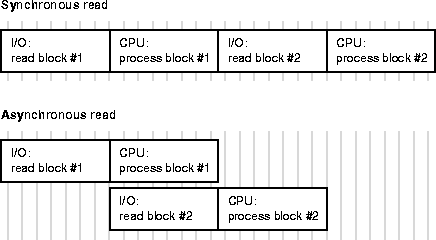
Asynchronous operations are currently supported for parallel table scans, hash joins, sorts, and serial table scans. However, this feature may require operating system specific configuration and may not be supported on all platforms. Check your Oracle operating system specific documentation.
The following examples describe a limited variety of parallel execution implementation possibilities. Each example begins by using either automatic or manual parallel execution tuning. Oracle automatically sets other parameters based on each sample system's characteristics and on how parallel execution tuning was initialized. The examples then describe setting the degree of parallelism and the enabling of the adaptive multi-user feature.
The effects that the parameter settings in these examples have on internally-derived settings and overall performance are only approximations. Your system's performance characteristics will vary depending on operating system dependencies and user workloads.
With additional adjustments, you can fine tune these examples to make them more closely resemble your environment. To further analyze the consequences of setting PARALLEL_AUTOMATIC_TUNING to TRUE, refer to Table 26-1.
In your production environment, after you set the DOP for your tables and enable the adaptive multi-user feature, you may want to analyze system performance as explained in "Phase Four - Monitoring Parallel Execution Performance". If your system performance remains poor, refer to Phase One's explanation of "Step Three: Tuning General Parameters".
The following four examples describe different system types in ascending order of size and complexity.
In this example, the DBA has limited parallel execution experience and does not have time to closely monitor the system.
The database is mostly a star type schema with some summary tables and a few tables in third normal form. The workload is mostly "ad hoc" in nature. Users expect parallel execution to improve the performance of their high-volume queries.
Other facts about the system are:
The DBA makes the following settings:
Oracle automatically makes the following default settings:
The DBA parallelizes every table having more than 10,000 rows using a command similar to the following:
ALTER TABLE employee PARALLEL;
In this example, because PARALLEL_THREADS_PER_CPU is 2 and the number of CPUs is 4, the DOP is 8. Because PARALLEL_ADAPTIVE_MULTI_USER is set to TRUE, Oracle may reduce this DOP in response to the system load that exists at the time of the query's initiation.
In this example the DBA is experienced but is also busy with other responsibilities. The DBA knows how to organize users into resource consumer groups and uses views and other roles to control access to parallelism. The DBA also has experimented with manually adjusting the settings that automated parallel tuning generates and has chosen to use all of them except for the PARALLEL_ADAPTIVE_MULTI_USER parameter which the DBA sets to FALSE.
The system workload involves some adhoc queries and a high volume of batch operations to convert a central repository into summary tables and star schemas. Most queries on this system are generated by Oracle Express and other tools.
The database has source tables in third normal form and end-user tables in a star schema and summary form only.
Other facts about the system are:
The DBA makes the following settings:
The DBA also sets other parameters unrelated to parallelism. As a result, Oracle responds by automatically adjusting the following parameter settings:
The DBA parallelizes some tables in the data warehouse while creating other views for special users:
   ALTER TABLE sales PARALLEL;
   CREATE VIEW invoice_parallel AS SELECT /*+ PARALLEL(P) */ * FROM invoices P;
The DBA allows the system to use the PARALLEL_THREADS_PER_CPU setting of 4 with 8 CPUs. The DOP for the tables is 32. This means a simple query uses 32 processes while more complex queries use 64.
In this example, the DBA is experienced and is occupied primarily with managing this system. The DBA has good control over resources and understands how to tune the system. The DBA schedules large queries in batch mode.
The workload includes some adhoc parallel queries. As well, a large number of serial queries are processed against a star schema. There is also some batch processing that generates summary tables and indexes. The database is completely denormalized and the Oracle Parallel Server option is in use.
Other facts about the system are:
The DBA uses manual parallel tuning by setting the following:
The DBA also sets other parameters unrelated to parallel execution. Because PARALLEL_AUTOMATIC_TUNING is set to FALSE, Oracle allocates parallel execution buffers from the SHARED_POOL.
The DBA parallelizes tables in the data warehouse by explicitly setting the DOP using syntax similar to the following:
   ALTER TABLE department1 PARALLEL 10;
   ALTER TABLE department2 PARALLEL 5;
   CREATE VIEW current_sales AS SELECT /*+ PARALLEL(P, 20) */ * FROM sales P;
In this example, Oracle does not make calculations for parallel execution because the DBA has manually set all parallel execution parameters.
In this example, the DBA is very experienced and is dedicated to administering this system. The DBA has good control over the environment, but the variety of users requires the DBA to devote constant attention to the system.
The DBA sets PARALLEL_AUTOMATIC_TUNING to TRUE which makes Oracle allocate parallel execution buffers from the large pool. PARALLEL_ADAPTIVE_MULTI_USER is automatically enabled. After gaining experience with the system, the DBA fine-tunes the system supplied defaults to further improve performance.
The database is a very large data warehouse with data marts residing on the same machine. The data marts are generated and refreshed from data in the warehouse. The warehouse is mostly normalized while the marts are mostly star schemas and summary tables. The DBA has carefully customized system parameters through experimentation.
Other facts about the system are:
The DBA makes the following settings:
The DBA has carefully evaluated which users and tables require parallelism and has set the values according to their requirements. The DBA has taken all steps mentioned in the earlier examples, but in addition, the DBA also uses the following command during peak user hours to enable the adaptive DOP algorithms:
ALTER SYSTEM SET PARALLEL_ADAPTIVE_MULTI_USER = TRUE;
During off hours when batch processing is about to begin, the DBA disables adaptive processing by issuing the command:
ALTER SYSTEM SET PARALLEL_ADAPTIVE_MULTI_USER = FALSE;
This section describes how to tune the physical database layout for optimal performance of parallel execution.
Different parallel operations use different types of parallelism. The optimal physical database layout depends on what parallel operations are most prevalent in your application.
The basic unit of parallelism is a called a granule. The operation being parallelized (a table scan, table update, or index creation, for example) is divided by Oracle into granules. Query server processes execute the operation one granule at a time. The number of granules and their size affect the DOP (degree of parallelism) you can use. It also affects how well the work is balanced across query server processes.
Block range granules are the basic unit of most parallel operations. This is true even on partitioned tables; it is the reason why, on Oracle, the parallel degree is not related to the number of partitions.
Block range granules are ranges of physical blocks from a table. Because they are based on physical data addresses, Oracle can size block range granules to allow better load balancing. Block range granules permit dynamic parallelism that does not depend on static pre-allocation of tables or indexes. On SMP (symmetric multi-processors) systems, granules are located on different devices to drive as many disks as possible. On many MPP (massively parallel processing) systems, block range granules are preferentially assigned to query server processes that have physical proximity to the disks storing the granules. Block range granules are also used with global striping.
When block range granules are used predominantly for parallel access to a table or index, there are administrative considerations such as recovery or using partitions for deleting portions of data that may influence partition layout more than performance considerations. The number of disks that you stripe partitions over should be at least equal to the value of the DOP so that parallel execution operations can take advantage of partition pruning.
When partition granules are used, a query server process works on an entire partition or subpartition of a table or index. Because partition granules are statically determined when a table or index is created, partition granules do not allow as much flexibility in parallelizing an operation. This means that the allowable DOP might be limited, and that load might not be well balanced across query server processes.
Partition granules are the basic unit of parallel index range scans and parallel operations that modify multiple partitions of a partitioned table or index. These operations include parallel update, parallel delete, parallel direct-load insert into partitioned tables, parallel creation of partitioned indexes, and parallel creation of partitioned tables. Operations such as parallel DML and CREATE LOCAL INDEX, do not recognize block range granules.
When partition granules are used for parallel access to a table or index, it is important that there be a relatively large number of partitions (at least three times the DOP), so Oracle can effectively balance work across the query server processes.
To avoid I/O bottlenecks during parallel processing, tablespaces accessed by parallel operations should be striped. As shown in Figure 26-2, tablespaces should always stripe over at least as many devices as CPUs; in this example, there are four CPUs. As was mentioned for partitioned granules, the number of disks over which you stripe these tablespaces should be at least equal to the value set for DOP.
Stripe tablespaces for tables, tablespaces for indexes, rollback segments, and temporary tablespaces. You must also spread the devices over controllers, I/O channels, and/or internal busses.
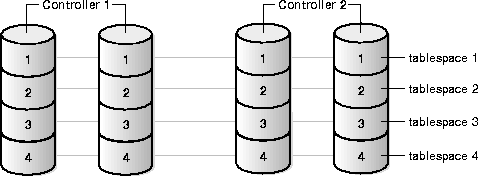
To stripe data during loads, use the FILE= clause of parallel loader to load data from multiple load sessions into different files in the tablespace. To make striping effective, ensure that enough controllers and other I/O components are available to support the bandwidth of parallel data movement into and out of the striped tablespaces.
The operating system or volume manager can perform striping (OS striping), or you can perform striping manually for parallel operations.
We recommend using a large stripe size of at least 64KB with OS striping when possible. This approach always performs better than manual striping, especially in multi-user environments.
Operating system striping is usually flexible and easy to manage. It supports multiple users running sequentially as well as single users running in parallel. Two main advantages make OS striping preferable to manual striping, unless the system is very small or availability is the main concern:
Stripe size must be at least as large as the I/O size. If stripe size is larger than I/O size by a factor of 2 or 4, then certain tradeoffs may arise. The large stripe size can be beneficial because it allows the system to perform more sequential operations on each disk; it decreases the number of seeks on disk. The disadvantage is that it reduces the I/O parallelism so fewer disks are simultaneously active. If you encounter problems, increase the I/O size of scan operations (going, for example, from 64KB to 128KB), instead of changing the stripe size. The maximum I/O size is platform-specific (in a range, for example, of 64KB to 1MB).
With OS striping, from a performance standpoint, the best layout is to stripe data, indexes, and temporary tablespaces across all the disks of your platform. In this way, maximum I/O performance (both in terms of throughput and number of I/Os per second) can be reached when one object is accessed by a parallel operation. If multiple objects are accessed at the same time (as in a multi-user configuration), striping automatically limits the contention. If availability is a major concern, associate this method with hardware redundancy, for example RAID5, which permits both performance and availability.
You can use manual striping on all platforms. To do this, add multiple files to each tablespace, each on a separate disk. If you use manual striping correctly, your system will experience significant performance gains. However, you should be aware of several drawbacks that may adversely affect performance if you do not stripe correctly.
First, when using manual striping, the DOP is more a function of the number of disks than of the number of CPUs. This is because it is necessary to have one server process per datafile to drive all the disks and limit the risk of experiencing I/O bottlenecks. Also, manual striping is very sensitive to datafile size skew which can affect the scalability of parallel scan operations. Second, manual striping requires more planning and set up effort that operating system striping.
|
See Also:
Oracle8i Concepts for information on disk striping and partitioning. For MPP systems, see your platform-specific Oracle documentation regarding the advisability of disabling disk affinity when using operating system striping. |
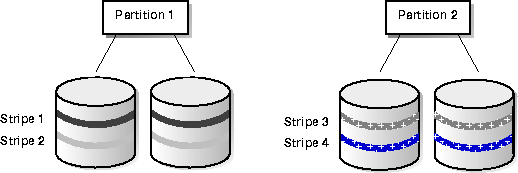
Local striping, which applies only to partitioned tables and indexes, is a form of non-overlapping disk-to-partition striping. Each partition has its own set of disks and files, as illustrated in Table 26-3. There is no overlapping disk access, and no overlapping of files.
An advantage of local striping is that if one disk fails, it does not affect other partitions. Moreover, you still have some striping even if you have data in only one partition.
A disadvantage of local striping is that you need many more disks to implement it--each partition requires a few disks of its own. Another major disadvantage is that after partition pruning to only a single or a few partitions, the system will have limited I/O bandwidth. As a result, local striping is not very practical for parallel operations. For this reason, consider local striping only if your main concern is availability, and not parallel execution. A good compromise might be to use global striping associated with RAID5, which permits both performance and availability.
Global striping, illustrated in Figure 26-4, entails overlapping disks and partitions.
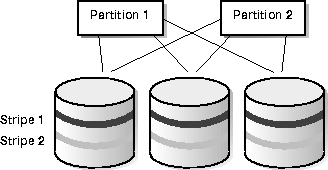
Global striping is advantageous if you have partition pruning and need to access data only in one partition. Spreading the data in that partition across many disks improves performance for parallel execution operations. A disadvantage of global striping is that if one disk fails, all partitions are affected.
There are two considerations when analyzing striping issues for your applications. First, consider the cardinality of the relationships among the objects in a storage system. Second, consider what you can optimize in your striping effort: full table scans, general tablespace availability, partition scans, or some combinations of these goals. These two topics are discussed under the following headings.
To analyze striping, consider the following relationships:

Figure 26-5 shows the cardinality of the relationships among objects in a typical Oracle storage system. For every table there may be:
Goals. You may wish to stripe an object across devices to achieve one of three goals:
To attain both Goal 1 and Goal 2, having the table reside on many devices, with the highest possible availability, you can maximize the number of partitions p and minimize the number of partitions per tablespace s.
For highest availability but the least intra-partition parallelism, place each partition in its own tablespace. Do not used striped files, and use one file per tablespace. To minimize Goal 2 and thereby minimize availability, set f and n equal to 1.
When you minimize availability you maximize intra-partition parallelism. Goal 3 conflicts with Goal 2 because you cannot simultaneously maximize the formula for Goal 3 and minimize the formula for Goal 2. You must compromise to achieve some benefits of both goals.
Goal 1: To optimize full table scans. Having a table on many devices is beneficial because full table scans are scalable.
Calculate the number of partitions multiplied by the number of files in the tablespace multiplied by the number of devices per file. Divide this product by the number of partitions that share the same tablespace, multiplied by the number of files that share the same device. The formula is as follows:

You can do this by having t partitions, with every partition in its own tablespace, if every tablespace has one file, and these files are not striped.

If the table is not partitioned, but is in one tablespace in one file, stripe it over n devices.

Maximum t partitions, every partition in its own tablespace, f files in each tablespace, each tablespace on a striped device:

Goal 2: To optimize availability. Restricting each tablespace to a small number of devices and having as many partitions as possible helps you achieve high availability.

Availability is maximized when f = n = m = 1 and p is much greater than 1.
Goal 3: To optimize partition scans. Achieving intra-partition parallelism is beneficial because partition scans are scalable. To do this, place each partition on many devices.

Partitions can reside in a tablespace that can have many files. There could be either
Striping affects media recovery. Loss of a disk usually means loss of access to all objects stored on that disk. If all objects are striped over all disks, then loss of any disk stops the entire database. Furthermore, you may need to restore all database files from backups, even if each file has only a small fraction of its total data stored on the failed disk.
Often, the same OS subsystem that provides striping also provides mirroring. With the declining price of disks, mirroring can provide an effective supplement to backups and log archival--but not a substitute for them. Mirroring can help your system recover from device failures more quickly than with a backup, but is not as robust. Mirroring does not protect against software faults and other problems that an independent backup would protect your system against.
You can effectively use mirroring if you are able to reload read-only data from the original source tapes. If you have a disk failure, restoring data from backups could involve lengthy downtime, whereas restoring it from a mirrored disk would enable your system to get back online quickly.
RAID technology is even less expensive than mirroring. RAID avoids full duplication in favor of more expensive write operations. For "read-mostly" applications, this may suffice.
|
See Also:
For a discussion of manually striping tables across datafiles, refer to "Striping Disks". For a discussion of media recovery issues, see "Backup and Recovery of the Data Warehouse". |
For more information about automatic file striping and tools you can use to determine I/O distribution among your devices, refer to your operating system documentation.
This section describes the partitioning features that significantly enhance data access and greatly improve overall applications performance. This is especially true for applications accessing tables and indexes with millions of rows and many gigabytes of data.
Partitioned tables and indexes facilitate administrative operations by allowing these operations to work on subsets of data. For example, you can add a new partition, organize an existing partition, or drop a partition with less than a second of interruption to a read-only application.
Using the partitioning methods described in this section can help you tune SQL statements to avoid unnecessary index and table scans (using partition pruning). You can also improve the performance of massive join operations when large amount of data, for example, several millions rows, are joined together; do this using partition-wise joins. Finally, partitioning data greatly improves manageability of very large databases and dramatically reduces the time required for administrative tasks such as backup and restore.
Oracle offers three partitioning methods:
Each partitioning method has a different set of advantages and disadvantages. Thus, each method is appropriate for a particular situation where the others are not.
Range partitioning maps data to partitions based on boundaries identified by ranges of column values that you establish for each partition. This method is useful primarily for DSS applications that manage historical data.
Hash partitioning maps data to partitions based on a hashing algorithm that Oracle applies to a partitioning key identified by the user. The hashing algorithm evenly distributes rows among partitions. Therefore, the resulting set of partitions should be approximately of the same size. This also makes hash partitioning ideal for distributing data evenly across devices. Hash partitioning is also a good and easy-to-use alternative to range partitioning when data is not historical in content.
Composite partitioning combines the features of range and hash partitioning. With composite partitioning, Oracle first distributes data into partitions according to boundaries established by the partition ranges. Then Oracle further divides the data into subpartitions within each range partition. Oracle uses a hashing algorithm to distribute data into the subpartitions.
|
See Also:
For more information, please refer to, and Oracle8i Concepts. and the Oracle8i Administrator's Guide. |
You can create both local and global indexes on a table partitioned by range, hash, or composite. Local indexes inherit the partitioning attributes of their related tables. For example, if you create a local index on a composite table, Oracle automatically partitions the local index using the composite method.
Oracle only supports range partitioning for global indexes. Therefore, you cannot partition global indexes using the hash or composite partitioning methods.
The following section describes performance issues for range, hash, and composite partitioning.
As mentioned, range partitioning is a convenient method for partitioning historical data. The boundaries of range partitions define the ordering of the partitions in the tables or indexes.
The most common use of range partitioning leverages the partitioning of data into time intervals on a column of type "date". Because of this, SQL statements accessing range partitions tend to focus on timeframes. An example of this is a SQL statement similar to "select data from a particular period in time". In such a scenario, if each partition represents one month's worth of data, the query "find data of month 98-DEC" needs to access only the December partition of year 98. This reduces the amount of data scanned to a fraction of the total data available. This optimization method is called 'partition pruning'.
Range partitioning is also ideal when you periodically load new data and purge old data. This 'adding' or 'dropping' of partitions is a major manageability enhancement.
It is common to keep a 'rolling window' of data, for example keeping the last 36 months of data online. Range partitioning simplifies this process: to add a new month's data you load it into a separate table, clean the data, index it, and then add it to the range partitioned table using the EXCHANGE PARTITION command; all while the table remains online. Once you add the new partition, you can drop the 'trailing' month with the DROP PARTITION command.
In conclusion, consider using Range partitioning when:
The following SQL example creates the table "Sales" for a period of two years, 1994 and 1995, and partitions it by range according to the column s_saledate to separate the data into eight quarters, each corresponding to a partition:
   CREATE TABLE sales
   (s_productid NUMBER,
   s_saledate DATE,
   s_custid NUMBER,
   s_totalprice NUMBER)
   PARTITION BY RANGE(s_saledate)
   (PARTITION sal94q1 VALUES LESS THAN TO_DATE (01-APR-1994, DD-MON-YYYY),
   PARTITION sal94q2 VALUES LESS THAN TO_DATE (01-JUL-1994, DD-MON-YYYY),
   PARTITION sal94q3 VALUES LESS THAN TO_DATE (01-OCT-1994, DD-MON-YYYY),
   PARTITION sal94q4 VALUES LESS THAN TO_DATE (01-JAN-1995, DD-MON-YYYY),
   PARTITION sal95q1 VALUES LESS THAN TO_DATE (01-APR-1995, DD-MON-YYYY),
   PARTITION sal95q2 VALUES LESS THAN TO_DATE (01-JUL-1995, DD-MON-YYYY),
   PARTITION sal95q3 VALUES LESS THAN TO_DATE (01-OCT-1995, DD-MON-YYYY),
   PARTITION sal95q4 VALUES LESS THAN TO_DATE (01-JAN-1996, DD-MON-YYYY));
The way Oracle distributes data in hashed partitions has no logical meaning. Therefore, hash partitioning is not an effective way to manage historical data. However, hashed partitions share all other performance characteristics of range partitions. This means using partition pruning is limited to equality predicates. You can also use partition-wise joins, parallel index access and PDML.
|
See Also:
Partition-wise joins are described later in this chapter under the heading "Partition-wise Joins". |
As a general rule, use hash partitioning:
If you add or coalesce a hashed partition, Oracle automatically re-arranges the rows to reflect the change in the number of partitions and subpartitions. The hash function that Oracles uses is especially designed to limit the cost of this reorganization. Instead of reshuffling all the rows in the table, Oracles uses an 'add partition' logic that splits one and only one of the existing hashed partitions. Conversely, Oracle coalesces a partition by merging two existing hashed partitions.
Although this dramatically improves the manageability of hash partitioned tables, it means that the hash function can cause a skew if the number of partitions of a hash partitioned table, or the number of subpartitions in each partition of a composite table, is not a power of 2. If you do not quantify the number of partitions by a power of 2, in the worst case the largest partition can be twice the size of the smallest. So for optimal performance, create partitions, or subpartitions per partitions, using a power of two. For example, 2, 4, 8, 16, 32, 64, 128, 256, 512, 1024, and so on.
The following example creates 4 hashed partitions for the table "Sales" using the column s_productid as the partition key:
   CREATE TABLE sales
   (s_productid NUMBER,
    s_saledate DATE,
    s_custid NUMBER,
    s_totalprice NUMBER)
   PARTITION BY HASH(s_productid)
   PARTITIONS 4;
Specify the partition names only if you want some of the partitions to have different properties than the table. Otherwise, Oracle automatically generates internal names for the partitions. Also, you can use the STORE IN clause to assign partitions to tablespaces in a round-robin manner.
Composite partitioning offers the benefits of both range and hash partitioning. With composite partitioning, Oracle first partitions by range, and then within each range Oracle creates subpartitions and distributes data within them using a hashing algorithm. Oracle uses the same hashing algorithm to distribute data among the hash subpartitions of composite partitioned tables as it does for hash partitioned tables.
Data placed in composite partitions is logically ordered only in terms of the partition boundaries you use to define the range level partitions. The partitioning of data within each partition has no logical organization beyond the identity of the partition to which the subpartitions belong.
Consequently, tables and local indexes partitioned using the composite method:
Use the composite partitioning method for tables and local indexes if:
When using the composite method, Oracle stores each subpartition on a different segment. Thus, the subpartitions may have properties that are different from the properties of the table or the partition to which the subpartitions belong.
The following SQL example partitions the table "Sales" by range on the column
s_saledate to create 4 partitions. This takes advantage of ordering data by a time frame. Then within each range partition, the data is further subdivided into 4 subpartitions by hash on the column s_productid.
   CREATE TABLE sales(
   s_productid NUMBER,
   s_saledate DATE,
   s_custid NUMBER,
   s_totalprice)
   PARTITION BY RANGE (s_saledate)
   SUBPARTITION BY HASH (s_productid) SUBPARTITIONS 4
  (PARTITION sal94q1 VALUES LESS THAN TO_DATE (01-APR-1994, DD-MON-YYYY),
   PARTITION sal94q2 VALUES LESS THAN TO_DATE (01-JUL-1994, DD-MON-YYYY),
   PARTITION sal94q3 VALUES LESS THAN TO_DATE (01-OCT-1994, DD-MON-YYYY),
   PARTITION sal94q4 VALUES LESS THAN TO_DATE (01-JAN-1995, DD-MON-YYYY));
Each hashed subpartition contains sales of a single quarter ordered by product code. The total number of subpartitions is 16.
Partition pruning improves query execution by using the cost-based optimizer to analyze FROM and WHERE clauses in SQL statements to eliminate unneeded partitions when building the partition access list. This allows Oracle to only perform operations on partitions relevant to the SQL statement. Oracle can only do this when you use range, equality, and inlist predicates on the range partitioning columns, and equality and inlist predicates on the hash partitioning columns.
Partition pruning can also dramatically reduce the amount of data retrieved from disk and reduce processing time. This results in substantial improvements in query performance and resource utilization. If you partition the index and table on different columns, partition pruning also eliminates index partitions even when the underlying table's partitions cannot be eliminated. Do this by creating a global partitioned index.
On composite partitioned objects, Oracle can prune at both the range partition level and hash subpartition level using the relevant predicates. For example, referring to the table Sales from the previous example, partitioned by range on the column
s_saledate and subpartitioned by hash on column s_productid, consider the following SQL statement
   SELECT * FROM sales
   WHERE s_saledate BETWEEN TO_DATE(01-JUL-1994, DD-MON-YYYY) AND
   TO_DATE(01-OCT-1994, DD-MON-YYYY) AND s_productid = 1200;
Oracle uses the predicate on the partitioning columns to perform partition pruning as follows:
In the previous example the date value was fully specified, 4 digits for year, using the TO_DATE function. While this is the recommended format for specifying date values, the optimizer can prune partitions using the predicates on s_saledate when you use other formats as in the following examples:
   SELECT * FROM sales
   WHERE s_saledate BETWEEN TO_DATE(01-JUL-1994, DD-MON-YY) AND
   TO_DATE(01-OCT-1994, DD-MON-YY) AND s_productid = 1200;

   SELECT * FROM sales
   WHERE s_saledate BETWEEN '01-JUL-1994' AND
   '01-OCT-1994' AND s_productid = 1200;
However, you will not be able to see which partitions Oracle is accessing as is usually shown on the partition_start and partition_stop columns of the EXPLAIN PLAN command output on the SQL statement. Instead, you will see the keyword 'KEY' for both columns.
As mentioned, to avoid I/O bottlenecks, when Oracle is not scanning all partitions because some have been eliminated by pruning, spread each partition over several devices. On MPP systems, spread those devices over multiple nodes.
Partition-wise joins reduce query response time by minimizing the amount of data exchanged among query servers when joins execute in parallel. This significantly reduces response time and resource utilization, both in terms of CPU and memory. In OPS (Oracle Parallel Server) environments it also avoids or at least limits the data traffic over the interconnect which is the key to achieving good scalability for massive join operations.
There are two variations of partition-wise join, full and partial as discussed under the following headings.
A full partition-wise join divides a large join into smaller joins between a pair of partitions from the two joined tables. To use this feature, you must equi-partition both tables on their join keys. For example, consider a massive join between a sales table and a customer table on the column 'customerid'. The query "find the records of all customers who bought more than 100 articles in Quarter 3 of 1994" is a typical example of a SQL statement performing a massive join. The following is an example of this:
   SELECT c_customer_name, COUNT(*)
   FROM sales, customer
     WHERE s_customerid = c_customerid
        AND s_saledate BETWEEN TO_DATE(01-jul-1994, DD-MON-YYYY) AND
     TO_DATE(01-oct-1994, DD-MON-YYYY)
   GROUP BY c_customer_name HAVING
   COUNT(*) > 100;
This join is a massive join typical in data warehousing environments. The entire customer table is joined with one quarter of the sales data. In large data warehouse applications, it might mean joining millions of rows. The hash method to use in that case is obviously a hash join. But you can reduce the processing time for this hash join even more if both tables are equi-partitioned on the customerid column. This enables a full partition-wise join.
When you execute a full partition-wise join in parallel, the granule of parallelism, as described under "Types of Parallelism", is a partition. As a result, the degree of parallelism is limited to the number of partitions. For example, you should have at least 16 partitions to set the degree of parallelism of the query to 16.
You can use various partitioning methods to equi-partition both tables on the column customerid with 16 partitions. These methods are described in the following sub-sections.
This is the simplest method: the Customer and Sales tables are both partitioned by hash into 16 partitions, on s_customerid and c_customerid respectively. This partitioning method should enable full partition-wise join when the tables are joined on the customerid column.
In serial, this join is performed between a pair of matching hash partitions at a time: when one partition pair has been joined, the join of another partition pair begins. The join completes when the 16 partition pairs have been processed.
Parallel execution of a full partition-wise join is a straight-forward parallelization of the serial execution. Instead of joining one partition pair at a time, 16 partition pairs are joined in parallel by the 16 query servers. Figure 26-6 illustrates the parallel execution of a full partition-wise join.
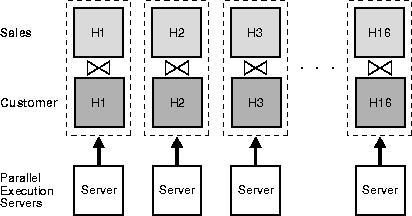
In Figure 26-6 we assume that the degree of parallelism and the number of partitions are the same, in other words, 16 for both. It is possible to have more partitions than the degree of parallelism to improve load balancing and limit possible skew in the execution. If you have more partitions than query servers, when one query server is done with the join of one pair of partitions, it requests that the query coordinator give it another pair to join. This process repeats until all pairs have been processed. This method allows dynamic load balancing when the number of partition pairs is greater than the degree of parallelism, for example, 64 partitions with a degree of parallelism of 16.
In Oracle Parallel Server environments running on shared-nothing platforms or MPPs, partition placements on nodes is critical to achieving good scalability. To avoid remote I/O, both matching partitions should have affinity to the same node. Partition pairs should be spread over all nodes to avoid bottlenecks and to use all CPU resources available on the system.
You can, however, have a node host multiple pairs when there are more pairs than nodes. For example, with an 8-node system and 16 partition pairs, each node should receive 2 pairs.
|
See Also:
For more information on data affinity, please refer to Oracle8i Parallel Server Concepts and Administration. |
This method is a variation of the hash/hash method. The sales table is a typical example of a table storing historical data. For all the reasons mentioned under the heading "Performance Considerations for Range Partitioning", a more logical partitioning method for sales is probably the range method, not the hash method.
For example, assume you want to partition the Sales table by range on the column s_saledate into 8 partitions. Also assume you have 2 years' of data and each partition represents a quarter. Instead of range partitioning you can use composite to enable a full partition-wise join while preserving the partitioning on s_saledate. Do this by partitioning the Sales table by range on s_saledate and then by subpartitioning each partition by hash on s_customerid using 16 subpartitions per partition, for a total of 128 subpartitions. The customer table can still use hash partitioning with 16 partitions.
With that new partitioning method, a full partition-wise join works similarly to the hash/hash method. The join is still divided into 16 smaller joins between hash partition pairs from both tables. The difference is that now each hash partition in the Sales table is composed of a set of 8 subpartitions, one from each range partition.
Figure 26-7 illustrates how the hash partitions are formed in the Sales table. In Figure 26-7, each cell represents a subpartition. Each row corresponds to one range partition for a total of 8 range partitions; each range partition has 16 subpartitions. Symmetrically, each column on the figure corresponds to one hash partition for a total of 16 hash partitions; each hash partition has 8 subpartitions. Note that hash partitions can be defined only if all partitions have the same number of subpartitions, in this case, 16.
Hash partitions in a composite table are implicit. However, Oracle does not record them in the data dictionary and you cannot manipulate them with DDL commands as you can range partitions.
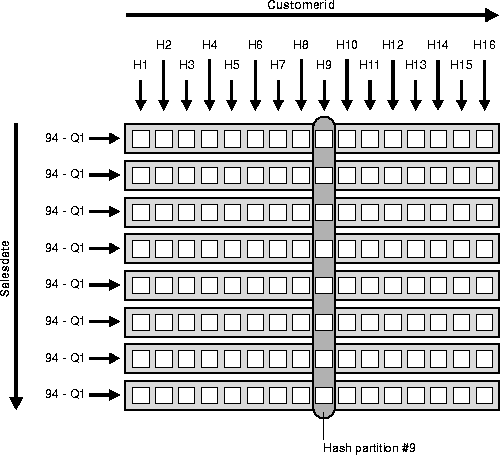
This partitioning method is effective because it allows you to combine pruning (on s_salesdate) with a full partition-wise join (on customerid). In the previous example query, pruning is achieved by only scanning the subpartitions corresponding to Q3 of 1994, in other words, row number 3 on Figure 26-7. Oracle them joins these subpartitions with the customer table using a full partition-wise join.
All characteristics of the hash/hash method also apply to the composite/hash method. In particular for this example, these two points are common to both methods:
If needed, you can also partition the Customer table by composite. For example, you can partition it by range on a zip code column to enable pruning based on zip code. You should then subpartition it by hash on customerid to enable a partition-wise join on the hash dimension.
You can also use partition-wise joins for range partitioning. However, this is more complex to implement because you must know your data's distribution before performing the join. Furthermore, this can lead to data skew during the execution if you do not correctly identify the partition bounds so you have partitions of equal size.
The basic principle for using range/range is the same as for hash/hash: you must equi-partition both tables. This means that the number of partitions must be the same and the partition bounds must be identical. For example, assume that you know in advance that you have 10 million customers, and the values for customerid vary from 1 to 10000000. In other words, you have possibly 10 million different values. To create 16 partitions, you can range partition both tables, Sales on
s_customerid and Customer on c_customerid. You should define partition bounds for both tables to generate partitions of the same size. In this example, partition bounds should be defined as 625001, 1250001, 1875001, ..., 10000001, so each partition contains 625000 rows.
Finally, you can also subpartition one or both tables on another column. Therefore, the range/composite and composite/composite methods on the range dimension are also valid for enabling a full partition-wise join on the range dimension.
Oracle can only perform partial partition-wise joins in parallel. Unlike full partition-wise joins, partial partition-wise joins require you to partition only one table on the join key, not both. The partitioned table is referred to as the 'reference' table. The other table may or may not be partitioned. Partial partition-wise joins are more common than full partition-wise join because it requires that you only partition one of the joined tables on the join key.
To execute a partial partition-wise join, Oracle dynamically re-partitions the other table based on the partitioning of the reference table. Once the other table is repartitioned, the execution is similar to a full partition-wise join.
The performance advantage that partial partition-wise joins have over conventional parallel joins is that the reference table is not 'moved' during the join operation. Conventional parallel joins require both input tables to be re-distributed on the join key. This re-distribution operation involves exchanging rows between query servers. This is a very CPU-intensive operation and can lead to excessive interconnect traffic in OPS environments. Partitioning large tables on a join key, either a foreign or primary key, prevents this re-distribution every time the table is joined on that key. Of course, if you choose a foreign key to partition the table, which is the most common scenario, select a foreign key that is involved in many queries.
To illustrate partial partition-wise joins, consider the previous Sales/Customer example. Assume that customer is not partitioned or partitioned on a column other than c_customerid. Because Sales is often joined with Customer on customerid and because this join dominates our application workload, partition Sales on
s_customerid to enable partial partition-wise join every time Customer and Sales are joined. As in full partition-wise join, we have several alternatives:
the simplest method to enable a partial partition-wise join is to partition Sales by hash on c_customerid. The number of partitions determines the maximum degree of parallelism because the partition is the smallest granule of parallelism for partial partition-wise join operations.
The parallel execution of a partial partition-wise join is illustrated in Figure 26-8 assuming that both the degree of parallelism and the number of partitions of Sales are 16. The execution involves two sets of query servers: one set, labeled 'set 1' on the figure, scans the customer table in parallel. The granule of parallelism for the scan operation is a range of blocks.
Rows from Customer that are selected by the first set, in this case this is all rows, are re-distributed to the second set of query servers by hashing customerid. For example, all rows in Customer that could have matching rows in partition H1 of Sales are sent to query server 1 in the second set. Rows received by the second set of query servers are joined with the rows from the corresponding partitions in Sales. For example, query server number 1 in the second set joins all Customer rows that it receives with partition H1 of Sales.
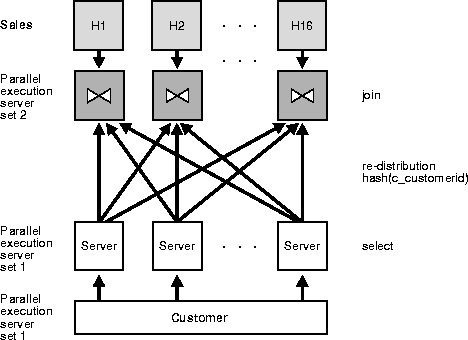
Considerations for full partition-wise joins also apply to partial partition-wise joins:
For more information on data affinity, please refer to Oracle8i Parallel Server Concepts and Administration.
See Also:
As with full partition-wise joins, the prime partitioning method for the Sales table is to use the range method on column s_salesdate. This is because Sales is a typical example of a table that stores historical data. To enable a partial partition-wise join while preserving this range partitioning, you can subpartition Sales by hash on column s_customerid using 16 subpartitions per partition. Pruning and partial partition-wise joins can be used together if a query joins Customer and Sales and if the query has a selection predicate on s_salesdate.
When Sales is composite, the granule of parallelism for partial-partition wise join is a hash partition and not a subpartition. Refer to Figure 26-7 for the definition of a hash partition in a composite table. Again, the number of hash partitions should be a multiple of the degree of parallelism. Also, on an MPP system, ensure that each hash partition has affinity to a single node. In the previous example, it means that the 8 subpartitions composing a hash partition should have affinity to the same node.
finally, you can use range partitioning on s_customerid to enable a partial partition-wise join. This works similarly to the hash method, although it is not recommended. The resulting data distribution could be skewed if the size of the partitions differs. Moreover, this method is more complex to implement because it requires prior knowledge of the values of the partitioning column which is also a join key.
Partition-wise joins offer benefits as described in this section:
Partition-wise joins reduce communications overhead when they are executed in parallel. This is because in the default case, parallel execution of a join operation by a set of parallel execution servers requires the redistribution of each table on the join column into disjoint subsets of rows. These disjoint subsets of rows are then joined pair-wise by a single parallel execution server.
Oracle can avoid redistributing the partitions since the two tables are already partitioned on the join column. This allows each parallel execution server to join a pair of matching partitions.
This performance enhancement is even more noticeable in OPS configurations with internode parallel execution. This is because partition-wise joins can dramatically reduce interconnect traffic. Using this feature is an almost mandatory optimization measure for large DSS configurations that use OPS.
Currently, most OPS platforms, such as MPP and SMP clusters, provide very limited interconnect bandwidths compared to their processing powers. Ideally, interconnect bandwidth should be comparable to disk bandwidth, but this is seldom the case. As a result, most join operations in OPS experience excessively high interconnect latencies without this optimization.
Partition-wise joins require less memory. In the case of serial joins, the join is performed on a pair of matching partitions at the same time. Thus, if data is evenly distributed across partitions, the memory requirement is divided by the number of partition. In this case there is no skew.
In the parallel case it depends on the number of partition pairs that are joined in parallel. For example, if the degree of parallelism is 20 and the number of partitions is 100, 5 times less memory is required because only 20 joins of two partitions are performed at the same time. The fact that partition-wise joins require less memory has a direct effect on performance. For example, the join does not need to write blocks to disk during the build phase of a hash join.
The performance improvements from parallel partition-wise joins also come with disadvantages. The cost-based optimizer weighs the advantages and disadvantages when deciding whether to use partition-wise joins.
This section discusses the following topics:
This section presents a case study illustrating how to create, load, index, and analyze a large data warehouse fact table with partitions in a typical star schema. This example uses SQL Loader to explicitly stripe data over 30 disks.
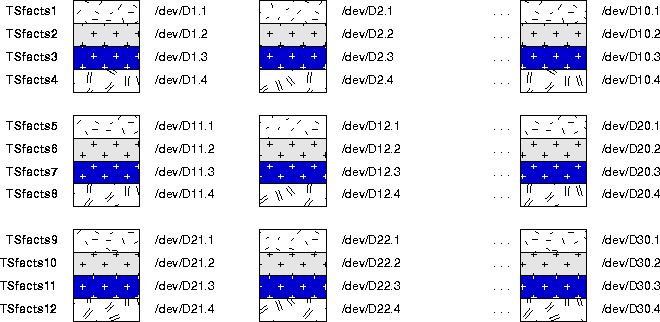
Below is the command to create a tablespace named "Tsfacts1". Other tablespaces are created with analogous commands. On a 10-CPU machine, it should be possible to run all 12 CREATE TABLESPACE commands together. Alternatively, it might be better to run them in two batches of 6 (two from each of the three groups of disks).
CREATE TABLESPACE Tsfacts1
DATAFILE /dev/D1.1'  SIZE 1024MB REUSE
DATAFILE /dev/D2.1'  SIZE 1024MB REUSE
DATAFILE /dev/D3.1'  SIZE 1024MB REUSE
DATAFILE /dev/D4.1' SIZE 1024MB REUSE
DATAFILE /dev/D5.1'  SIZE 1024MB REUSE
DATAFILE /dev/D6.1'  SIZE 1024MB REUSE
DATAFILE /dev/D7.1'  SIZE 1024MB REUSE
DATAFILE /dev/D8.1' SIZE 1024MB REUSE
DATAFILE /dev/D9.1'  SIZE 1024MB REUSE
DATAFILE /dev/D10.1  SIZE 1024MB REUSE
DEFAULT STORAGE (INITIAL 100MB NEXT 100MB PCTINCREASE 0)
CREATE TABLESPACE Tsfacts2
DATAFILE /dev/D4.2' SIZE 1024MB REUSE
DATAFILE /dev/D5.2'  SIZE 1024MB REUSE
DATAFILE /dev/D6.2'  SIZE 1024MB REUSE
DATAFILE /dev/D7.2'  SIZE 1024MB REUSE
DATAFILE /dev/D8.2' SIZE 1024MB REUSE
DATAFILE /dev/D9.2'  SIZE 1024MB REUSE
DATAFILE /dev/D10.2  SIZE 1024MB REUSE
DATAFILE /dev/D1.2'  SIZE 1024MB REUSE
DATAFILE /dev/D2.2'  SIZE 1024MB REUSE
DATAFILE /dev/D3.2'  SIZE 1024MB REUSE
DEFAULT STORAGE (INITIAL 100MB NEXT 100MB PCTINCREASE 0)
...
CREATE TABLESPACE Tsfacts4
DATAFILE /dev/D10.4'  SIZE 1024MB REUSE
DATAFILE /dev/D1.4'  SIZE 1024MB REUSE
DATAFILE /dev/D2.4'  SIZE 1024MB REUSE
DATAFILE /dev/D3.4  SIZE 1024MB REUSE
DATAFILE /dev/D4.4' SIZE 1024MB REUSE
DATAFILE /dev/D5.4'  SIZE 1024MB REUSE
DATAFILE /dev/D6.4'  SIZE 1024MB REUSE
DATAFILE /dev/D7.4'  SIZE 1024MB REUSE
DATAFILE /dev/D8.4' SIZE 1024MB REUSE
DATAFILE /dev/D9.4'  SIZE 1024MB REUSE
DEFAULT STORAGE (INITIAL 100MB NEXT 100MB PCTINCREASE 0)
...
CREATE TABLESPACE Tsfacts12
DATAFILE /dev/D30.4'  SIZE 1024MB REUSE
DATAFILE /dev/D21.4'  SIZE 1024MB REUSE
DATAFILE /dev/D22.4'  SIZE 1024MB REUSE
DATAFILE /dev/D23.4  SIZE 1024MB REUSE
DATAFILE /dev/D24.4' SIZE 1024MB REUSE
DATAFILE /dev/D25.4'  SIZE 1024MB REUSE
DATAFILE /dev/D26.4'  SIZE 1024MB REUSE
DATAFILE /dev/D27.4'  SIZE 1024MB REUSE
DATAFILE /dev/D28.4' SIZE 1024MB REUSE
DATAFILE /dev/D29.4'  SIZE 1024MB REUSE
DEFAULT STORAGE (INITIAL 100MB NEXT 100MB PCTINCREASE 0)
Extent sizes in the STORAGE clause should be multiples of the multiblock read size, where:
blocksize * MULTIBLOCK_READ_COUNT = multiblock read size
INITIAL and NEXT should normally be set to the same value. In the case of parallel load, make the extent size large enough to keep the number of extents reasonable, and to avoid excessive overhead and serialization due to bottlenecks in the data dictionary. When PARALLEL=TRUE is used for parallel loader, the INITIAL extent is not used. In this case you can override the INITIAL extent size specified in the tablespace default storage clause with the value specified in the loader control file, for example, 64KB.
Tables or indexes can have an unlimited number of extents provided you have set the COMPATIBLE system parameter to match the current release number, and use the MAXEXTENTS keyword on the CREATE or ALTER command for the tablespace or object. In practice, however, a limit of 10,000 extents per object is reasonable. A table or index has an unlimited number of extents, so set the PERCENT_INCREASE parameter to zero to have extents of equal size.
|
Note: It is not desirable to allocate extents faster than about 2 or 3 per minute. See "ST (Space Transaction) Enqueue for Sorts and Temporary Data" for more information. Thus, each process should get an extent that lasts for 3 to 5 minutes. Normally such an extent is at least 50MB for a large object. Too small an extent size incurs significant overhead and this affects performance and scalability of parallel operations. The largest possible extent size for a 4GB disk evenly divided into 4 partitions is 1GB. 100MB extents should perform well. Each partition will have 100 extents. You can then customize the default storage parameters for each object created in the tablespace, if needed. |
We create a partitioned table with 12 partitions, each in its own tablespace. The table contains multiple dimensions and multiple measures. The partitioning column is named "dim_2" and is a date. There are other columns as well.
CREATE TABLE fact (dim_1 NUMBER, dim_2 DATE, ...
meas_1 NUMBER, meas_2 NUMBER, ... )
PARALLEL
(PARTITION BY RANGE (dim_2)
PARTITION jan95 VALUES LESS THAN ('02-01-1995') TABLESPACE
TSfacts1
PARTITION feb95 VALUES LESS THAN ('03-01-1995') TABLESPACE
TSfacts2
...
PARTITION dec95 VALUES LESS THAN ('01-01-1996') TABLESPACE
TSfacts12);
This section describes four alternative approaches to loading partitions in parallel.
The different approaches to loading help you manage the ramifications of the PARALLEL=TRUE keyword of SQL*Loader that controls whether individual partitions are loaded in parallel. The PARALLEL keyword entails restrictions such as the following:
However, regardless of the setting of this keyword, if you have one loader process per partition, you are still effectively loading into the table in parallel.
Case 1
In this approach, assume 12 input files are partitioned in the same way as your table. The DBA has 1 input file per partition of the table to be loaded. The DBA starts 12 SQL*Loader sessions concurrently in parallel, entering statements like these:
   SQLLDR DATA=jan95.dat DIRECT=TRUE CONTROL=jan95.ctl
  SQLLDR DATA=feb95.dat DIRECT=TRUE CONTROL=feb95.ctl
   . . .
   SQLLDR DATA=dec95.dat DIRECT=TRUE CONTROL=dec95.ctl
In the example, the keyword PARALLEL=TRUE is not set. A separate control file per partition is necessary because the control file must specify the partition into which the loading should be done. It contains a statement such as:
LOAD INTO fact partition(jan95)
The advantages of this approach are that local indexes are maintained by SQL*Loader. You still get parallel loading, but on a partition level--without the restrictions of the PARALLEL keyword.
A disadvantage is that you must partition the input prior to loading manually.
Case 2
In another common approach, assume an arbitrary number of input files that are not partitioned in the same way as the table. The DBA can adopt a strategy of performing parallel load for each input file individually. Thus if there are 7 input files, the DBA can start 7 SQL*Loader sessions, using statements like the following:
SQLLDR DATA=file1.dat DIRECT=TRUE PARALLEL=TRUE
Oracle partitions the input data so that it goes into the correct partitions. In this case all the loader sessions can share the same control file, so there is no need to mention it in the statement.
The keyword PARALLEL=TRUE must be used because each of the 7 loader sessions can write into every partition. In case 1, every loader session would write into only 1 partition, because the data was partitioned prior to loading. Hence all the PARALLEL keyword restrictions are in effect.
In this case Oracle attempts to spread the data evenly across all the files in each of the 12 tablespaces--however an even spread of data is not guaranteed. Moreover, there could be I/O contention during the load when the loader processes are attempting to write to the same device simultaneously.
Case 3
In Case 3 (illustrated in the example), the DBA wants precise control over the load. To achieve this, the DBA must partition the input data in the same way as the datafiles are partitioned in Oracle.
This example uses 10 processes loading into 30 disks. To accomplish this, the DBA must split the input into 120 files beforehand. The 10 processes will load the first partition in parallel on the first 10 disks, then the second partition in parallel on the second 10 disks, and so on through the 12th partition. The DBA runs the following commands concurrently as background processes:
   SQLLDR DATA=jan95.file1.dat DIRECT=TRUE PARALLEL=TRUE FILE=/dev/D1.1
   ...
   SQLLDR DATA=jan95.file10.dat DIRECT=TRUE PARALLEL=TRUE FILE=/dev/D10.1
   WAIT;
   ...
   SQLLDR DATA=dec95.file1.dat DIRECT=TRUE PARALLEL=TRUE FILE=/dev/D30.4
   ...
   SQLLDR DATA=dec95.file10.dat DIRECT=TRUE PARALLEL=TRUE FILE=/dev/D29.4
For Oracle Parallel Server, divide the loader session evenly among the nodes. The datafile being read should always reside on the same node as the loader session.
The keyword PARALLEL=TRUE must be used, because multiple loader sessions can write into the same partition. Hence all the restrictions entailed by the PARALLEL keyword are in effect. An advantage of this approach, however, is that it guarantees that all of the data is precisely balanced, exactly reflecting your partitioning.
Case 4
For this approach, all partitions must be in the same tablespace. You need to have the same number of input files as datafiles in the tablespace, but you do not need to partition the input the same way in which the table is partitioned.
For example, if all 30 devices were in the same tablespace, then you would arbitrarily partition your input data into 30 files, then start 30 SQL*Loader sessions in parallel. The statement starting up the first session would be similar to the following:
   SQLLDR DATA=file1.dat DIRECT=TRUE PARALLEL=TRUE FILE=/dev/D1
   . . .
   SQLLDR DATA=file30.dat DIRECT=TRUE PARALLEL=TRUE FILE=/dev/D30
The advantage of this approach is that as in Case 3, you have control over the exact placement of datafiles because you use the FILE keyword. However, you are not required to partition the input data by value because Oracle does that for you.
A disadvantage is that this approach requires all the partitions to be in the same tablespace. This minimizes availability.
For optimal space management performance use dedicated temporary tablespaces. As with the TSfacts tablespace, we first add a single datafile and later add the remainder in parallel as in this example:
   CREATE TABLESPACE TStemp TEMPORARY DATAFILE '/dev/D31'
   SIZE 4096MB REUSE
   DEFAULT STORAGE (INITIAL 10MB NEXT 10MB PCTINCREASE 0);
Temporary extents are all the same size, because the server ignores the PCTINCREASE and INITIAL settings and only uses the NEXT setting for temporary extents. This helps avoid fragmentation.
As a general rule, temporary extents should be smaller than permanent extents, because there are more demands for temporary space, and parallel processes or other operations running concurrently must share the temporary tablespace. Normally, temporary extents should be in the range of 1MB to 10MB. Once you allocate an extent it is yours for the duration of your operation. If you allocate a large extent but only need to use a small amount of space, the unused space in the extent is tied up.
At the same time, temporary extents should be large enough that processes do not have to spend all their time waiting for space. Temporary tablespaces use less overhead than permanent tablespaces when allocating and freeing a new extent. However, obtaining a new temporary extent still requires the overhead of acquiring a latch and searching through the SGA structures, as well as SGA space consumption for the sort extent pool. Also, if extents are too small, SMON may take a long time dropping old sort segments when new instances start up.
Operating system striping is an alternative technique you can use with temporary tablespaces. Media recovery, however, offers subtle challenges for large temporary tablespaces. It does not make sense to mirror, use RAID, or back up a temporary tablespace. If you lose a disk in an OS striped temporary space, you will probably have to drop and recreate the tablespace. This could take several hours for our 120GB example. With Oracle striping, simply remove the defective disk from the tablespace. For example, if /dev/D50 fails, enter:
   ALTER DATABASE DATAFILE '/dev/D50' RESIZE 1K;
   ALTER DATABASE DATAFILE '/dev/D50' OFFLINE;
Because the dictionary sees the size as 1KB, which is less than the extent size, the corrupt file is not accessed. Eventually, you may wish to recreate the tablespace.
Be sure to make your temporary tablespace available for use:
ALTER USER scott TEMPORARY TABLESPACE TStemp;
Indexes on the fact table can be partitioned or non-partitioned. Local partitioned indexes provide the simplest administration. The only disadvantage is that a search of a local non-prefixed index requires searching all index partitions.
The considerations for creating index tablespaces are similar to those for creating other tablespaces. Operating system striping with a small stripe width is often a good choice, but to simplify administration it is best to use a separate tablespace for each index. If it is a local index you may want to place it into the same tablespace as the partition to which it corresponds. If each partition is striped over a number of disks, the individual index partitions can be rebuilt in parallel for recovery. Alternatively, operating system mirroring can be used. For these reasons the NOLOGGING option of the index creation statement may be attractive for a data warehouse.
Tablespaces for partitioned indexes should be created in parallel in the same manner as tablespaces for partitioned tables.
Partitioned indexes are created in parallel using partition granules, so the maximum DOP possible is the number of granules. Local index creation has less inherent parallelism than global index creation, and so may run faster if a higher DOP is used. The following statement could be used to create a local index on the fact table:
   CREATE INDEX I on fact(dim_1,dim_2,dim_3) LOCAL
   PARTITION jan95 TABLESPACE Tsidx1,
   PARTITION feb95 TABLESPACE Tsidx2,
   ...
   PARALLEL(DEGREE 12) NOLOGGING;
To backup or restore January data, you only need to manage tablespace Tsidx1.
|
See Also:
Oracle8i Concepts for a discussion of partitioned indexes. For more information on analyzing statistics, please refer to Chapter 7, "Optimizer Modes, Plan Stability, and Hints" |
After analyzing your tables and indexes, you should see performance improvements that scales linearly with the degree of parallelism used. The following operations should scale:
Start with simple parallel operations. Evaluate total I/O throughput with SELECT COUNT(*) FROM facts. Evaluate total CPU power by adding a complex WHERE clause. I/O imbalance may suggest a better physical database layout. After you understand how simple scans work, add aggregation, joins, and other operations that reflect individual aspects of the overall workload. Look for bottlenecks.
Besides query performance you should also monitor parallel load, parallel index creation, and parallel DML, and look for good utilization of I/O and CPU resources.
Use the EXPLAIN PLAN command to see the execution plans for parallel queries. EXPLAIN PLAN output shows optimizer information in the COST, BYTES, and CARDINALITY columns. For more information on using EXPLAIN PLAN, please refer to Chapter 13, "Using EXPLAIN PLAN".
There are several ways to optimize the parallel execution of join statements. You can alter your system's configuration, adjust parameters as discussed earlier in this chapter, or use hints, such as the DISTRIBUTION hint. For more information on hints for parallel operations, please refer to "Hints for Parallel Execution".
When you want to refresh your data warehouse database using parallel insert, update, or delete on a data warehouse, there are additional issues to consider when designing the physical database. These considerations do not affect parallel execution operations. These issues are:
A complete listing of PDML and direct-load insert restrictions is found in Oracle8i Concepts. If a parallel restriction is violated, the operation is simply performed serially. If a direct-load insert restriction is violated, then the APPEND hint is ignored and a conventional insert is performed. No error message is returned.
If you are performing parallel insert, update, or delete operations, the DOP is equal to or less than the number of partitions in the table.
Parallel DML works mostly on partitioned tables. It does not use asynchronous I/O and may generate a high number of random I/O requests during index maintenance of parallel UPDATE and DELETE operations. For local index maintenance, local striping is most efficient in reducing I/O contention, because one server process only goes to its own set of disks and disk controllers. Local striping also increases availability in the event of one disk failing.
For global index maintenance, (partitioned or non-partitioned), globally striping the index across many disks and disk controllers is the best way to distribute the number of I/Os.
If you have global indexes, a global index segment and global index blocks are shared by server processes of the same parallel DML statement. Even if the operations are not performed against the same row, the server processes may share the same index blocks. Each server transaction needs one transaction entry in the index block header before it can make changes to a block. Therefore, in the CREATE INDEX or ALTER INDEX statements, you should set INITRANS, the initial number of transactions allocated within each data block, to a large value, such as the maximum DOP against this index. Leave MAXTRANS, the maximum number of concurrent transactions that can update a data block, at its default value, which is the maximum your system can support. This value should not exceed 255.
If you run a DOP of 10 against a table with a global index, all 10 server processes might attempt to change the same global index block. For this reason you must set MAXTRANS to at least 10 so all server processes can make the change at the same time. If MAXTRANS is not large enough, the parallel DML operation fails.
Once a segment has been created, the number of process and transaction free lists is fixed and cannot be altered. If you specify a large number of process free lists in the segment header, you may find that this limits the number of transaction free lists that are available. You can abate this limitation the next time you recreate the segment header by decreasing the number of process free lists; this leaves more room for transaction free lists in the segment header.
For UPDATE and DELETE operations, each server process may require its own transaction free list. The parallel DML DOP is thus effectively limited by the smallest number of transaction free lists available on any of the global indexes the DML statement must maintain. For example, if you have two global indexes, one with 50 transaction free lists and one with 30 transaction free lists, the DOP is limited to 30.
The FREELISTS parameter of the STORAGE clause is used to set the number of process free lists. By default, no process free lists are created.
The default number of transaction free lists depends on the block size. For example, if the number of process free lists is not set explicitly, a 4KB block has about 80 transaction free lists by default. The minimum number of transaction free lists is 25.
|
See Also:
Oracle8i Parallel Server Concepts and Administration for information about transaction free lists. |
Parallel DDL and parallel DML operations may generate a large amount of redo logs. A single ARCH process to archive these redo logs might not be able to keep up. To avoid this problem, you can spawn multiple archiver processes. This can be done manually or by using a job queue.
Parallel DML operations dirty a large number of data, index, and undo blocks in the buffer cache during a short period of time. If you see a high number of "FREE_BUFFER_WAITS" after querying the V$SYSTEM_EVENT view as in the following syntax:
SELECT TOTAL_WAITS FROM V$SYSTEM_EVENT WHERE EVENT = 'FREE BUFFER WAITS';
Tune the DBWn process(es). If there are no waits for free buffers, the above query does not return any rows.
The [NO]LOGGING option applies to tables, partitions, tablespaces, and indexes. Virtually no log is generated for certain operations (such as direct-load INSERT) if the NOLOGGING option is used. The NOLOGGING attribute is not specified at the INSERT statement level, but is instead specified when using the ALTER or CREATE command for the table, partition, index, or tablespace.
When a table or index has NOLOGGING set, neither parallel nor serial direct-load INSERT operations generate undo or redo logs. Processes running with the NOLOGGING option set run faster because no redo is generated. However, after a NOLOGGING operation against a table, partition, or index, if a media failure occurs before a backup is taken, then all tables, partitions, and indexes that have been modified may be corrupted.
For backward compatibility, [UN]RECOVERABLE is still supported as an alternate keyword with the CREATE TABLE command. This alternate keyword may not be supported, however, in future releases.
At the tablespace level, the logging clause specifies the default logging attribute for all tables, indexes, and partitions created in the tablespace. When an existing tablespace logging attribute is changed by the ALTER TABLESPACE statement, then all tables, indexes, and partitions created after the ALTER statement will have the new logging attribute; existing ones will not change their logging attributes. The tablespace level logging attribute can be overridden by the specifications at the table, index, or partition level.
The default logging attribute is LOGGING. However, if you have put the database in NOARCHIVELOG mode, by issuing ALTER DATABASE NOARCHIVELOG, then all operations that can be done without logging will not generate logs, regardless of the specified logging attribute.
Phase Four discusses the following topics for monitoring parallel execution performance:
After your system has run for a few days, monitor parallel execution performance statistics to determine whether your parallel processing is optimal. Do this using any of the views discussed in this phase.
In Oracle Parallel Server, global versions of views described in this phase aggregate statistics from multiple instances. The global views have names beginning with "G", such as GV$FILESTAT for V$FILESTAT, and so on.
The V$PX_SESSION view shows data about query server sessions, groups, sets, and server numbers. Displays real-time data about the processes working on behalf of parallel execution. This table includes information about the requested DOP and actual DOP granted to the operation.
The V$PX_SESSTAT view provides a join of the session information from V$PX_SESSION and the V$SESSTAT table. Thus, all session statistics available to a normal session are available for all sessions performed using parallel execution.
The V$PX_PROCESS view contains information about the parallel processes. Includes status, session ID, Process ID and other information.
The V$PX_PROCESS_SYSSTAT view shows the status of query servers and provides buffer allocation statistics.
The V$PQ_SESSTAT view shows the status of all current server groups in the system such as data about how queries allocate processes and how the multi-user and load balancing algorithms are affecting the default and hinted values. V$PQ_SESSTAT will be obsolete in a future release.
You may need to adjust some parameter settings to improve performance after reviewing data from these views. In this case, refer to the discussion of "Step Three: Tuning General Parameters". Query these views periodically to monitor the progress of long-running parallel operations.
.
|
See Also:
For more information on collecting statistics with the DBMS_STATS package, refer to Chapter 7, "Optimizer Modes, Plan Stability, and Hints". |
The V$FILESTAT view sums read and write requests, the number of blocks, and service times for every datafile in every tablespace. Use V$FILESTAT to diagnose I/O and workload distribution problems.
You can join statistics from V$FILESTAT with statistics in the DBA_DATA_FILES view to group I/O by tablespace or to find the filename for a given file number. Using a ratio analysis, you can determine the percentage of the total tablespace activity used by each file in the tablespace. If you make a practice of putting just one large, heavily accessed object in a tablespace, you can use this technique to identify objects that have a poor physical layout.
You can further diagnose disk space allocation problems using the DBA_EXTENTS view. Ensure that space is allocated evenly from all files in the tablespace. Monitoring V$FILESTAT during a long-running operation and then correlating I/O activity to the EXPLAIN PLAN output is a good way to follow progress.
The V$PARAMETER view lists the name, current value, and default value of all system parameters. In addition, the view shows whether a parameter is a session parameter that you can modify online with an ALTER SYSTEM or ALTER SESSION command.
The V$PQ_TQSTAT view provides a detailed report of message traffic at the table queue level. V$PQ_TQSTAT data is valid only when queried from a session that is executing parallel SQL statements. A table queue is the pipeline between query server groups or between the parallel coordinator and a query server group or between a query server group and the coordinator. Table queues are represented in EXPLAIN PLAN output by the row labels of PARALLEL_TO_PARALLEL, SERIAL_TO_PARALLEL, or PARALLEL_TO_SERIAL, respectively.
V$PQ_TQSTAT has a row for each query server process that reads from or writes to in each table queue. A table queue connecting 10 consumer processes to 10 producer processes has 20 rows in the view. Sum the bytes column and group by TQ_ID, the table queue identifier, to obtain the total number of bytes sent through each table queue. Compare this with the optimizer estimates; large variations may indicate a need to analyze the data using a larger sample.
Compute the variance of bytes grouped by TQ_ID. Large variances indicate workload imbalances. You should investigate large variances to determine whether the producers start out with unequal distributions of data, or whether the distribution itself is skewed. If the data itself is skewed, this may indicate a low cardinality, or low number of distinct values.
The V$SESSTAT view provides parallel execution statistics for each session. The statistics include total number of queries, DML and DDL statements executed in a session and the total number of intra- and inter-instance messages exchanged during parallel execution during the session.
V$SYSSTAT does the same as V$SESSTAT for the entire system.
These examples use the dynamic performance views just described.
Use V$PX_SESSION to determine the configuration of the server group executing in parallel. In this example, Session ID 9 is the query coordinator, while sessions 7 and 21 are in the first group, first set. Sessions 18 and 20 are in the first group, second set. The requested and granted DOP for this query is 2 as shown by Oracle's response to the following query:
   SELECT QCSID, SID, INST_ID "Inst",
   SERVER_GROUP "Group", SERVER_SET "Set",
     DEGREE "Degree", REQ_DEGREE "Req Degree"
     FROM GV$PX_SESSION
      ORDER BY QCSID, QCINST_ID, SERVER_GROUP, SERVER_SET;
Oracle responds with:
QCSID      SID        Inst       Group      Set        Degree     Req Degree
---------- ---------- ---------- ---------- ---------- ---------- ----------
         9          9          1
         9          7          1          1          1          2          2
         9         21          1          1          1          2          2
         9         18          1          1          2          2          2
         9         20          1          1          2          2          2
5 rows selected.
The processes shown in the output from the previous example using
GV$PX_SESSION collaborate to complete the same task. In the next example, we execute a join query to determine the progress of these processes in terms of physical reads. Use this query to track any specific statistic:
   SELECT QCSID, SID, INST_ID "Inst",
   SERVER_GROUP "Group", SERVER_SET "Set" ,
    NAME "Stat Name", VALUE
    FROM GV$PX_SESSTAT A, V$STATNAME B
    WHERE A.STATISTIC# = B.STATISTIC#
    AND NAME LIKE 'PHYSICAL READS'
    AND VALUE > 0
      ORDER BY QCSID, QCINST_ID, SERVER_GROUP, SERVER_SET;
Oracle responds with output similar to:
QCSID  SID   Inst   Group  Set    Stat Name          VALUE
------ ----- ------ ------ ------ ------------------ ----------
     9     9      1               physical reads     3863
     9     7      1      1      1 physical reads     2
     9    21      1      1      1 physical reads     2
     9    18      1      1      2 physical reads     2
     9    20      1      1      2 physical reads     2
5 rows selected.
Use the previous type of query to track statistics in V$STATNAME. Repeat this query as often as required to observe the progress of the query server processes.
The next query uses V$PX_PROCESS to check the status of the query servers.
SELECT * FROM V$PX_PROCESS;
Your output should be similar to the following:
SERV STATUS    PID    SPID      SID    SERIAL
---- --------- ------ --------- ------ ------
P002 IN USE        16 16955         21   7729
P003 IN USE        17 16957         20   2921
P004 AVAILABLE     18 16959
P005 AVAILABLE     19 16962
P000 IN USE        12 6999          18   4720
P001 IN USE        13 7004           7    234
6 rows selected.
The V$SYSSTAT and V$SESSTAT views contain several statistics for monitoring parallel execution. Use these statistics to track the number of parallel queries, DMLs, DDLs, DFOs, and operations. Each query, DML, or DDL can have multiple parallel operations and multiple DFOs.
In addition, statistics also count the number of query operations for which the DOP was reduced, or downgraded, due to either the adaptive multi-user algorithm or due to the depletion of available parallel execution servers.
Finally, statistics in these views also count the number of messages sent on behalf of parallel execution. The following syntax is an example of how to display these statistics:
  SELECT NAME, VALUE FROM GV$SYSSTAT
  WHERE UPPER (NAME) LIKE '%PARALLEL OPERATIONS%'
     OR UPPER (NAME) LIKE '%PARALLELIZED%'
     OR UPPER (NAME) LIKE '%PX%' ;
Oracle responds with output similar to:
NAME                                               VALUE
-------------------------------------------------- ----------
queries parallelized                                      347
DML statements parallelized                                 0
DDL statements parallelized                                 0
DFO trees parallelized                                    463
Parallel operations not downgraded                         28
Parallel operations downgraded to serial                   31
Parallel operations downgraded 75 to 99 pct               252
Parallel operations downgraded 50 to 75 pct               128
Parallel operations downgraded 25 to 50 pct                43
Parallel operations downgraded 1 to 25 pct                 12
PX local messages sent                                  74548
PX local messages recv'd                                74128
PX remote messages sent                                     0
PX remote messages recv'd                                   0

14 rows selected.
There is considerable overlap between information available in Oracle and information available though operating system utilities (such as sar and vmstat on UNIX-based systems). Operating systems provide performance statistics on I/O, communication, CPU, memory and paging, scheduling, and synchronization primitives. The Oracle V$SESSTAT view provides the major categories of OS statistics as well.
Typically, operating system information about I/O devices and semaphore operations is harder to map back to database objects and operations than is Oracle information. However, some operating systems have good visualization tools and efficient means of collecting the data.
Operating system information about CPU and memory usage is very important for assessing performance. Probably the most important statistic is CPU usage. The goal of low -level performance tuning is to become CPU bound on all CPUs. Once this is achieved, you can move up a level and work at the SQL level to find an alternate plan that might be more I/O intensive but uses less CPU.
Operating system memory and paging information is valuable for fine tuning the many system parameters that control how memory is divided among memory-intensive warehouse subsystems like parallel communication, sort, and hash join.
