Release 8.1.5
A68003-01
 Library |
 Product |
 Contents |
 Index |
| Oracle8i Application Developer's Guide - Fundamentals Release 8.1.5 A68003-01 |
|


This chapter discusses some of the procedural capabilities of Oracle for application development, including:
PL/SQL is a modern, block-structured programming language. It provides a number of features that make developing powerful database applications very convenient. For example, PL/SQL provides procedural constructs, such as loops and conditional statements, that are not available in standard SQL.
You can directly enter SQL data manipulation language (DML) statements inside PL/SQL blocks, and you can use procedures, supplied by Oracle, to perform data definition language (DDL) statements.
PL/SQL code runs on the server, so using PL/SQL lets you centralize significant parts of your database applications for increased maintainability and security. It also enables you to achieve a significant reduction of network overhead in client/server applications.
You can even use PL/SQL for some database applications in place of 3GL programs that use embedded SQL or the Oracle Call Interface (OCI).
PL/SQL program units include:
For complete information about the PL/SQL language, see the PL/SQL User's Guide and Reference.
See Also:
An anonymous block is a PL/SQL program unit that has no name, and it does not require the explicit presence of the BEGIN and END keywords to enclose the executable statements. An anonymous block consists of an optional declarative part, an executable part, and one or more optional exception handlers.
The declarative part declares PL/SQL variables, exceptions, and cursors. The executable part contains PL/SQL code and SQL statements, and can contain nested blocks. Exception handlers contain code that is called when the exception is raised, either as a predefined PL/SQL exception (such as NO_DATA_FOUND or ZERO_DIVIDE) or as an exception that you define.
The following short example of a PL/SQL anonymous block prints the names of all employees in department 20 in the Emp_tab table, using the DBMS_OUTPUT package:
DECLARE
   Emp_name    VARCHAR2(10);
   Cursor      c1 IS SELECT Ename FROM Emp_tab
                  WHERE Deptno = 20;
BEGIN
   OPEN c1;
   LOOP
      FETCH c1 INTO Emp_name;
      EXIT WHEN c1%NOTFOUND;
      DBMS_OUTPUT.PUT_LINE(Emp_name);
   END LOOP;
END;
|
See Also:
For complete information about the |
Exceptions let you handle Oracle error conditions within PL/SQL program logic. This allows your application to prevent the server from issuing an error that could cause the client application to abend. The following anonymous block handles the predefined Oracle exception NO_DATA_FOUND (which would result in an ORA-01403 error if not handled):
DECLARE
   Emp_number   INTEGER := 9999;
   Emp_name     VARCHAR2(10);
BEGIN
   SELECT Ename INTO Emp_name FROM Emp_tab
      WHERE Empno = Emp_number;   -- no such number
   DBMS_OUTPUT.PUT_LINE('Employee name is ' || Emp_name);
EXCEPTION
   WHEN NO_DATA_FOUND THEN
      DBMS_OUTPUT.PUT_LINE('No such employee: ' || Emp_number);
END;
You can also define your own exceptions, declare them in the declaration part of a block, and define them in the exception part of the block. An example follows:
DECLARE
   Emp_name           VARCHAR2(10);
   Emp_number         INTEGER;
   Empno_out_of_range EXCEPTION;
BEGIN
   Emp_number := 10001;
   IF Emp_number > 9999 OR Emp_number < 1000 THEN
      RAISE Empno_out_of_range;
   ELSE
      SELECT Ename INTO Emp_name FROM Emp_tab
         WHERE Empno = Emp_number;
      DBMS_OUTPUT.PUT_LINE('Employee name is ' || Emp_name);
END IF;
EXCEPTION
   WHEN Empno_out_of_range THEN
      DBMS_OUTPUT.PUT_LINE('Employee number ' || Emp_number ||
       ' is out of range.');
END;
Anonymous blocks are usually used interactively from a tool, such as SQL*Plus, or in a precompiler, OCI, or SQL*Module application. They are usually used to call stored procedures or to open cursor variables.
A stored procedure, function, or package is a PL/SQL program unit that has the following features:
Because a procedure or function is stored in the database, it must be named. This distinguishes it from other stored procedures and makes it possible for applications to call it. Each publicly-visible procedure or function in a schema must have a unique name, and the name must be a legal PL/SQL identifier.
Stored procedures and functions can take parameters. The following example shows a stored procedure that is similar to the anonymous block in "Anonymous Blocks".
PROCEDURE Get_emp_names (Dept_num IN NUMBER) IS
   Emp_name       VARCHAR2(10);
   CURSOR         c1 (Depno NUMBER) IS
                     SELECT Ename FROM Emp_tab
                        WHERE deptno = Depno;
BEGIN
   OPEN c1(Dept_num);
   LOOP
      FETCH c1 INTO Emp_name;
      EXIT WHEN C1%NOTFOUND;
      DBMS_OUTPUT.PUT_LINE(Emp_name);
   END LOOP;
   CLOSE c1;
END;
In this stored procedure example, the department number is an input parameter which is used when the parameterized cursor c1 is opened.
The formal parameters of a procedure have three major parts:
Parameter modes define the behavior of formal parameters. The three parameter modes, IN (the default), OUT, and IN OUT, can be used with any subprogram. However, avoid using the OUT and IN OUT modes with functions. The purpose of a function is to take no arguments and return a single value. It is poor programming practice to have a function return multiple values. Also, functions should be free from side effects, which change the values of variables not local to the subprogram.
Table 10-1 summarizes the information about parameter modes.
The datatype of a formal parameter consists of one of the following:
NUMBER or VARCHAR2.
%TYPE or %ROWTYPE attributes.
%TYPE and %ROWTYPE Attributes
Use the type attributes %TYPE and %ROWTYPE to constrain the parameter. For example, the Get_emp_names procedure specification in "Parameters for Procedures and Functions" could be written as the following:
PROCEDURE Get_emp_names(Dept_num IN Emp_tab.Deptno%TYPE)
This has the Dept_num parameter take the same datatype as the Deptno column in the Emp_tab table. The column and table must be available when a declaration using %TYPE (or %ROWTYPE) is elaborated.
Using %TYPE is recommended, because if the type of the column in the table changes, then it is not necessary to change the application code.
If the Get_emp_names procedure is part of a package, then you can use previously-declared public (package) variables to constrain a parameter datatype. For example:
Dept_number    number(2);
...
PROCEDURE Get_emp_names(Dept_num IN Dept_number%TYPE);
Use the %ROWTYPE attribute to create a record that contains all the columns of the specified table. The following example defines the Get_emp_rec procedure, which returns all the columns of the Emp_tab table in a PL/SQL record for the given empno:
PROCEDURE Get_emp_rec (Emp_number  IN  Emp_tab.Empno%TYPE,
                       Emp_ret     OUT Emp_tab%ROWTYPE) IS
BEGIN
   SELECT Empno, Ename, Job, Mgr, Hiredate, Sal, Comm, Deptno
      INTO Emp_ret
      FROM Emp_tab
      WHERE Empno = Emp_number;
END;
You could call this procedure from a PL/SQL block as follows:
DECLARE
   Emp_row      Emp_tab%ROWTYPE;     -- declare a record matching a
                                     -- row in the Emp_tab table
BEGIN
   Get_emp_rec(7499, Emp_row);   -- call for Emp_tab# 7499
   DBMS_OUTPUT.PUT(Emp_row.Ename || ' '                || Emp_row.Empno);
   DBMS_OUTPUT.PUT(' '           || Emp_row.Job || ' ' || Emp_row.Mgr);
   DBMS_OUTPUT.PUT(' '           || Emp_row.Hiredate   || ' ' || Emp_row.Sal);
   DBMS_OUTPUT.PUT(' '           || Emp_row.Comm || ' '|| Emp_row.Deptno);
   DBMS_OUTPUT.NEW_LINE;
END;
Stored functions can also return values that are declared using %ROWTYPE. For example:
FUNCTION Get_emp_rec (Dept_num IN Emp_tab.Deptno%TYPE)
   RETURN Emp_tab%ROWTYPE IS ...
You can pass PL/SQL tables as parameters to stored procedures and functions. You can also pass tables of records as parameters.
Parameters can take default values. Use the DEFAULT keyword or the assignment operator to give a parameter a default value. For example, the specification for the Get_emp_names procedure could be written as the following:
PROCEDURE Get_emp_names (Dept_num IN NUMBER DEFAULT 20) IS ...
or
PROCEDURE Get_emp_names (Dept_num IN NUMBER := 20) IS ...
When a parameter takes a default value, it can be omitted from the actual parameter list when you call the procedure. When you do specify the parameter value on the call, it overrides the default value.
Use your usual text editor to write the procedure or function. At the beginning of the procedure, place the following statement:
CREATE PROCEDURE Procedure_name AS ...
For example, to use the example in "%TYPE and %ROWTYPE Attributes", create a text (source) file called get_emp.sql containing the following code:
CREATE PROCEDURE Get_emp_rec (Emp_number  IN  Emp_tab.Empno%TYPE,
                              Emp_ret     OUT Emp_tab%ROWTYPE) AS
BEGIN
   SELECT Empno, Ename, Job, Mgr, Hiredate, Sal, Comm, Deptno
      INTO Emp_ret
      FROM Emp_tab
      WHERE Empno = Emp_number;
END;
/
Then, using an interactive tool such as SQL*Plus, load the text file containing the procedure by entering the following statement:
SQLPLUS> @get_emp
This loads the procedure into the current schema from the get_emp.sql file (.sql is the default file extension). Note the slash (/) at the end of the code. This is not part of the code; it just activates the loading of the procedure.
Use the CREATE [OR REPLACE] FUNCTION... statement to store functions.
You can use either the keyword IS or AS after the procedure parameter list.
|
See Also:
See the Oracle8i Reference for the complete syntax of the |
To create a stand-alone procedure or function, or package specification or body, you must meet the following prerequisites:
CREATE PROCEDURE system privilege to create a procedure or package in your schema, or the CREATE ANY PROCEDURE system privilege to create a procedure or package in another user's schema.
If the privileges of a procedure's or a package's owner change, then the procedure must be reauthenticated before it is run. If a necessary privilege to a referenced object is revoked from the owner of the procedure or package, then the procedure cannot be run.
The EXECUTE privilege on a procedure gives a user the right to run a procedure owned by another user. Privileged users run the procedure under the security domain of the procedure's owner. Therefore, users never need to be granted the privileges to the objects referenced by a procedure. This allows for more disciplined and efficient security strategies with database applications and their users. Furthermore, all procedures and packages are stored in the data dictionary (in the SYSTEM tablespace). No quota controls the amount of space available to a user who creates procedures and packages.
To alter a stored procedure or function, you must first drop it using the DROP PROCEDURE or DROP FUNCTION statement, then recreate it using the CREATE PROCEDURE or CREATE FUNCTION statement. Alternatively, use the CREATE OR REPLACE PROCEDURE or CREATE OR REPLACE FUNCTION statement, which first drops the procedure or function if it exists, then recreates it as specified.
A stand-alone procedure, a stand-alone function, a package body, or an entire package can be dropped using the SQL statements DROP PROCEDURE, DROP FUNCTION, DROP PACKAGE BODY, and DROP PACKAGE, respectively. A DROP PACKAGE statement drops both a package's specification and body.
The following statement drops the Old_sal_raise procedure in your schema:
DROP PROCEDURE Old_sal_raise;
To drop a procedure, function, or package, the procedure or package must be in your schema, or you must have the DROP ANY PROCEDURE privilege. An individual procedure within a package cannot be dropped; the containing package specification and body must be re-created without the procedures to be dropped.
A PL/SQL procedure executing on an Oracle Server can call an external procedure written in a 3GL. The 3GL procedure runs in a separate address space from that of the Oracle Server.
A package is an encapsulated collection of related program objects (e.g., procedures, functions, variables, constants, cursors, and exceptions) stored together in the database.
Using packages is an alternative to creating procedures and functions as standalone schema objects. Packages have many advantages over stand-alone procedures and functions. For example, they:
The PL/SQL User's Guide and Reference has more information about subprogram name overloading.
See Also:
The specification part of a package declares the public types, variables, constants, and subprograms that are visible outside the immediate scope of the package. The body of a package defines the objects declared in the specification, as well as private objects that are not visible to applications outside the package.
The following example shows a package specification for a package named Employee_management. The package contains one stored function and two stored procedures. The body for this package defines the function and the procedures:
CREATE PACKAGE BODY Employee_management AS
   FUNCTION Hire_emp (Name VARCHAR2, Job VARCHAR2,
      Mgr NUMBER, Hiredate DATE, Sal NUMBER, Comm NUMBER,
      Deptno NUMBER) RETURN NUMBER IS
       New_empno    NUMBER(10);

-- This function accepts all arguments for the fields in
-- the employee table except for the employee number.
-- A value for this field is supplied by a sequence.
-- The function returns the sequence number generated
-- by the call to this function.

   BEGIN
      SELECT Emp_sequence.NEXTVAL INTO New_empno FROM dual;
      INSERT INTO Emp_tab VALUES (New_empno, Name, Job, Mgr,
         Hiredate, Sal, Comm, Deptno);
      RETURN (New_empno);
   END Hire_emp;

   PROCEDURE fire_emp(emp_id IN NUMBER) AS

-- This procedure deletes the employee with an employee
-- number that corresponds to the argument Emp_id. If
-- no employee is found, then an exception is raised.

   BEGIN
      DELETE FROM Emp_tab WHERE Empno = Emp_id;
      IF SQL%NOTFOUND THEN
      Raise_application_error(-20011, 'Invalid Employee
         Number: ' || TO_CHAR(Emp_id));
   END IF;
END fire_emp;

PROCEDURE Sal_raise (Emp_id IN NUMBER, Sal_incr IN NUMBER) AS

-- This procedure accepts two arguments. Emp_id is a
-- number that corresponds to an employee number.
-- SAL_INCR is the amount by which to increase the
-- employee's salary. If employee exists, then update
-- salary with increase.

   BEGIN
      UPDATE Emp_tab
         SET Sal = Sal + Sal_incr
         WHERE Empno = Emp_id;
      IF SQL%NOTFOUND THEN
         Raise_application_error(-20011, 'Invalid Employee
            Number: ' || TO_CHAR(Emp_id));
      END IF;
   END Sal_raise;
END Employee_management;
Each part of a package is created with a different statement. Create the package specification using the CREATE PACKAGE statement. The CREATE PACKAGE statement declares public package objects.
To create a package body, use the CREATE PACKAGE BODY statement. The CREATE PACKAGE BODY statement defines the procedural code of the public procedures and functions declared in the package specification.
You can also define private, or local, package procedures, functions, and variables in a package body. These objects can only be accessed by other procedures and functions in the body of the same package. They are not visible to external users, regardless of the privileges they hold.
It is often more convenient to add the OR REPLACE clause in the CREATE PACKAGE or CREATE PACKAGE BODY statements when you are first developing your application. The effect of this option is to drop the package or the package body without warning. The CREATE statements would then be the following:
CREATE OR REPLACE PACKAGE Package_name AS ...
and
CREATE OR REPLACE PACKAGE BODY Package_name AS ...
The body of a package can contain include:
Procedures, functions, cursors, and variables that are declared in the package specification are global. They can be called, or used, by external users that have EXECUTE permission for the package or that have EXECUTE ANY PROCEDURE privileges.
When you create the package body, make sure that each procedure that you define in the body has the same parameters, by name, datatype, and mode, as the declaration in the package specification. For functions in the package body, the parameters and the return type must agree in name and type.
The privileges required to create or drop a package specification or package body are the same as those required to create or drop a stand-alone procedure or function.
The names of a package and all public objects in the package must be unique within a given schema. The package specification and its body must have the same name. All package constructs must have unique names within the scope of the package, unless overloading of procedure names is desired.
Each session that references a package object has its own instance of the corresponding package, including persistent state for any public and private variables, cursors, and constants. If any of the session's instantiated packages (specification or body) are subsequently invalidated and recompiled, then all other dependent package instantiations (including state) for the session are lost.
For example, assume that session S instantiates packages P1 and P2, and that a procedure in package P1 calls a procedure in package P2. If P1 is invalidated and recompiled (for example, as the result of a DDL operation), then the session S instantiations of both P1 and P2 are lost. In such situations, a session receives the following error the first time it attempts to use any object of an invalidated package instantiation:
ORA-04068: existing state of packages has been discarded
The second time a session makes such a package call, the package is reinstantiated for the session without error.
In most production environments, DDL operations that can cause invalidations are usually performed during inactive working hours; therefore, this situation might not be a problem for end-user applications. However, if package specification or body invalidations are common in your system during working hours, then you might want to code your applications to detect for this error when package calls are made.
There are many built-in packages provided with the Oracle Server, either to extend the functionality of the database or to give PL/SQL access to SQL features. You may take advantage of the functionality provided by these packages when creating your application, or you may simply want to use these packages for ideas in creating your own stored procedures.
This section lists each of the supplied packages and indicates where they are described in more detail. These packages run as the calling user, rather than the package owner. Unless otherwise noted, the packages are callable through public synonyms of the same name.
| Package Name | Description | Documentation |
|---|---|---|
Calendar (see Note #2 below) |
Provides calendar maintenance functions. |
|
DBMS_ALERT |
Provides support for the asynchronous notification of database events. |
|
DBMS_APPLICATION_INFO |
Lets you register an application name with the database for auditing or performance tracking purposes. |
|
DBMS_AQ |
Lets you add a message (of a predefined object type) onto a queue or to dequeue a message. |
|
DBMS_AQADM |
Lets you perform administrative functions on a queue or queue table for messages of a predefined object type. |
|
DBMS_DDL |
Provides access to some SQL DDL statements from stored procedures, and provides special administration operations not available as DDLs. |
|
DBMS_DEBUG |
A PL/SQL API to the PL/SQL debugger layer, Probe, in the Oracle server. |
|
DBMS_DEFER |
Provides the user interface to a replicated transactional deferred remote procedure call facility. Requires the Distributed Option. |
|
DBMS_DEFER_QUERY |
Permits querying the deferred remote procedure calls (RPC) queue data that is not exposed through views. Requires the Distributed Option. |
|
DMBS_DEFER_SYS |
Provides the system administrator interface to a replicated transactional deferred remote procedure call facility. Requires the Distributed Option. |
|
DBMS_DESCRIBE |
Describes the arguments of a stored procedure with full name translation and security checking. |
|
DBMS_DISTRIBUTED_TRUST_ADMIN |
Maintains the Trusted Database List, which is used to determine if a privileged database link from a particular server can be accepted. |
|
DBMS_HS |
Lets you create and modify objects in the Heterogeneous Services dictionary. |
|
DBMS_HS_PASSTHROUGH |
Lets you use Heterogeneous Services to send pass-through SQL statements to non-Oracle systems. |
|
DBMS_IOT |
Creates a table into which references to the chained rows for an Index Organized Table can be placed using the |
|
DBMS_JOB |
Lets you schedule administrative procedures that you want performed at periodic intervals; it is also the interface for the job queue. |
|
DBMS_LOB |
Provides general purpose routines for operations on Oracle Large Object ( |
|
DBMS_LOCK |
Lets you request, convert and release locks through Oracle Lock Management services. |
|
DBMS_LOGMNR |
Provides functions to initialize and run the log reader. |
|
DBMS_LOGMNR_D |
Queries the dictionary tables of the current database, and creates a text based file containing their contents. |
|
DBMS_OFFLINE_OG |
Provides public APIs for offline instantiation of master groups. |
|
DBMS_OFFLINE_SNAPSHOT |
Provides public APIs for offline instantiation of snapshots. |
|
DBMS_OLAP |
Provides procedures for summaries, dimensions, and query rewrites. |
|
DBMS_ORACLE_TRACE_AGENT |
Provides client callable interfaces to the Oracle TRACE instrumentation within the Oracle7 Server. |
|
DBMS_ORACLE_TRACE_USER |
Provides public access to the Oracle release 7 Server Oracle TRACE instrumentation for the calling user. |
|
DBMS_OUTPUT |
Accumulates information in a buffer so that it can be retrieved out later. |
|
DBMS_PCLXUTIL |
Provides intra-partition parallelism for creating partition-wise local indexes. |
|
DBMS_PIPE |
Provides a DBMS pipe service which enables messages to be sent between sessions. |
|
DBMS_PROFILER |
Provides a Probe Profiler API to profile existing PL/SQL applications and identify performance bottlenecks. |
|
DBMS_RANDOM |
Provides a built-in random number generator. |
|
DBMS_RECTIFIER_DIFF |
Provides APIs used to detect and resolve data inconsistencies between two replicated sites. |
|
DBMS_REFRESH |
Lets you create groups of snapshots that can be refreshed together to a transactionally consistent point in time. Requires the Distributed Option. |
|
DBMS_REPAIR |
Provides data corruption repair procedures. |
|
DBMS_REPCAT |
Provides routines to administer and update the replication catalog and environment. Requires the Replication Option. |
|
DBMS_REPCAT_ADMIN |
Lets you create users with the privileges needed by the symmetric replication facility. Requires the Replication Option. |
|
DBMS_REPCAT_INSTATIATE |
Instantiates deployment templates. Requires the Replication Option. |
|
DBMS_REPCAT_RGT |
Controls the maintenance and definition of refresh group templates. Requires the Replication Option. |
|
DBMS_REPUTIL |
Provides routines to generate shadow tables, triggers, and packages for table replication. |
|
DBMS_RESOURCE_MANAGER |
Maintains plans, consumer groups, and plan directives; it also provides semantics so that you may group together changes to the plan schema. |
|
DBMS_RESOURCE_MANAGER_PRIVS |
Maintains privileges associated with resource consumer groups. |
|
DBMS_RLS |
Provides row level security administrative interface. |
|
DBMS_ROWID |
Provides procedures to create |
|
DBMS_SESSION |
Provides access to SQL |
|
DBMS_SHARED_POOL |
Lets you keep objects in shared memory, so that they will not be aged out with the normal LRU mechanism. |
|
DBMS_SNAPSHOT
(synonym |
Lets you refresh snapshots that are not part of the same refresh group and purge logs. Requires the Distributed Option. |
|
DBMS_SPACE |
Provides segment space information not available through standard SQL. |
|
DBMS_SPACE_ADMIN |
Provides tablespace and segment space administration not available through the standard SQL. |
|
DBMS_SQL |
Lets you use dynamic SQL to access the database. |
|
DBMS_STANDARD |
Provides language facilities that help your application interact with Oracle. |
(see Note #1 below) |
DBMS_STATS |
Provides a mechanism for users to view and modify optimizer statistics gathered for database objects. |
|
DBMS_TRACE |
Provides routines to start and stop PL/SQL tracing. |
|
DBMS_TRANSACTION |
Provides access to SQL transaction statements from stored procedures and monitors transaction activities. |
|
DBMS_TTS |
Checks if the transportable set is self-contained. |
|
DBMS_UTILITY |
Provides various utility routines. |
|
DEBUG_EXTPROC |
Lets you debug external procedures on platforms with debuggers that can attach to a running process. |
|
OUTLN_PKG |
Provides the interface for procedures and functions associated with management of stored outlines. |
|
PLITBLM |
Handles index-table operations. |
(see Note #1 below) |
SDO_ADMIN (see Note #3 below) |
Provides functions implementing spatial index creation and maintenance for spatial objects. |
|
SDO_GEOM (see Note #3 below) |
Provides functions implementing geometric operations on spatial objects. |
|
SDO_MIGRATE (see Note #3 below) |
Provides functions for migrating spatial data from release 7.3.3 and 7.3.4 to 8.1.x. |
|
SDO_TUNE (see Note #3 below) |
Provides functions for selecting parameters that determine the behavior of the spatial indexing scheme used in the Spatial Cartridge. |
|
STANDARD |
Declares types, exceptions, and subprograms which are available automatically to every PL/SQL program. |
(see Note #1 below) |
TimeSeries (see Note #2 below) |
Provides functions that perform operations, such as extraction, retrieval, arithmetic, and aggregation, on time series data. |
|
TimeScale (see Note #2 below) |
Provides scaleup and scaledown functions. |
|
TSTools (see Note #2 below) |
Provides administrative tools procedures. |
|
UTL_COLL |
Enables PL/SQL programs to use collection locators to query and update. |
|
UTL_FILE |
Enables your PL/SQL programs to read and write operating system (OS) text files and provides a restricted version of standard OS stream file I/O. |
|
UTL_HTTP |
Enables HTTP callouts from PL/SQL and SQL to access data on the Internet or to call Oracle Web Server Cartridges. |
|
UTL_PG |
Provides functions for converting COBOL numeric data into Oracle numbers and Oracle numbers into COBOL numeric data. |
|
UTL_RAW |
Provides SQL functions for |
|
UTL_REF |
Enables a PL/SQL program to access an object by providing a reference to the object. |
|
Vir_Pkg (see Note #2 below) |
Provides analytical and conversion functions for Visual Information Retrieval. |
Oracle8i Visual Information Retrieval User's Guide and Reference |
|
The |
|
|
|
Time-Series, Image, Visual Information Retrieval, Audio, and Server-Managed Video Cartridge packages are installed in user ORDSYS without public synonyms. |
|
|
|
Spatial Cartridge packages are installed in user MDSYS with public synonyms. |
|
|
Oracle uses two engines to run PL/SQL blocks and subprograms: the PL/SQL engine and the SQL engine. The PL/SQL engine runs procedural statements, while the SQL engine runs SQL statements. During execution, every SQL statement causes a context switch between the two engines, which results in a performance penalty.
Performance can be improved substantially by minimizing the number of context switches required to run a particular block or subprogram. When a SQL statement runs inside a loop that uses collection elements as bind variables, the large number of context switches required by the block can cause poor performance. Collections include the following:
Binding is the assignment of values to PL/SQL variables in SQL statements. Bulk binding is binding an entire collection at once. Without bulk binds, the elements in a collection are sent to the SQL engine individually, whereas bulk binds pass the entire collection back and forth between the two engines.
Using bulk binds, you can improve performance by reducing the number of context switches required to run SQL statements that use collection elements. Typically, using bulk binds improves performance for SQL statements that affect four or more database rows. The more rows affected by a SQL statement, the greater the performance gain will be with bulk binds.
|
Note: This section provides an overview of bulk binds to help you decide if you should use them in your PL/SQL applications. For detailed information about using bulk binds, see the PL/SQL User's Guide and Reference. |
The following sections discuss common scenarios where bulk binds can improve performance. If you have, or plan to have, similar scenarios in your applications, then you should consider using bulk binds.
Bulk binds can be used to improve the performance of DML statements that reference collections. To bulk-bind an input collection before sending it to the SQL engine, use the FORALL keyword. The SQL statement must be an INSERT, UPDATE, or DELETE statement that references collection elements.
For example, the following PL/SQL block increases the salary for employees whose manager's ID number is 7902, 7698, or 7839, without using bulk binds:
DECLARE
   TYPE Numlist IS VARRAY (100) OF NUMBER;
   Id NUMLIST := NUMLIST(7902, 7698, 7839);
BEGIN
   FOR i IN Id.FIRST..Id.LAST LOOP
      UPDATE Emp_tab SET Sal = 1.1 * Sal
      WHERE Mgr = Id(i);
   END LOOP;
END;
To run this block, PL/SQL sends a SQL statement to the SQL engine for each employee that is updated. If there are many employees to update, then the large number of context switches between the PL/SQL engine and the SQL engine can hurt performance.
Use the FORALL keyword to bulk-bind the collection and improve performance:
DECLARE
   TYPE Numlist IS VARRAY (100) OF NUMBER;
   Id NUMLIST := NUMLIST(7902, 7698, 7839);
BEGIN
   FORALL i IN Id.FIRST..Id.LAST   -- bulk-bind the VARRAY
      UPDATE Emp_tab SET Sal = 1.1 * Sal
      WHERE Mgr = Id(i);
END;
Bulk binds can be used to improve the performance of SELECT statements that reference collections. To bulk-bind output collections before returning them to the PL/SQL engine, use the keywords BULK COLLECT INTO.
For example, the following PL/SQL block returns the employee name and job for employees whose manager's ID number is 7698, without using bulk binds:
DECLARE
   TYPE Var_tab IS TABLE OF VARCHAR2(20) INDEX BY BINARY_INTEGER;
   Empno VAR_TAB;
   Ename VAR_TAB;
   Counter NUMBER;
   CURSOR C IS
      SELECT Empno, Ename FROM Emp_tab WHERE Mgr = 7698;
BEGIN

-- Initialize variable tracing number of employees returned.

   counter := 1;

-- Find all employees whose manager's ID number is 7698.

   FOR rec IN C LOOP
      Empno(Counter) := rec.Empno;
      Ename(Counter) := rec.Ename;
      Counter := Counter + 1;
   END LOOP;
END;
PL/SQL sends a SQL statement to the SQL engine for each employee that is selected. If there are many employees selected, then the large number of context switches between the PL/SQL engine and the SQL engine can hurt performance.
Use the BULK COLLECT INTO keywords to bulk-bind the collection and improve performance:
DECLARE
   TYPE Emplist IS VARRAY(100) OF NUMBER;
   Empids EMPLIST := EMPLIST(7369, 7499, 7521, 7566, 7654, 7698);
   TYPE Bonlist IS TABLE OF Emp_tab.Sal%TYPE;
   Bonlist_inst BONLIST;
BEGIN
   Bonlist_inst := BONLIST(1,2,3,4,5);
   FOR i IN Empids.FIRST..empIDs.LAST LOOP
      UPDATE Emp_tab SET Bonus = 0.1 * Sal
         WHERE empno = Empids(i)
       RETURNING Sal INTO BONLIST(i);
   END LOOP;
END;
Bulk binds can be used to improve the performance of FOR loops that reference collections and return DML. If you have, or plan to have, PL/SQL code that does this, then you can use the FORALL keyword along with the BULK COLLECT INTO keywords to improve performance.
For example, the following PL/SQL block updates the Emp_tab table by computing bonuses for a collection of employees; then it returns the bonuses in a column called Bonlist. Both actions are performed without using bulk binds:
DECLARE
   TYPE Emplist IS VARRAY(100) OF NUMBER;
   Empids EMPLIST := EMPLIST(7369, 7499, 7521, 7566, 7654, 7698);
   TYPE Bonlist IS TABLE OF Emp_tab.sal%TYPE;
   Bonlist_inst BONLIST;
BEGIN
   Bonlist_inst := BONLIST(1,2,3,4,5);
   FOR i IN Empids.FIRST..Empids.LAST LOOP
      UPDATE Emp_tab Set Bonus = 0.1 * sal
         WHERE Empno = Empids(i)
       RETURNING Sal INTO BONLIST(i);
   END LOOP;
END;
PL/SQL sends a SQL statement to the SQL engine for each employee that is updated. If there are many employees updated, then the large number of context switches between the PL/SQL engine and the SQL engine can hurt performance.
Use the FORALL and BULK COLLECT INTO keywords together to bulk-bind the collection and improve performance:
DECLARE
   TYPE Emplist IS VARRAY(100) OF NUMBER;
   TYPE Numlist IS TABLE OF Emp_tab.Sal%TYPE;
   Empids EMPLIST := EMPLIST(7369, 7499, 7521, 7566, 7654, 7698);
   Bonlist NUMLIST;
BEGIN
   FORALL i IN Empids.FIRST..empIDs.LAST
      UPDATE Emp_tab SET Bonus = 0.1 * Sal
      WHERE Empno = Empids(i)
      RETURNING Sal BULK COLLECT INTO Bonlist;
END;
A trigger is a special kind of PL/SQL anonymous block. You can define triggers to fire before or after SQL statements, either on a statement level or for each row that is affected. You can also define INSTEAD OF triggers or system triggers (triggers on DATABASE and SCHEMA).
You can deliver your stored procedures in object code format using the PL/SQL Wrapper. Wrapping your PL/SQL code hides your application internals. To run the PL/SQL Wrapper, enter the WRAP statement at your system prompt using the following syntax:
wrap INAME=input_file [ONAME=ouput_file]
|
See Also:
For complete instructions on using the PL/SQL Wrapper, see the PL/SQL User's Guide and Reference. |
Dependencies among PL/SQL program units can be handled in two ways:
If timestamps are used to handle dependencies among PL/SQL program units, then whenever you alter a program unit or a relevant schema object, all of its dependent units are marked as invalid and must be recompiled before they can be run.
Each program unit carries a timestamp that is set by the server when the unit is created or recompiled. Figure 10-1 demonstrates this graphically. Procedures P1 and P2 call stored procedure P3. Stored procedure P3 references table T1. In this example, each of the procedures is dependent on table T1. P3 depends upon T1 directly, while P1 and P2 depend upon T1 indirectly.

If P3 is altered, then P1 and P2 are marked as invalid immediately, if they are on the same server as P3. The compiled states of P1 and P2 contain records of the timestamp of P3. Therefore, if the procedure P3 is altered and recompiled, then the timestamp on P3 no longer matches the value that was recorded for P3 during the compilation of P1 and P2.
If P1 and P2 are on a client system, or on another Oracle Server in a distributed environment, then the timestamp information is used to mark them as invalid at runtime.
The disadvantage of this dependency model is that it is unnecessarily restrictive. Recompilation of dependent objects across the network are often performed when not strictly necessary, leading to performance degradation.
Furthermore, on the client side, the timestamp model can lead to situations that block an application from running at all, if the client-side application is built using PL/SQL version 2. Earlier releases of tools, such as Oracle Forms, that used PL/SQL version 1 on the client side did not use this dependency model, because PL/SQL version 1 had no support for stored procedures.
For releases of Oracle Forms that are integrated with PL/SQL version 2 on the client side, the timestamp model can present problems. For example, during the installation of the application, the application is rendered invalid unless the client-side PL/SQL procedures that it uses are recompiled at the client site. Also, if a client-side procedure depends on a server procedure, and if the server procedure is changed or automatically recompiled, then the client-side PL/SQL procedure must then be recompiled. Yet in many application environments (such as Forms runtime applications), there is no PL/SQL compiler available on the client. This blocks the application from running at all. The client application developer must then redistribute new versions of the application to all customers.
To alleviate some of the problems with the timestamp-only dependency model, Oracle provides the additional capability of remote dependencies using signatures. The signature capability affects only remote dependencies. Local (same server) dependencies are not affected, as recompilation is always possible in this environment.
A signature is associated with each compiled stored program unit. It identifies the unit using the following criteria:
IN, OUT, IN OUT).
The user has control over whether signatures or timestamps govern remote dependencies.
When the signature dependency model is used, a dependency on a remote program unit causes an invalidation of the dependent unit if the dependent unit contains a call to a subprogram in the parent unit, and if the signature of this subprogram has been changed in an incompatible manner.
For example, consider a procedure Get_emp_name stored on a server in Boston (BOSTON_SERVER). The procedure is defined as the following:
CREATE OR REPLACE PROCEDURE Get_emp_name (
   emp_number   IN  NUMBER,
   hire_date    OUT VARCHAR2,
   emp_name     OUT VARCHAR2) AS
BEGIN
   SELECT ename, to_char(hiredate, 'DD-MON-YY')
      INTO emp_name, hire_date
      FROM emp
      WHERE empno = emp_number;
END;
When Get_emp_name is compiled on BOSTON_SERVER, its signature, as well as its timestamp, is recorded.
Now, assume that on another server in California, some PL/SQL code calls Get_emp_name identifying it using a DBlink called BOSTON_SERVER, as follows:
CREATE OR REPLACE PROCEDURE print_ename (emp_number IN NUMBER) AS
   hire_date    VARCHAR2(12);
   ename        VARCHAR2(10);
BEGIN
   get_emp_name@BOSTON_SERVER(emp_number, hire_date, ename);
   dbms_output.put_line(ename);
   dbms_output.put_line(hire_date);
END;
When this California server code is compiled, the following actions take place:
Get_emp_name is transferred to the California server.
Print_ename.
At runtime, during the remote procedure call from the California server to the Boston server, the recorded signature of Get_emp_name that was saved in the compiled state of Print_ename gets sent to the Boston server, regardless of whether or not there were any changes.
If the timestamp dependency mode is in effect, then a mismatch in timestamps causes an error status to be returned to the calling procedure.
However, if the signature mode is in effect, then any mismatch in timestamps is ignored, and the recorded signature of Get_emp_name in the compiled state of Print_ename on the California server is compared with the current signature of Get_emp_name on the Boston server. If they match, then the call succeeds. If they do not match, then an error status is returned to the Print_name procedure.
Note that the Get_emp_name procedure on the Boston server could have been changed. Or, its timestamp could be different from that recorded in the Print_name procedure on the California server, possibly due to the installation of a new release of the server. As long as the signature remote dependency mode is in effect on the California server, a timestamp mismatch does not cause an error when Get_emp_name is called.
A signature changes when you switch from one class of datatype to another. Within each datatype class, there can be several types. Changing a parameter datatype from one type to another within a class does not cause the signature to change.
Table 10-3 lists the classes of types.
Changing to or from an explicit specification of the default parameter mode IN does not change the signature of a subprogram. For example, you change
PROCEDURE P1 (Param1 NUMBER);
to
PROCEDURE P1 (Param1 IN NUMBER);
This does not change the signature. Any other change of parameter mode does change the signature.
Changing the specification of a default parameter value does not change the signature. For example, procedure P1 has the same signature in the following two examples:
PROCEDURE P1 (Param1 IN NUMBER := 100);
PROCEDURE P1 (Param1 IN NUMBER := 200);
An application developer who requires that callers get the new default value must recompile the called procedure, but no signature-based invalidation occurs when a default parameter value assignment is changed.
Using the Get_emp_names procedure defined in "Parameters for Procedures and Functions", if the procedure body is changed to the following:
DECLARE
   Emp_number  NUMBER;
   Hire_date   DATE;
BEGIN
-- date format model changes

   SELECT Ename, To_char(Hiredate, 'DD/MON/YYYY')
      INTO Emp_name, Hire_date
      FROM Emp_tab
      WHERE Empno = Emp_number;
END;
Then, the specification of the procedure has not changed, and, therefore, its signature has not changed.
But, if the procedure specification is changed to the following:
CREATE OR REPLACE PROCEDURE Get_emp_name (
   Emp_number  IN  NUMBER,
   Hire_date   OUT DATE,
   Emp_name    OUT VARCHAR2) AS
And, if the body is changed accordingly, then the signature changes, because the parameter Hire_date has a different datatype.
However, if the name of that parameter changes to When_hired, and the datatype remains VARCHAR2, and the mode remains OUT, then the signature does not change. Changing the name of a formal parameter does not change the signature of the unit.
Consider the following example:
CREATE OR REPLACE PACKAGE Emp_package AS
    TYPE Emp_data_type IS RECORD (
        Emp_number NUMBER,
        Hire_date  VARCHAR2(12),
        Emp_name   VARCHAR2(10));
    PROCEDURE Get_emp_data
        (Emp_data IN OUT Emp_data_type);
END;

CREATE OR REPLACE PACKAGE BODY Emp_package AS
    PROCEDURE Get_emp_data
        (Emp_data IN OUT Emp_data_type) IS
   BEGIN
       SELECT Empno, Ename, TO_CHAR(Hiredate, 'DD/MON/YY')
           INTO Emp_data
           FROM Emp_tab
           WHERE Empno = Emp_data.Emp_number;
   END;
END;
If the package specification is changed so that the record's field names are changed, but the types remain the same, then this does not affect the signature. For example, the following package specification has the same signature as the previous package specification example:
CREATE OR REPLACE PACKAGE Emp_package AS
    TYPE Emp_data_type IS RECORD (
        Emp_num    NUMBER,         -- was Emp_number
        Hire_dat   VARCHAR2(12),   -- was Hire_date
        Empname    VARCHAR2(10));  -- was Emp_name
    PROCEDURE Get_emp_data
        (Emp_data IN OUT Emp_data_type);
END;
Changing the name of the type of a parameter does not cause a change in the signature if the type remains the same as before. For example, the following package specification for Emp_package is the same as the first one:
CREATE OR REPLACE PACKAGE Emp_package AS
    TYPE Emp_data_record_type IS RECORD (
        Emp_number NUMBER,
        Hire_date  VARCHAR2(12),
        Emp_name   VARCHAR2(10));
    PROCEDURE Get_emp_data
        (Emp_data IN OUT Emp_data_record_type);
END;
The dynamic initialization parameter REMOTE_DEPENDENCIES_MODE controls whether the timestamp or the signature dependency model is in effect.
REMOTE_DEPENDENCIES_MODE = TIMESTAMP
Then only timestamps are used to resolve dependencies (if this is not explicitly overridden dynamically).
REMOTE_DEPENDENCIES_MODE = SIGNATURE
Then signatures are used to resolve dependencies (if this not explicitly overridden dynamically).
ALTER SESSION SET REMOTE_DEPENDENCIES_MODE =
    {SIGNATURE | TIMESTAMP}
The above example alters the dependency model for the current session.
ALTER SYSTEM SET REMOTE_DEPENDENCIES_MODE =
    {SIGNATURE | TIMESTAMP}
The above example alters the dependency model on a system-wide basis after startup.
If the REMOTE_DEPENDENCIES_MODE parameter is not specified, either in the init.ora parameter file or using the ALTER SESSION or ALTER SYSTEM DDL statements, then timestamp is the default value. Therefore, unless you explicitly use the REMOTE_DEPENDENCIES_MODE parameter, or the appropriate DDL statement, your server is operating using the timestamp dependency model.
When you use REMOTE_DEPENDENCIES_MODE=SIGNATURE, you should be aware of the following:
When REMOTE_DEPENDENCIES_MODE = TIMESTAMP (the default value), dependencies among program units are handled by comparing timestamps at runtime. If the timestamp of a called remote procedure does not match the timestamp of the called procedure, then the calling (dependent) unit is invalidated and must be recompiled. In this case, if there is no local PL/SQL compiler, then the calling application cannot proceed.
In the timestamp dependency mode, signatures are not compared. If there is a local PL/SQL compiler, then recompilation happens automatically when the calling procedure is run.
When REMOTE_DEPENDENCIES_MODE = SIGNATURE, the recorded timestamp in the calling unit is first compared to the current timestamp in the called remote unit. If they match, then the call proceeds. If the timestamps do not match, then the signature of the called remote subprogram, as recorded in the calling subprogram, is compared with the current signature of the called subprogram. If they do not match (using the criteria described in the section "When Does a Signature Change?"), then an error is returned to the calling session.
Oracle recommends that you follow these guidelines for setting the REMOTE_DEPENDENCIES_MODE parameter:
TIMESTAMP (or let it default to that) to get the timestamp dependency mode.
SIGNATURE. This allows:
A cursor is a static object; a cursor variable is a pointer to a cursor. Because cursor variables are pointers, they can be passed and returned as parameters to procedures and functions. A cursor variable can also refer to different cursors in its lifetime.
Some additional advantages of cursor variables include:
EXECUTE permission on the stored procedure that opens the cursor. But, the user does not need to have READ permission on the tables used in the query. This capability can be used to limit access to the columns in the table, as well as access to other stored procedures.
Memory is usually allocated for a cursor variable in the client application using the appropriate ALLOCATE statement. In Pro*C, use the EXEC SQL ALLOCATE <cursor_name> statement. In OCI, use the Cursor Data Area.
You can also use cursor variables in applications that run entirely in a single server session. You can declare cursor variables in PL/SQL subprograms, open them, and use them as parameters for other PL/SQL subprograms.
This section includes several examples of cursor variable usage in PL/SQL. For additional cursor variable examples that use the programmatic interfaces, see the following manuals:
The following package defines a PL/SQL cursor variable type Emp_val_cv_type, and two procedures. The first procedure, Open_emp_cv, opens the cursor variable using a bind variable in the WHERE clause. The second procedure, Fetch_emp_data, fetches rows from the Emp_tab table using the cursor variable.
CREATE OR REPLACE PACKAGE Emp_data AS
  TYPE Emp_val_cv_type IS REF CURSOR RETURN Emp_tab%ROWTYPE;
  PROCEDURE Open_emp_cv (Emp_cv          IN OUT Emp_val_cv_type,
                         Dept_number     IN     INTEGER);
  PROCEDURE Fetch_emp_data (emp_cv       IN     Emp_val_cv_type,
                            emp_row      OUT    Emp_tab%ROWTYPE);
END Emp_data;

CREATE OR REPLACE PACKAGE BODY Emp_data AS
  PROCEDURE Open_emp_cv (Emp_cv      IN OUT Emp_val_cv_type,
                         Dept_number IN     INTEGER) IS
  BEGIN
    OPEN emp_cv FOR SELECT * FROM Emp_tab WHERE deptno = dept_number;
  END open_emp_cv;
  PROCEDURE Fetch_emp_data (Emp_cv      IN  Emp_val_cv_type,
                            Emp_row     OUT Emp_tab%ROWTYPE) IS
  BEGIN
    FETCH Emp_cv INTO Emp_row;
  END Fetch_emp_data;
END Emp_data;
The following example shows how to call the Emp_data package procedures from a PL/SQL block:
DECLARE
-- declare a cursor variable
   Emp_curs Emp_data.Emp_val_cv_type;
   Dept_number Dept_tab.Deptno%TYPE;
   Emp_row Emp_tab%ROWTYPE;

BEGIN
   Dept_number := 20;
-- open the cursor using a variable
   Emp_data.Open_emp_cv(Emp_curs, Dept_number);
-- fetch the data and display it
   LOOP
     Emp_data.Fetch_emp_data(Emp_curs, Emp_row);
     EXIT WHEN Emp_curs%NOTFOUND;
     DBMS_OUTPUT.PUT(Emp_row.Ename || '  ');
     DBMS_OUTPUT.PUT_LINE(Emp_row.Sal);
   END LOOP;
END;
The power of cursor variables comes from their ability to point to different cursors. In the following package example, a discriminant is used to open a cursor variable to point to one of two different cursors:
CREATE OR REPLACE PACKAGE Emp_dept_data AS
  TYPE Cv_type IS REF CURSOR;
  PROCEDURE Open_cv (Cv          IN OUT cv_type,
                     Discrim     IN     POSITIVE);
END Emp_dept_data;

CREATE OR REPLACE PACKAGE BODY Emp_dept_data AS
  PROCEDURE Open_cv (Cv      IN OUT cv_type,
                     Discrim IN     POSITIVE) IS
  BEGIN
    IF Discrim = 1 THEN
      OPEN Cv FOR SELECT * FROM Emp_tab WHERE Sal > 2000;
    ELSIF Discrim = 2 THEN
      OPEN Cv FOR SELECT * FROM Dept_tab;
    END IF;
  END Open_cv;
END Emp_dept_data;
You can call the Open_cv procedure to open the cursor variable and point it to either a query on the Emp_tab table or the Dept_tab table. The following PL/SQL block shows how to fetch using the cursor variable, and then use the ROWTYPE_MISMATCH predefined exception to handle either fetch:
DECLARE
  Emp_rec  Emp_tab%ROWTYPE;
  Dept_rec Dept_tab%ROWTYPE;
  Cv       Emp_dept_data.CV_TYPE;

BEGIN
  Emp_dept_data.open_cv(Cv, 1); -- Open Cv For Emp_tab Fetch
  Fetch cv INTO Dept_rec;       -- but fetch into Dept_tab record
                                -- which raises ROWTYPE_MISMATCH
  DBMS_OUTPUT.PUT(Dept_rec.Deptno);
  DBMS_OUTPUT.PUT_LINE('  ' || Dept_rec.Loc);

EXCEPTION
  WHEN ROWTYPE_MISMATCH THEN
    BEGIN
      DBMS_OUTPUT.PUT_LINE
           ('Row type mismatch, fetching Emp_tab data...');
      FETCH Cv INTO Emp_rec;
      DBMS_OUTPUT.PUT(Emp_rec.Deptno);
      DBMS_OUTPUT.PUT_LINE('  ' || Emp_rec.Ename);
    END;
When you use SQL*Plus to submit PL/SQL code, and when the code contains errors, you receive notification that compilation errors have occurred, but there is no immediate indication of what the errors are. For example, if you submit a stand-alone (or stored) procedure PROC1 in the file proc1.sql as follows:
SVRMGR> @proc1
And, if there are one or more errors in the code, then you receive a notice such as the following:
MGR-00072: Warning: Procedure proc1 created with compilation errors
In this case, use the SHOW ERRORS statement in SQL*Plus to get a list of the errors that were found. SHOW ERRORS with no argument lists the errors from the most recent compilation. You can qualify SHOW ERRORS using the name of a procedure, function, package, or package body:
SQL> SHOW ERRORS PROC1
SQL> SHOW ERRORS PROCEDURE PROC1
|
See Also:
See the SQL*Plus User's Guide and Reference for complete information about the |
Assume that you want to create a simple procedure that deletes records from the employee table using SQL*Plus:
CREATE OR REPLACE PROCEDURE Fire_emp(Emp_id NUMBER) AS
   BEGIN
      DELETE FROM Emp_tab WHER Empno = Emp_id;
   END
/
Notice that the CREATE PROCEDURE statement has two errors: the DELETE statement has an error (the 'E' is absent from WHERE), and the semicolon is missing after END.
After the CREATE PROCEDURE statement is entered and an error is returned, a SHOW ERRORS statement returns the following lines:
SHOW ERRORS;

ERRORS FOR PROCEDURE Fire_emp:
LINE/COL       ERROR
-------------- --------------------------------------------
3/27           PL/SQL-00103: Encountered the symbol "EMPNO" wh. . .
5/0            PL/SQL-00103: Encountered the symbol "END" when . . .
2 rows selected.
Notice that each line and column number where errors were found is listed by the SHOW ERRORS statement.
Alternatively, you can query the following data dictionary views to list errors when using any tool or application:
The error text associated with the compilation of a procedure is updated when the procedure is replaced, and it is deleted when the procedure is dropped.
Original source code can be retrieved from the data dictionary using the following views: ALL_SOURCE, USER_SOURCE, and DBA_SOURCE.
Oracle allows user-defined errors in PL/SQL code to be handled so that user-specified error numbers and messages are returned to the client application. After received, the client application can handle the error based on the user-specified error number and message returned by Oracle.
User-specified error messages are returned using the RAISE_APPLICATION_ERROR procedure. For example:
RAISE_APPLICATION_ERROR(Error_number, 'text', Keep_error_stack)
This procedure stops procedure execution, rolls back any effects of the procedure, and returns a user-specified error number and message (unless the error is trapped by an exception handler). ERROR_NUMBER must be in the range of -20000 to -20999.
Error number -20000 should be used as a generic number for messages where it is important to relay information to the user, but having a unique error number is not required. Text must be a character expression, 2 Kbytes or less (longer messages are ignored). Keep_error_stack can be TRUE if you want to add the error to any already on the stack, or FALSE if you want to replace the existing errors. By default, this option is FALSE.
The RAISE_APPLICATION_ERROR procedure is often used in exception handlers or in the logic of PL/SQL code. For example, the following exception handler selects the string for the associated user-defined error message and calls the RAISE_APPLICATION_ERROR procedure:
...
WHEN NO_DATA_FOUND THEN
   SELECT Error_string INTO Message
   FROM Error_table,
   V$NLS_PARAMETERS V
   WHERE Error_number = -20101 AND Lang = v.value AND
      v.parameter = "NLS_LANGUAGE";
   Raise_application_error(-20101, Message);
...
|
See Also:
For information on exception handling when calling remote procedures, see"Handling Errors in Remote Procedures". |
The following section includes an example of passing a user-specified error number from a trigger to a procedure.
User-defined exceptions are explicitly defined and signaled within the PL/SQL block to control processing of errors specific to the application. When an exception is raised (signaled), the usual execution of the PL/SQL block stops, and a routine called an exception handler is called. Specific exception handlers can be written to handle any internal or user-defined exception.
Application code can check for a condition that requires special attention using an IF statement. If there is an error condition, then two options are available:
RAISE statement that names the appropriate exception. A RAISE statement stops the execution of the procedure, and control passes to an exception handler (if any).
RAISE_APPLICATION_ERROR procedure to return a user-specified error number and message.
You can also define an exception handler to handle user-specified error messages. For example, Figure 10-2 illustrates the following:
Declare a user-defined exception in a procedure or package body (private exceptions), or in the specification of a package (public exceptions). Define an exception handler in the body of a procedure (stand-alone or package).
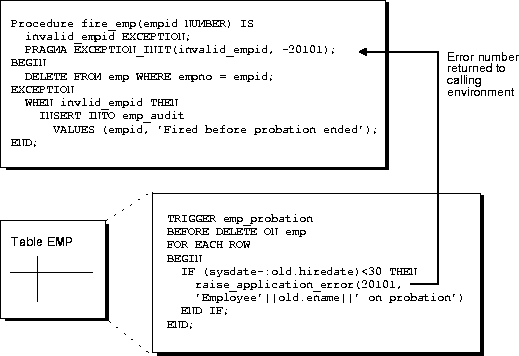
In database PL/SQL program units, an unhandled user-error condition or internal error condition that is not trapped by an appropriate exception handler causes the implicit rollback of the program unit. If the program unit includes a COMMIT statement before the point at which the unhandled exception is observed, then the implicit rollback of the program unit can only be completed back to the previous COMMIT.
Additionally, unhandled exceptions in database-stored PL/SQL program units propagate back to client-side applications that call the containing program unit. In such an application, only the application program unit call is rolled back (not the entire application program unit), because it is submitted to the database as a SQL statement.
If unhandled exceptions in database PL/SQL program units are propagated back to database applications, then the database PL/SQL code should be modified to handle the exceptions. Your application can also trap for unhandled exceptions when calling database program units and handle such errors appropriately.
You can use a trigger or a stored procedure to create a distributed query. This distributed query is decomposed by the local Oracle into a corresponding number of remote queries, which are sent to the remote nodes for execution. The remote nodes run the queries and send the results back to the local node. The local node then performs any necessary post-processing and returns the results to the user or application.
If a portion of a distributed statement fails, possibly due to an integrity constraint violation, then Oracle returns error number ORA-02055. Subsequent statements, or procedure calls, return error number ORA-02067 until a rollback or a rollback to savepoint is entered.
You should design your application to check for any returned error messages that indicates that a portion of the distributed update has failed. If you detect a failure, then you should rollback the entire transaction (or rollback to a savepoint) before allowing the application to proceed.
When a procedure is run locally or at a remote location, four types of exceptions can occur:
EXCEPTION.
NO_DATA_FOUND.
ORA-00900 and ORA-02015.
RAISE_APPLICATION_ERROR() procedure.
When using local procedures, all of these messages can be trapped by writing an exception handler, such as shown in the following example:
EXCEPTION
    WHEN ZERO_DIVIDE THEN
    /* ...handle the exception */
Notice that the WHEN clause requires an exception name. If the exception that is raised does not have a name, such as those generated with RAISE_APPLICATION_ERROR, then one can be assigned using PRAGMA_EXCEPTION_INIT, as shown in the following example:
DECLARE
    ...
    Null_salary EXCEPTION;
    PRAGMA EXCEPTION_INIT(Null_salary, -20101);
BEGIN
    ...
    RAISE_APPLICATION_ERROR(-20101, 'salary is missing');
    ...
EXCEPTION
    WHEN Null_salary THEN
        ...
When calling a remote procedure, exceptions are also handled by creating a local exception handler. The remote procedure must return an error number to the local calling procedure, which then handles the exception, as shown in the previous example. Because PL/SQL user-defined exceptions always return ORA-06510 to the local procedure, these exceptions cannot be handled. All other remote exceptions can be handled in the same manner as local exceptions.
A free Java-based debugger is available from Oracle for debugging PL/SQL applications. This is a lightweight debugger which can be run as an applet from the Microsoft or Netscape browser, or as a stand-alone application to debug PL/SQL stored procedures. The debugger works with Oracle 7.3.4 and higher.
If you are using PL/SQL for writing Web-based applications in conjunction with the Applications Server, and if you would like to debug and look at the generated HTML, you can use this debugger as well (check restrictions in the README file).
You can download the debugger from: http://www.oracle.com/st/products/features/plsql.html
The DBMS_DEBUG API, provided with Oracle8i, implements server-side debuggers, and it provides a way to debug server-side PL/SQL program units. Several of the debuggers currently available, such as Oracle Procedure Builder and various third-party vendor solutions, use this API.
Oracle Procedure Builder is an advanced client-server debugger that transparently debugs your database applications. It lets you run PL/SQL procedures and triggers in a controlled debugging environment, and you can set breakpoints, list the values of variables, and perform other debugging tasks. Oracle Procedure Builder is part of the Oracle Developer tool set.
You can also debug stored procedures and triggers using the DBMS_OUTPUT supplied package. Put PUT and PUT_LINE statements in your code to output the value of variables and expressions to your terminal.
|
See Also:
See Oracle8i Supplied Packages Reference for more information about the |
Procedures can be called from many different environments. For example:
LENGTH or ROUND.
This section includes some common examples of calling procedures from within these environments.
A procedure or trigger can call another stored procedure. For example, included in the body of one procedure might be the following line:
. . .
Sal_raise(Emp_id, 200);
. . .
This line calls the Sal_raise procedure. Emp_id is a variable within the context of the procedure. Recursive procedure calls are allowed within PL/SQL: A procedure can call itself.
A procedure can be called interactively from an Oracle tool, such as SQL*Plus. For example, to call a procedure named SAL_RAISE, owned by you, you can use an anonymous PL/SQL block, as follows:
BEGIN
    Sal_raise(7369, 200);
END;
An easier way to run a block is to use the SQL*Plus statement EXECUTE, which wraps BEGIN and END statements around the code you enter. For example:
EXECUTE Sal_raise(7369, 200);
Some interactive tools allow session variables to be created. For example, when using SQL*Plus, the following statement creates a session variable:
VARIABLE Assigned_empno NUMBER
After defined, any session variable can be used for the duration of the session. For example, you might run a function and capture the return value using a session variable:
EXECUTE :Assigned_empno := Hire_emp('JSMITH', 'President',
   1032, SYSDATE, 5000, NULL, 10);
PRINT Assigned_empno;
ASSIGNED_EMPNO
--------------
          2893
|
See Also:
See the SQL*Plus User's Guide and Reference for SQL*Plus information. See your tools documentation for information about performing similar operations using your development tool. |
A 3GL database application, such as a precompiler or an OCI application, can include a call to a procedure within the code of the application.
To run a procedure within a PL/SQL block in an application, simply call the procedure. The following line within a PL/SQL block calls the Fire_emp procedure:
Fire_emp1(:Empnun);
In this case, :Empno is a host (bind) variable within the context of the application.
To run a procedure within the code of a precompiler application, you must use the EXEC call interface. For example, the following statement calls the Fire_emp procedure in the code of a precompiler application:
EXEC SQL EXECUTE
   BEGIN
      Fire_emp1(:Empnum);
   END;
END-EXEC;
|
See Also:
For more information about calling PL/SQL procedures from within 3GL applications, see the following manuals: Oracle Call Interface Programmer's Guide |
References to procedures and packages are resolved according to the algorithm described in the "Name Resolution in SQL Statements" section of Chapter 3, "Managing Schema Objects".
If you are the owner of a stand-alone procedure or package, then you can run the stand-alone procedure or packaged procedure, or any public procedure or packaged procedure at any time, as described in the previous sections. If you want to run a stand-alone or packaged procedure owned by another user, then the following conditions apply:
EXECUTE privilege for the stand-alone procedure or package containing the procedure, or you must have the EXECUTE ANY PROCEDURE system privilege. If you are executing a remote procedure, then you must be granted the EXECUTE privilege or EXECUTE ANY PROCEDURE system privilege directly, not through a role.
EXECUTE Jward.Fire_emp (1043);

EXECUTE Jward.Hire_fire.Fire_emp (1043);
When you call a procedure, specify a value or parameter for each of the procedure's arguments. Identify the argument values using either of the following methods, or a combination of both:
For example, these statements each call the procedure Sal_raise to increase the salary of employee number 7369 by 500:
Sal_raise(7369, 500);

Sal_raise(Sal_incr=>500, Emp_id=>7369);

Sal_raise(7369, Sal_incr=>500);
The first statement identifies the argument values by listing them in the order in which they appear in the procedure specification.
The second statement identifies the argument values by name and in an order different from that of the procedure specification. If you use argument names, then you can list the arguments in any order.
The third statement identifies the argument values using a combination of these methods. If you use a combination of order and argument names, then values identified in order must precede values identified by name.
If you used the DEFAULT option to define default values for IN parameters to a subprogram (see the PL/SQL User's Guide and Reference),then you can pass different numbers of actual parameters to the first subprogram, accepting or overriding the default values as you please. If an actual value is not passed, then the corresponding default value is used. If you want to assign a value to an argument that occurs after an omitted argument (for which the corresponding default is used), then you must explicitly designate the name of the argument, as well as its value.
Call remote procedures using an appropriate database link and the procedure's name. The following SQL*Plus statement runs the procedure Fire_emp located in the database and pointed to by the local database link named NY:
EXECUTE fire_emp1@boston_server(1043);
|
See Also:
For information on exception handling when calling remote procedures, see "Handling Errors in Remote Procedures". |
You must explicitly pass values to all remote procedure parameters, even if there are defaults. You cannot access remote package variables and constants.
Remote objects can be referenced within the body of a locally defined procedure. The following procedure deletes a row from the remote employee table:
CREATE OR REPLACE PROCEDURE fire_emp(emp_id NUMBER) IS
BEGIN
    DELETE FROM emp@boston_server WHERE empno = emp_id;
END;
The list below explains how to properly call remote procedures, depending on the calling environment.
CREATE OR REPLACE PROCEDURE local_procedure(arg IN NUMBER) AS
BEGIN
  fire_emp1@boston_server(arg);
END;
CREATE SYNONYM synonym1 for  fire_emp1@boston_server;
CREATE OR REPLACE PROCEDURE local_procedure(arg IN NUMBER) AS
BEGIN
  synonym1(arg);
END;
DECLARE
   arg NUMBER;
BEGIN
   local_procedure(arg);
END;
Here, local_procedure is defined as in the first item of this list.
All calls to remotely stored procedures are assumed to perform updates; therefore, this type of referencing always requires two-phase commit of that transaction (even if the remote procedure is read-only). Furthermore, if a transaction that includes a remote procedure call is rolled back, then the work done by the remote procedure is also rolled back. A procedure called remotely cannot execute a COMMIT, ROLLBACK, or SAVEPOINT statement.
A distributed update modifies data on two or more nodes. A distributed update is possible using a procedure that includes two or more remote updates that access data on different nodes. Statements in the construct are sent to the remote nodes, and the execution of the construct succeeds or fails as a unit. If part of a distributed update fails and part succeeds, then a rollback (of the entire transaction or to a savepoint) is required to proceed. Consider this when creating procedures that perform distributed updates.
Pay special attention when using a local procedure that calls a remote procedure. If a timestamp mismatch is found during execution of the local procedure, then the remote procedure is not run, and the local procedure is invalidated.
Synonyms can be created for stand-alone procedures and packages to do the following:
When a privileged user needs to call a procedure, an associated synonym can be used. Because the procedures defined within a package are not individual objects (the package is the object), synonyms cannot be created for individual procedures within a package.
You can include user-written PL/SQL functions in SQL expressions. (You must be using PL/SQL release 2.1 or higher.) By using PL/SQL functions in SQL statements, you can do the following:
WHERE clause of a query can filter data using criteria that would otherwise need to be evaluated by the application.
PL/SQL functions must be created as top-level functions or declared within a package specification before they can be named within a SQL statement. Stored PL/SQL functions are used in the same manner as built-in Oracle functions (such as SUBSTR or ABS).
PL/SQL functions can be placed wherever an Oracle function can be placed within a SQL statement, or, wherever expressions can occur in SQL. For example, they can be called from the following:
SELECT statement.
WHERE and HAVING clause.
CONNECT BY, START WITH, ORDER BY, and GROUP BY clauses.
VALUES clause of the INSERT statement.
SET clause of the UPDATE statement.
You cannot call stored PL/SQL functions from a CHECK constraint clause of a CREATE or ALTER TABLE statement or use them to specify a default value for a column. These situations require an unchanging definition.
Use the following syntax to reference a PL/SQL function from SQL:
[[schema.]package.]function_name[@dblink][(param_1...param_n)]
For example, to reference a function you created that is called My_func, in the My_funcs_pkg package, in the Scott schema, that takes two numeric parameters, you could call the following:
SELECT Scott.My_funcs_pkg.My_func(10,20) FROM dual;
If only one of the optional schema or package names is given, then the first identifier can be either a schema name or a package name. For example, to determine whether Payroll in the reference Payroll.Tax_rate is a schema or package name, Oracle proceeds as follows:
Payroll package in the current schema.
PAYROLL package is found in the current schema, then Oracle looks for a Tax_rate function in the Payroll package. If a Tax_rate function is not found in the Payroll package, then an error message is returned.
Payroll package is not found, then Oracle looks for a schema named Payroll that contains a top-level Tax_rate function. If the Tax_rate function is not found in the Payroll schema, then an error message is returned.
You can also refer to a stored top-level function using any synonym that you have defined for it.
In SQL statements, the names of database columns take precedence over the names of functions with no parameters. For example, if schema Scott creates the following two objects:
CREATE TABLE Emp_tab(New_sal NUMBER ...);
CREATE FUNCTION New_sal RETURN NUMBER IS ...;
Then, in the following two statements, the reference to New_sal refers to the column Emp_tab.New_sal:
SELECT New_sal FROM Emp_tab;
SELECT Emp_tab.New_sal FROM Emp_tab;
To access the function new_sal, enter the following:
SELECT Scott.New_sal FROM Emp_tab;
For example, to call the Tax_rate PL/SQL function from schema Scott, run it against the Ss_no and sal columns in Tax_table, and place the results in the variable Income_tax, specify the following:
DECLARE
   Tax_id     NUMBER;
   Income_tax NUMBER;
BEGIN
   SELECT scott.tax_rate (Ss_no, Sal)
      INTO Income_tax
      FROM Tax_table
      WHERE Ss_no = Tax_id;
END;
These sample calls to PL/SQL functions are allowed in SQL expressions:
Circle_area(Radius)
Payroll.Tax_rate(Empno)
scott.Payroll.Tax_rate@boston_server(Dependents, Empno)
To pass any number of arguments to a function, supply the arguments within the parentheses. You must use positional notation; named notation is not currently supported. For functions that do not accept arguments, use ().
The stored function Gross_pay initializes two of its formal parameters to default values using the DEFAULT clause. For example:
CREATE OR REPLACE FUNCTION Gross_pay
    (Emp_id  IN NUMBER,
     St_hrs  IN NUMBER DEFAULT 40,
     Ot_hrs  IN NUMBER DEFAULT 0) RETURN NUMBER AS
  ...
When calling Gross_pay from a procedural statement, you can always accept the default value of St_hrs. This is because you can use named notation, which lets you skip parameters. For example:
IF Gross_pay(Eenum, Ot_hrs => Otime) > Pay_limit
THEN ...
However, when calling Gross_pay from a SQL expression, you cannot accept the default value of St_hrs, unless you accept the default value of Ot_hrs. This is because you cannot use named notation.
To call a PL/SQL function from SQL, you must either own or have EXECUTE privileges on the function. To select from a view defined with a PL/SQL function, you must have SELECT privileges on the view. No separate EXECUTE privileges are necessary to select from the view.
To be callable from SQL expressions, a user-defined PL/SQL function must meet the following basic requirements:
IN parameters; none can be an OUT or IN OUT parameter.
CHAR, DATE, or NUMBER, not PL/SQL types, such as BOOLEAN, RECORD, or TABLE.
For example, the following stored function meets the basic requirements:
CREATE FUNCTION Gross_pay
      (Emp_id IN NUMBER,
       St_hrs IN NUMBER DEFAULT 40,
       Ot_hrs IN NUMBER DEFAULT 0) RETURN NUMBER AS
   St_rate  NUMBER;
   Ot_rate  NUMBER;

BEGIN
   SELECT Srate, Orate INTO St_rate, Ot_rate FROM Payroll
      WHERE Acctno = Emp_id;
   RETURN St_hrs * St_rate + Ot_hrs * Ot_rate;
END Gross_pay;
The purity of a stored function refers to the side effects of that function on database tables or package variables. Side effects can prevent the parallelization of a query, yield order-dependent (and therefore, indeterminate) results, or require that package state be maintained across user sessions. Various side effects are not allowed when a function is called from a SQL query or DML statement.
In previous releases, Oracle leveraged the PL/SQL compiler to enforce restrictions during the compilation of a stored function or a SQL statement. In Oracle8i, the compile-time restrictions have been relaxed, and a smaller set of restrictions are enforced during execution.
This change provides uniform support for stored functions written in PL/SQL, Java, and C, and it allows programmers the most flexibility possible.
A user-written function can now be called from a SQL statement without any compile-time checking of its purity: PRAGMA RESTRICT_REFERENCES is no longer required on functions called from SQL statements.
PRAGMA RESTRICT_REFERENCES remains available as a means of asking the PL/SQL compiler to verify that a function has only the side effects that you expect. SQL statements, package variable accesses, or calls to functions that violate the declared restrictions will continue to raise PL/SQL compilation errors to help you isolate the code that has unintended effects.
Because Oracle no longer requires that the pragma on functions called from SQL statements, different applications may choose different style standards on whether and where to use PRAGMA RESTRICT REFERENCES. An existing PL/SQL application will most likely want to continue using the pragma even on new functionality, to ease integration with the existing code. A newly created Java application will most likely not want to use the pragma at all, because the Java compiler does not have the functionality to assist in isolating unintended effects.
When a SQL statement is run, checks are made to see if it is logically embedded within the execution of an already running SQL statement. This occurs if the statement is run from a trigger or from a function that was in turn called from the already running SQL statement. In these cases, further checks occur to determine if the new SQL statement is safe in the specific context.
The following restrictions are enforced:
ALTER the system or session.
SELECT) statement or from a parallelized DML statement may not execute a DML statement or otherwise modify the database.
These restrictions apply regardless of what mechanism is used to run the SQL statement inside the function or trigger. For example:
EXECUTE IMMEDIATE), or run using the DBMS_SQL package.
You can avoid these restrictions if the execution of the new SQL statement is not logically embedded in the context of the already running statement. PL/SQL's new autonomous transactions provide one escape. Another escape is available using OCI from an external C function, if you create a new connection, rather than using the handle available from the OCIExtProcContext argument.
The keywords DETERMINISTIC and PARALLEL_ENABLE can be used in the syntax for declaring a function. These are optimization hints, informing the query optimizer and other aspects of Oracle8i about those functions that need not be called redundantly and about those that may be used within a parallelized query or parallelized DML statement. Only functions that are DETERMINISTIC are allowed in function-based indexes and in certain snapshots and materialized views.
A function that is dependent solely on the values passed into it as arguments, and does not meaningfully reference or modify the contents of package variables or the database, or have any other side-effects, is termed deterministic. Such a function reliably produces the exact same result value for any particular combination of argument values passed into it.
The DETERMINISTIC keyword is placed after the return value type in a declaration of the function. For example:
CREATE FUNCTION F1 (P1 NUMBER) RETURN NUMBER DETERMINISTIC IS
BEGIN
  RETURN P1 * 2;
END;
This keyword may be placed on a function defined in a CREATE FUNCTION statement, in a function's declaration in a CREATE PACKAGE statement, or on a method's declaration in a CREATE TYPE statement. It should not be repeated on the function's or method's body in a CREATE PACKAGE BODY or CREATE TYPE BODY statement.
Certain performance optimizations occur on calls to functions that are marked DETERMINISTIC, without any other action being required. However, the database has no reasonable way to recognize if the function's behavior indeed is truly deterministic. If the DETERMINISTIC keyword is applied to a function whose behavior is not truly deterministic, then the result of queries involving that function is unpredictable.
Two new features in Oracle8i require that any function used with them is declared DETERMINISTIC.
DETERMINISTIC.
DETERMINISTIC if that view is to be marked ENABLE QUERY REWRITE.
Both of these features attempt to use previously calculated results rather than calling the function when it is possible to do so.
It is also preferable that only functions declared DETERMINISTIC are used in any materialized view or snapshot that is declared REFRESH FAST. Oracle allows in REFRESH FAST snapshots those functions that have a PRAGMA RESTRICT_REFERENCES noting that they are RNDS, and those PL/SQL functions defined with a CREATE FUNCTION statement whose code can be examined to determine that they do not read the database nor call any other routine which might, as these have been allowed historically.
Functions that are used in a WHERE, ORDER BY, or GROUP BY clause, are MAP or ORDER methods of a SQL type, or in any other way are part of determining whether or where a row should appear in a result set also should be DETERMINISTIC as discussed above. Oracle cannot require that they be explicitly declared DETERMINISTIC without breaking existing applications, but the use of the keyword might be a wise choice of style within your application.
Oracle's parallel execution feature divides the work of executing a SQL statement across multiple processes. Functions called from a SQL statement which is run in parallel may have a separate copy run in each of these processes, with each copy called for only the subset of rows that are handled by that process.
Each process has its own copy of package variables. When parallel execution begins, these are initialized based on the information in the package specification and body as if a new user is logging into the system; the values in package variables are not copied from the original login session. And changes made to package variables are not automatically propagated between the various sessions or back to the original session. Java STATIC class attributes are similarly initialized and modified independently in each process. Because a function can use package (or Java STATIC) variables to accumulate some value across the various rows it encounters, Oracle cannot assume that it is safe to parallelize the execution of all user-defined functions.
For query (SELECT) statements, in previous releases, the parallel query optimization looked to see if a function was noted as RNPS and WNPS in a PRAGMA RESTRICT_REFERENCES declaration; those functions that were marked as both RNPS and WNPS could be run in parallel. Functions defined with a CREATE FUNCTION statement had their code implicitly examined to determine if they were actually pure enough; parallelized execution might occur even though a pragma cannot be specified on these functions.
For DML statements, in previous releases, the parallelization optimization looked to see if a function was noted as having all four of RNDS, WNDS, RNPS and WNPS specified in a PRAGMA RESTRICT_REFERENCES declaration; those functions that were marked as neither reading nor writing to either the database or package variables could run in parallel. Again, those functions defined with a CREATE FUNCTION statement had their code implicitly examined to determine if they were actually pure enough; parallelized execution might occur even though a pragma cannot be specified on these functions.
In Oracle8i, we continue to parallelize those functions that Oracle7 and Oracle8 would recognize as parallelizable. In addition, a new keyword, PARALLEL_ENABLE, has been added. This is the preferred way now for users to mark their code as safe for parallel execution. This keyword is syntactically similar to DETERMINISTIC as described above; it is placed after the return value type in a declaration of the function, as in:
CREATE FUNCTION F1 (P1 NUMBER) RETURN NUMBER PARALLEL_ENABLE IS
BEGIN
  RETURN P1 * 2;
END;
This keyword may be placed on a function defined in a CREATE FUNCTION statement, in a function's declaration in a CREATE PACKAGE statement, or on a method's declaration in a CREATE TYPE statement. It should not be repeated on the function's or method's body in a CREATE PACKAGE BODY or CREATE TYPE BODY statement.
Note that a PL/SQL function that is defined with CREATE FUNCTION may still be run in parallel without any explicit declaration that it is safe to do so, if the system can determine that it neither reads nor writes package variables nor calls any function that might do so. A Java method or C function is never seen by the system as safe to run in parallel unless the programmer explicitly indicates PARALLEL_ENABLE on the "call specification" or provides a PRAGMA RESTRICT_REFERENCES indicating that the function is sufficiently pure.
An additional runtime restriction is imposed on functions run in parallel as part of a parallelized DML statement. Such a function is not permitted to in turn execute a DML statement; it is subject to the same restrictions that are enforced on functions that are run inside a query (SELECT) statement.
To assert the purity level, code the pragma RESTRICT_REFERENCES in the package specification (not in the package body). The pragma must follow the function declaration, but it does not need to follow it immediately. Only one pragma can reference a given function declaration.
To code the pragma RESTRICT_REFERENCES, use the following syntax:
PRAGMA RESTRICT_REFERENCES (
    Function_name, WNDS [, WNPS] [, RNDS] [, RNPS] [, TRUST] );
Where:
You can pass the arguments in any order. If any SQL statement inside the function body violates a rule, then you get an error when the statement is parsed.
In the example below, the function compound neither reads nor writes database or package state; therefore, you can assert the maximum purity level. Always assert the highest purity level that a function allows. That way, the PL/SQL compiler never rejects the function unnecessarily.
CREATE PACKAGE Finance AS  -- package specification
   FUNCTION Compound
         (Years  IN NUMBER,
          Amount IN NUMBER,
          Rate   IN NUMBER) RETURN NUMBER;
   PRAGMA RESTRICT_REFERENCES (Compound, WNDS, WNPS, RNDS, RNPS);
END Finance;

CREATE PACKAGE BODY Finance AS  --package body
   FUNCTION Compound
         (Years  IN NUMBER,
          Amount IN NUMBER,
          Rate   IN NUMBER) RETURN NUMBER IS
   BEGIN
      RETURN Amount * POWER((Rate / 100) + 1, Years);
   END Compound;
                   -- no pragma in package body
END Finance;
Later, you might call compound from a PL/SQL block, as follows:
DECLARE
   Interest NUMBER;
   Acct_id NUMBER;
BEGIN
   SELECT Finance.Compound(Yrs, Amt, Rte)  -- function call
   INTO   Interest
   FROM   Accounts
   WHERE  Acctno = Acct_id;
The keyword TRUST in the RESTRICT_REFERENCES syntax allows easy calling from functions that have RESTRICT_REFERENCES declarations to those that do not. When TRUST is present, the restrictions listed in the pragma are not actually enforced, but rather are simply trusted to be true.
When calling from a section of code that is using pragmas to one that is not, there are two likely usage styles. One is to place a pragma on the routine to be called, for example on a "call specification" for a Java method. Then, calls from PL/SQL to this method will complain if the method is less restricted than the calling function. For example:
CREATE OR REPLACE PACKAGE P1 IS
   FUNCTION F1 (P1 NUMBER) RETURN NUMBER IS
      LANGUAGE JAVA NAME 'CLASS1.METHODNAME(int) return int';
      PRAGMA RESTRICT_REFERENCES(F1,WNDS,TRUST);
   FUNCTION F2 (P1 NUMBER) RETURN NUMBER;

   PRAGMA RESTRICT_REFERENCES(F2,WNDS);
END;

CREATE OR REPLACE PACKAGE BODY P1 IS
   FUNCTION F2 (P1 NUMBER) RETURN NUMBER IS
   BEGIN
      RETURN F1(P1);
   END;
END;
Here, F2 can call F1, as F1 has been declared to be WNDS.
The other approach is to mark only the caller, which may then make a call to any function without complaint. For example:
CREATE OR REPLACE PACKAGE P1a IS
   FUNCTION F1 (P1 NUMBER) RETURN NUMBER IS
      LANGUAGE JAVA NAME 'CLASS1.METHODNAME(int) return int';
   FUNCTION F2 (P1 NUMBER) RETURN NUMBER;
   PRAGMA RESTRICT_REFERENCES(F2,WNDS,TRUST);
END;

CREATE OR REPLACE PACKAGE BODY P1a IS
   FUNCTION F2 (P1 NUMBER) RETURN NUMBER IS
   BEGIN
      RETURN F1(P1);
   END;
END;
Here, F2 can call F1 because while F2 is promised to be WNDS (because TRUST is specified), the body of F2 is not actually examined to determine if it truly satisfies the WNDS restriction. Because F2 is not examined, its call to F1 is allowed, even though there is no PRAGMA RESTRICT_REFERENCES for F1.
Static INSERT, UPDATE, and DELETE statements do not violate RNDS if these statements do not explicitly read any database states, such as columns of a table. However, dynamic INSERT, UPDATE, and DELETE statements always violate RNDS, regardless of whether or not the statements explicitly read database states.
The following INSERT violates RNDS if it's executed dynamically, but it does not violate RNDS if it's executed statically.
INSERT INTO my_table values(3, 'SCOTT');
The following UPDATE always violates RNDS statically and dynamically, because it explicitly reads the column name of my_table.
UPDATE my_table SET id=777 WHERE name='SCOTT';
PL/SQL lets you overload packaged (but not stand-alone) functions. You can use the same name for different functions if their formal parameters differ in number, order, or datatype family.
However, a RESTRICT_REFERENCES pragma can apply to only one function declaration. Therefore, a pragma that references the name of overloaded functions always applies to the nearest foregoing function declaration.
In the following example, the pragma applies to the second declaration of valid:
CREATE PACKAGE Tests AS
    FUNCTION Valid (x NUMBER) RETURN CHAR;
    FUNCTION Valid (x DATE) RETURN CHAR;
    PRAGMA RESTRICT_REFERENCES (valid, WNDS);
 END;
PL/SQL packages usually consume user global area (UGA) memory corresponding to the number of package variables and cursors in the package. This limits scalability, because the memory increases linearly with the number of users. The solution is to allow some packages to be marked as SERIALLY_REUSABLE (using pragma syntax).
For serially reusable packages, the package global memory is not kept in the UGA per user; rather, it is kept in a small pool and reused for different users. This means that the global memory for such a package is only used within a unit of work. At the end of that unit of work, the memory can therefore be released to the pool to be reused by another user (after running the initialization code for all the global variables).
The unit of work for serially reusable packages is implicitly a call to the server; for example, an OCI call to the server, or a PL/SQL client-to-server RPC call, or a server-to-server RPC call.
The state of a nonreusable package (one not marked SERIALLY_REUSABLE) persists for the lifetime of a session. A package's state includes global variables, cursors, and so on.
The state of a serially reusable package persists only for the lifetime of a call to the server. On a subsequent call to the server, if a reference is made to the serially reusable package, then Oracle creates a new instantiation (described below) of the serially reusable package and initializes all the global variables to NULL or to the default values provided. Any changes made to the serially reusable package state in the previous calls to the server are not visible.
Because the state of a non-reusable package persists for the lifetime of the session, this locks up UGA memory for the whole session. In applications, such as Oracle Office, a log-on session can typically exist for days together. Applications often need to use certain packages only for certain localized periods in the session and would ideally like to de-instantiate the package state in the middle of the session, after they are done using the package.
With SERIALLY_REUSABLE packages, application developers have a way of modelling their applications to manage their memory better for scalability. Package state that they care about only for the duration of a call to the server should be captured in SERIALLY_REUSABLE packages.
A package can be marked serially reusable by a pragma. The syntax of the pragma is:
PRAGMA SERIALLY_REUSABLE;
A package specification can be marked serially reusable, whether or not it has a corresponding package body. If the package has a body, then the body must have the serially reusable pragma, if its corresponding specification has the pragma; it cannot have the serially reusable pragma unless the specification also has the pragma.
A package that is marked SERIALLY_REUSABLE has the following properties:
This example has a serially reusable package specification (there is no body). It demonstrates how package variables act across call boundaries.
CONNECT Scott/Tiger

CREATE OR REPLACE PACKAGE Sr_pkg IS
  PRAGMA SERIALLY_REUSABLE;
  N NUMBER := 5;                -- default initialization
END Sr_pkg;
Suppose your Enterprise Manager (or SQL*Plus) application issues the following:
CONNECT Scott/Tiger

# first CALL to server
BEGIN
   Sr_pkg.N := 10;
END;

# second CALL to server
BEGIN
   DBMS_OUTPUT.PUT_LINE(Sr_pkg.N);
END;
The above program prints:
5
This example has both a package specification and package body, which are serially reusable. Like Example 1, this example demonstrates how the package variables act across call boundaries.
CONNECT Scott/Tiger

DROP PACKAGE Sr_pkg;
CREATE OR REPLACE PACKAGE Sr_pkg IS
   PRAGMA SERIALLY_REUSABLE;
   TYPE Str_table_type IS TABLE OF VARCHAR2(200) INDEX BY BINARY_INTEGER;
   Num     NUMBER        := 10;
   Str     VARCHAR2(200) := 'default-init-str';
   Str_tab STR_TABLE_TYPE;

    PROCEDURE Print_pkg;
    PROCEDURE Init_and_print_pkg(N NUMBER, V VARCHAR2);
END Sr_pkg;
CREATE OR REPLACE PACKAGE BODY Sr_pkg IS
   -- the body is required to have the pragma because the
  -- specification of this package has the pragma
  PRAGMA SERIALLY_REUSABLE;
   PROCEDURE Print_pkg IS
   BEGIN
      DBMS_OUTPUT.PUT_LINE('num: ' || Sr_pkg.Num);
      DBMS_OUTPUT.PUT_LINE('str: ' || Sr_pkg.Str);
      DBMS_OUTPUT.PUT_LINE('number of table elems: ' || Sr_pkg.Str_tab.Count);
      FOR i IN 1..Sr_pkg.Str_tab.Count LOOP
         DBMS_OUTPUT.PUT_LINE(Sr_pkg.Str_tab(i));
      END LOOP;
   END;
   PROCEDURE Init_and_print_pkg(N NUMBER, V VARCHAR2) IS
   BEGIN
   -- init the package globals
      Sr_pkg.Num := N;
      Sr_pkg.Str := V;
      FOR i IN 1..n LOOP
         Sr_pkg.Str_tab(i) := V || ' ' || i;
   END LOOP;
   -- now print the package
   Print_pkg;
   END;
 END Sr_pkg;

SET SERVEROUTPUT ON;

Rem SR package access in a CALL:

BEGIN
   -- initialize and print the package
   DBMS_OUTPUT.PUT_LINE('Initing and printing pkg state..');
   Sr_pkg.Init_and_print_pkg(4, 'abracadabra');
   -- print it in the same call to the server.
   -- we should see the initialized values.
   DBMS_OUTPUT.PUT_LINE('Printing package state in the same CALL...');
   Sr_pkg.Print_pkg;
END;

Initing and printing pkg state..
num: 4
str: abracadabra
number of table elems: 4
abracadabra 1
abracadabra 2
abracadabra 3
abracadabra 4
Printing package state in the same CALL...
num: 4
str: abracadabra
number of table elems: 4
abracadabra 1
abracadabra 2
abracadabra 3
abracadabra 4

REM SR package access in subsequent CALL:
BEGIN
   -- print the package in the next call to the server.
   -- We should that the package state is reset to the initial (default) values.
   DBMS_OUTPUT.PUT_LINE('Printing package state in the next CALL...');
   Sr_pkg.Print_pkg;
END;
Statement processed.
Printing package state in the next CALL...
num: 10
str: default-init-str
number of table elems: 0
This example demonstrates that any open cursors in serially reusable packages get closed automatically at the end of a work boundary (which is a call). Also, in a new call, these cursors need to be opened again.
REM  For serially reusable pkg: At the end work boundaries
REM  (which is currently the OCI call boundary) all open
REM  cursors will be closed.
REM
REM  Because the cursor is closed - every time we fetch we
REM  will start at the first row again.

CONNECT Scott/Tiger
DROP PACKAGE  Sr_pkg;
DROP TABLE People;
CREATE TABLE People (Name VARCHAR2(20));
INSERT INTO  People  VALUES ('ET');
INSERT INTO  People  VALUES ('RAMBO');
CREATE OR REPLACE PACKAGE Sr_pkg IS
   PRAGMA SERIALLY_REUSABLE;
   CURSOR C IS SELECT Name FROM People;
END Sr_pkg;
SQL> SET SERVEROUTPUT ON;
SQL>
CREATE OR REPLACE PROCEDURE Fetch_from_cursor IS
Name VARCHAR2(200);
BEGIN
   IF (Sr_pkg.C%ISOPEN) THEN
      DBMS_OUTPUT.PUT_LINE('cursor is already open.');
   ELSE
      DBMS_OUTPUT.PUT_LINE('cursor is closed; opening now.');
      OPEN Sr_pkg.C;
   END IF;
   -- fetching from cursor.
   FETCH sr_pkg.C INTO name;
   DBMS_OUTPUT.PUT_LINE('fetched: ' || Name);
   FETCH Sr_pkg.C INTO name;
   DBMS_OUTPUT.PUT_LINE('fetched: ' || Name);
   -- Oops forgot to close the cursor (Sr_pkg.C).
   -- But, because it is a Serially Reusable pkg's cursor,
   -- it will be closed at the end of this CALL to the server.
END;
EXECUTE fetch_from_cursor;
cursor is closed; opening now.
fetched: ET
fetched: RAMBO
