Release 8.1.5
A67791-01
 Library |
 Product |
 Contents |
 Index |
| Oracle8i Replication Release 8.1.5 A67791-01 |
|


This chapter covers the following topics:
This chapter has examples of how to use the Oracle Replication Manager tool to manage conflict resolution in an advanced replication system. Each section also lists equivalent replication management API procedures for your reference. For complete information about Oracle's replication management API, see the Oracle8i Replication API Reference book.
Note:
Replication conflicts can occur in an advanced replication environment that permits concurrent updates to the same data at multiple sites. For example, when two transactions originating from different sites update the same row at nearly the same time, a conflict can occur. When you configure an advanced replication environment, you must consider whether replication conflicts can occur. If your system design permits replication conflicts and a conflict occurs, the system data does not converge until the conflict is resolved in some way.
In general, your first choice should always be to design a replicated environment that avoids the possibility of conflicts. Using several techniques, most system designs can avoid conflicts in all or a large percentage of the data that you replicate. However, many applications require that some percentage of data be updateable at multiple sites. If this is the case, you must then address the possibility of replication conflicts.
The next few sections introduce general information about replication conflicts, how to design an advanced replication system with replication conflicts in mind, how you can avoid replication conflicts in your replicated system design, and how Oracle can detect and resolve conflicts in designs where conflict avoidance is not possible.
When you design any type of database application and supporting database, it is critical that you understand the requirements of the application before you begin to build the database or the application itself. For example, each application should be modular, with clearly defined functional boundaries and dependencies (for example, order-entry, shipping, billing). Furthermore, you should normalize supporting database data to reduce the amount of hidden dependencies between modules in the application system.
In addition to basic database design practices, there are additional requirements that you must investigate when building a database that operates in an advanced replication environment. Start by considering the general requirements of applications that will work with replicated data. For example, some applications might work fine with basic read-only table snapshots, and as a result, can avoid the possibility of replication conflicts altogether. Other applications might require that most of the replicated data be read-only and a small fraction of the data (for example, one or two tables or even one or two columns in a specific table) be updateable at all replication sites. In this case, you must determine how to resolve replication conflicts when they occur so that the integrity of replicated data remains intact.
To better understand how to design a replicated database system with conflicts in mind, consider the following environments where conflict detection and resolution is feasible in some cases but not possible in others:
Advanced Replication includes facilities for detecting and resolving three types of conflicts: update conflicts, uniqueness conflicts, and delete conflicts.
An update conflict occurs when the replication of an update to a row conflicts with another update to the same row. Update conflicts can happen when two transactions, originating from different sites, update the same row at nearly the same time.
A uniqueness conflict occurs when the replication of a row attempts to violate entity integrity (a PRIMARY KEY or UNIQUE constraint). For example, consider what happens when two transactions originate from two different sites each inserting a row into a respective table replica with the same primary key value. In this case, replication of the transactions causes a uniqueness conflict.
A delete conflict occurs when two transactions originate from different sites, with one transaction deleting a row that the other transaction updates or deletes.
If application requirements permit, you should first design an advanced replication system that avoids the possibility of replication conflicts altogether. The next few sections briefly suggest several techniques that you can use to avoid some or all replication conflicts.
One way you can avoid the possibility of replication conflicts is to limit the number of sites in the system with simultaneous update access to the replicated data. Two replicated data ownership models support this approach: primary site ownership and dynamic site ownership.
Primary ownership is the replicated data model that basic read-only replication environments support. Primary ownership prevents all replication conflicts, because only a single server permits update access to a set of replicated data.
Rather than control the ownership of data at the table level, applications can employ horizontal and vertical partitioning to establish more granular static ownership of data. For example, applications might have update access to specific columns or rows in a replicated table on a site-by-site basis.
Additional Information: For more information about Oracle's basic, read-only replication features, see Chapter 2.
The dynamic ownership replicated data model is less restrictive than primary site ownership. With dynamic ownership, capability to update a data replica moves from site to site, still ensuring that only one site provides update access to specific data at any given point in time. A workflow system clearly illustrates the concept of a dynamic ownership. For example, related departmental applications can read the status code of a product order, for example, ENTERABLE, SHIPPABLE, BILLABLE, to determine when they can and cannot update the order.
Additional Information: For more information about using dynamic ownership data models, see "Using Dynamic Ownership Conflict Avoidance".
When both primary site ownership and dynamic ownership data models are too restrictive for your application requirements, you must use a shared ownership data model. Even so, typically you can use some simple strategies to avoid specific types of conflicts.
It is quite easy to configure an advanced replication environment to prevent the possibility of uniqueness conflicts. For example, you can create replica sequences at each site so that each sequence generates a mutually exclusive set of sequence numbers; however, this solution can become problematic as the number of sites increase or the number of entries in the replicated table grows. Alternatively, you can allow each site's replica sequences to use the full range of sequence values and include a unique site identifier as part of a composite primary key.
Delete conflicts should always be avoided in all replicated data environments. In general, applications that operate within an asynchronous, shared ownership data model should not delete rows using DELETE statements. Instead, applications can mark rows for deletion and then configure the system to periodically purge logically deleted rows using procedural replication.
After trying to eliminate the possibility of uniqueness and delete conflicts in an advanced replication system, you should also try to limit the number of update conflicts that are possible. However, in a shared ownership data model, update conflicts cannot be avoided in all cases. If you cannot avoid all update conflicts, you must understand exactly what types of replication conflicts are possible and then configure the system to resolve conflicts when they occur.
Each master site in an advanced replication system automatically detects and resolves replication conflicts when they occur. For example, when a master site pushes its deferred transaction queue to another master site in the system, the remote procedures being called at the receiving site detect replication conflicts automatically, if any.
When a snapshot site pushes deferred transactions to its corresponding master site, the receiving master site performs conflict detection and resolution. A snapshot site refreshes its data by performing snapshot refreshes. The refresh mechanism ensures that, upon completion, the data at a snapshot is the same as the data at the corresponding master, including the results of any conflict resolution; therefore, it is not necessary for a snapshot site to perform work to detect or resolve replication conflicts.
The receiving master site in an advanced replication system detects update, uniqueness, and delete conflicts as follows:
To detect and resolve an update conflict for a row, the propagating site must send a certain amount of data about the new and old versions of the row to the receiving site. For maximum performance, tune the amount of data that Oracle uses to support update conflict detection and resolution. For more information, see "Minimizing Data Propagation for Update Conflict Resolution".
Note:
To detect replication conflicts accurately, Oracle must be able to uniquely identify and match corresponding rows at different sites during data replication. Typically, Oracle's advanced replication facility uses the primary key of a table to uniquely identify rows in the table. When a table does not have a primary key, you must designate an alternate key--a column or set of columns that Oracle can use to identify rows in the table during data replication.
When replication conflicts occur at a receiving master site, you must resolve them to ensure that the data throughout the system eventually converges. Data convergence means that all sites managing replicated data will ultimately agree on a set of matching information. If replication conflicts happen and you neglect to resolve them, the replicated data at various sites remains inconsistent. Furthermore, there can be undesirable cascading affects. An inconsistency can create additional conflicts, which create additional inconsistencies, and so on.
If you cannot avoid all types of replication conflicts in your system, you can configure the system to use Oracle's automatic conflict resolution features. The following sections explain more about Oracle's conflict resolution features for each type of replication conflict.
You should always use Oracle's automatic conflict resolution features to resolve conflicts when they occur. When you do not configure automatic conflict resolution for replicated tables, Oracle simply logs conflicts at each site. In this case, you are forced to resolve conflicts manually to preserve the integrity of replicated data. Manual conflict resolution can be challenging to perform. Furthermore, delays in performing manual conflict resolution can leave inconsistencies in the data that can create cascading effects mentioned in the previous section.
Oracle uses column groups to detect and resolve update conflicts. A column group is a logical grouping of one or more columns in a replicated table. Every column in a replicated table is part of a single column group. When configuring replicated tables at the master definition site, you can create column groups and then assign columns and corresponding conflict resolution methods to each group.
Having column groups allows you to designate different methods of resolving conflicts for different types of data. For example, numeric data is often suited for an arithmetical resolution method, and character data is often suited for a timestamp resolution method. However, when selecting columns for a column group, it is important to group columns wisely. If two or more columns in a table must remain consistent with respect to each other, place the columns within the same column group to ensure data integrity. For example, if the zip code column in a customer table uses one resolution method while the city column uses a different resolution method, the sites could converge on a zip code that does match the city. Therefore, all components of an address should typically be within a single column group so that conflict resolution is applied to the address as a unit.
By default, every replicated table has a shadow column group. A table's shadow column group contains all columns that are not within a specific column group. You cannot assign conflict resolution methods to a table's shadow group. Therefore, make sure to include a column in a column group when conflict resolution is necessary for the column.
In most cases, you should build an advanced replication system and corresponding applications so that uniqueness conflicts are not possible. However, if you cannot avoid uniqueness conflicts, you can assign one or more conflict resolution methods to a PRIMARY KEY or UNIQUE constraint in a replicated table to resolve uniqueness conflicts when they occur. Oracle provides a few prebuilt uniqueness conflict resolution methods. However, you will typically want to use these methods with conflict notification so that you can validate the accuracy of resolved uniqueness conflicts.
You should always design advanced replication environments to avoid delete conflicts. If avoiding delete conflicts is too restrictive for an application design, you can write custom delete conflict resolution methods and assign them to replicated tables. Oracle does not offer any prebuilt delete conflict resolution methods. See "User-Defined Conflict Resolution Methods" for more information about writing your own conflict resolution methods.
To resolve replication conflicts automatically, you can assign one or more conflict resolution methods. Oracle has many prebuilt conflict resolution methods that you can use to resolve conflicts. If necessary, you can build your own methods to resolve conflicts. The following sections explain more about prebuilt and custom conflict resolution methods.
Oracle offers the following prebuilt methods for update conflicts that you can assign to a column group.
Additional Information: For complete information about each prebuilt update conflict resolution method, "Prebuilt Update Conflict Resolution Methods".
Oracle's prebuilt update conflict resolution methods have varying characteristics in their ability to converge replicated data. For example, the additive conflict resolution method can converge replicated data managed by more than one master site, but the earliest timestamp method cannot.
Additional Information: For specific information about the data convergence property of each prebuilt conflict resolution method, "Guaranteeing Data Convergence".
Oracle offers the following prebuilt uniqueness conflict resolution methods that you can assign to PRIMARY KEY and UNIQUE constraints.
Oracle's prebuilt uniqueness conflict resolution methods do not converge the data in a replicated environment; they simply provide techniques for resolving PRIMARY KEY and UNIQUE constraint violations. Therefore, when you use one of Oracle's uniqueness conflict resolution methods to resolve conflicts, you should also employ a notification mechanism to alert you to uniqueness conflicts when they happen and then manually converge replicated data, if necessary.
Additional Information: For complete information about Oracle's prebuilt uniqueness conflict resolution methods, "Prebuilt Uniqueness Resolution Methods".
Oracle's prebuilt conflict resolution methods do not support the following situations.
For these situations, you must either provide your own conflict resolution method or determine a method of resolving error transactions manually.
In addition to using Oracle's prebuilt conflict resolution methods, you can also consider using conflict logging and conflict notification to compliment conflict resolution. Oracle lets you configure a replicated table to call user-defined methods that record conflict information or notify you when Oracle cannot resolve a conflict. You can configure column groups, constraints, and replicated tables to notify you for all conflicts, or for only those conflicts that Oracle cannot resolve.
Additional Information: For more information about writing your own conflict resolution and notification methods, see "User-Defined Conflict Resolution Methods".
Indicating multiple conflict resolution methods for a column group allows Oracle to resolve a conflict in different ways should others fail to resolve the conflict. When trying to resolve a conflict, Oracle executes each group's methods in the order that you list. The algorithm that Oracle uses to resolve update conflicts is as follows.
You should use multiple conflict resolutions methods for the following reasons:
The following sections explain more about each issue.
In certain situations, the preferred conflict resolution method that you set for a column group, constraint, or table might not always succeed. If this is at all possible, you should specify a sequence of one or more alternative methods to increase the possibility that Oracle can perform conflict resolution without the need for manual resolution.
Some system-defined conflict resolution methods cannot guarantee successful resolution of conflicts in all circumstances. For example, the latest timestamp update conflict resolution method uses a special timestamp column to determine and apply the most recent change. In the unlikely event that the row at the originating site and the row at another site change at precisely the same second, the latest timestamp method cannot resolve the conflict because Oracle stores time related information at the granularity of a second. If you declare a backup update conflict resolution method such as site priority, Oracle might be able to resolve the conflict automatically.
Another reason to use multiple conflict resolution routines is to call a user-defined method that records conflict information or notifies you when Oracle cannot resolve a conflict. For example, you might decide to configure a PRIMARY KEY constraint to call a custom conflict notification method first and then resolve conflicts using the append site name uniqueness conflict resolution method.
Additional Information: For more information about conflict notification, "User-Defined Conflict Notification Methods".
If you decide that conflict resolution is necessary in your advanced replication system, you must first design your conflict resolution strategy and then implement it when you create replicated tables. The following sections provide you with an overview of the steps necessary to complete each stage of conflict resolution configuration.
Use the following guidelines to design and prepare for a conflict resolution strategy.
For more information about configuring conflict notification, see "User-Defined Conflict Notification Methods".
After planning, use Oracle Replication Manager and Oracle's replication management API to configure conflict resolution for the replicated tables in a master group. In general, these steps include the following:
The following sections explain how to configure update, uniqueness, and delete conflict resolution.
In a typical advanced replication environment, uniqueness and delete conflicts are not possible, and update conflicts, therefore, require the most attention during system design and configuration. Oracle's advanced replication facility uses column groups to detect and resolve update conflicts. The following sections explain how to configure column groups for a replicated table and associate update conflict resolution methods for column groups.
After adding a table to a master group at the master definition site and while replication activity is suspended for the group, you can configure column groups for the table and establish conflict resolution.
The table property sheet will appear in the right pane of the Replication Manager user interface.
API Equivalent: DBMS_REPCAT.MAKE_COLUMN_GROUP
While replication activity is suspended for a master group, you can add or remove the columns in a column group for a table.
The table property sheet will appear in the right pane of the Replication Manager user interface.
API Equivalent: DBMS_REPCAT.ADD_GROUPED_COLUMN, DBMS_REPCAT.DROP_GROUPED_COLUMN
While replication activity is suspended for a master group, you can drop a column group for a table.
The table property sheet will appear in the right pane of the Replication Manager user interface.
API Equivalent: DBMS_REPCAT.DROP_COLUMN_GROUP
While replication activity is suspended for a master group, you can use Oracle Replication Manager to assign, remove, and order the update conflict resolution methods for a column group of a replicated table.
The table property sheet will appear in the right pane of the Replication Manager user interface.
At this point, you can assign, remove, or order the update conflict resolution methods for the selected column group. The following sections explain each procedure.
To assign a new update conflict resolution method to the selected column group, press the Add button in the Select Column Group Resolution Methods object group to display the Add Update Resolution Method dialog and add a new update conflict resolution method for the target column group.
API Equivalent: DBMS_REPCAT.ADD_UPDATE_RESOLUTION
To remove an update conflict resolution method from the selected column group, select the method to remove and then press the Remove button in the Select Column Group Resolution Methods object group.
API Equivalent: DBMS_REPCAT.DROP_UPDATE_RESOLUTION
To order or reorder the application of conflict resolution methods for the selected column group, press the Reorder button. When the Reorder Resolution Methods dialog box appears, Select a resolution method and use the arrow keys to reorder the resolution methods. Press the OK button when you have completed your resolution order modifications.
The following sections explain Oracle's prebuilt methods that you can use to resolve update conflicts, including:
The following sections explain each prebuilt update conflict resolution method in detail.
|
Note: The conflict resolution methods that you assign need to ensure data convergence and provide results that are appropriate for how your business uses the data. For complete information about data convergence and Oracle's prebuilt conflict resolution methods, see "Guaranteeing Data Convergence". |
The additive and average methods work with column groups consisting of a single numeric column only.
current value = current value + (new value - old value)
The additive conflict resolution method provides convergence for any number of master sites.
current value = (current value + new value)/2
The average method cannot guarantee convergence if your replicated environment has more than one master. This method is useful for an environment with a single master site and multiple updateable snapshots.
When the advanced replication facility detects a conflict with a column group and calls the minimum value conflict resolution method, it compares the new value from the originating site with the current value from the destination site for a designated column in the column group. You must designate this column when you select the minimum value conflict resolution method.
If the new value of the designated column is less than the current value, the column group values from the originating site are applied at the destination site (assuming that all other errors were successfully resolved for the row). If the new value of the designated column is greater than the current value, the conflict is resolved by leaving the current values of the column group unchanged.
The maximum value method is the same as the minimum value method, except that the values from the originating site are only applied if the value of the designated column at the originating site is greater than the value of the designated column at the destination site.
There are no restrictions on the datatypes of the columns in the column group. Convergence for more than one master site is only guaranteed if:
The earliest timestamp and latest timestamp methods are variations on the minimum and maximum value methods. To use the timestamp method, you must designate a column in the replicated table of type DATE. When an application updates any column in a column group, the application must also update the value of the designated timestamp column with the local SYSDATE. For a change applied from another site, the timestamp value should be set to the timestamp value from the originating site.
The following example demonstrates an appropriate application of the latest timestamp update conflict resolution method:
The earliest timestamp method applies the changes from the site with the earliest timestamp, and the latest timestamp method applies the changes from the site with the latest timestamp.
When you use timestamp resolution, you must carefully consider how time is measured on the different sites managing replicated data. For example, if a replicated environment crosses time zones, applications that use the system should convert all timestamps to a common time zone such as Greenwich Mean Time (GMT). Furthermore, if two sites in a system do not have their system clocks synchronized reasonably well, timestamp comparisons might not be accurate enough to satisfy application requirements.
There are two ways to maintain timestamp columns if you use the EARLIEST or LATEST timestamp update conflict resolution methods.
A clock counts seconds as an increasing value. Assuming that you have properly designed your timestamping mechanism and established a backup method in case two sites have the same timestamp, the latest timestamp method (like the maximum value method) guarantees convergence. The earliest timestamp method, however, cannot guarantee convergence for more than one master.
Additional Information: For an example of a timestamp and site maintenance trigger, "Sample Timestamp and Site Maintenance Trigger".
The overwrite and discard methods ignore the values from either the originating or destination site and therefore can never guarantee convergence with more than one master site. These methods are designed to be used by a single master site and multiple snapshot sites, or with some form of a user-defined notification facility.
For example, if you have a single master site that you expect to be used primarily for queries, with all updates being performed at the snapshot sites, you might select the overwrite method. The overwrite and discard methods are also useful if:
The overwrite method replaces the current value at the destination site with the new value from the originating site. Conversely, the discard method ignores the new value from the originating site.
Priority groups allow you to assign a priority level to each possible value of a particular column. If Oracle detects a conflict, Oracle updates the table whose "priority" column has a lower value using the data from the table with the higher priority value.
As shown in Figure 5-1, the REPPRIORITY view displays the priority level assigned to each priority group member (value that the "priority" column can contain). You must specify a priority for all possible values of the "priority" column.
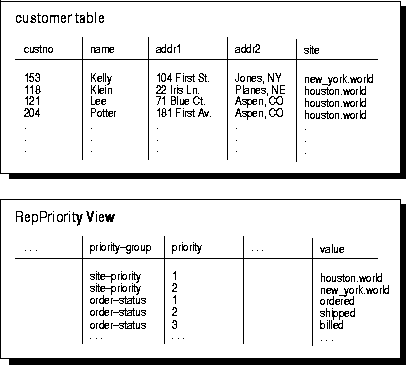
The REPPRIORITY view displays the values of all priority groups defined at the current location. In the example shown in Figure 5-1, there are two different priority groups, site-priority and order-status. The CUSTOMER table is using the site-priority priority group.
Before you use Replication Manager to select the priority group method of update conflict resolution, you must designate which column in your table is the "priority" column.
Additional Information: To learn how to configure priority groups for update conflict resolution, "Using Priority Groups for Update Conflict Resolution".
Site priority is a special kind of priority group. With site priority, the "priority" column you designate is automatically updated with the global database name of the site where the update originated. The REPPRIORITY view displays the priority level assigned to each database site. Site priority can be useful if one site is considered to be more likely to have the most accurate information. For example, in Figure 5-1, the New York site (priority value = 2) is corporate headquarters, while the Houston site (priority value = 1) is an updateable snapshot at a sales office. Therefore, the headquarters office is considered more likely than the sales office to have the most accurate information about the credit that can be extended to each customer.
When you are using site priority, convergence with more than one master is not guaranteed. However, you can guarantee convergence with more than one master when you are using priority groups if the value of the "priority" column is always increasing. That is, the values in the priority column correspond to an ordered sequence of events; for example: ordered, shipped, billed.
Similar to priority groups, you must complete several preparatory steps before using Replication Manager to select site priority conflict resolution for a column group.
Additional Information: To learn how to configure site priority, "Using Site Priority for Update Conflict Resolution".
To use the priority group method to resolve update conflicts, you must complete some special steps using Oracle's replication management API before using Replication Manager to assign the priority group resolution method to a column group. First, you must create a priority group. To create a priority group, do the following:
A single priority group can be used by multiple tables. Therefore, the name that you select for your priority group must be unique within a master group. The column corresponding to this priority group can have different names in different tables.
You must indicate which column in a table is associated with a particular priority group when you add the priority group conflict resolution method for the table. The priority group must therefore contain all possible values for all columns associated with that priority group.
For example, suppose that you have a replicated table, INVENTORY, with a column of type VARCHAR2, STATUS, that could have three possible values: ORDERED, SHIPPED, and BILLED. Now suppose that you want to resolve update conflicts based upon the value of the STATUS column. After suspending replication activity for the associated master group ACCT, complete the following steps at the master definition site to configure priority group resolution for the INVENTORY table.
DBMS_REPCAT.DEFINE_PRIORITY_GROUP(
            gname                 => 'acct',
            pgroup                => 'status',
            datatype               =>'varchar2');
DBMS_REPCAT.ADD_PRIORITY_VARCHAR2(
           gname                  => 'acct',
          pgroup                 => 'status',
            value                => 'ordered',
            priority             => 1);
DBMS_REPCAT.ADD_PRIORITY_VARCHAR2(
            sname                => 'acct',
            pgroup               => 'status',
            value                => 'shipped',
            priority             => 2);
DBMS_REPCAT.ADD_PRIORITY_VARCHAR2(
            sname                => 'acct',
            pgroup               => 'status',
            value                => 'billed',
            priority             => 3);
The next several sections describe more about managing priority groups.
Use the DEFINE_PRIORITY_GROUP procedure in the DBMS_REPCAT package to create a new priority group for a master group, as shown in the following example:
DBMS_REPCAT.DEFINE_PRIORITY_GROUP(
            gname      => 'acct',
            pgroup     => 'status',
            datatype   => 'varchar2');
This example creates a priority group called STATUS for the ACCT master group. The members of this priority group have values of type VARCHAR2.
Additional Information: See "DEFINE_PRIORITY_GROUP" procedure in the Oracle8i Replication API Reference book for details.
There are several different procedures in the DBMS_REPCAT package for adding members to a priority group. These procedures are of the form ADD_PRIORITY_type, where type is equivalent to the datatype that you specified when you created the priority group:
The specific procedure that you must call is determined by the datatype of your "priority" column. You must call this procedure once for each of the possible values of the "priority" column.
The following example adds the value SHIPPED to the STATUS priority group:
DBMS_REPCAT.ADD_PRIORITY_VARCHAR2(
            gname     => 'acct',
            pgroup    => 'status',
            value     => 'shipped',
            priority    => 2);
Additional Information: The parameters for the ADD_PRIORITY_datatype procedures are described in Table 10-77 , and the exceptions are listed in Table 10-78 .
There are several different procedures in the DBMS_REPCAT package for altering the value of a member of a priority group. These procedures are of the form ALTER_PRIORITY_type, where type is equivalent to the datatype that you specified when you created the priority group:
The procedure that you must call is determined by the datatype of your "priority" column. Because a priority group member consists of a priority associated with a particular value, these procedures enable you to change the value associated with a given priority level.
The following example changes the recognized value of items at priority level 2 from SHIPPED to IN_SHIPPING:
DBMS_REPCAT.ALTER_PRIORITY_VARCHAR2(
               gname        => 'acct',
               pgroup       => 'status',
               old_value    => 'shipped',
               new_value      => 'in_shipping');
Additional Information: See the "ALTER_PRIORITY_datatype" procedures in the Oracle8i Replication API Reference book for details.
Use the ALTER_PRIORITY procedure in the DBMS_REPCAT package to alter the priority level associated with a given priority group member. Because a priority group member consists of a priority associated with a particular value, this procedure lets you raise or lower the priority of a given column value. Members with higher priority values are given higher priority when resolving conflicts.
The following example changes the priority of items marked as IN_SHIPPING from level 2 to level 4:
DBMS_REPCAT.ALTER_PRIORITY(
             gname            => 'acct',
             pgroup           => 'status',
             old_priority     => 2,
             new_priority     => 4);
Additional Information: The parameters for the ALTER_PRIORITY procedure are described in Table 10-87 , and the exceptions are listed in Table 10-88 .
There are several different procedures in the DBMS_REPCAT package for dropping a member of a priority group by value. These procedures are of the form DROP_PRIORITY_type, where type is equivalent to the datatype that you specified when you created the priority group:
The procedure that you must call is determined by the datatype of your "priority" column.
In the following example, IN_SHIPPING is no longer a valid state for items in the STATUS priority group:
DBMS_REPCAT.DROP_PRIORITY_VARCHAR2(
           gname        => 'acct',
           pgroup       => 'status',
           value          => 'in_shipping');
Additional Information: The parameters for the DROP_PRIORITY_datatype procedures are described in Table 10-138, and the exceptions are listed in Table 10-139.
Use the DROP_PRIORITY procedure in the DBMS_REPCAT package to drop a member of a priority group by priority level.
In the following example, IN_SHIPPING (which was assigned to priority level 4) is no longer a valid state for items in the STATUS priority group:
DBMS_REPCAT.DROP_PRIORITY(
           gname         => 'acct',
           pgroup        => 'status',
           priority_num    => 4);

Additional Information: The parameters for the DROP_PRIORITY procedure are
described in Table 10-136  , and the exceptions are listed in Table 10-137  .
Use the DROP_PRIORITY_GROUP procedure in the DBMS_REPCAT package to drop a priority group for a given master group. For example, the following call drops the STATUS priority group:
DBMS_REPCAT.DROP_PRIORITY_GROUP(
           gname      => 'acct',
           pgroup       => 'status');
Attention: Before dropping a priority group, you remove the priority group update resolution method from all column groups that depend on the priority group. Query the REPRESOLUTION view to determine which column groups depend on a priority group.
Additional Information: The parameters for the DROP_PRIORITY_GROUP procedure are described in Table 10-140, and the exceptions are listed in Table 10-141.
Site priority is a specialized form of priority groups. Thus, many of the procedures associated with site priority behave similarly to the procedures associated with priority groups.
If you chose to use the site priority method to resolve update conflicts, you must first create a site priority group before you can use Replication Manager to add this conflict resolution method to a column group. Creation of a site priority group consists of two steps.
In general, you need only one site priority group for a master group. This site priority group can be used by any number of replicated tables. The next several sections describe how to manage site priority groups.
When configuring or managing site priority, keep in mind the following important order dependent operations.
Use the DEFINE_SITE_PRIORITY procedure in the DBMS_REPCAT package to create a new site priority group for a master group, as shown in the following example:
DBMS_REPCAT.DEFINE_SITE_PRIORITY(
            gname     => 'acct',
            name        => 'site');

This example creates a site priority group called SITE for the ACCT object
group.
Additional Information: The parameters for the DEFINE_SITE_PRIORITY procedure are described in Table 10-124, and the exceptions are listed in Table 10-125.
Use the ADD_SITE_PRIORITY_SITE procedure in the DBMS_REPCAT package to add a new site to a site priority group, as shown in the following example:
DBMS_REPCAT.ADD_SITE_PRIORITY_SITE(
           gname       => 'acct',
           name        => 'site',
           site        => 'hq.widgetek.com',
           priority      => 100);
This example adds the HQ site to the SITE group and sets its priority level to 100.
Additional Information: The parameters for the ADD_SITE_PRIORITY_SITE procedure are described in Table 10-79, and the exceptions are listed in Table 10-80.
Use the ALTER_SITE_PRIORITY procedure in the DBMS_REPCAT package to alter the priority level associated with a given site, as shown in the following example:
DBMS_REPCAT.ALTER_SITE_PRIORITY(
            gname        => 'acct',
            name         => 'site',
            old_priority => 100,
            new_priority   => 200);
This example changes the priority level of a site in the SITE group from 100 to 200.
Additional Information: The parameters for the ALTER_SITE_PRIORITY procedure are described in Table 10-91, and the exceptions are listed in Table 10-92.
Use the ALTER_SITE_PRIORITY_SITE procedure in the DBMS_REPCAT package to alter the site associated with a given priority level, as shown in the following example:
DBMS_REPCAT.ALTER_SITE_PRIORITY_SITE(
           gname         => 'acct',
           name          => 'site',
           old_site      => 'hq.widgetek.com',
           new_site        => 'hq.widgetworld.com);
This example changes the global database name of the HQ site to HQ.WIDGETWORLD.COM, while its priority level remains the same.
Additional Information: The parameters for the ALTER_SITE_PRIORITY_ SITE procedure are described in Table 10-93, and the exceptions are listed in Table 10-94.
Use the DROP_SITE_PRIORITY_SITE procedure in the DBMS_REPCAT package to drop a given site, by name, from a site priority group, as shown in the following example:
DBMS_REPCAT.DROP_SITE_PRIORITY_SITE(
           gname    => 'acct',
           name     => 'site',
           site       => 'hq.widgetek.com');
This example drops the HQ site from the SITE group.
Additional Information: The parameters for the DROP_SITE_PRIORITY_SITE procedure are described in Table 10-144, and the exceptions are listed in Table 10-145.
Use the DBMS_REPCAT.DROP_PRIORITY procedure described on page 5 - 27 to drop a site from a site priority group by priority level.
Use the DROP_SITE_PRIORITY procedure in the DBMS_REPCAT package to drop a site priority group for a given master group, as shown in the following example:
DBMS_REPCAT.DROP_SITE_PRIORITY(
           gname   => 'acct',
           name      => 'site');
In this example, SITE is no longer a valid site priority group.
Attention: Before calling this procedure, you must call the DROP_UPDATE_RESOLUTION procedure for any column groups in the master group that are using the SITE PRIORITY conflict resolution method with this site priority group. You can determine which column groups are affected by querying the REPRESOLUTION view.
Additional Information: The parameters for the DROP_SITE_PRIORITY procedure are described in Table 10-142, and the exceptions are listed in Table 10-143.
In either a trigger or in your application, you must implement the logic necessary to maintain the timestamp and site information. The following example trigger considers clock synchronization problems, but needs to be modified if the application crosses time zones.
Because the example trigger uses one of the generated procedures to check whether or not the trigger should actually be fired, it is necessary to generate replication support for the corresponding CUSTOMERS table before creating the trigger. This will also allow transactions on the CUSTOMERS table to be propagated.
dbms_repcat.generate_replication_support(sname => 'SALES',
                                         oname => 'CUSTOMERS',
                                        type  => 'TABLE');
Now you can define the trigger:
CREATE OR REPLACE TRIGGER sales.t_customers
  BEFORE INSERT OR UPDATE ON sales.customers
  FOR EACH ROW
DECLARE
  timestamp$x DATE := SYSDATE;
  site$x VARCHAR2(128) := dbms_reputil.global_name;
BEGIN
 -- Don't fire if a snapshot refreshing;
 -- Don't fire if a master and replication is turned off
 IF (NOT (dbms_snapshot.i_am_a_refresh)
 AND dbms_reputil.replication_is_on) THEN
  IF NOT dbms_reputil.from_remote THEN
    IF INSERTING THEN
       -- set site and timestamp columns.
       :new."TIMESTAMP" := TIMESTAMP$X;
       :new."SITE" := SITE$X;
    ELSIF UPDATING THEN
        IF(:old."ADDR1" = :new."ADDR1" OR
          (:old."ADDR1" IS NULL AND :new."ADDR1" IS NULL)) AND
          (:old."ADDR2" = :new."ADDR2" OR
          (:old."ADDR2" IS NULL AND :new."ADDR2" IS NULL)) AND
          (:old."FIRST_NAME" = :new."FIRST_NAME" OR
          (:old."FIRST_NAME" IS NULL AND  :new."FIRST_NAME"
                                                 IS NULL)) AND
          (:old."LAST_NAME" = :new."LAST_NAME" OR
          (:old."LAST_NAME" IS NULL AND :new."LAST_NAME" IS NULL)) AND
          (:old."SITE" = :new."SITE" OR
          (:old."SITE" IS NULL AND :new."SITE" IS NULL)) AND
          (:old."TIMESTAMP" = :new."TIMESTAMP" OR
          (:old."TIMESTAMP" IS NULL AND :new."TIMESTAMP" IS NULL)) THEN
          -- column group was not changed; do nothing
          NULL;
        ELSE
          -- column group was changed; set site and timestamp columns.
          :new."SITE" := SITE$X;
          :new."TIMESTAMP" := TIMESTAMP$X;
          -- consider time synchronization problems;
          -- previous update to this row may have originated from a site
          -- with a clock time ahead of the local clock time.
          IF :old."TIMESTAMP" IS NOT NULL AND
             :old."TIMESTAMP" > :new."TIMESTAMP" THEN
             :new."TIMESTAMP" := :old."TIMESTAMP" + 1 / 86400;
          ELSIF :old."TIMESTAMP" IS NOT NULL AND
             :old."TIMESTAMP" = :new."TIMESTAMP" AND
            (:old."SITE" IS NULL OR :old."SITE" != :new."SITE") THEN
            :new."TIMESTAMP" := :old."TIMESTAMP" + 1 / 86400;
          END IF;
        END IF;
      END IF;
    END IF;
  END IF;
END;
Next, use Replication Manager to add the trigger to the master group that contains the replicated table and resume replication activity for the master group.
In a typical advanced replication environment, you should try to avoid the possibility of uniqueness conflicts. However, if uniqueness conflicts must be addressed, you can assign one or more conflict resolution methods to a PRIMARY KEY or UNIQUE constraint in a replicated table to resolve uniqueness conflicts when they occur. The following sections explain how to configure a replicated table and associate uniqueness conflict resolution methods for PRIMARY KEY and UNIQUE constraints.
To assign a uniqueness conflict resolution method to a constraint, use the ADD_ UNIQUE_RESOLUTION procedure of the DBMS_REPCAT package. For example, the following statement assigns the APPEND_SEQUENCE uniqueness conflict resolution method to the C_CUST_NAME constraint of the CUSTOMERS table:
DBMS_REPCAT.ADD_UNIQUE_RESOLUTION (
                   sname                 => 'acct',
                   oname                 => 'customers',
                   constraint_name       => 'c_cust_name',
                   sequence_no           =>  1,
                   method                => 'APPEND SEQUENCE',
                   comment               => 'Resolve Conflict',
                   parameter_column_name => 'last_name');
Additional Information: The parameters for the ADD_UNIQUE_RESOLUTION procedure are described in Chapter 10.
To remove a uniqueness conflict resolution method from a constraint, use the DROP_ UNIQUE_RESOLUTION procedure of the DBMS_REPCAT package. For example, the following statement drops the uniqueness conflict resolution method assigned in the previous example:
DBMS_REPCAT.DROP_UNIQUE_RESOLUTION (
     sname              => 'acct',
     oname              => 'customers',
     constraint_name    => 'c_cust_name',
     sequence_no        =>  1 );
Additional Information: See the "DROP_UNIQUE_RESOLUTION" procedure in the Oracle8i Replication API Reference book for details.
Oracle provides three prebuilt methods for resolving uniqueness conflicts:
The following sections explain each uniqueness conflict resolution method in detail.
|
Note: Oracle's prebuilt uniqueness conflict resolution methods do not actually converge the data in a replicated environment; they simply provide techniques for resolving constraint violations. When you use one of Oracle's uniqueness conflict resolution methods, you should also use a notification mechanism to alert you to uniqueness conflicts when they happen and then manually converge replicated data, if necessary. For more information about data convergence, see "Guaranteeing Data Convergence". |
The append site name and append sequence methods work by appending a string to a column that is generating a DUP_VAL_ON_INDEX exception. Although these methods allow the column to be inserted or updated without violating a unique integrity constraint, they do not provide any form of convergence between multiple master sites. The resulting discrepancies must be manually resolved; therefore, these methods are meant to be used with some form of a notification facility.
These methods can be useful when the availability of the data may be more important than the complete accuracy of the data. To allow data to be available as soon as it is replicated
When a uniqueness conflict occurs, the append site name method appends the global database name of the site originating the transaction to the replicated column value. The name is appended to the first period (.). For example, HOUSTON.WORLD becomes HOUSTON.
Similarly, the append sequence method appends a generated sequence number to the column value. The column value is truncated as needed. If the generated portion of the column value exceeds the column length, the conflict method does not resolve the error.
The discard uniqueness conflict resolution method resolves uniqueness conflicts by simply discarding the row from the originating site that caused the error. This method does not guarantees convergence with multiple masters and should be used with a notification facility.
Unlike the append methods, the discard uniqueness method minimizes the propagation of data until data accuracy can be verified.
In a typical advanced replication environment, you should try to avoid the possibility of delete conflicts. However, if the possibility of delete conflicts must be addressed, you can create your own delete conflict resolution methods and then assign them to a replicated table. The following sections explain how to configure a replicated table and associate user-defined delete conflict resolution methods to the table.
To assign a user-defined delete conflict resolution method to a replicated table, use the ADD_ DELETE_RESOLUTION procedure of the DBMS_REPCAT package. For example, the following statement assigns the CUSTOMERS_DELETE_M1 user-defined function as a delete conflict resolution method for the CUSTOMERS table:
DBMS_REPCAT.ADD_DELETE_RESOLUTION (
     sname                  => 'acct',
     oname                  => 'customers',
     sequence_no            => 1,
     parameter_column_name  => 'last_name',
     function_name          => 'customers_delete_m1' );
Additional Information: The parameters for the ADD_DELETE_RESOLUTION procedure are described in Chapter 10.
To remove a delete conflict resolution method from a replicated table, use the DROP_ DELETE_RESOLUTION procedure of the DBMS_REPCAT package. For example, the following statement drops the delete conflict resolution method assigned in the previous example:
DBMS_REPCAT.DROP_DELETE_RESOLUTION (
     sname                  => 'acct',
     oname                  => 'customers',
     sequence_no            => 1 );
Additional Information: The parameters for the DROP_DELETE_RESOLUTION procedure are described in Chapter 10.
Data convergence is a requirement in an advanced replication system. Data convergence happens when all replication sites ultimately have the same values for a given row. When you configure an advanced replication system, the conflict resolution strategy you design must guarantee data convergence. Table 6-1 summarizes Oracle's prebuilt update conflict resolution methods and in which types of configurations they guarantee data convergence between multiple master sites and their associated snapshot sites.
If you have more than one master site, the overwrite, discard, average, earliest timestamp, and site priority methods cannot guarantee data convergence; consequently, these methods should only be used in conjunction with a notification facility. Furthermore, network failures and infrequent pushing of the deferred remote procedure call (RPC) queue increase the likelihood of non-convergence for these methods.
However, the overwrite, discard, average, earliest timestamp, and site priority methods are perfect for mass deployment environments that use a single master site with many updateable snapshots.
Ordering conflicts can occur in advanced replication configurations with three or more master sites. If propagation to master site X is blocked for any reason, updates to replicated data can continue to be propagated among other master sites. When propagation resumes, these updates may be propagated to site X in a different order than they occurred on the other masters, and these updates may conflict. By default, the resulting conflicts will be recorded in the error log and can be re-executed after the transactions they depend upon are propagated and applied. Whenever possible, however, it is best to avoid or automatically resolve ordering conflicts. For example, you should select conflict resolution routines that ensure convergence in multimaster configurations where ordering conflicts are possible.
The example in Table 6-2 shows how having three master sites can lead to ordering conflicts. Master Site A has priority 30; Master Site B has priority 25; and Master Site C has priority 10; x is a column of a particular row in a column group that is assigned the site-priority conflict resolution method. The highest priority is given to the site with the highest priority value. Priority values can be any Oracle number and do not have to be consecutive integers.
Table 6-2 Example: Ordering Conflicts With Site Priority
You can guarantee convergence when using priority groups if you require that the flow of ownership be ordered. For example, the workflow model dictates that information flow one-way through a three-step sequence:
If the billing site receives a change to a row from the ordering site after the billing site received a change to that row from the shipping site, the billing site ignores the out-of-order change because the change from shipping has a higher priority.
Suggestion: To help determine which conflict resolution method to use, make a diagram or time-action table (such as Table 6-2) to help uncover any potential loopholes in your conflict resolution methodology.
To detect and resolve an update conflict for a row, the propagating site must send a certain amount of data about the new and old versions of the row to the receiving site. Depending on your environment, the amount of data that Oracle propagates to support update conflict detection and resolution can be different.
For example, when you create a replicated table and all participating sites are Oracle8 or greater databases, you can choose minimize the amount of data that must be communicated to determine conflicts for each changed row in the table. In this case, Oracle propagates:
In general, you should choose to minimize data propagation in Oracle8 or greater replication environments to reduce the amount of data that Oracle needs to transmit across the network. As a result, you can help to improve overall system performance.
Alternatively, when a replicated environment uses both Oracle7 and Oracle8 or greater sites, you cannot minimize the communication of row data for update conflict resolution. In this case, Oracle must propagate the entire old and new versions of each changed row to perform conflict resolution.
When you use Replication Manager to generate support for replicated tables, you can minimize data propagation by enabling the Minimize Communications setting of the Edit Replication Object property sheet. When using the replication API, you can minimize data propagation by setting the min_communication parameter to TRUE in the following DBMS_REPCAT procedures:
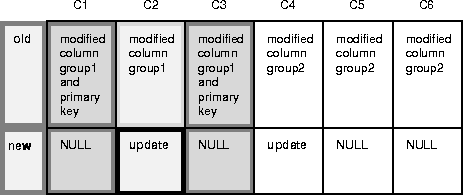
In the replicated table below, columns 1 and 3 together compose the primary key. There are two column groups, columns 1 - 3 and columns 4 - 6.
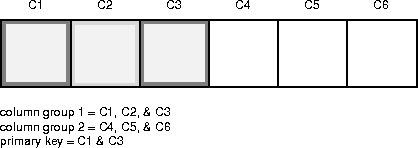
If you disable the Minimize Communication setting when generating replication support for the table, Oracle sends six old values (C1 -C6) and six new values (C1 - C6) for any update. For example, if you update column C4,
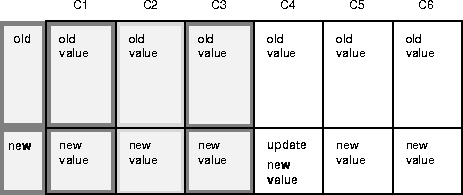
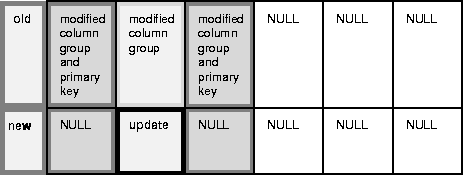
Alternatively, if you enable the Minimize Communication setting when generating replication support for the table, Oracle minimizes communication. For example, when you update column C4, Oracle sends:
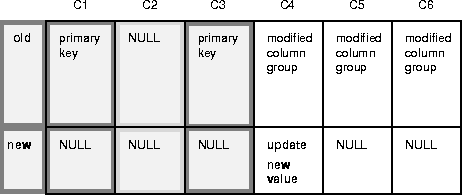
If you update columns C2 and C4, Oracle sends:
If you update column 2, Oracle sends:
If you have minimized propagation using the method described above, you can further reduce data propagation in some cases by using the DBMS_REPCAT. SEND_AND_COMPARE_OLD_VALUES procedure to send old values only if they are needed to detect and resolve conflicts. For example, the latest timestamp conflict detection and resolution method does not require old values for non-key and non-timestamp columns.
Suggestion: Further minimizing propagation of old values is particularly valuable if you are replicating LOB datatypes and do not expect conflicts on these columns.
Attention: You must ensure that the appropriate old values are propagated to detect and resolve anticipated conflicts. User-supplied conflict resolution procedures must deal properly with NULL old column values that are transmitted. Using SEND_AND_COMPARE_OLD_VALUES to further reduce data propagation reduces protection against unexpected conflicts.
To further reduce data propagation execute the following procedure:
 DBMS_REPCAT.VARCHAR2SDBMS_REPCAT.SEND_AND_COMPARE_OLD_VALUES(
     sname         IN    VARCHAR2,
     oname         IN    VARCHAR2,
     column_list   IN    VARCHAR2 |
     column_table  IN    DBMS_REPCAT.VARCHAR2s
     operation     IN    VARCHAR2 := 'UPDATE',
      send           IN     BOOLEAN  :=  TRUE);
After executing this procedure, you must generate replication support again with min_communication set to TRUE for this change to take effect.
The specified behavior for old column values is exposed in two columns in the REPCOLUMN view: COMPARE_OLD_ON_DELETE ('Y' or 'N') and COMPARE_OLD_ON_UPDATE ('Y' or 'N').
The following example shows how you can further reduce data propagation by using SEND_AND_COMPARE_OLD_VALUES. Consider a table called 'SCOTT.REPORTS' with 3 columns. Column 1 is the primary key and is in its own column group (column group 1). Column 2 and column 3 are in a second column group (column group 2).
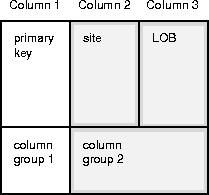
The conflict resolution strategy for the second column group is site priority. Column 2 is a VARCHAR2 column containing the site name. Column 3 is a LOB column. Whenever you update the LOB, you must also update column 2 with the global name of the site at which the update occurs. Because there are no triggers for piecewise updates to LOBs, you must explicitly update column 2 whenever you do a piecewise update on the LOB.
Suppose you generate replication support for SCOTT.REPORTS with min_communication set to TRUE and then use an UPDATE statement to modify column 2 (the site name) and column 3 (the LOB). The deferred remote procedure call (RPC) contains the new value of the site name and the new value of the LOB because they were updated. The deferred RPC also contains the old value of the primary key (column 1), the old value of the site name (Column 2), and the old value of the LOB (Column 3).
To ensure that the old value of the LOB is not propagated when either column C2 or column C3 is updated, make the following call:
  dbms_repcat.send_and_compare_old_values(
              sname         => 'SCOTT',
              oname         => 'REPORTS'
              column_list   => 'C3',
              operation     => 'UPDATE',
              send          => FALSE);
You must generate replication support for SCOTT.REPORTS again with min_communication set to TRUE for this change to take effect. Suppose you subsequently use an UPDATE statement to modify column 2 (the site name) and column 3 (the LOB). The deferred RPC contains the old value of the primary key (column 1), the old and new values of the site name (column 2), and just the new value of the LOB (column 3). The deferred RPC contains NULLs for the new value of the primary key and the old value of the LOB.
Additional Information: See the "SEND_AND_COMPARE_OLD_VALUES" procedure in the Oracle8i Replication API Reference book for details.
Oracle allows you to write your own conflict resolution or notification methods. A user-defined conflict resolution method is a PL/SQL function that returns either TRUE or FALSE. TRUE indicates that the method has successfully resolved all conflicting modifications for a column group. If the method cannot successfully resolve a conflict, it should return FALSE. Oracle continues to evaluate available conflict resolution methods, in sequence order, until either a method returns TRUE or there are no more methods available.
If the conflict resolution method raises an exception, Oracle stops evaluation of the method, and, if any other methods were provided to resolve the conflict (with a later sequence number), Oracle does not evaluate them.
The parameters needed by a user-defined conflict resolution method are determined by the type of conflict being resolved (unique, update, or delete) and the columns of the table being replicated. All conflict resolution methods take some combination of old, new, and current column values for the table.
The conflict resolution function should accept as parameters the values for the columns specified in the PARAMETER_COLUMN_NAME argument to the DBMS_REPCAT.ADD_conflicttype_RESOLUTION procedures. The column parameters are passed to the conflict resolution method in the order listed in the PARAMETER_COLUMN_NAME argument, or in ascending alphabetical order if you specified '*' for this argument. When both old and new column values are passed as parameters (for update conflicts), the old value of the column immediately precedes the new value.
Attention: Type checking of parameter columns in user-defined conflict resolution methods is not performed until you regenerate replication support for the associated replicated table.
For update conflicts, a user-defined function should accept the following values for each column in the column group:
The old, new, and current values for a column are received consecutively. The final argument to the conflict resolution method should be a Boolean flag. If this flag is FALSE, it indicates that you have updated the value of the IN OUT parameter, new, and that you should update the current column value with this new value. If this flag is TRUE, it indicates that the current column value should not be changed.
Uniqueness conflicts can occur as the result of an INSERT or UPDATE. Your uniqueness conflict resolution method should accept the new column value from the initiating site in IN OUT mode for each column in the column group. The final parameter to the conflict resolution method should be a Boolean flag.
If the method can resolve the conflict, it should modify the new column values so that Oracle can insert or update the current row with the new column values. Your function should set the Boolean flag to TRUE if it wants to discard the new column values, and FALSE otherwise.
Because a conflict resolution method cannot guarantee convergence for uniqueness conflicts, a user-defined uniqueness resolution method should include a notification mechanism.
Delete conflicts occur when you successfully delete from the local site, but the associated row cannot be found at the remote site (for example, because it had been updated). For delete conflicts, the function should accept old column values in IN OUT mode for the entire row. The final parameter to the conflict resolution method should be a BOOLEAN flag.
If the conflict resolution method can resolve the conflict, it modifies the old column values so that Oracle can delete the current row that matches all old column values. Your function should set the Boolean flag to TRUE if it wants to discard these column values, and FALSE otherwise.
If you perform a delete at the local site and an update at the remote site, the remote site detects the delete conflict, but the local site detects an unresolvable update conflict. This type of conflict cannot be handled automatically. The conflict will raise a NO_DATA_FOUND exception and Oracle logs the transaction as an error transaction.
Designing a mechanism to properly handle these types of update/delete conflicts is difficult. It is far easier to avoid these types of conflicts entirely, by simply "marking" deleted rows, and then purging them using procedural replication.
Additional Information: See "Avoiding Delete Conflicts" on page 7-20.
You should avoid the following types of SQL commands in user-defined conflict resolution methods. Use of such commands can result in unpredictable results.
The following examples show user-defined methods that are variations on the standard MAXIMUM and ADDITIVE prebuilt conflict resolution methods. Unlike the standard methods, these custom functions can handle nulls in the columns used to resolve the conflict.
-- User function similar to MAXIMUM method.
-- If curr is null or curr < new, use new values.
-- If new is null or new < curr, use current values.
-- If both are null, no resolution.
-- Does not converge with > 2 masters, unless
-- always increasing.

FUNCTION max_null_loses(old                 IN    NUMBER,
                        new                 IN  OUT  NUMBER,
                        cur                 IN    NUMBER,
                        ignore_discard_flag OUT    BOOLEAN)
  RETURN BOOLEAN IS
BEGIN
   IF (new IS NULL AND cur IS NULL) OR new = cur THEN
       RETURN FALSE;
   END IF;
   IF new IS NULL THEN
       ignore_discard_flag := TRUE;
   ELSIF cur IS NULL THEN
       ignore_discard_flag := FALSE;
   ELSIF new < cur THEN
       ignore_discard_flag := TRUE;
   ELSE
       ignore_discard_flag := FALSE;
   END IF;
   RETURN TRUE;
END max_null_loses;
-- User function similar to ADDITIVE method.
-- If old is null, old = 0.
-- If new is null, new = 0.
-- If curr is null, curr = 0.
-- new = curr + (new - old) -> just like ADDITIVE method.

FUNCTION additive_nulls(old                 IN    NUMBER,
                        new                 IN  OUT  NUMBER,
                        cur                 IN    NUMBER,
                        ignore_discard_flag OUT    BOOLEAN)
   RETURN BOOLEAN IS
   old_val NUMBER := 0.0;
   new_val NUMBER := 0.0;
   cur_val NUMBER := 0.0;
BEGIN
   IF old IS NOT NULL THEN
      old_val := old;
   END IF;
   IF new IS NOT NULL THEN
      new_val := new;
   END IF;
   IF cur IS NOT NULL THEN
      cur_val := cur;
   END IF;
   new := cur_val + (new_val - old_val);
   ignore_discard_flag := FALSE;
   RETURN TRUE;
END additive_nulls;
A conflict notification method is a user-defined function that provides conflict notification rather than or in addition to conflict resolution. For example, you can write your own conflict notification methods to log conflict information in a database table, send an email message, or page an administrator. After you write a conflict notification method, you can assign it to a column group (or constraint) in a specific order so that Oracle notifies you when a conflict happens, before attempting subsequent conflict resolution methods, or after Oracle attempts to resolve a conflict but cannot do so.
To configure a replicated table with a user-defined conflict notification mechanism, you must complete the following steps:
The following sections explain each step.
When configuring a replicated table to use a user-defined conflict notification method, the first step is to create a database table that can record conflict notifications. You can create a table to log conflict notifications for one or many tables in a master group.
To create a conflict notification log table at all master sites, use the replication execute DDL facility. For more information, "Executing DDL Within a Master Group". Do not generate replication support for the conflict notification tables because their entries are specific to the site that detects a conflict.
The following CREATE TABLE statement creates a table that you can use to log conflict notifications from several tables in a master group.
CREATE TABLE conf_report (
 line          NUMBER(2),    --- used to order message text
 txt           VARCHAR2(80), --- conflict notification message
 timestamp     DATE,         --- time of conflict
 table_name    VARCHAR2(30), --- table in whic the
                             --- conflict occurred
 table_owner   VARCHAR2(30), --- owner of the table
 conflict_type VARCHAR2(6)   --- INSERT, DELETE or UNIQUE
)
To create a conflict notification method, you must define the method in a PL/SQL package and then replicate the package as part of a master group along with the associated replicated table.
A conflict notification method can perform conflict notification only, or both conflict notification and resolution. If possible, you should always use one of Oracle's prebuilt conflict resolution methods to resolve conflicts. When a user-defined conflict notification method performs only conflict notification, assign the user-defined method to a column group (or constraint) along with conflict resolution methods that can resolve conflicts.
The following package and package body perform a simple form of conflict notification by logging uniqueness conflicts for a CUSTOMERS table into the previously defined CONF_REPORT table.
CREATE OR REPLACE PACKAGE notify AS
 -- Report uniqueness constraint violations on CUSTOMERS table
 FUNCTION customers_unique_violation (
   first_name         IN OUT VARCHAR2,
   last_name          IN OUT VARCHAR2,
   discard_new_values IN OUT BOOLEAN)
 RETURN BOOLEAN;
END notify;
/

CREATE OR REPLACE PACKAGE BODY notify AS
 -- Define a PL/SQL table to hold the notification message
 TYPE message_table IS TABLE OF VARCHAR2(80) INDEX BY BINARY_INTEGER;

 PROCEDURE report_conflict (
   conflict_report IN MESSAGE_TABLE,
   report_length   IN NUMBER,
   conflict_time   IN DATE,
   conflict_table  IN VARCHAR2,
   table_owner     IN VARCHAR2,
   conflict_type   IN VARCHAR2) IS
 BEGIN
   FOR idx IN 1..report_length LOOP
     BEGIN
       INSERT INTO sales.conf_report
         (line, txt, timestamp, table_name, table_owner, conflict_type)
         VALUES (idx, SUBSTR(conflict_report(idx),1,80), conflict_time,
                 conflict_table, table_owner, conflict_type);
     EXCEPTION WHEN others THEN NULL;
     END;
   END LOOP;
 END report_conflict;

 -- This is the conflict resolution method that will be called first when
 -- a uniqueness constraint violated is detected in the CUSTOMERS table.
 FUNCTION customers_unique_violation (
   first_name  IN OUT VARCHAR2,
   last_nameIN OUT VARCHAR2,
   discard_new_valuesIN OUT BOOLEAN)
  RETURN BOOLEAN IS
   local_node  VARCHAR2(128);
   conf_report MESSAGE_TABLE;
   conf_time   DATE := SYSDATE;
  BEGIN
  -- Get the global name of the local site
    BEGIN
      SELECT global_name INTO local_node FROM global_name;
    EXCEPTION WHEN others THEN local_node := '?';
    END;
  -- Generate a message for the DBA
  conf_report(1) := 'UNIQUENESS CONFLICT DETECTED IN TABLE CUSTOMERS ON ' ||
                    TO_CHAR(conf_time, 'MM-DD-YYYY HH24:MI:SS');
  conf_report(2) := '  AT NODE ' || local_node;
  conf_report(3) := 'ATTEMPTING TO RESOLVE CONFLICT USING ' ||
                    'APPEND SEQUENCE METHOD';
  conf_report(4) := 'FIRST NAME: ' || first_name;
  conf_report(5) := 'LAST NAME:  ' || last_name;
  conf_report(6) := NULL;
  --- Report the conflict
  report_conflict(conf_report, 5, conf_time, 'CUSTOMERS',
                'OFF_SHORE_ACCOUNTS', 'UNIQUE');
  --- Do not discard the new column values. They are still needed by
  --- other conflict resolution Methods
  discard_new_values := FALSE;
  --- Indicate that the conflict was not resolved.
    RETURN FALSE;
  END customers_unique_violation;
END notify;
/
Oracle provides replication catalog (REPCAT) views that you can use to determine what conflict resolution methods are being used by each of the tables and column groups in your replicated environment. Each view has three versions: USER_*, ALL_*, SYS.DBA_*. The views available include the following:
Additional Information: See "Data Dictionary Views" in the Oracle8i Replication API Reference book for details.
