Release 8.1.5
A67781-01
 Library |
 Product |
 Contents |
 Index |
| Oracle8i Concepts Release 8.1.5 A67781-01 |
|


My object all sublime I shall achieve in time--To let the punishment fit the crime.
Sir William Schwenck Gilbert: The Mikado
This chapter discusses the different types of database objects contained in a user's schema. It includes:
For information about additional schema objects, see "Database Links", "Stored Procedures and Functions", "Packages", and Chapter 20, "Triggers".
Associated with each database user is a schema. A schema is a collection of schema objects. Examples of schema objects include tables, views, sequences, synonyms, indexes, clusters, database links, snapshots, procedures, functions, and packages.
Schema objects are logical data storage structures. Schema objects do not have a one-to-one correspondence to physical files on disk that store their information. However, Oracle stores a schema object logically within a tablespace of the database. The data of each object is physically contained in one or more of the tablespace's datafiles. For some objects such as tables, indexes, and clusters, you can specify how much disk space Oracle allocates for the object within the tablespace's datafiles.
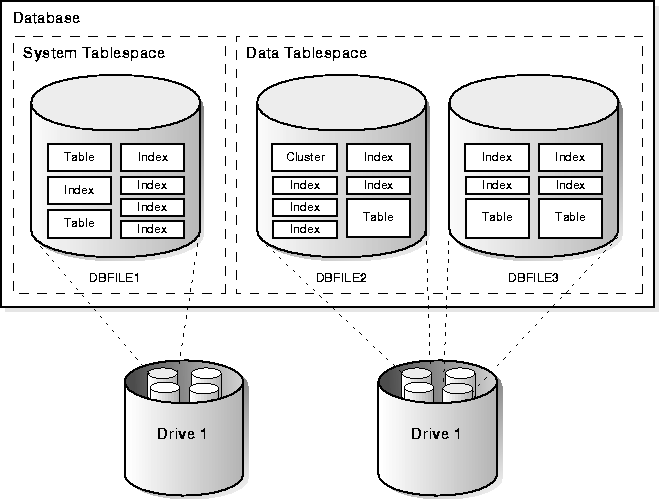
There is no relationship between schemas and tablespaces: a tablespace can contain objects from different schemas, and the objects for a schema can be contained in different tablespaces. Figure 10-1 illustrates the relationship among objects, tablespaces, and datafiles.
|
Additional Information:
This chapter describes tables, views, materialized views, sequences, synonyms, indexes, and clusters. Other kinds of schema objects are explained elsewhere in this manual or in other manuals. Specifically:
|
Tables are the basic unit of data storage in an Oracle database. Data is stored in rows and columns. You define a table with a table name (such as EMP) and set of columns. You give each column a column name (such as EMPNO, ENAME, and JOB), a datatype (such as VARCHAR2, DATE, or NUMBER), and a width (the width might be predetermined by the datatype, as in DATE) or precision and scale (for columns of the NUMBER datatype only). A row is a collection of column information corresponding to a single record. See Chapter 12, "Built-In Datatypes", for a discussion of the Oracle datatypes.
You can optionally specify rules for each column of a table. These rules are called integrity constraints. One example is a NOT NULL integrity constraint. This constraint forces the column to contain a value in every row. See Chapter 28, "Data Integrity", for more information about integrity constraints.
Once you create a table, you insert rows of data using SQL statements. Table data can then be queried, deleted, or updated using SQL.
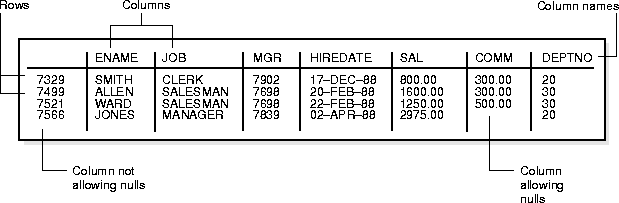
Figure 10-2 shows a sample table named EMP.
When you create a table, Oracle automatically allocates a data segment in a tablespace to hold the table's future data. (However, clustered tables and temporary tables are exceptions to this rule.) You can control the allocation of space for a table's data segment and use of this reserved space in the following ways:
Oracle stores data for a clustered table in the data segment created for the cluster. Storage parameters cannot be specified when a clustered table is created or altered; the storage parameters set for the cluster always control the storage of all tables in the cluster.
The tablespace that contains a nonclustered table's data segment is either the table owner's default tablespace or a tablespace specifically named in the CREATE TABLE statement. See "User Tablespace Settings and Quotas".
Oracle stores each row of a database table as one or more row pieces. If an entire row can be inserted into a single data block, Oracle stores the row as one row piece. However, if all of a row's data cannot be inserted into a single data block or an update to an existing row causes the row to outgrow its data block, Oracle stores the row using multiple row pieces. A data block usually contains only one row piece per row. When Oracle must store a row in more than one row piece, it is "chained" across multiple blocks. A chained row's pieces are chained together using the rowids of the pieces. See "Row Chaining and Migrating".
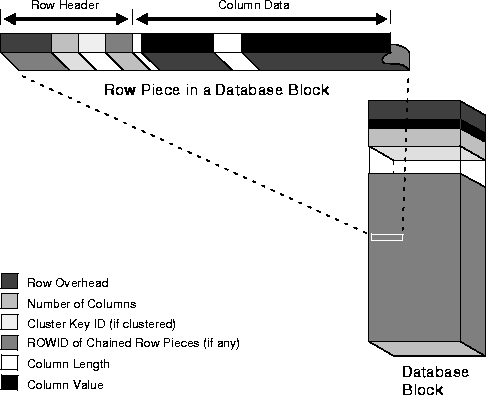
Each row piece, chained or unchained, contains a row header and data for all or some of the row's columns. Individual columns might also span row pieces and, consequently, data blocks. Figure 10-3 shows the format of a row piece.
The row header precedes the data and contains information about
A row fully contained in one block has at least three bytes of row header. After the row header information, each row contains column length and data. The column length requires one byte for columns that store 250 bytes or less, or three bytes for columns that store more than 250 bytes, and precedes the column data. Space required for column data depends on the datatype. If the datatype of a column is variable length, the space required to hold a value can grow and shrink with updates to the data.
To conserve space, a null in a column only stores the column length (zero). Oracle does not store data for the null column. Also, for trailing null columns, Oracle does not even store the column length. See "Nulls".
Clustered rows contain the same information as nonclustered rows. In addition, they contain information that references the cluster key to which they belong. See "Format of Clustered Data Blocks".
You can drop a column from a table by using the DROP COLUMN option of the ALTER TABLE command. This removes the column from the table description and removes the column length and data from each row of the table, freeing space in the data block.
Dropping a column in a large table takes a considerable amount of time. A quicker alternative is to mark a column as unused with the SET UNUSED option of the ALTER TABLE command. This makes the column data unavailable, although the data remains in each row of the table. After marking a column as unused, you can add another column that has the same name to the table. The unused column can then be dropped at a later time when you want to reclaim the space occupied by the column data.
|
Additional Information:
See the Oracle8i Administrator's Guide for information about how to drop columns or mark them as unused, and see Oracle8i SQL Reference for details about the ALTER TABLE command. |
The rowid identifies each row piece by its location or address. Once assigned, a given row piece retains its rowid until the corresponding row is deleted, or exported and imported using the Export and Import utilities. For clustered tables (see "Clusters") if the cluster key values of a row change, the row keeps the same rowid, but also gets an additional pointer rowid for the new values.
Because rowids are constant for the lifetime of a row piece, it is useful to reference rowids in SQL statements such as SELECT, UPDATE, and DELETE. See "Physical Rowids" for more information.
The column order is the same for all rows in a given table. Columns are usually stored in the order in which they were listed in the CREATE TABLE statement, but this is not guaranteed. For example, if you create a table with a column of datatype LONG, Oracle always stores this column last. Also, if a table is altered so that a new column is added, the new column becomes the last column stored.
In general, you should try to place columns that frequently contain nulls last so that rows take less space. Note, though, that if the table you are creating includes a LONG column as well, the benefits of placing frequently null columns last are lost.
A null is the absence of a value in a column of a row. Nulls indicate missing, unknown, or inapplicable data. A null should not be used to imply any other value, such as zero. A column allows nulls unless a NOT NULL or PRIMARY KEY integrity constraint has been defined for the column, in which case no row can be inserted without a value for that column.
Nulls are stored in the database if they fall between columns with data values. In these cases they require one byte to store the length of the column (zero).
Trailing nulls in a row require no storage because a new row header signals that the remaining columns in the previous row are null (for example, if the last three columns of a table are null, no information is stored for those columns). In tables with many columns, the columns more likely to contain nulls should be defined last to conserve disk space.
Most comparisons between nulls and other values are by definition neither true nor false, but unknown. To identify nulls in SQL, use the IS NULL predicate. Use the SQL function NVL to convert nulls to non-null values.
|
Additional Information:
See Oracle8i SQL Reference for more information about comparisons using IS NULL and the NVL function. |
Nulls are not indexed, except when the cluster key column value is null or the index is a bitmap index (see "Indexes and Nulls" and "Bitmap Indexes and Nulls").
You can assign a column of a table a default value so that when a new row is inserted and a value for the column is omitted, a default value is supplied automatically. Default column values work as though an INSERT statement actually specifies the default value.
Legal default values include any literal or expression that does not refer to a column, LEVEL, ROWNUM, or PRIOR. Default values can include the SQL functions SYSDATE, USER, USERENV, and UID. The datatype of the default literal or expression must match or be convertible to the column datatype.
If a default value is not explicitly defined for a column, the default for the column is implicitly set to NULL.
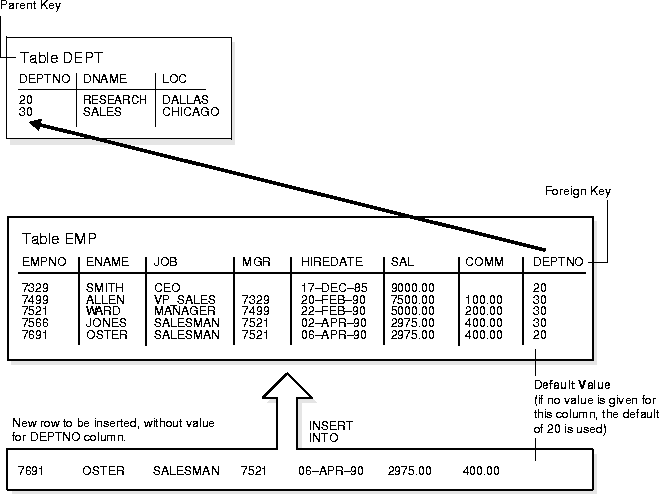
Integrity constraint checking occurs after the row with a default value is inserted. For example, in Figure 10-4, a row is inserted into the EMP table that does not include a value for the employee's department number. Because no value is supplied for the department number, Oracle inserts the DEPTNO column's default value "20". After inserting the default value, Oracle checks the FOREIGN KEY integrity constraint defined on the DEPTNO column.
For more information about integrity constraints, see Chapter 28, "Data Integrity".
You can create a table with a column whose datatype is another table. That is, tables can be nested within other tables as values in a column. The Oracle server stores nested table data "out of line" from the rows of the parent table, using a store table which is associated with the nested table column. The parent row contains a unique set identifier value associated with a nested table instance.
|
Additional Information:
See "Nested Tables" and Oracle8i Application Developer's Guide - Fundamentals. |
In addition to permanent tables, Oracle can create temporary tables to hold session-private data that exists only for the duration of a transaction or session.
The CREATE GLOBAL TEMPORARY TABLE command creates a temporary table which can be transaction specific or session specific. For transaction-specific temporary tables, data exists for the duration of the transaction while for session-specific temporary tables, data exists for the duration of the session. Data in a temporary table is private to the session. Each session can only see and modify its own data. DML locks are not acquired on the data of the temporary tables. The LOCK command has no effect on a temporary table as each session has its own private data.
A TRUNCATE statement issued on a session-specific temporary table truncates data in its own session; it does not truncate the data of other sessions that are using the same table.
DML statements on temporary tables do not generate redo logs for the data changes. However, undo logs for the data and redo logs for the undo logs are generated. Data from the temporary table is automatically dropped in the case of session termination, either when the user logs off or when the session terminates abnormally such as during a session or instance crash.
You can create indexes for temporary tables using the CREATE INDEX command. Indexes created on temporary tables are also temporary and the data in the index has the same session or transaction scope as the data in the temporary table.
You can create views that access both temporary and permanent tables. You can also create triggers on temporary tables.
The EXPORT and IMPORT utilities can export and import the definition of a temporary table. However, no data rows are exported even if you use the ROWS option. Similarly, you can replicate the definition of a temporary table but you cannot replicate its data.
Temporary tables use temporary segments (see "Extents in Temporary Segments"). Unlike permanent tables, temporary tables and their indexes do not automatically allocate a segment when they are created. Instead, segments are allocated when the first INSERT (or CREATE TABLE AS SELECT) is performed. This means that if a SELECT, UPDATE, or DELETE is performed before the first INSERT, then the table appears to be empty.
You can perform DDL commands (ALTER TABLE, DROP TABLE, CREATE INDEX, and so on) on a temporary table only when no session is currently bound to it. A session gets bound to a temporary table when an INSERT is performed on it. The session gets unbound by a TRUNCATE, at session termination, or by doing a COMMIT or ABORT for a transaction-specific temporary table.
Temporary segments are deallocated at the end of the transaction for transaction-specific temporary tables and at the end of the session for session-specific temporary tables.
Transaction-specific temporary tables are accessible by user transactions and their child transactions. However, a given transaction-specific temporary table cannot be used concurrently by two transactions in the same session (although it can be used by transactions in different sessions).
A view is a tailored presentation of the data contained in one or more tables (or other views). A view takes the output of a query and treats it as a table; therefore, a view can be thought of as a "stored query" or a "virtual table". You can use views in most places where a table can be used.
For example, the EMP table has several columns and numerous rows of information. If you only want users to see five of these columns, or only specific rows, you can create a view of that table for other users to access.
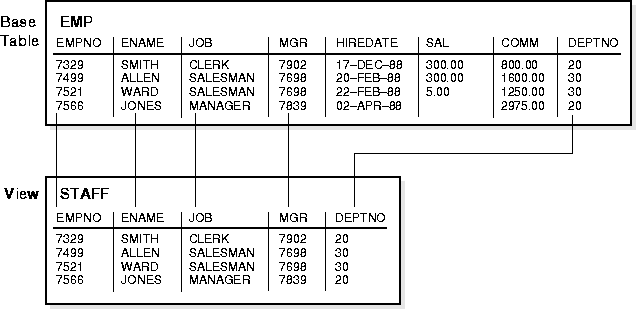
Figure 10-5 shows an example of a view called STAFF derived from the base table EMP. Notice that the view shows only five of the columns in the base table.
Since views are derived from tables, they have many similarities. For example, you can define views with up to 1000 columns, just like a table. You can query views, and with some restrictions you can update, insert into, and delete from views. All operations performed on a view actually affect data in some base table of the view and are subject to the integrity constraints and triggers of the base tables.
Unlike a table, a view is not allocated any storage space, nor does a view actually contain data; rather, a view is defined by a query that extracts or derives data from the tables the view references. These tables are called base tables. Base tables can in turn be actual tables or can be views themselves (including snapshots). Because a view is based on other objects, a view requires no storage other than storage for the definition of the view (the stored query) in the data dictionary.
Views provide a means to present a different representation of the data that resides within the base tables. Views are very powerful because they allow you to tailor the presentation of data to different types of users. Views are often used
For example, Figure 10-5 shows how the STAFF view does not show the SAL or COMM columns of the base table EMP.
For example, a single view might be defined with a join, which is a collection of related columns or rows in multiple tables. However, the view hides the fact that this information actually originates from several tables.
For example, views allow users to select information from multiple tables without actually knowing how to perform a join.
For example, the columns of a view can be renamed without affecting the tables on which the view is based.
For example, if a view's defining query references three columns of a four column table and a fifth column is added to the table, the view's definition is not affected and all applications using the view are not affected.
For example, a view can be defined that joins a GROUP BY view with a table, or a view can be defined that joins a UNION view with a table.
For example, a query could perform extensive calculations with table information. By saving this query as a view, the calculations can be performed each time the view is queried.
Oracle stores a view's definition in the data dictionary as the text of the query that defines the view. When you reference a view in a SQL statement, Oracle merges the statement that references the view with the query that defines the view and then parses the merged statement in a shared SQL area and executes it. Oracle parses a statement that references a view in a new shared SQL area only if no existing shared SQL area contains an identical statement. Therefore, you obtain the benefit of reduced memory usage associated with shared SQL when you use views.
In evaluating views containing string literals or SQL functions that have NLS parameters as arguments (such as TO_CHAR, TO_DATE, and TO_NUMBER), Oracle takes default values for these parameters from the NLS parameters for the session. You can override these default values by specifying NLS parameters explicitly in the view definition.
|
Additional Information:
See the Oracle8i National Language Support Guide for information about National Language Support. |
Oracle determines whether to use indexes for a query against a view by transforming the original query when merging it with the view's defining query.
Consider the view
CREATE VIEW emp_view AS
  SELECT empno, ename, sal, loc
    FROM emp, dept
    WHERE emp.deptno = dept.deptno AND
                       dept.deptno = 10;
Now consider the following user-issued query:
SELECT ename
  FROM emp_view
  WHERE empno = 9876;
The final query constructed by Oracle is
SELECT ename
  FROM emp, dept
  WHERE emp.deptno = dept.deptno AND
        dept.deptno = 10 AND
        emp.empno = 9876;
In all possible cases, Oracle merges a query against a view with the view's defining query (and those of any underlying views). Oracle optimizes the merged query as if you issued the query without referencing the views. Therefore, Oracle can use indexes on any referenced base table columns, whether the columns are referenced in the view definition or in the user query against the view.
In some cases, Oracle cannot merge the view definition with the user-issued query. In such cases, Oracle may not use all indexes on referenced columns.
See "Optimizing Statements That Access Views" for more information about query optimization.
Because a view is defined by a query that references other objects (tables, snapshots, or other views), a view is dependent on the referenced objects. Oracle automatically handles the dependencies for views. For example, if you drop a base table of a view and then recreate it, Oracle determines whether the new base table is acceptable to the existing definition of the view. See Chapter 21, "Oracle Dependency Management", for a complete discussion of dependencies in a database.
A join view is defined as a view that has more than one table or view in its FROM clause (a join) and that does not use any of these clauses: DISTINCT, AGGREGATION, GROUP BY, START WITH, CONNECT BY, ROWNUM, and set operations (UNION ALL, INTERSECT, and so on).
An updatable join view is a join view, which involves two or more base tables or views, where UPDATE, INSERT, and DELETE operations are permitted. The data dictionary views ALL_UPDATABLE_COLUMNS, DBA_UPDATABLE_COLUMNS, and USER_UPDATABLE_COLUMNS contain information that indicates which of the view columns are updatable.
Table 10-1 lists rules for updatable join views.
Views that are not updatable can be modified using INSTEAD OF triggers. See "INSTEAD-OF Triggers" for more information.
In the Oracle object-relational database, object views allow you to retrieve, update, insert, and delete relational data as if they were stored as object types. You can also define views that have columns which are object datatypes, such as objects, REFs, and collections (nested tables and VARRAYs).
|
Additional Information:
See Chapter 15, "Object Views" and the Oracle8i Application Developer's Guide - Fundamentals. |
An inline view is not a schema object, but rather it is a subquery with an alias (correlation name) that you can use like a view within a SQL statement.
For example, this query joins the summary table SUMTAB to an inline view V defined on the TIME table to obtain T.YEAR, and then rolls up the aggregates in SUMTAB to the YEAR level:
SELECT v.year, s.prod_name, SUM(s.sum_sales)FROM sumtab s,(SELECT DISTINCT t.month, t.year FROM time t) vWHERE s.month = v.month GROUP BY v.year, s.prod_name;
Materialized views are schema objects that can be used to summarize, precompute, replicate, and distribute data. They are suitable in various computing environments such as data warehousing, decision support, and distributed or mobile computing.
Cost-based optimization can make use of materialized views to improve query performance by automatically recognizing when a materialized view can and should be used to satisfy a request. The optimizer transparently rewrites the request to use the materialized view. Queries are then directed to the materialized view and not to the underlying detail tables or views.
Materialized views are similar to indexes in several ways: they consume storage space, they must be refreshed when the data in their master tables changes, and, when used for query rewrites, they improve the performance of SQL execution and their existence is transparent to SQL applications and users. (See "Indexes".) Unlike indexes, materialized views can be accessed directly using a SELECT statement and, depending on the types of refresh that are required, they can also be accessed directly in an INSERT, UPDATE, or DELETE statement.
A materialized view can be partitioned, and you can define a materialized view on a partitioned table and one or more indexes on the materialized view. For more information about partitioning, see Chapter 11, "Partitioned Tables and Indexes".
Oracle maintains the data in materialized views by refreshing them after changes are made to their master tables. The refresh method can be incremental (fast refresh) or complete. For materialized views that use the fast refresh method, a materialized view log or direct loader log keeps a record of changes to the master tables.
Materialized views can be refreshed either on demand or at regular time intervals. Alternatively, materialized views in the same database as their master tables can be refreshed whenever a transaction commits its changes to the master tables.
A materialized view log is a schema object that records changes to a master table's data so that a materialized view defined on the master table can be refreshed incrementally. Another name for materialize view log is snapshot log.
Each materialized view log is associated with a single master table. The materialized view log resides in the same database and schema as its master table.
|
Additional Information:
Oracle8i Tuning describes materialized views and materialized view logs in a warehousing environment and Oracle8i Replication describes materialized views (snapshots) used for replication. |
A dimension is a schema object that defines hierarchical relationships between pairs of columns or column sets. A hierarchical relationship is a functional dependency from one level of a hierarchy to the next level in the hierarchy. A dimension is a container of logical relationships between columns and does not have any data storage assigned to it.
The CREATE DIMENSION statement specifies:
The columns in a dimension can come either from the same table (denormalized) or from multiple tables (fully or partially normalized). To define a dimension over columns from multiple tables, you connect the tables using the JOIN KEY option of the HIERARCHY clause.
For example, a normalized time dimension might include a date table, a month table, and a year table, with join conditions that connect each date row to a month row, and each month row to a year row. In a fully denormalized time dimension, the date, month, and year columns would all be in the same table. Whether normalized or denormalized, the hierarchical relationships among the columns need to be specified in the CREATE DIMENSION statement.
|
Additional Information:
Oracle8i Tuning describes how dimensions are used in a warehousing environment. |
The sequence generator provides a sequential series of numbers. The sequence generator is especially useful in multi-user environments for generating unique sequential numbers without the overhead of disk I/O or transaction locking. Therefore, the sequence generator reduces "serialization" where the statements of two transactions must generate sequential numbers at the same time. By avoiding the serialization that results when multiple users wait for each other to generate and use a sequence number, the sequence generator improves transaction throughput and a user's wait is considerably shorter.
Sequence numbers are Oracle integers defined in the database of up to 38 digits. A sequence definition indicates general information: the name of the sequence, whether it ascends or descends, the interval between numbers, and other information. One important part of a sequence's definition is whether Oracle should cache sets of generated sequence numbers in memory.
Oracle stores the definitions of all sequences for a particular database as rows in a single data dictionary table in the SYSTEM tablespace. Therefore, all sequence definitions are always available, because the SYSTEM tablespace is always online.
Sequence numbers are used by SQL statements that reference the sequence. You can issue a statement to generate a new sequence number or use the current sequence number. Once a statement in a user's session generates a sequence number, the particular sequence number is available only to that session; each user that references a sequence has access to its own, current sequence number.
Sequence numbers are generated independently of tables. Therefore, the same sequence generator can be used for one or for multiple tables. Sequence number generation is useful to generate unique primary keys for your data automatically and to coordinate keys across multiple rows or tables. Individual sequence numbers can be skipped if they were generated and used in a transaction that was ultimately rolled back. Applications can make provisions to catch and reuse these sequence numbers, if desired.
|
Additional Information:
For performance implications when using sequences, see the Oracle8i Application Developer's Guide - Fundamentals. |
A synonym is an alias for any table, view, snapshot, sequence, procedure, function, or package. Because a synonym is simply an alias, it requires no storage other than its definition in the data dictionary.
Synonyms are often used for security and convenience. For example, they can do the following:
You can create both public and private synonyms. A public synonym is owned by the special user group named PUBLIC and every user in a database can access it. A private synonym is in the schema of a specific user who has control over its availability to others.
Synonyms are very useful in both distributed and nondistributed database environments because they hide the identity of the underlying object, including its location in a distributed system. This is advantageous because if the underlying object must be renamed or moved, only the synonym needs to be redefined and applications based on the synonym continue to function without modification.
Synonyms can also simplify SQL statements for users in a distributed database system. The following example shows how and why public synonyms are often created by a database administrator to hide the identity of a base table and reduce the complexity of SQL statements. Assume the following:
At this point, you would have to query the table SALES_DATA with a SQL statement similar to the one below:
SELECT * FROM jward.sales_data;
Notice how you must include both the schema that contains the table along with the table name to perform the query.
Assume that the database administrator creates a public synonym with the following SQL statement:
CREATE PUBLIC SYNONYM sales FOR jward.sales_data;
After the public synonym is created, you can query the table SALES_DATA with a simple SQL statement:
SELECT * FROM sales;
Notice that the public synonym SALES hides the name of the table SALES_DATA and the name of the schema that contains the table.
Indexes are optional structures associated with tables and clusters. You can create indexes on one or more columns of a table to speed SQL statement execution on that table. Just as the index in this manual helps you locate information faster than if there were no index, an Oracle index provides a faster access path to table data. Indexes are the primary means of reducing disk I/O when properly used.
You can create an unlimited number of indexes for a table provided that the combination of columns differs for each index. You can create more than one index using the same columns provided that you specify distinctly different combinations of the columns. For example, the following statements specify valid combinations:
CREATE INDEX emp_idx1 ON emp (ename, job);
CREATE INDEX emp_idx2 ON emp (job, ename);
You cannot create an index that references only one column in a table if another such index already exists.
Oracle provides several indexing schemes, which provide complementary performance functionality: B*-tree indexes (currently the most common), B*-tree cluster indexes, hash cluster indexes, reverse key indexes, and bitmap indexes. Oracle also provides support for function-based indexes and domain indexes specific to an application or cartridge.
The absence or presence of an index does not require a change in the wording of any SQL statement. An index is merely a fast access path to the data; it affects only the speed of execution. Given a data value that has been indexed, the index points directly to the location of the rows containing that value.
Indexes are logically and physically independent of the data in the associated table. You can create or drop an index at anytime without affecting the base tables or other indexes. If you drop an index, all applications continue to work; however, access of previously indexed data might be slower. Indexes, as independent structures, require storage space.
Oracle automatically maintains and uses indexes once they are created. Oracle automatically reflects changes to data, such as adding new rows, updating rows, or deleting rows, in all relevant indexes with no additional action by users.
Retrieval performance of indexed data remains almost constant, even as new rows are inserted. However, the presence of many indexes on a table decreases the performance of updates, deletes, and inserts because Oracle must also update the indexes associated with the table.
The optimizer can use an existing index to build another index. This results in a much faster index build.
Indexes can be unique or nonunique. Unique indexes guarantee that no two rows of a table have duplicate values in the columns that define the index. Nonunique indexes do not impose this restriction on the column values.
Oracle recommends that you do not explicitly define unique indexes on tables; uniqueness is strictly a logical concept and should be associated with the definition of a table. Alternatively, define UNIQUE integrity constraints on the desired columns. Oracle enforces UNIQUE integrity constraints by automatically defining a unique index on the unique key.
A composite index (also called a concatenated index) is an index that you create on multiple columns in a table. Columns in a composite index can appear in any order and need not be adjacent in the table.
Composite indexes can speed retrieval of data for SELECT statements in which the WHERE clause references all or the leading portion of the columns in the composite index. Therefore, the order of the columns used in the definition is important; generally, the most commonly accessed or most selective columns go first.
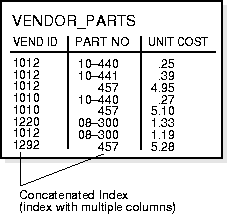
Figure 10-6 illustrates the VENDOR_PARTS table that has a composite index on the VENDOR_ID and PART_NO columns.
No more than 32 columns can form a regular composite index, and for a bitmap index the maximum number columns is 30. A key value cannot exceed roughly one-half (minus some overhead) the available data space in a data block.
Although the terms are often used interchangeably, you should understand the distinction between "indexes" and "keys". Indexes are structures actually stored in the database, which users create, alter, and drop using SQL statements. You create an index to provide a fast access path to table data. Keys are strictly a logical concept. Keys correspond to another feature of Oracle called integrity constraints, which enforce the business rules of a database (see Chapter 28, "Data Integrity").
Because Oracle uses indexes to enforce some integrity constraints, the terms key and index are often are used interchangeably; however, they should not be confused with each other.
NULL values in indexes are considered to be distinct except when all the non-NULL values in two or more rows of an index are identical, in which case the rows are considered to be identical. Therefore, UNIQUE indexes prevent rows containing NULL values from being treated as identical. This does not apply if there are no non-NULL values--in other words, if the rows are entirely NULL.
Oracle does not index table rows in which all key columns are NULL, except in the case of bitmap indexes (see "Bitmap Indexes and Nulls") or when the cluster key column value is null.
You can create indexes on functions and expressions that involve one or more columns in the table being indexed. A function-based index precomputes the value of the function or expression and stores it in the index. You can create a function-based index as either B*-tree or bitmap index (see "Bitmap Indexes").
The function used for building the index can be an arithmetic expression or an expression that contains a PL/SQL function, package function, C callout, or SQL function. The expression cannot contain any aggregate functions, and it must be DETERMINISTIC (see "DETERMINISTIC Functions"). For building an index on a column containing an object type, the function can be a method of that object, such as a map method. However, you cannot build a function-based index on a LOB column, REF, or nested table column; nor can you build a function-based index if the object type contains a LOB, REF, or nested table.
Function-based indexes provide an efficient mechanism for evaluating statements that contain functions in their WHERE clauses. You can create a function-based index to materialize computational-intensive expressions in the index, so that Oracle does not need to compute the value of the expression when processing SELECT and DELETE statements. When processing INSERT and UPDATE statements, however, Oracle must still evaluate the function to process the statement.
For example, if you create the following index:
CREATE INDEX idx ON table_1 (a + b * (c - 1), a, b);
then Oracle can use it when processing queries such as this:
SELECT a FROM table_1 WHERE a + b * (c - 1) < 100;
Function-based indexes defined on UPPER(column_name) or LOWER(column_name) can facilitate case-insensitive searches. For example, the following index:
CREATE INDEX uppercase_idx ON emp (UPPER(empname));
can facilitate processing queries such as this:
SELECT * FROM emp WHERE UPPER(empname) = 'RICHARD';
A function-based index can also be used for an NLS sort index that provides efficient linguistic collation in SQL statements.
|
Additional Information:
See the Oracle8i National Language Support Guide for information about NLS sort indexes. |
You must gather statistics about function-based indexes for the optimizer (see "Statistics for Cost-Based Optimization"); otherwise, the indexes cannot be used to process SQL statements. Rule-based optimization never uses function-based indexes.
Cost-based optimization can use an index range scan on a function-based index for queries with expressions in WHERE clause. (See "Index Scans" and "Access Paths".) For example, in this query:
select * from T where a + b < 10;
the optimizer can use index range scan if an index is built on a+b. The range scan access path is especially beneficial when the predicate (WHERE clause) has low selectivity. In addition, the optimizer can estimate the selectivity of predicates involving expressions more accurately if the expressions are materialized in a function-based index.
The optimizer performs expression matching by parsing the expression in a SQL statement and then comparing the expression trees of the statement and the function-based index. This comparison is case-insensitive and ignores blank spaces. See "Evaluation of Expressions and Conditions" for details about how the optimizer evaluates expressions.
Function-based indexes depend on the function used in the expression that defines the index. If the function is a PL/SQL function or package function, the index will be disabled by any changes to the function specification.
PL/SQL functions used in defining function-based indexes must be DETERMINISTIC (see "DETERMINISTIC Functions"). The index owner needs the EXECUTE privilege on the defining function. If the EXECUTE privilege is revoked, the function-based index is marked DISABLED.
See "Function-Based Index Dependencies" for more information about dependencies and privileges for function-based indexes.
When you create an index, Oracle automatically allocates an index segment to hold the index's data in a tablespace. You control allocation of space for an index's segment and use of this reserved space in the following ways:
The tablespace of an index's segment is either the owner's default tablespace or a tablespace specifically named in the CREATE INDEX statement. You do not have to place an index in the same tablespace as its associated table. Furthermore, you can improve performance of queries that use an index by storing an index and its table in different tablespaces located on different disk drives because Oracle can retrieve both index and table data in parallel. See "User Tablespace Settings and Quotas".
Space available for index data is the Oracle block size minus block overhead, entry overhead, rowid, and one length byte per value indexed. The number of bytes required for the overhead of an index block is operating system dependent.
When you create an index, Oracle fetches and sorts the columns to be indexed, and stores the rowid along with the index value for each row. Then Oracle loads the index from the bottom up. For example, consider the statement:
CREATE INDEX emp_ename ON emp(ename);
Oracle sorts the EMP table on the ENAME column. It then loads the index with the ENAME and corresponding rowid values in this sorted order. When it uses the index, Oracle does a quick search through the sorted ENAME values and then uses the associated rowid values to locate the rows having the sought ENAME value.
Although Oracle accepts the keywords ASC, DESC, COMPRESS, and NOCOMPRESS in the CREATE INDEX command, they have no effect on index data, which is stored using rear compression in the branch nodes but not in the leaf nodes.
Oracle uses B*-tree indexes that are balanced to equalize access times to any row. The theory of B*-tree indexes is beyond the scope of this manual; for more information you can refer to computer science texts dealing with data structures. Figure 10-7 illustrates the structure of a B*-tree index.
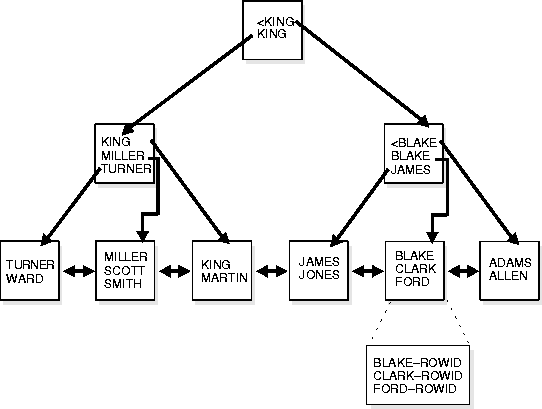
The upper blocks (branch blocks) of a B*-tree index contain index data that points to lower level index blocks. The lowest level index blocks (leaf blocks) contain every indexed data value and a corresponding rowid used to locate the actual row; the leaf blocks are doubly linked. Indexes in columns containing character data are based on the binary values of the characters in the database character set.
For a unique index, there is one rowid per data value. For a nonunique index, the rowid is included in the key in sorted order, so nonunique indexes are sorted by the index key and rowid. Key values containing all nulls are not indexed, except for cluster indexes. Two rows can both contain all nulls and not violate a unique index.
The B*-tree structure has the following advantages:
Key compression allows you to compress portions of the primary key column values in an index (or index-organized table), which reduces the storage overhead of repeated values.
Generally, keys in an index have two pieces, a grouping piece and a unique piece. If the key is not defined to have a unique piece, Oracle provides one in the form of a rowid appended to the grouping piece. Key compression is a method of breaking off the grouping piece and storing it so it can be shared by multiple unique pieces.
Key compression breaks the index key into a prefix entry (the grouping piece) and a suffix entry (the unique piece). Compression is achieved by sharing the prefix entries among the suffix entries in an index block. Only keys in the leaf blocks of a B*-tree index are compressed. In the branch blocks the key suffix can be truncated but the key is not compressed.
Key compression is done within an index block but not across multiple index blocks. Suffix entries form the compressed version of index rows. Each suffix entry references a prefix entry, which is stored in the same index block as the suffix entry.
By default the prefix consists of all key columns excluding the last one. For example, in a key made up of three columns (column1, column2, column3) the default prefix is (column1, column2). For a list of values (1,2,3), (1,2,4), (1,2,7), (1,3,5), (1,3,4), (1,4,4) the repeated occurrences of (1,2), (1,3) in the prefix are compressed.
Alternatively, you can specify the prefix length, which is the number of columns in the prefix. For example, if you specify prefix length 1 then the prefix is column1 and the suffix is (column2, column3). For the list of values (1,2,3), (1,2,4), (1,2,7), (1,3,5), (1,3,4), (1,4,4) the repeated occurrences of 1 in the prefix are compressed.
The maximum prefix length for a non-unique index is the number of key columns, and the maximum prefix length for a unique index is the number of key columns minus one.
Prefix entries are written to the index block only if the index block does not already contain a prefix entry whose value is equal to the present prefix entry. Prefix entries are available for sharing immediately after being written to the index block and remain available until the last deleted referencing suffix entry is cleaned out of the index block.
Key compression can lead to a huge saving in space, allowing you to store more keys per index block which can lead to less I/O and better performance.
Although key compression reduces the storage requirements of an index, it may increase the CPU time required to reconstruct the key column values during an index scan. It also incurs some additional storage overhead, because every prefix entry has an overhead of four bytes associated with it.
Key compression is useful in many different scenarios, such as:
In some cases, however, key compression cannot be used. For example, in a unique index with a single attribute key, key compression is not possible because there is a unique piece but there are no grouping pieces to share.
Creating a reverse key index, compared to a standard index, reverses the bytes of each column indexed (except the rowid) while keeping the column order. Such an arrangement can help avoid performance degradation in indexes in an Oracle Parallel Server environment where modifications to the index are concentrated on a small set of leaf blocks. By reversing the keys of the index, the insertions become distributed across all leaf keys in the index.
Using the reverse key arrangement eliminates the ability to run an index range scanning query on the index. Because lexically adjacent keys are not stored next to each other in a reverse-key index, only fetch-by-key or full-index (table) scans can be performed.
Under some circumstances using a reverse-key index can make an OLTP Oracle Parallel Server application faster. For example, keeping the index of mail messages in Oracle Office: some users keep old messages around, and the index must maintain pointers to these as well as to the most recent.
The REVERSE keyword provides a simple mechanism for creating a reverse key index. You can specify the keyword REVERSE along with the optional index specifications in a CREATE INDEX statement:
CREATE INDEX i ON t (a,b,c) REVERSE;
You can specify the keyword NOREVERSE to REBUILD a reverse-key index into one that is not reverse keyed:
ALTER INDEX i REBUILD NOREVERSE;
Rebuilding a reverse-key index without the NOREVERSE keyword produces a rebuilt, reverse-key index. You cannot rebuild a normal index as a reverse key index; you must use the CREATE command instead.
|
Attention: Bitmap indexes are available only if you have purchased the Oracle8i Enterprise Edition. See Getting to Know Oracle8i for more information about the features available in Oracle8i and the Oracle8i Enterprise Edition. |
The purpose of an index is to provide pointers to the rows in a table that contain a given key value. In a regular index, this is achieved by storing a list of rowids for each key corresponding to the rows with that key value. (Oracle stores each key value repeatedly with each stored rowid.) In a bitmap index, a bitmap for each key value is used instead of a list of rowids.
Each bit in the bitmap corresponds to a possible rowid, and if the bit is set, it means that the row with the corresponding rowid contains the key value. A mapping function converts the bit position to an actual rowid, so the bitmap index provides the same functionality as a regular index even though it uses a different representation internally. If the number of different key values is small, bitmap indexes are very space efficient.
Bitmap indexing efficiently merges indexes that correspond to several conditions in a WHERE clause. Rows that satisfy some, but not all conditions are filtered out before the table itself is accessed. This improves response time, often dramatically.
Bitmap indexing benefits data warehousing applications which have large amounts of data and ad hoc queries, but a low level of concurrent transactions. For such applications, bitmap indexing provides:
Fully indexing a large table with a traditional B*-tree index can be prohibitively expensive in terms of space since the index can be several times larger than the data in the table. Bitmap indexes are typically only a fraction of the size of the indexed data in the table.
Bitmap indexes are not suitable for OLTP applications with large numbers of concurrent transactions modifying the data. These indexes are primarily intended for decision support (DSS) in data warehousing applications where users typically query the data rather than update it.
Bitmap indexes are integrated with the Oracle cost-based optimization approach and execution engine. They can be used seamlessly in combination with other Oracle execution methods. For example, the optimizer can decide to perform a hash join between two tables using a bitmap index on one table and a regular B*-tree index on the other. The optimizer considers bitmap indexes and other available access methods, such as regular B*-tree indexes and full table scan, and chooses the most efficient method, taking parallelism into account where appropriate.
Parallel query and parallel DML work with bitmap indexes as with traditional indexes. (Bitmap indexes on partitioned tables must be local indexes; see "Index Partitioning" for more information.) Parallel create index and concatenated indexes are also supported.
The advantages of using bitmap indexes are greatest for low cardinality columns: that is, columns in which the number of distinct values is small compared to the number of rows in the table. If the values in a column are repeated more than a hundred times, the column is a candidate for a bitmap index. Even columns with a lower number of repetitions (and thus higher cardinality), can be candidates if they tend to be involved in complex conditions in the WHERE clauses of queries.
For example, on a table with one million rows, a column with 10,000 distinct values is a candidate for a bitmap index. A bitmap index on this column can out-perform a B*-tree index, particularly when this column is often queried in conjunction with other columns.
B*-tree indexes are most effective for high-cardinality data: that is, data with many possible values, such as CUSTOMER_NAME or PHONE_NUMBER. A regular B*-tree index can be several times larger than the indexed data. Used appropriately, bitmap indexes can be significantly smaller than a corresponding B*-tree index.
In ad hoc queries and similar situations, bitmap indexes can dramatically improve query performance. AND and OR conditions in the WHERE clause of a query can be quickly resolved by performing the corresponding boolean operations directly on the bitmaps before converting the resulting bitmap to rowids. If the resulting number of rows is small, the query can be answered very quickly without resorting to a full table scan of the table.
Table 10-2 shows a portion of a company's customer data.
Since MARITAL_STATUS, REGION, GENDER, and INCOME_LEVEL are all low-cardinality columns (there are only three possible values for marital status and region, two possible values for gender, and four for income level) it is appropriate to create bitmap indexes on these columns. A bitmap index should not be created on CUSTOMER# because this is a high-cardinality column. Instead, a unique B*-tree index on this column in order would provide the most efficient representation and retrieval.
Table 10-3 illustrates the bitmap index for the REGION column in this example. It consists of three separate bitmaps, one for each region.
| REGION='east' | REGION='central' | REGION='west' |
|---|---|---|
|
1 |
0 |
0 |
|
0 |
1 |
0 |
|
0 |
0 |
1 |
|
0 |
0 |
1 |
|
0 |
1 |
0 |
|
0 |
1 |
0 |
Each entry (or "bit") in the bitmap corresponds to a single row of the CUSTOMER table. The value of each bit depends upon the values of the corresponding row in the table. For instance, the bitmap REGION='east' contains a one as its first bit: this is because the region is "east" in the first row of the CUSTOMER table. The bitmap REGION='east' has a zero for its other bits because none of the other rows of the table contain "east" as their value for REGION.
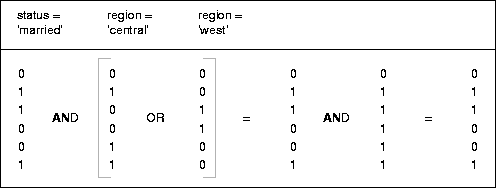
An analyst investigating demographic trends of the company's customers might ask, "How many of our married customers live in the central or west regions?" This corresponds to the following SQL query:
SELECT COUNT(*) FROM CUSTOMER
    WHERE MARITAL_STATUS = 'married' AND REGION IN ('central','west');
Bitmap indexes can process this query with great efficiency by merely counting the number of ones in the resulting bitmap, as illustrated in Figure 10-8. To identify the specific customers who satisfy the criteria, the resulting bitmap would be used to access the table.
Bitmap indexes include rows that have NULL values, unlike most other types of indexes. Indexing of nulls can be useful for some types of SQL statements, such as queries with the aggregate function COUNT.
SELECT COUNT(*) FROM EMP;
Any bitmap index can be used for this query because all table rows are indexed, including those that have NULL data. If nulls were not indexed, the optimizer would only be able to use indexes on columns with NOT NULL constraints.
SELECT COUNT(*) FROM EMP WHERE COMM IS NULL;
This query can be optimized with a bitmap index on COMM.
SELECT COUNT(*) FROM CUSTOMER WHERE GENDER = 'M' AND STATE != 'CA';
This query can be answered by finding the bitmap for GENDER = 'M' and subtracting the bitmap for STATE = 'CA'. If STATE may contain null values (that is, if it does not have a NOT NULL constraint), then the bitmaps for STATE = 'NULL' must also be subtracted from the result.
Like other indexes, you can create bitmap indexes on partitioned tables. The only restriction is that bitmap indexes must be local to the partitioned table--they cannot be global indexes. (Global bitmap indexes are supported only on nonpartitioned tables).
For information about partitioned tables and descriptions of local and global indexes, see Chapter 11, "Partitioned Tables and Indexes".
An index-organized table differs from an ordinary table in that the data for the table is held in its associated index. Changes to the table data, such as adding new rows, updating rows, or deleting rows, result only in updating the index.
The index-organized table is like an ordinary table with an index on one or more of its columns, but instead of maintaining two separate storages for the table and the B*-tree index, the database system only maintains a single B*-tree index which contains both the encoded key value and the associated column values for the corresponding row. Rather than having a row's rowid as the second element of the index entry, the actual data row is stored in the B*-tree index. The data rows are built on the primary key for the table, and each B*-tree index entry contains <primary_key_value, non_primary_key_column_values>.
Index-organized tables are suitable for accessing data by the primary key or any key that is a valid prefix of the primary key. There is no duplication of key values because only non-key column values are stored with the key. You can build secondary indexes to provide efficient access by other columns (see "Secondary Indexes on Index-Organized Tables").
Applications manipulate the index-organized table just like an ordinary table, using SQL statements. However, the database system performs all operations by manipulating the corresponding B*-tree index.
Table 10-4 summarizes the differences between index-organized tables and ordinary tables.
|
Additional Information:
See Oracle8i Administrator's Guide for information about how to create and maintain index-organized tables. |
Because data rows are stored in the index, index-organized tables provide faster key-based access to table data for queries that involve exact match or range search, or both. The storage requirements are reduced because key columns are not duplicated as they are in an ordinary table and its index. The data row stored with the key in an index-organized table only contains non-key column values. Also, placing the data row with the key eliminates the additional storage that an index on an ordinary table requires for physical rowids, which link the key values to corresponding rows in the table.
Index-organized tables can contain the collection datatypes VARRAY and NESTED TABLE, which store an object ID (OID) for each element of the collection. The storage overhead of 16 bytes per element for the OID is unnecessary, because OIDs are repeated for all elements in a collection. Key compression allows you to compress the repeating OID values in the leaf blocks of an index-organized table. See "Key Compression".
B*-tree index entries are usually quite small since they only consist of the pair <key, ROWID>. In index-organized tables, however, the B*-tree index entries can be very large since they consist of the pair <key, non_key_column_values>. If the index entry gets very large then the leaf nodes may end up storing one row or row-piece thereby destroying the dense clustering property of the B*-tree index.
Oracle provides an OVERFLOW clause to handle this problem. You can specify an overflow tablespace as well as a threshold value. The threshold is specified as a percentage of the block size (PCTTHRESHOLD).
If the row size is greater than the specified threshold value, then the non-key column values for the row that exceeds the threshold are stored in the specified overflow tablespace. In such a case the index entry contains a <key, rowhead> pair, where the rowhead contains the beginning portion of the rest of the columns. It is like a regular row-piece, except it points to an overflow row-piece that contains the remaining column values.
|
Additional Information:
See the Oracle8i Administrator's Guide for examples of using the OVERFLOW clause. |
Secondary index support on index-organized tables provides efficient access to index-organized table using columns that are not the primary key nor a prefix of the primary key.
Oracle constructs secondary indexes on index-organized tables using logical row identifiers (logical rowids) that are based on the table's primary key. A logical rowid optionally includes a physical guess, which identifies the block location of the row. Oracle can use these guesses to probe directly into the leaf block of the index-organized table, bypassing the primary key search. But because rows in index-organized tables do not have permanent physical addresses, the guesses can become stale when rows are moved to new blocks.
For an ordinary table, access by a secondary index involves a scan of the secondary index and an additional I/O to fetch the data block containing the row. For index-organized tables, access by a secondary index varies, depending on the use and accuracy of physical guesses:
For more information, see "Logical Rowids".
This section describes some additional features that make index-organized tables more useful.
You can rebuild an index-organized table to reduce fragmentation incurred due to incremental updates. Use the MOVE option of the ALTER TABLE command to rebuild an index-organized table.
The MOVE option rebuilds the primary key index B*-tree of the index-organized table but does not rebuild the overflow data segment except when you specify the OVERFLOW clause explicitly or you alter the PCTTHRESHOLD or INCLUDING column value as part of the ALTER TABLE statement. Also, index and data segments associated with LOB columns are not rebuilt unless you specify the LOB column explicitly.
The CREATE TABLE ... AS SELECT statement allows you to create an index-organized table and load it in parallel using the PARALLEL clause in the underlying subquery (AS SELECT). This statement provides an alternative to parallel bulk-load using SQL*Loader.
You can partition an index-organized table by range of column values (see "Range Partitioning"). The partitioning columns must form a subset of the primary key columns.
The following types of secondary indexes on index-organized tables can be partitioned by range of column values:
See "Index Partitioning" and for more information.
Index-organized tables are especially useful for the following types of applications:
Information Retrieval (IR) applications support content-based searches on document collections. To provide such a capability, IR applications maintain an inverted index for the document collection. An inverted index typically contains entries of the form <token, document_id, occurrence_data> for each distinct word in a document. The application performs a content-based search by scanning the inverted index looking for tokens of interest.
You can define an ordinary table to model the inverted index. To speed-up retrieval of data from the table, you can also define an index on the column corresponding to the token. However, this scheme has the following shortcomings:
In some cases, retrieval performance can be improved by defining a concatenated index on multiple columns of the inverted index table. The concatenated index allows for index-organized retrieval when the occurrence data is not required (that is, for Boolean queries). In such cases, the rowid fetches of inverted table records is avoided. When the query involves a proximity predicate (for example, the phrase "Oracle Corporation"), the concatenated index approach still requires the inverted index table to be accessed. Furthermore, building and maintaining a concatenated index is much more time consuming than using a single column index on the token. Also, the storage overhead is higher as multiple columns of the key (token) are duplicated in the table and the index.
Using an index-organized table to model an inverted index overcomes the problems described above. Namely:
In addition, since index-organized tables are visible to the applications, they are suitable for supporting cooperative indexing where the application and database jointly manage the application-specific indexes.
Spatial applications can benefit from index-organized tables as they use some form of inverted index for maintaining application-specific indexes.
Spatial applications maintain inverted indexes for handling spatial queries. For example, a spatial index for objects residing in a collection of grids can be modeled as an inverted index where each entry is of the form:
<grid_id, spatial_object_id, spatial_object_data>
Index-organized tables are appropriate for modeling such inverted indexes because they provide the required retrieval performance while minimizing storage costs.
On-line analytical processing (OLAP) applications typically manipulate multi-dimensional blocks. To allow fast retrieval of portions of the multi-dimensional blocks, they maintain an inverted index to map a set of dimension values to a set of pages.
An entry in the inverted index is of the form:
<dimension_value, list_of_pages>
The inverted index maintained by OLAP applications can easily be modeled as an index-organized table.
Oracle provides extensible indexing to accommodate indexes on complex data types (such as documents, spatial data, images, and video clips) and make use of specialized indexing techniques. With extensible indexing you can encapsulate application-specific index management routines as an indextype schema object and define a domain index (an application-specific index) on table columns or attributes of an object type. (See "User-Defined Datatypes" for information about object types and their attributes.) Extensible indexing also provides efficient processing of application-specific operators.
The application software, called the cartridge, controls the structure and content of a domain index. The Oracle server interacts with the application to build, maintain, and search the domain index. The index structure itself can be stored in the Oracle database as an index-organized table or externally as a file.
The indextype schema object encapsulates the set of routines that manage and access a domain index. The purpose of an indextype is to enable efficient search and retrieval functions for complex domains such as text, spatial, image, and OLAP data using external application software.
The Oracle Data Cartridge Interface (ODCIIndex) specifies all the routines that have to be implemented by the index designer. The routines can be implemented as type methods (see "Object Types").
The index definition routines build the domain index when a CREATE INDEX statement references the indextype, alter the domain index information when a ALTER INDEX statement alters it, remove the index information when a DROP INDEX statement drops it, and truncate the index when the base table is truncated.
The index maintenance routines maintain the contents of the domain index when the base table rows are inserted, deleted, updated, or loaded.
The index scan routines implement access to the domain index to retrieve rows of the base table that satisfy predicates containing built-in or user-defined operators in the accessing SQL statement. See "User-Defined Operators" for more information about operators that can be used in scans of domain indexes.
An index scan is specified through three routines, istart, ifetch, and iclose, which can initialize data structures, fetch rows satisfying the predicate, and close the cursor once all rows satisfying the predicate are returned.
The domain index schema object is an application-specific index that is created, managed, and accessed by routines supplied by an indextype. It is called a domain index because it indexes data in application-specific domains.
Only single-column domain indexes are currently supported. You can build single-column domain indexes on columns having scalar, object, or LOB datatypes.
You can create multiple domain indexes on the same column only if their indextypes are different. The built-in B*-tree index method can be viewed as a distinct indextype in this respect.
A domain index can be stored in an index-organized table or in an external file. The SQL interface for extensible indexing makes no restrictions on the location of the index data, only that the application adhere to the protocol for index definition, maintenance, and search operations.
For B*-tree indexes, you can query the USER_INDEXES view to get index information. To provide similar support for domain indexes, index designers can add any domain-specific metadata in the following manner:
Oracle provides a set of built-in operators which include arithmetic operators (+, -, *, /), comparison operators ( =, >, <), logical operators (NOT, AND, OR), and set operators (UNION). These operators take as input one or more arguments (operands) and return a result. They are represented in SQL statements by special characters (+) or keywords (AND). Users and domain cartridge writers can define new operators, which can then be used in SQL statements like built-in operators.
A user-defined operator is a schema object identified by a name which could be a character string or a special character or symbol. Like built-in operators, the user-defined operator takes a set of operands as input and returns a result. The implementation of the operator must be provided by the user or domain cartridge writer.
User-defined operators can be invoked anywhere built-in operators can be used, that is, wherever expressions can occur in queries and data manipulation statements, such as:
For example, if you define a new operator named Contains, which takes as input a text document and a keyword and returns TRUE if the document contains that keyword, you can write a SQL query as:
SELECT * FROM employees WHERE Contains(resume, 'Oracle and UNIX');
You create an operator by specifying the operator name and its bindings, if any, in a CREATE OPERATOR statement. An operator's binding associates it with a user-defined function that provides an implementation for the operator. The binding also identifies the operator with a unique signature (the sequence of datatypes of the arguments to the function).
An operator can have multiple bindings as long as they differ in their signatures. Oracle executes the appropriate function when the operator is invoked with a particular signature. An operator created in a schema can be evaluated using functions defined in the same or different schemas.
The user-defined function bound to an operator could be:
For example, an operator Contains can be created in the Ordsys schema with two bindings and the corresponding functions that providing the implementation in Text and Spatial domains:
CREATE OPERATOR Ordsys.Contains
    BINDING
        (VARCHAR2, VARCHAR2) RETURN BOOLEAN USING text.contains,
        (Spatial.Geo, Spatial.Geo) RETURN BOOLEAN USING Spatial.contains;
Although the return datatype is specified as part of operator binding declaration, it does not determine the uniqueness of the binding, However, the specified function must have the same argument and return datatypes as the operator binding.
Operators can also be evaluated using indexes. Oracle uses indexes to efficiently evaluate some built-in operators; for example, a B*-tree index can be used to evaluate the comparison operators =, >, and <. Similarly, user-defined domain indexes can be used to efficiently evaluate user-defined operators.
An indextype provides index-based implementation for the operators listed in the indextype definition. The Oracle server can invoke routines specified in the indextype to search the domain index to identify candidate rows and then do further processing (filtering, selection, and fetching of rows).
|
Additional Information:
See Oracle8i Data Cartridge Developer's Guide for more information about indextypes, domain indexes, and user-defined operators. |
Clusters are an optional method of storing table data. A cluster is a group of tables that share the same data blocks because they share common columns and are often used together.
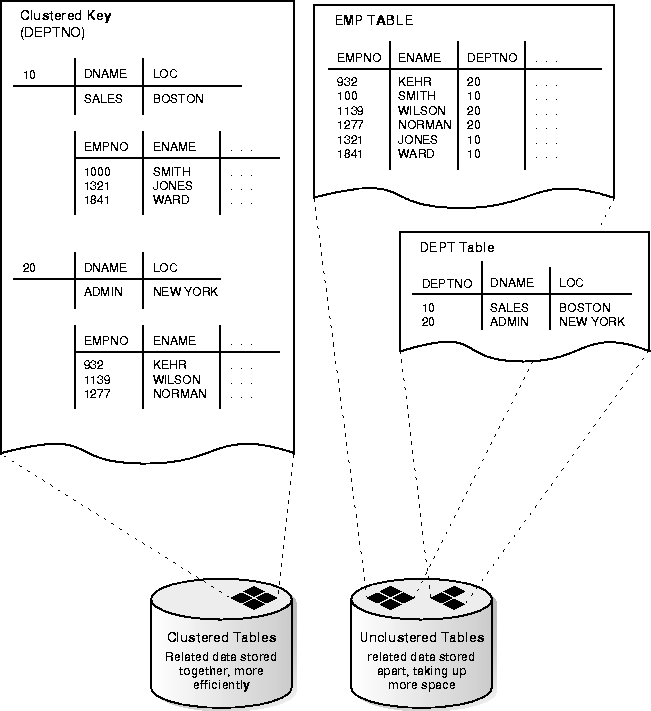
For example, the EMP and DEPT table share the DEPTNO column. When you cluster the EMP and DEPT tables (Figure 10-9, "Clustered Table Data"), Oracle physically stores all rows for each department from both the EMP and DEPT tables in the same data blocks.
Because clusters store related rows of different tables together in the same data blocks, properly used clusters offer two primary benefits:
Therefore, less storage might be required to store related table and index data in a cluster than is necessary in nonclustered table format. For example, in Figure 10-9 notice how each cluster key (each DEPTNO) is stored just once for many rows that contain the same value in both the EMP and DEPT tables.
Clusters can reduce the performance of INSERT statements as compared with storing a table separately with its own index. This disadvantage relates to the use of space and the number of blocks that must be visited to scan a table; because multiple tables have data in each block, more blocks must be used to store a clustered table than if that table were stored nonclustered.
To identify data that would be better stored in clustered form than nonclustered, look for tables that are related via referential integrity constraints and tables that are frequently accessed together using a join. If you cluster tables on the columns used to join table data, you reduce the number of data blocks that must be accessed to process the query; all the rows needed for a join on a cluster key are in the same block. Therefore, performance for joins is improved. Similarly, it might be useful to cluster an individual table. For example, the EMP table could be clustered on the DEPTNO column to cluster the rows for employees in the same department. This would be advantageous if applications commonly process rows department by department.
Like indexes, clusters do not affect application design. The existence of a cluster is transparent to users and to applications. You access data stored in a clustered table via SQL just like data stored in a nonclustered table.
|
Additional Information:
For more information about the performance implications of using clusters, see Oracle8i Tuning. |
In general, clustered data blocks have an identical format to nonclustered data blocks with the addition of data in the table directory. However, Oracle stores all rows that share the same cluster key value in the same data block.
When you create a cluster, specify the average amount of space required to store all the rows for a cluster key value using the SIZE parameter of the CREATE CLUSTER command. SIZE determines the maximum number of cluster keys that can be stored per data block.
For example, if each data block has 1700 bytes of available space and the specified cluster key size is 500 bytes, each data block can potentially hold rows for three cluster keys. If SIZE is greater than the amount of available space per data block, each data block holds rows for only one cluster key value.
Although the maximum number of cluster key values per data block is fixed by SIZE, Oracle does not actually reserve space for each cluster key value nor does it guarantee the number of cluster keys that are assigned to a block. For example, if SIZE determines that three cluster key values are allowed per data block, this does not prevent rows for one cluster key value from taking up all of the available space in the block. If more rows exist for a given key than can fit in a single block, the block is chained, as necessary.
A cluster key value is stored only once in a data block.
The cluster key is the column, or group of columns, that the clustered tables have in common. You specify the columns of the cluster key when creating the cluster. You subsequently specify the same columns when creating every table added to the cluster.
For each column specified as part of the cluster key (when creating the cluster), every table created in the cluster must have a column that matches the size and type of the column in the cluster key. No more than 16 columns can form the cluster key, and a cluster key value cannot exceed roughly one-half (minus some overhead) the available data space in a data block. The cluster key cannot include a LONG or LONG RAW column.
You can update the data values in clustered columns of a table. However, because the placement of data depends on the cluster key, changing the cluster key for a row might cause Oracle to physically relocate the row. Therefore, columns that are updated often are not good candidates for the cluster key.
You must create an index on the cluster key columns after you have created a cluster. A cluster index is an index defined specifically for a cluster. Such an index contains an entry for each cluster key value.
To locate a row in a cluster, the cluster index is used to find the cluster key value, which points to the data block associated with that cluster key value. Therefore, Oracle accesses a given row with a minimum of two I/Os (possibly more, depending on the number of levels that must be traversed in the index).
You must create a cluster index before you can execute any DML statements (including INSERT and SELECT statements) against the clustered tables. Therefore, you cannot load data into a clustered table until you create the cluster index.
Like a table index, Oracle stores a cluster index in an index segment. Therefore, you can place a cluster in one tablespace and the cluster index in a different tablespace.
A cluster index is unlike a table index in the following ways:
If you drop a cluster index, data in the cluster remains but becomes unavailable until you create a new cluster index. You might want to drop a cluster index to move the cluster index to another tablespace or to change its storage characteristics; however, you must recreate the cluster's index to allow access to data in the cluster.
Hashing is an optional way of storing table data to improve the performance of data retrieval. To use hashing, you create a hash cluster and load tables into the cluster. Oracle physically stores the rows of a table in a hash cluster and retrieves them according to the results of a hash function.
Oracle uses a hash function to generate a distribution of numeric values, called hash values, which are based on specific cluster key values. The key of a hash cluster (like the key of an index cluster) can be a single column or composite key (multiple column key). To find or store a row in a hash cluster, Oracle applies the hash function to the row's cluster key value; the resulting hash value corresponds to a data block in the cluster, which Oracle then reads or writes on behalf of the issued statement.
A hash cluster is an alternative to a nonclustered table with an index or an index cluster. With an indexed table or index cluster, Oracle locates the rows in a table using key values that Oracle stores in a separate index.
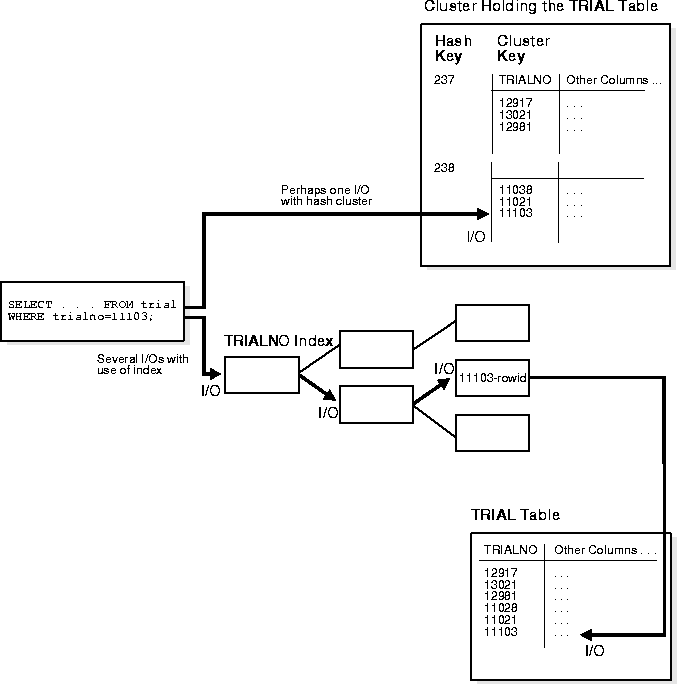
To find or store a row in an indexed table or cluster, at least two I/Os must be performed (but often more): one or more I/Os to find or store the key value in the index, and another I/O to read or write the row in the table or cluster. In contrast, Oracle uses a hash function to locate a row in a hash cluster (no I/O is required). As a result, a minimum of one I/O operation is necessary to read or write a row in a hash cluster.
A hash cluster stores related rows together in the same data blocks. Rows in a hash cluster are stored together based on their hash value.
When you create a hash cluster, Oracle allocates an initial amount of storage for the cluster's data segment. Oracle bases the amount of storage initially allocated for a hash cluster on the predicted number and predicted average size of the hash key's rows in the cluster.
Figure 10-10 illustrates data retrieval for a table in a hash cluster as well as a table with an index. The following sections further explain the internal operations of hash cluster storage.
To find or store a row in a hash cluster, Oracle applies the hash function to the row's cluster key value. The resulting hash value corresponds to a data block in the cluster, which Oracle then reads or writes on behalf of an issued statement. The number of hash values for a hash cluster is fixed at creation and is determined by the HASHKEYS parameter of the CREATE CLUSTER command.
The value of HASHKEYS limits the number of unique hash values that can be generated by the hash function used for the cluster. Oracle rounds the number you specify for HASHKEYS to the nearest prime number. For example, setting HASHKEYS to 100 means that for any cluster key value, the hash function generates values between 0 and 100 (there will be 101 hash values).
Therefore, the distribution of rows in a hash cluster is directly controlled by the value set for the HASHKEYS parameter. With a larger number of hash keys for a given number of rows, the likelihood of a collision (two cluster key values having the same hash value) decreases. Minimizing the number of collisions is important because overflow blocks (thus extra I/O) might be necessary to store rows with hash values that collide.
The maximum number of hash keys assigned per data block is determined by the SIZE parameter of the CREATE CLUSTER command. SIZE is an estimate of the total amount of space in bytes required to store the average number of rows associated with each hash value. For example, if the available free space per data block is 1700 bytes and SIZE is set to 500 bytes, three hash keys are assigned per data block.
Although the maximum number of hash key values per data block is determined by SIZE, Oracle does not actually reserve space for each hash key value in the block (but see "Single Table Hash Clusters" for an exception). For example, if SIZE determines that three hash key values are allowed per block, this does not prevent rows for one hash key value from taking up all of the available space in the block. If there are more rows for a given hash key value than can fit in a single block, the block is chained, as necessary.
Note that each row's hash value is not stored as part of the row; however, the cluster key value for each row is stored. Therefore, when determining the proper value for SIZE, the cluster key value must be included for every row to be stored.
A hash function is a function applied to a cluster key value that returns a hash value. Oracle then uses the hash value to locate the row in the proper data block of the hash cluster. The job of a hash function is to provide the maximum distribution of rows among the available hash values of the cluster. To achieve this goal, a hash function must minimize the number of collisions.
When you create a cluster, you can use the internal hash function of Oracle or bypass the use of this function. The internal hash function allows the cluster key to be a single column or composite key.
Furthermore, the cluster key can consist of columns of any datatype (except LONG and LONG RAW). The internal hash function offers sufficient distribution of cluster key values among available hash keys, producing a minimum number of collisions for any type of cluster key.
In cases where the cluster key is already a unique identifier that is uniformly distributed over its range, you might want to bypass the internal hash function and simply specify the column on which to hash.
Instead of using the internal hash function to generate a hash value, Oracle checks the cluster key value. If the cluster key value is less than HASHKEYS, the hash value is the cluster key value; however, if the cluster key value is equal to or greater than HASHKEYS, Oracle divides the cluster key value by the number specified for HASHKEYS, and the remainder is the hash value; that is, the hash value is the cluster key value mod the number of hash keys.
Use the HASH IS parameter of the CREATE CLUSTER command to specify the cluster key column if cluster key values are distributed evenly throughout the cluster. The cluster key must be comprised of a single column that contains only zero scale numbers (integers). If the internal hash function is bypassed and a non-integer cluster key value is supplied, the operation (INSERT or UPDATE statement) is rolled back and an error is returned.
You can also specify any SQL expression as the hash function for a hash cluster. If your cluster key values are not evenly distributed among the cluster, you should consider creating your own hash function that more efficiently distributes cluster rows among the hash values.
For example, if you have a hash cluster containing employee information and the cluster key is the employee's home area code, it is likely that many employees will hash to the same hash value. To alleviate this problem, you can place the following expression in the HASH IS clause of the CREATE CLUSTER command:
MOD((emp.home_area_code + emp.home_prefix + emp.home_suffix), 101)
The expression takes the area code column and adds the phone prefix and suffix columns, divides by the number of hash values (in this case 101), and then uses the remainder as the hash value. The result is cluster rows more evenly distributed among the various hash values.
As with other types of segments, the allocation of extents during the creation of a hash cluster is controlled by the INITIAL, NEXT, and MINEXTENTS parameters of the STORAGE clause. However, with hash clusters, an initial portion of space, called the hash table, is allocated at creation so that all hash keys of the cluster can be mapped, with the total space equal to SIZE * HASHKEYS. Therefore, initial allocation of space for a hash cluster is also dependent on the values of SIZE and HASHKEYS. The larger of (SIZE*HASHKEYS) and that specified by the STORAGE clause (INITIAL, NEXT, and so on) is used.
Space subsequently allocated to a hash cluster is used to hold the overflow of rows from data blocks that are already full. For example, assume the original data block for a given hash key is full. A user inserts a row into a clustered table such that the row's cluster key hashes to the hash value that is stored in a full data block; therefore, the row cannot be inserted into the root block (original block) allocated for the hash key. Instead, the row is inserted into an overflow block that is chained to the root block of the hash key.
Frequent collisions might or might not result in a larger number of overflow blocks within a hash cluster (thus reducing data retrieval performance). If a collision occurs and there is no space in the original block allocated for the hash key, an overflow block must be allocated to hold the new row. The likelihood of this happening is largely dependent on the average size of each hash key value and corresponding data, specified when the hash cluster is created, as illustrated in Figure 10-11.
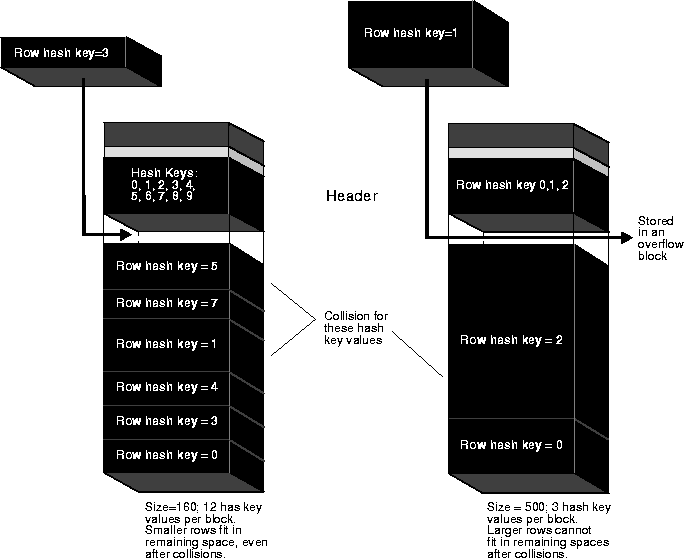
If the average size is small and each row has a unique hash key value, many hash key values can be assigned per data block. In this case, a small colliding row can likely fit into the space of the root block for the hash key. However, if the average hash key value size is large or each hash key value corresponds to multiple rows, only a few hash key values can be assigned per data block. In this case, it is likely that the large row will not fit in the root block allocated for the hash key value and an overflow block is allocated.
A single-table hash cluster can provide fast access to rows in a table. In an ordinary hash cluster, Oracle scans all the rows for a given table in the block, even if there actually happens to be just one row with the matching key. In a single-table hash cluster, however, if there is a one-to-one mapping between hash keys and data rows then Oracle can locate a row without scanning all the rows in the data block.
Oracle preallocates space for each hash key value when the single-table hash cluster is created. There cannot be more than one row per hash value (not the underlying cluster key value) and there cannot be any row chaining in the block; otherwise Oracle scans all rows in that block to determine which rows match the cluster key.
|
Additional Information:
See Oracle8i SQL Reference for details about the SINGLE TABLE HASHKEYS option of the CREATE CLUSTER command. |
